USA
USA UAE
UAESmall Business
Designed for startups and growing businesses


See More





Brand: Aptare Technologies
Salesgear- All-in-one platform for Sales management that helps connect with leads on the right channels and increase productivity.
See MoreHave you used Salesgear before?
Share your insights for better experience
Brand: Aptare Technologies
Founded Year: 2021
Salesgear is a multi-channel sales engagement platform that helps sales and marketing professionals effectively engage their prospective customers. Using Salesgear, you have the power to create outreach sequences across phone, LinkedIn, e-mail and SMS.
 Outbound Lead Generation Inbound Lead Conversion Contact Database Omnichannel Outreach Meeting Scheduler AI Writing Assistant Sequences Reports & Analytics Dashboards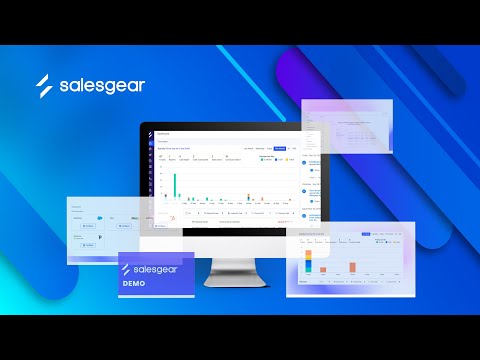

Watch the demo video to explore key features, real workflows, and how the software fits your business needs.



 Ubuntu
  Windows
  MacOS
MacOS  Desktop
  Cloud-Based

Small Business
Designed for startups and growing businesses
Medium Business
Built for business growth and flexibility
Enterprises
Designed for complex and large-scale business needs
4.8
Out of 5

Overall Rating
Based on
4 Verified Reviews
Rating Breakdown
97% Recommend this Product
Add ReviewSalesgear is well-received among users, particularly for its user-friendly interface and efficient sales engagement capabilities. Customers appreciate the clean design and the ability to streamline outbound processes, with many highlighting the responsive support team as a key benefit. However, some users have noted occasional product bugs and expressed a desire for features like automatic time zone deduction for contacts. Overall, the tool is praised for its effectiveness in enhancing sales productivity, making it a strong choice for small to medium-sized businesses.

Sep 29, 2023
Techjockey Verified
“Amazing Sales Engagement Tool that is a must for everyone!"”
Pros
I've used probably close to 10 different sales engagement platforms and prospecting tools since beginning my career. Salesgear is one of the easiest tools to use, hands down! It's super user-friendly and makes it easy to use with an all-in-one platform. Allowing us to prospect effectively for all our clients at a large scale.
Cons
To create a prospect list for outbound and send bulk emails
Reason to switch
To create a prospect list for outbound and send bulk emails
Sep 29, 2023
Techjockey Verified
“Comprehensive outbound tool”
Pros
The clean modern UI/ UX helps you to efficiently reach out to multiple customers at a faster rate. The product team's constant updates and quick response rate helped us scale.
Cons
The availability of an automatic time zone deduction on contacts added based on phone code would be a nice add-on. Otherwise, the product is clean and easy to use. It is best for streamlining the outbound process.
Reason to switch
For streamlining the outbound process
Sep 29, 2023
Techjockey Verified
“Quick and efficient tool”
Pros
Salesgear offers a user-friendly interface that makes it effortless to create sequences and perform various tasks. The tool's intuitive design enables users to quickly navigate and utilize its features with ease. Additionally, one of the standout aspects of Salesgear is its prompt and reliable support from the team. Whenever assistance is needed, the support team is readily available to provide instant help and address any inquiries or concerns that may arise.
Cons
Nothing particular I dislike.
Reason to switch
To automate inbound & outbound outreach

Salesgear
Price On Request
Desktop
Mobile
Web based
On Premises
Windows
Mac OS

Wappalyzer
Price On Request
Desktop
Mobile
Web based
On Premises
Windows
Mac OS
LeadScout
₹ 399
Desktop
Mobile
Web based
On Premises
Windows
Mac OS

Woorise
Price On Request
Desktop
Mobile
Web based
On Premises
Windows
Mac OS
Leadinfo
Price On Request
Desktop
Mobile
Web based
On Premises
Windows
Mac OS

Quicklead
Price On Request
Desktop
Mobile
Web based
On Premises
Windows
Mac OS

Leadfuze
Price On Request
Desktop
Mobile
Web based
On Premises
Windows
Mac OS

Dripify
Price On Request
Desktop
Mobile
Web based
On Premises
Windows
Mac OS

We-Connect
Price On Request
Desktop
Mobile
Web based
On Premises
Windows
Mac OS

Surfe
Price On Request
Desktop
Mobile
Web based
On Premises
Windows
Mac OS

Mailmunch
Price On Request
Desktop
Mobile
Web based
On Premises
Windows
Mac OS
(2) Product(s) selected
Starting Price:
$250 /Month
Starting Price:
$107 /Month
Starting Price:
$177 /Quarter
Starting Price:
$59 /Month
Starting Price:
$29 /Month
Starting Price:
$49 /User/Month
Starting Price:
$20

Available
Price on Request

Available
Price on Request

Starting Price:
$99 /Month

Starting Price:
$26
Salesgear is compatible with windows and Mac operating systems.
Salesgear app is not available for mobile devices.
Salesgear supports web-based deployment type.
Salesgear software pricing is available on request at techjockey.com.
Salesgear software is typically used by small to large-scale businesses, sales teams, sales firms and individuals who need sales management software.
Salesgear demo is available for free with techjockey.com.
Salesgear offers a free trial. However, the premium plan with advanced features is available at techjockey.com with exciting deals.
Salesgear installation is not required, as it is web-based. Just open the Setup Wizard to get started.
The Salesgear app is not available on Android and iOS devices.
Salesgear pricing is available on request at techjockey.com.
Salesgear simplifies outbound sales by streamlining the sales process. With this tool, users can conveniently access and update buyer information, schedule follow-up tasks, and communicate through calls and emails directly from the CRM, eliminating the need to switch between multiple tabs. It enhances efficiency and organization in sales management.
20,000+ Software Listed
Best Price Guranteed
Free Expert Consultation
2M+ Happy Customers
Terms and Condtions

Users with registered businesses can purchase goods from merchants on the platform to satisfy their business needs. Users are not permitted to utilize any products acquired through the platform for resale, advertising, business, or further distribution.
For each purchase made, users will receive a Tax Invoice (or 'GST invoice') that includes specific details such as:
the GSTIN of the user associated with their registered business, and
the specified Entity Name for their business.
It should be noted that not all products are eligible for GST Invoice. Only the products displayed by participating sellers with the 'GST-based Invoice Available' callout on the product description page would qualify.
Certain goods and services are not eligible to get a GST Invoice, including items with VAS, i.e., Value Added Services (e.g., Total Mobile Protection/Assured Buyback) and those involving an exchange offer at the time of purchase.
Users must ensure the accuracy of the GSTIN, and business entity name provided for the GST Invoice. Requests for corrections into GST Invoice would not be accommodated by Techjockey.com or any Seller, and any issues arising from user-provided information are the sole responsibility of users.
Techjockey.com is not liable for the GST Invoice or any associated input tax credit. To efficiently claim an input tax credit, users should select the registered place of business address as per the GST authority's data and follow the provisions of the GST Act and rules.
To claim an input tax credit, the delivery and billing addresses must match. Furthermore, input tax credits will not be granted if the delivery address and GSTIN on the invoice are from different states. In case of incorrect GST details provided during the order placement, the order will be canceled automatically.