linkedin
Screendragon logo
play Hello, we are Screendragon!
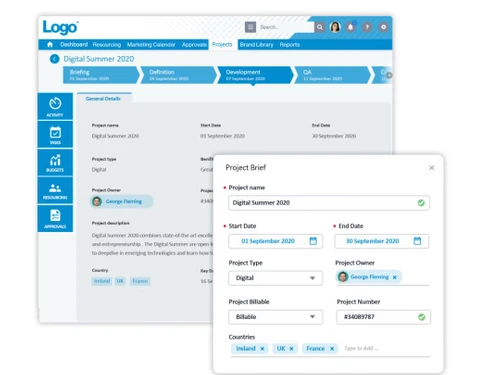
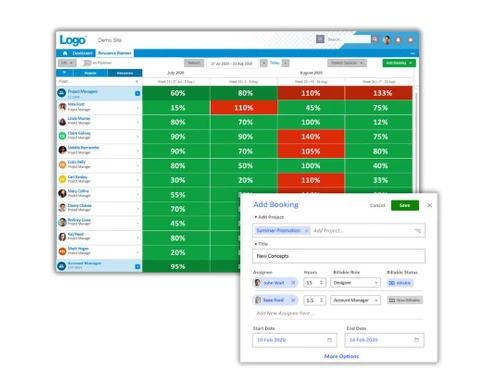
screendragon dashboard
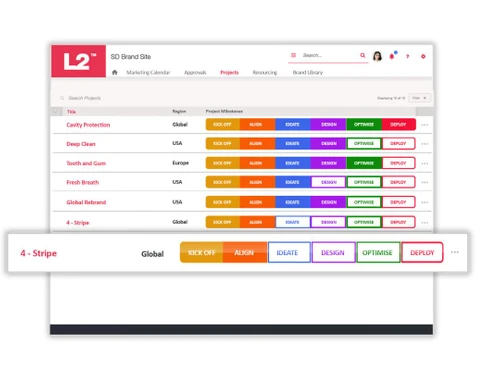
screendragon analysis

Screendragon

Brand: Screendragon

  • 4.4

  • 4 Ratings

Boost efficiency, enhance collaboration, automate workflows, and gain actionable insights with a secure, customizable solution designed for modern teams.

See More

Have you used Screendragon before?

Share your insights for better experience

Add a Review

Price Available on Request

Questions about pricing or customization? We’re here to help, just a click away.

100% Genuine
Products
Best Price
Guaranteed
Safe & Secure
Payment
  • Description

  • Pricing

  • Features

  • Specification

  • Review

  • Compare

  • Alternatives

  • FAQ

Screendragon Software Overview

What is Screendragon Workforce Management Software?

Screendragon is a comprehensive work management platform engineered to streamline project processes, foster collaboration, and expedite project delivery. It serves as a centralized hub where teams can efficiently manage projects, allocate resources, and oversee content, ensuring seamless coordination and alignment across all organizational levels. 

It is designed to meet the evolving needs of modern businesses operating in dynamic environments. By offering customizable workflows tailored to specific project requirements, Screendragon workforce management software enables teams to adapt and refine their processes to meet changing demands.

Furthermore, Screendragon's advanced analytics capabilities provide teams with valuable insights into project performance, enabling them to identify areas for improvement and make informed decisions to drive success. 

Key Features of Screendragon WFM Software

  • Easy Form Creation: Screendragon lets you design custom forms effortlessly, adding multimedia, tailoring fields, and controlling visibility based on user roles.
  • Simplified Workflow Building: You can create workflows visually without coding, using templates or custom designs, with decision trees and email alerts.
  • Visual Task Management: Tasks are easy to track with Gantt charts, Kanban boards, or lists, where deadlines, priorities, and assignments are adjustable.
  • Streamlined Digital Approvals: Screendragon workforce software approves files like documents and videos quickly, marks changes, compares versions, and maintains a clear audit trail for decisions.
  • Advanced Permissions for Teams: Control who can access or edit workflows by assigning roles, ensuring the right people are involved at the right time.
  • Custom Reports and Real-Time Updates: The Screendragon workforce management system creates personalized reports to monitor data and use dashboards to track project milestones or updates in real-time effortlessly.
  • Strong Security and Scalability: Trusted by enterprises, Screendragon ensures high-level security and supports thousands of users across global teams without compromising performance.
  • Integration with Popular Tools: Screendragon workforce management solution integrates with tools like Google Drive, SAP, and Office 365, allowing seamless work using your preferred apps.
  • Helpful for Creative Teams: Designed with an intuitive interface, Screendragon is perfect for agencies to manage creative projects, resources, and finances efficiently.
  • Improved Collaboration and Planning: Gain clear visibility of tasks, spot bottlenecks early, and plan projects effectively for smoother team collaboration and better outcomes.

Why Choose Screendragon Software?

  • Centralized Project Management: Manage all project-related activities and resources from a single, integrated platform for enhanced visibility and control.
  • Streamlined Workflow Automation: Automate manual tasks and processes to streamline project workflows and improve efficiency.
  • Flexible Accessibility: Access Screendragon workforce management software from anywhere, on any device, ensuring seamless collaboration and productivity regardless of location.
  • Simplified Approval Processes: Expedite approval processes with intuitive interfaces and one-click approvals for faster decision-making.
  • Enhanced Project Visibility: Gain clear visibility into project statuses, milestones, and deadlines to ensure projects stay on track and within budget.
  • Versatile Integration Options: Screendragon workforce management system connects with existing tools and systems to optimize workflow efficiency and streamline operations.

Benefits of Screendragon Software

  • Accelerate Project Delivery: Streamline project processes and workflows to expedite project delivery and achieve faster time-to-market.
  • Enhance Collaboration Efficiency: Foster seamless collaboration and communication among team members to improve productivity and drive innovation.
  • Optimize Resource Utilization: Screendragon workforce management solutions maximize resource allocation and utilization to ensure optimal project outcomes and ROI.
  • Gain Actionable Insights: Leverage comprehensive reporting and analytics to gain valuable insights into project performance and make data-driven decisions.
  • Ensure Data Security: Protect sensitive project data with robust security features and strict access controls to safeguard against unauthorized access.

Pricing of Screendragon Workflow Management Software

Screendragon pricing is available on request on Techjockey.com. The pricing model is based on different parameters, including extra features, deployment type, and total users. For further queries related to the Screendragon software, you can contact our experts and learn more about the pricing and offers.

Read more

Screendragon Company Details

Founded Year:  2001

Screendragon is a work management platform designed for marketing, agency and professional services teams.

Director/Founders Fergus Ashe, Jan Quant, John Briggs
Company Size 101-500 Employees

Screendragon Pricing & Plans

Looking for The Right Pricing?

Share your requirements and get a plan built around your business.

  • Define your business needs
  • Get customised pricing
  • Choose features that fit your workflow

Price Available on Request

Get personalised Screendragon pricing that fits your needs. Our team will connect with you.

Screendragon Features

  • icon_check Smart Work Requests
    Streamline project intake and assignment processes with intelligent work request management.
  • icon_check Automated Workflow
    Increase efficiency and consistency by automating repetitive tasks and processes.
  • icon_check Resource Management
    Optimize resource allocation and utilization for improved project outcomes.
  • icon_check Budget Management
    Track project finances and expenses with ease, ensuring financial transparency and control.
  • icon_check Reports & Analytics
    Gain valuable insights into project performance and productivity with comprehensive reporting and analytics tools.
  • icon_check Creative Collaboration
    Foster collaboration and creativity among team members with tools designed for seamless communication and idea-sharing.
  • icon_check Financial Tracking
  • icon_check Scopes & Estimates
    Define project scopes and estimates accurately to ensure alignment with client expectations and budget constraints.
  • icon_check Digital Briefs
    Streamline project briefing processes by creating and sharing digital briefs with stakeholders.
  • icon_check Online Proofing
    Simplify the review and approval process for creative assets with intuitive online proofing tools.
Screendragon Demo Video play icon

Get Screendragon Demo

Watch the demo video to explore key features, real workflows, and how the software fits your business needs.

Understand
Key Features
Personal
Demo Insights
Interactive
Demo Support

Screendragon Specifications

Supported Platforms
Ubuntu Ubuntu Windows Windows MacOS MacOS Linux Linux
Devices
Desktop Desktop
Deployment
Cloud-Based Cloud-Based
Suitable For
All Industries
Business Specific
All Businesses
Business Size
Small Business Startups Medium Business Enterprises
Customer Support
Phone Email Communities
Language
English
Training Resources
Webinars Videos

Explore the Best Alternative Solutions Similar to Your Business Size and Needs

Screendragon Review

4.4

Out of 5

img

Overall Rating

Based on
4 Verified Ratings

Rating Breakdown

  • Features 4.3
  • Value for Money 4.5
  • Ease of Use 4.3
  • Customer Support 4.3

85% Recommend this Product

Add Review

Techjockey Trusted Reviews from Verified Users

No reviews are currently available for Screendragon. Discover similar Workforce Management Software reviews
  • Workstatus

    4.6

    Whats great - Workstatus can monitor your team's performance through screenshots and tracking their assigned tasks. Installation is simple ... read more

  • Cubiloon

    4.3

    Whats great - Scalable features and responsive support team. read more

  • Rippling

    4.4

    Whats great - Combines multiple HR functions, user-friendly interface, and good automation. read more

Compare Screendragon With other Workforce Management Software

Products
Ratings
Pricing
Device Supported
Deployment
Supported Platforms
  • img

    Screendragon

  • 4.4

  • Price On Request

  • Desktop

    Mobile

  • Web based

    On Premises

  • Windows

    Mac OS

  • img

    Workstatus

  • 4.6

  • ₹ 399

  • Desktop

    Mobile

  • Web based

    On Premises

  • Windows

    Mac OS

  • img

    Payoneer WFM

  • 4.1

  • Price On Request

  • Desktop

    Mobile

  • Web based

    On Premises

  • Windows

    Mac OS

  • img

    GoodDay

  • 4.4

  • Price On Request

  • Desktop

    Mobile

  • Web based

    On Premises

  • Windows

    Mac OS

  • img

    ProHance

  • 4.3

  • Price On Request

  • Desktop

    Mobile

  • Web based

    On Premises

  • Windows

    Mac OS

  • img

    Trackforce

  • 4.3

  • Price On Request

  • Desktop

    Mobile

  • Web based

    On Premises

  • Windows

    Mac OS

  • img

    Jolt

  • 4.6

  • Price On Request

  • Desktop

    Mobile

  • Web based

    On Premises

  • Windows

    Mac OS

  • img

    T3Workforce

  • 3.8

  • ₹ 80

  • Desktop

    Mobile

  • Web based

    On Premises

  • Windows

    Mac OS

  • img

    TeamWise

  • 4.5

  • Price On Request

  • Desktop

    Mobile

  • Web based

    On Premises

  • Windows

    Mac OS

  • img

    WorkMax

  • 4.4

  • Price On Request

  • Desktop

    Mobile

  • Web based

    On Premises

  • Windows

    Mac OS

(0) Product(s) selected

Screendragon Alternatives

See All Screendragon Alternatives

Starting Price:

$6

Available

Price on Request

Available

Price on Request

Jolt

4.6

Available

Price on Request

Starting Price:

₹30 /Month

Available

Price on Request
Available

Price on Request

Available

Price on Request

Starting Price:

$8 /Month

Available

Price on Request

Is there any Screendragon App?

Screendragon software is not available for Android and iOS devices.

How much does Screendragon cost?

The pricing of Screendragon is available on request on Techjockey.com.

Is there any free demo for Screendragon?

The demo of Screendragon software is available with Techjockey.com

How can you access the Screendragon download?

Software installation is not needed since it supports web-based deployment. So, just open the setup wizard and get started.

How does Screendragon Work?

Screendragon simplifies project management by providing a centralized platform for streamlined workflows, enhanced collaboration, and comprehensive analytics, empowering teams to achieve greater productivity and efficiency.

What is the deployment type of Screendragon?

Screendragon software supports web-based deployment.

20,000+ Software Listed

Best Price Guranteed

Free Expert Consultation

2M+ Happy Customers

Terms and Condtions

close

Users with registered businesses can purchase goods from merchants on the platform to satisfy their business needs. Users are not permitted to utilize any products acquired through the platform for resale, advertising, business, or further distribution.

For each purchase made, users will receive a Tax Invoice (or 'GST invoice') that includes specific details such as:

  • the GSTIN of the user associated with their registered business, and

  • the specified Entity Name for their business.

It should be noted that not all products are eligible for GST Invoice. Only the products displayed by participating sellers with the 'GST-based Invoice Available' callout on the product description page would qualify.

Certain goods and services are not eligible to get a GST Invoice, including items with VAS, i.e., Value Added Services (e.g., Total Mobile Protection/Assured Buyback) and those involving an exchange offer at the time of purchase.

Users must ensure the accuracy of the GSTIN, and business entity name provided for the GST Invoice. Requests for corrections into GST Invoice would not be accommodated by Techjockey.com or any Seller, and any issues arising from user-provided information are the sole responsibility of users.

Techjockey.com is not liable for the GST Invoice or any associated input tax credit. To efficiently claim an input tax credit, users should select the registered place of business address as per the GST authority's data and follow the provisions of the GST Act and rules.

To claim an input tax credit, the delivery and billing addresses must match. Furthermore, input tax credits will not be granted if the delivery address and GSTIN on the invoice are from different states. In case of incorrect GST details provided during the order placement, the order will be canceled automatically.