linkedin
ServiceM8 logo
play How ServiceM8 Works
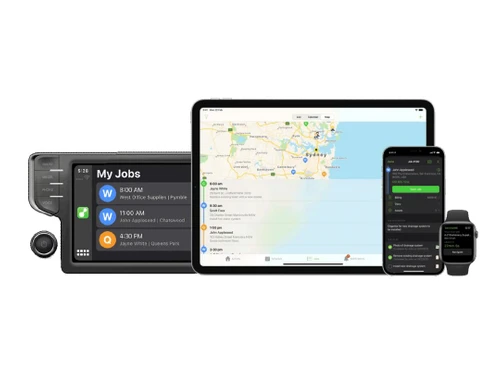
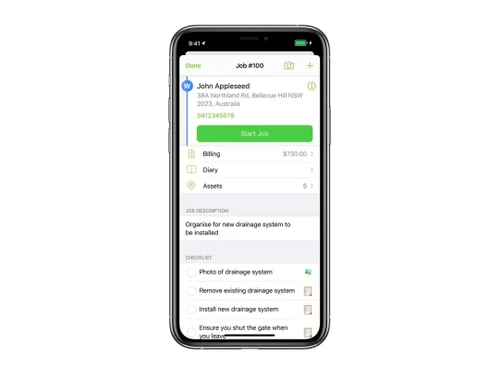
ServiceM8 Interfaces
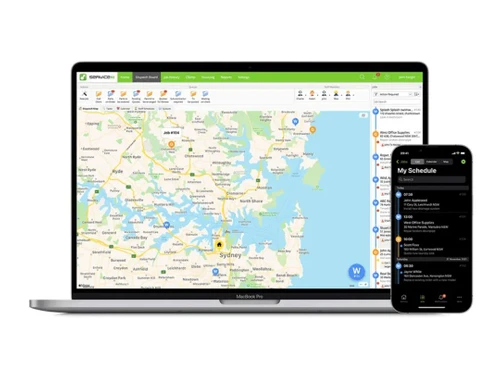
ServiceM8 Dispatch board

ServiceM8

Brand: ServiceM8

  • 4.4

  • 4 Ratings

ServiceM8 helps small service businesses manage their operations, from scheduling jobs to invoicing and payments, all while reducing paperwork.

See More

Have you used ServiceM8 before?

Share your insights for better experience

Add a Review
Starting Price
$29

View plans

100% Genuine
Products
Best Price
Guaranteed
Safe & Secure
Payment
  • Description

  • Pricing

  • Features

  • Specification

  • Review

  • Compare

  • Alternatives

  • FAQ

Starting at $29

ServiceM8 Software Overview

What is ServiceM8?

ServiceM8 is a cloud-based software designed to help small businesses, particularly in the trades and service industries, manage their operations more efficiently. It streamlines the entire process from the initial client call to scheduling jobs, creating quotes, completing work, invoicing, and receiving payments.

With ServiceM8, users can produce professional quotes and invoices quickly, which helps in winning new clients and retaining existing ones. The software is optimized for iOS devices, making it fast and user-friendly on iPhones and iPads. Businesses using ServiceM8 typically see a significant increase in productivity, completing about 30% more work within the first three months of use. Additionally, ServiceM8 Lite is available for Android users who need basic functionalities.

Why Choose ServiceM8 Software?

  • Increased Productivity: Businesses using ServiceM8 typically complete 30% more work within the first three months, enhancing overall efficiency.
  • Streamlined Operations: The software manages the entire workflow from client inquiries to job scheduling, quoting, completion, invoicing, and payment, reducing paperwork significantly.
  • Professional Quotes and Invoices: Users can quickly generate professional quotes and invoices, improving communication with clients and increasing the likelihood of winning new work.
  • Mobile Optimization: It is optimized for iOS devices, providing a fast and user-friendly experience for field technicians using iPhones or iPads.
  • Payment Flexibility: The software allows users to take payments on-site before leaving a job, facilitating quicker cash flow.
  • No Hidden Fees: It operates with a transparent pricing model that includes no hidden fees or long-term contracts.
  • Support for Various Users: It offers a Lite version for Android users who need basic functionalities, making it accessible for all team members.
  • Trusted by Professionals: ServiceM8 is used by trades and service contractors globally to manage over $35 billion in jobs, showcasing its reliability.
  • Continuous Improvements: The platform is regularly updated with new features and enhancements based on user feedback, ensuring it remains effective and relevant.
  • Self-Service or Partner Support: Users can choose to manage their setup independently or seek assistance from a ServiceM8 Partner for additional support.

Benefits of ServiceM8 Software

  • Job Status Visibility: Gain a clear overview of all job statuses at a glance, ensuring nothing falls through the cracks.
  • Optimized Route Planning: Reduce travel time and fuel costs with smart routing and scheduling.
  • Customizable Forms: Create digital checklists and forms tailored to your business needs for efficient data collection.
  • Recurring Jobs Management: Simplify the management of regular or repeat jobs with automated scheduling.
  • Photo and Note Storage: Store job-related photos, notes, and documents securely in the cloud for easy access.
  • Automated Communication: Set up automated reminders and updates for clients to reduce no-shows and improve communication.
  • Staff Accountability: Track staff performance and job completion times to identify areas for improvement.
  • Optimized for iOS: The software is specifically designed for iOS devices, providing a fast and powerful user experience for those using iPhones or iPads.
  • ServiceM8 Lite Option: For field technicians and subcontractors needing basic functionalities, the Lite version for Android offers essential features without complexity.
  • On-Site Payment Processing: It enables businesses to accept payments on-site before leaving a job, improving cash flow and customer convenience.

Pricing of ServiceM8

ServiceM8 price in India starts from $ 29/month at techjockey.com.

The pricing model is based on different parameters, including extra features, deployment type, and the total number of users. For further queries related to the product, you can contact our product team and learn more about the pricing and offers.

Read more

ServiceM8 Company Details

Founded Year:  2010

ServiceM8 is a job management app. We exist to help small businesses thrive.

Director/Founders Kim Ford
Company Size 1-100 Employees

ServiceM8 Pricing & Plans

Starter
Starting at $29
    • Licenses

      Licenses
      Licenses
    • Monthly

      Monthly
      Monthly

Key Features

  • Unlimited Users

  • 50 Jobs per month

  • Unlimited AI uses per day

  • All Essential Features

  • AI Smart Helpers

  • Recurring Jobs

  • Deposits

  • Partial/Progress Invoices

  • Supplier Invoice Importing

Growing
Starting at $79
    • Licenses

      Licenses
      Licenses
    • Monthly

      Monthly
      Monthly

Key Features

  • Unlimited Users

  • 150 Jobs per month

  • Unlimited AI uses per day

  • All Essential Features

  • All Starter features, plus:

  • Asset Management

  • Proposals

  • Bundles

  • ServiceM8 Inbox

Premium
Starting at $149
    • Licenses

      Licenses
      Licenses
    • Monthly

      Monthly
      Monthly

Key Features

  • Unlimited Users

  • 500 Jobs per month

  • Unlimited AI uses per day

  • All Essential Features

  • All Growing features, plus:

  • Job Costing

  • Markup Billing

  • Knowledge

Premium Plus
Starting at $349
    • Licenses

      Licenses
      Licenses
    • Monthly

      Monthly
      Monthly

Key Features

  • Unlimited Users

  • 1500+ Jobs per month

  • Unlimited AI uses per day

  • All Essential Features

  • All Premium features, plus:

ServiceM8 Features

  • icon_check Time Tracking
    Track and record billable hours, job durations, and employee shift time directly in the app with detailed timesheets.
  • icon_check Customer Database
    Maintain detailed client records, contact history, service interactions, and job logs for every customer in one place.
  • icon_check Scheduling
    Visual schedule board lets you assign, update, and dispatch jobs in real time with alerts for changes.
  • icon_check Mobile Access
    Full mobile app enables field workers to view jobs, update status, capture signatures, and communicate on the go.
  • icon_check Employee Time Clock
    Staff can clock in and out for shifts and jobs via the mobile app, simplifying attendance and payroll tracking.
  • icon_check Electronic Signature
    Capture customer electronic signatures on quotes, work orders, and invoices directly in the field.
  • icon_check Contract Management
    Create, store, and manage service contracts and recurring job schedules for maintenance and ongoing service work.
  • icon_check Routing
    Use integrated map views and navigation to guide field staff to job locations and optimize travel routes.
  • icon_check Job Management
    Create, assign, track, and complete jobs with full documentation, photos, statuses, and dispatch tools.
  • icon_check Service History Tracking
    Access the complete history of work done for each client, including notes, messages, and photos.
  • icon_check Work Order Management
    Generate and manage work orders from initial job details through completion and billing.
  • icon_check Billing & Invoicing
    Produce professional quotes and invoices on site, email or SMS them to clients, and track payment status.
  • icon_check Dispatch Management
    Dispatch jobs instantly, view team locations on a dispatch map, and notify field staff of assignments.
  • icon_check Unlimited Job Posts
    Create and manage unlimited job cards and work entries as part of your ongoing field service operations.
ServiceM8 Demo Video play icon

Get ServiceM8 Demo

Watch the demo video to explore key features, real workflows, and how the software fits your business needs.

Understand
Key Features
Personal
Demo Insights
Interactive
Demo Support

ServiceM8 Specification

Supported Platforms
Ubuntu Ubuntu Windows Windows iOS iOS Android Android MacOS MacOS Linux Linux
Devices
Desktop Desktop Mobile Mobile Tablet Tablet iPad iPad
Deployment
Web-Based Web-Based
Suitable For
All Industries
Business Specific
All Businesses
Business Size
Small Business Startups Medium Business SMBs MSMEs Freelancers
Customer Support
Email Communities
Language
English
Integration
API Integration
Training Resources
Documentation Videos
AI Features
AI Integrated

Explore the Best Alternative Solutions Similar to Your Business Size and Needs

ServiceM8 Review

4.4

Out of 5

img

Overall Rating

Based on
4 Verified Ratings

Rating Breakdown

  • Features 4
  • Value for Money 4.5
  • Ease of Use 4.6
  • Customer Support 4.7

97% Recommend this Product

Add Review

Techjockey Trusted Reviews from Verified Users

No reviews are currently available for ServiceM8. Discover similar Field Service Management Software reviews

  • Empfly Field Service Management

    4.8

    Whats great - We urgently needed offline capabilities since our field teams often work in no-network zones, and this solution delivered. Da... read more

  • Service CRM

    4.6

    Whats great - I am looking for Car Wash Management System since long time. I am fully satisfied with the product. read more

  • Field Force Connect

    4.6

    Whats great - Had a great experience. Our service agent was very knowledgeable and wanted to now how to help our organization. It was wonde... read more

Compare ServiceM8 With other Field Service Management Software

Products
Ratings
Pricing
Device Supported
Deployment
Supported Platforms
  • img

    ServiceM8

  • 4.4

  • Price On Request

  • Desktop

    Mobile

  • Web based

    On Premises

  • Windows

    Mac OS

  • img

    Service CRM

  • 4.6

  • Price On Request

  • Desktop

    Mobile

  • Web based

    On Premises

  • Windows

    Mac OS

  • img

    QuikAllot

  • 4.5

  • ₹ 9000

  • Desktop

    Mobile

  • Web based

    On Premises

  • Windows

    Mac OS

  • img

    Lystloc

  • 4.3

  • Price On Request

  • Desktop

    Mobile

  • Web based

    On Premises

  • Windows

    Mac OS

  • img

    TrackoField

  • 4.3

  • ₹ 3600

  • Desktop

    Mobile

  • Web based

    On Premises

  • Windows

    Mac OS

  • img

    Intelomatic

  • 4.3

  • Price On Request

  • Desktop

    Mobile

  • Web based

    On Premises

  • Windows

    Mac OS

  • img

    Fieldy

  • 4.2

  • ₹ 6000

  • Desktop

    Mobile

  • Web based

    On Premises

  • Windows

    Mac OS

  • img

    Zuper

  • 4.7

  • Price On Request

  • Desktop

    Mobile

  • Web based

    On Premises

  • Windows

    Mac OS

  • img

    Zoho FSM

  • 4.2

  • ₹ 1800

  • Desktop

    Mobile

  • Web based

    On Premises

  • Windows

    Mac OS

  • img

    MetricInfo

  • 4.3

  • ₹ 1000

  • Desktop

    Mobile

  • Web based

    On Premises

  • Windows

    Mac OS

(0) Product(s) selected

ServiceM8 Alternatives

See All ServiceM8 Alternatives

Available

Price on Request

Starting Price:

$40 /Month

Starting Price:

$39 /Month

Starting Price:

$7 /License

Starting Price:

₹199 /Month ₹699

SAVE UPTO 72%

Starting Price:

$225 /Month

Available

Price on Request

Available

Price on Request

Articles for ServiceM8

See All Related Articles

How much does ServiceM8 Software cost?

The price of ServiceM8 in India starts from $ 29/month, as listed on Techjockey.com.

Is there any ServiceM8 Software app?

Yes, ServiceM8 has a mobile app for iOS and Android devices.

Which operating system does ServiceM8 Software support?

ServiceM8 supports Windows, iOS, Android and MacOS.

Does ServiceM8 offer a free trial?

Yes, ServiceM8 offers a 14-day free trial for new users.

How does ServiceM8 Software work?

ServiceM8 helps manage jobs, scheduling, invoicing, and staff communication through a cloud-based platform.

Who are the potential users of ServiceM8 Software?

The potential users of ServiceM8 software include tradespeople, service contractors, field technicians, subcontractors, and small business owners in the service industry.

Is there any free demo for ServiceM8 Software?

Yes, ServiceM8 provides a free demo for interested users.

Is ServiceM8 Software free?

No, ServiceM8 is not free but offers affordable subscription plans.

Can ServiceM8 integrate with accounting software?

Yes, ServiceM8 integrates with Xero, QuickBooks, and MYOB for seamless accounting.

Can ServiceM8 handle recurring jobs?

Yes, ServiceM8 automates scheduling and management of recurring jobs.

20,000+ Software Listed

Best Price Guranteed

Free Expert Consultation

2M+ Happy Customers

Terms and Condtions

close

Users with registered businesses can purchase goods from merchants on the platform to satisfy their business needs. Users are not permitted to utilize any products acquired through the platform for resale, advertising, business, or further distribution.

For each purchase made, users will receive a Tax Invoice (or 'GST invoice') that includes specific details such as:

  • the GSTIN of the user associated with their registered business, and

  • the specified Entity Name for their business.

It should be noted that not all products are eligible for GST Invoice. Only the products displayed by participating sellers with the 'GST-based Invoice Available' callout on the product description page would qualify.

Certain goods and services are not eligible to get a GST Invoice, including items with VAS, i.e., Value Added Services (e.g., Total Mobile Protection/Assured Buyback) and those involving an exchange offer at the time of purchase.

Users must ensure the accuracy of the GSTIN, and business entity name provided for the GST Invoice. Requests for corrections into GST Invoice would not be accommodated by Techjockey.com or any Seller, and any issues arising from user-provided information are the sole responsibility of users.

Techjockey.com is not liable for the GST Invoice or any associated input tax credit. To efficiently claim an input tax credit, users should select the registered place of business address as per the GST authority's data and follow the provisions of the GST Act and rules.

To claim an input tax credit, the delivery and billing addresses must match. Furthermore, input tax credits will not be granted if the delivery address and GSTIN on the invoice are from different states. In case of incorrect GST details provided during the order placement, the order will be canceled automatically.