linkedin
ServiceWorks logo
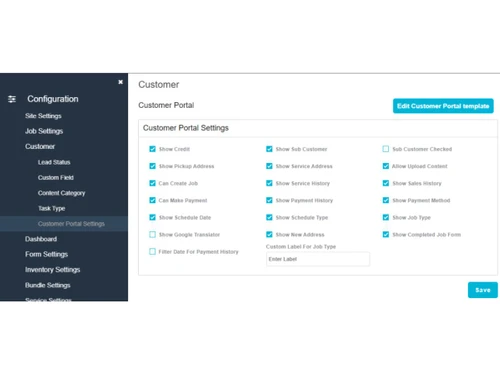
serviceworks-configuration
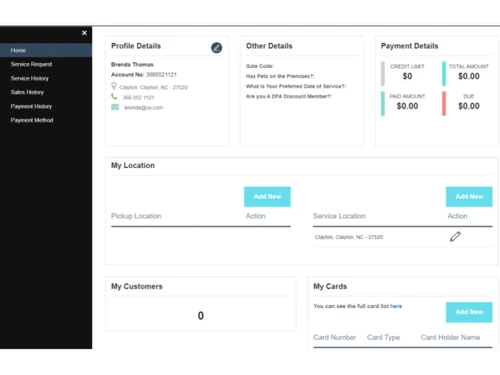
serviceworks-home
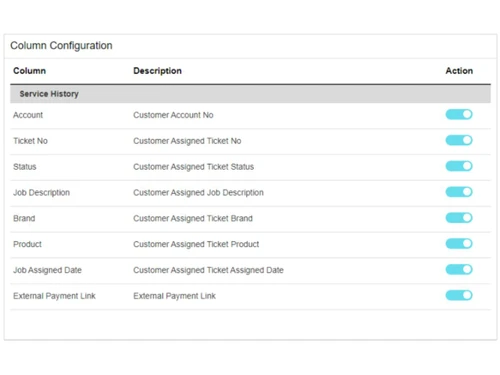
serviceworks-column

ServiceWorks

Brand: ServiceWorks

  • No Ratings & Reviews

ServiceWorks is a field service management platform that helps businesses manage operations, automate workflows, schedule jobs, and monitor field activities.

See More

Have you used ServiceWorks before?

Share your insights for better experience

Add a Review

Price Available on Request

Questions about pricing or customization? We’re here to help, just a click away.

100% Genuine
Products
Best Price
Guaranteed
Safe & Secure
Payment
  • Description

  • Pricing

  • Features

  • Specification

  • Review

  • Compare

  • Alternatives

  • FAQ

ServiceWorks Software Overview

What is ServiceWorks?

ServiceWorks is a cloud-based Field Service Management (FSM) software engineered to provide real-time operational intelligence for businesses. It is designed to streamline operations, optimize efficiency, and drive business growth by automating key tasks and enhancing customer engagement. The platform is configurable to suit specific business needs, allowing companies to apply their expert knowledge within a powerful digital framework. As a fully cloud-based solution, it requires no special hardware and can be accessed from any device, anywhere, making it a flexible tool for modern field service teams.

Why Choose ServiceWorks?

  • Fast and Easy Onboarding: ServiceWorks offers a personalized onboarding experience. Instead of a generic tutorial, new clients participate in a brainstorming session with a product specialist to configure the platform for their unique operational needs.
  • Hassle-Free Data Migration: Transitioning from a previous system is seamless. The ServiceWorks team can import your existing customers, price lists, and inventory data from a simple CSV or Excel file, ensuring a smooth migration.
  • Exceptional U.S.-Based Support: Users receive comprehensive support, including instructor-led training sessions for all staff members. Ongoing assistance is available via live chat with real people and direct phone support during business hours.
  • Cost-Effective Operations: The software supports integrated payment processing, helping streamline payment collection. Furthermore, since it runs on existing connected devices, there is no need for additional hardware investment.
  • Significant Time Savings: By automating routine tasks such as inventory management, accounting, scheduling, and route optimization, ServiceWorks saves businesses valuable hours every week, freeing up staff to focus on core activities.

Advanced Features of ServiceWorks

  • Mobility-Driven Business Management: Run your entire operation from any smartphone or tablet. The mobile app allows users to schedule jobs, dispatch technicians, look up customer information, and collect payments while on the go.
  • Intelligent Communication Automation: Keep all stakeholders informed with automated notifications. The system can send emails and SMS messages to customers, technicians, and administrators, helping maintain clear and timely communication.
  • Smart Reporting and Analytics: Make informed, strategic decisions with detailed analytics and real-time reporting. These insights help identify opportunities for growth, improve efficiency, and increase profitability.
  • Real-Time Field Operations: Technicians in the field can access job details, customer information, service history, forms, notes, parts, and other field workflows directly from the mobile app, helping them manage service work more efficiently.
  • Integrated Field Payments: Streamline the payment process by allowing technicians to send invoices and process payments directly from their mobile devices immediately after a job is completed.

Key Capabilities of ServiceWorks

  • Scheduling and Dispatching: An intuitive interface for booking, scheduling, and dispatching service calls efficiently. It helps optimize technician routes and manage workloads effectively.
  • Customer Lifecycle Management: Tools to deliver a seamless customer experience, including real-time engagement features and automated requests for customer feedback.
  • Mobile Field App: A comprehensive mobile application for technicians that provides access to all necessary information, including service history, job notes, and customer details. It also enables internal messaging between employees.
  • Inventory and Parts Management: Automates inventory tracking and allows technicians to receive parts directly in the field, ensuring they have the necessary components to complete jobs without delay.
  • Accounting and Invoicing: Simplifies financial management with automated accounting functions and a streamlined system for creating invoices and processing payments.

How to Use ServiceWorks?

  1. Request a Live Demonstration: The first step is to schedule a live demo or discovery call with a product specialist to see the software in action and discuss how it can meet your specific business needs.
  2. Participate in Customized Onboarding: Work directly with a specialist in a one-on-one session to configure the platform's workflows and settings to match your company's operational processes.
  3. Migrate Your Business Data: Provide your existing customer lists, inventory, and pricing data in an Excel or CSV format. The ServiceWorks team will handle the migration to import your information into the new system.
  4. Undergo Guided Team Training: Ensure your entire staff is comfortable and proficient with the software through instructor-led training sessions conducted via video conference.
  5. Deploy and Operate: Begin using ServiceWorks on your existing computers, tablets, and smartphones. Leverage the ongoing U.S.-based live chat and phone support for any questions that arise.

ServiceWorks Pricing

ServiceWorks pricing details are available on request on techjockey.com.

The pricing model is based on different parameters, including extra features, deployment type, and the total number of users. For further queries related to the product, you can contact our product team and learn more about the pricing and offers.

Read more

ServiceWorks Company Details

Founded Year:  2016

Complete platform for running service business from anywhere with enterprise level features and the lowest price on the market. Create estimates & jobs, schedule & dispatch, invoice, manage inventory , purchase order and more.

Director/Founders ServiceWorks
Company Size 1-100 Employees

ServiceWorks Pricing & Plans

Looking for The Right Pricing?

Share your requirements and get a plan built around your business.

  • Define your business needs
  • Get customised pricing
  • Choose features that fit your workflow

Price Available on Request

Get personalised ServiceWorks pricing that fits your needs. Our team will connect with you.

ServiceWorks Features

  • icon_check Work Order Management
    System for creating, assigning, and tracking individual service requests through various stages of the operational lifecycle.
  • icon_check Dispatch Management
    Logic-based engine that assigns field technicians to specific jobs based on availability, proximity, and required skill sets.
  • icon_check Drag and Drop Functionality
    Visual calendar interface allowing administrators to manually allocate service appointments and adjust time slots via cursor.
  • icon_check Route Optimization
    Algorithmic calculation of the most efficient travel paths for field staff to minimize transit time and fuel consumption costs.
  • icon_check Real Time GPS Tracking
    Integration of global positioning data to monitor the current geographical location and movement of mobile personnel in field.
  • icon_check Inventory Management
    Database for tracking stock levels, parts usage per job, and warehouse transfers to maintain accurate material requirements.
  • icon_check Automated Invoicing
    Logic module that converts completed work orders into financial documents based on predefined labor rates and material costs.
  • icon_check Payment Processing
    Integrated gateway for capturing credit card, check, or digital transactions directly through the desktop or mobile interface.
  • icon_check Purchase Order Management
    Procurement module for generating and sending material requests to vendors based on low stock alerts or specific job needs.
  • icon_check Digital Signature
    Functional tool for recording electronic signatures on mobile devices to provide legal proof of job completion and acceptance.
  • icon_check Alerts & Notifications
    Trigger-based system for sending SMS or email alerts to customers regarding technician arrival times or appointment changes.
  • icon_check Customer Portal
    Self-service web interface where clients can view historical invoices, track current job status, and book future appointments.
  • icon_check Time Tracking
    Internal utility for logging employee clock-in times and labor hours to export data for administrative payroll processing.
  • icon_check Multichannel Communication
    Integrated messaging system supporting two-way SMS, email, and internal staff notes linked directly to specific work orders.

ServiceWorks Specifications

Supported Platforms
Windows Windows iOS iOS Android Android MacOS MacOS
Devices
Desktop Desktop Mobile Mobile Tablet Tablet iPad iPad
Deployment
Cloud-Based Cloud-Based
Suitable For
All Industries
Business Specific
All Businesses
Business Size
Medium Business SMBs MSMBs
Customer Support
Email Communities
Language
English
Training Resources
Videos

Explore the Best Alternative Solutions Similar to Your Business Size and Needs

ServiceWorks Review

Techjockey Trusted Reviews from Verified Users

No reviews are currently available for ServiceWorks. Discover similar Field Service Management Software reviews

  • Empfly Field Service Management

    4.8

    Whats great - We urgently needed offline capabilities since our field teams often work in no-network zones, and this solution delivered. Da... read more

  • Service CRM

    4.6

    Whats great - I am looking for Car Wash Management System since long time. I am fully satisfied with the product. read more

  • Field Force Connect

    4.6

    Whats great - Had a great experience. Our service agent was very knowledgeable and wanted to now how to help our organization. It was wonde... read more

Compare ServiceWorks With other Field Service Management Software

Products
Ratings
Pricing
Device Supported
Deployment
Supported Platforms
  • img

    ServiceWorks

  • Price On Request

  • Desktop

    Mobile

  • Web based

    On Premises

  • Windows

    Mac OS

  • img

    Service CRM

  • 4.6

  • Price On Request

  • Desktop

    Mobile

  • Web based

    On Premises

  • Windows

    Mac OS

  • img

    QuikAllot

  • 4.5

  • ₹ 9000

  • Desktop

    Mobile

  • Web based

    On Premises

  • Windows

    Mac OS

  • img

    Lystloc

  • 4.3

  • Price On Request

  • Desktop

    Mobile

  • Web based

    On Premises

  • Windows

    Mac OS

  • img

    TrackoField

  • 4.3

  • ₹ 3600

  • Desktop

    Mobile

  • Web based

    On Premises

  • Windows

    Mac OS

  • img

    Fieldy

  • 4.2

  • ₹ 6000

  • Desktop

    Mobile

  • Web based

    On Premises

  • Windows

    Mac OS

  • img

    Intelomatic

  • 4.3

  • Price On Request

  • Desktop

    Mobile

  • Web based

    On Premises

  • Windows

    Mac OS

  • img

    Zuper

  • 4.7

  • Price On Request

  • Desktop

    Mobile

  • Web based

    On Premises

  • Windows

    Mac OS

  • img

    Zoho FSM

  • 4.2

  • ₹ 1800

  • Desktop

    Mobile

  • Web based

    On Premises

  • Windows

    Mac OS

  • img

    MetricInfo

  • 4.3

  • ₹ 1000

  • Desktop

    Mobile

  • Web based

    On Premises

  • Windows

    Mac OS

(0) Product(s) selected

ServiceWorks Alternatives

See All ServiceWorks Alternatives

Available

Price on Request

Starting Price:

$40 /Month

Starting Price:

$39 /Month

Starting Price:

$7 /License

Starting Price:

₹199 /Month ₹699

SAVE UPTO 72%

Starting Price:

$225 /Month

Available

Price on Request

Available

Price on Request

Articles for ServiceWorks

See All Related Articles

What is ServiceWorks?

ServiceWorks is a cloud-based field service management software solution designed to streamline operations, optimize efficiency, save costs, and improve the bottom line for businesses. It provides real-time operational intelligence to drive effectiveness in field service.

How much does ServiceWorks cost?

ServiceWorks pricing details are available on request on techjockey.com.

What are the features of ServiceWorks?

ServiceWorks offers a comprehensive suite of features including real-time operational intelligence, automated tasks like inventory, accounting, scheduling, and routing, smart reporting with detailed analytics, and mobile capabilities for managing operations on the go. It also provides communication automation, on-field payment processing, and robust customer support with individualized onboarding and training.

Is ServiceWorks a good software?

ServiceWorks is presented as a highly effective field service management software, trusted by partners and customers, with testimonials highlighting its ease of booking, scheduling, and dispatching. It aims to revolutionize field service by optimizing operations, saving costs, and enabling business growth through its cloud-based, mobile-driven solution.

Who can use ServiceWorks?

ServiceWorks is designed for any field service business looking to maximize proficiency, optimize operations, save costs, and grow by streamlining their field service management processes.

What kind of support and onboarding does ServiceWorks offer?

ServiceWorks provides excellent customer support including individualized onboarding sessions, instructor-led training via video conference, and resources like online tutorials. They also offer data import services, live chat, and phone support from their 100% in-house U.S. based team.

Does ServiceWorks require special hardware?

No, ServiceWorks does not require any special hardware; it is a cloud-based solution that works with your existing devices, eliminating the need for additional investment.

How does ServiceWorks enhance mobility for field technicians?

ServiceWorks empowers field technicians with full mobility, allowing them to run all business operations from any device and location, including scheduling, dispatching, looking up customers, receiving parts by scanning, creating new jobs or customers, accessing service history, and processing payments directly from their smartphone.

Can ServiceWorks help with data migration from an old system?

Yes, ServiceWorks offers hassle-free data import services, allowing them to migrate your existing customer data, price lists, and inventory from a CSV or Excel file into their system within a few days.

20,000+ Software Listed

Best Price Guranteed

Free Expert Consultation

2M+ Happy Customers

Terms and Condtions

close

Users with registered businesses can purchase goods from merchants on the platform to satisfy their business needs. Users are not permitted to utilize any products acquired through the platform for resale, advertising, business, or further distribution.

For each purchase made, users will receive a Tax Invoice (or 'GST invoice') that includes specific details such as:

  • the GSTIN of the user associated with their registered business, and

  • the specified Entity Name for their business.

It should be noted that not all products are eligible for GST Invoice. Only the products displayed by participating sellers with the 'GST-based Invoice Available' callout on the product description page would qualify.

Certain goods and services are not eligible to get a GST Invoice, including items with VAS, i.e., Value Added Services (e.g., Total Mobile Protection/Assured Buyback) and those involving an exchange offer at the time of purchase.

Users must ensure the accuracy of the GSTIN, and business entity name provided for the GST Invoice. Requests for corrections into GST Invoice would not be accommodated by Techjockey.com or any Seller, and any issues arising from user-provided information are the sole responsibility of users.

Techjockey.com is not liable for the GST Invoice or any associated input tax credit. To efficiently claim an input tax credit, users should select the registered place of business address as per the GST authority's data and follow the provisions of the GST Act and rules.

To claim an input tax credit, the delivery and billing addresses must match. Furthermore, input tax credits will not be granted if the delivery address and GSTIN on the invoice are from different states. In case of incorrect GST details provided during the order placement, the order will be canceled automatically.