linkedin
Shipstation logo
play What Is ShipStation? Here's Why It's The #1 Choice of Online Sellers.
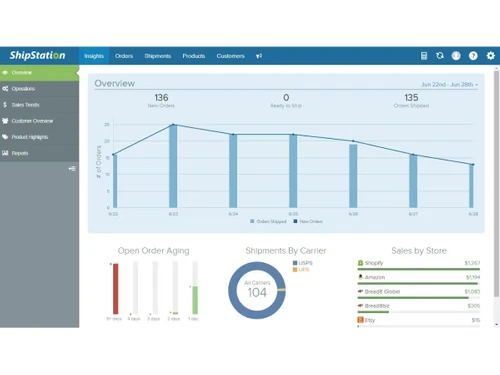
Shipstation overview
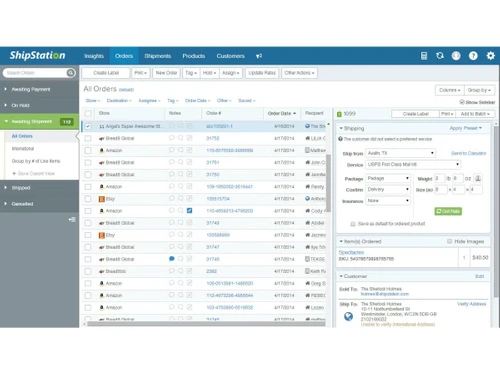
Shipstation orders

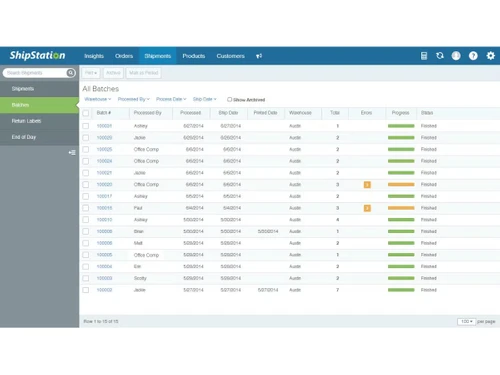
Shipstation

Brand: Shipstation

  • 4.3

  • 6 Ratings

ShipStation is a cloud-based order fulfillment and shipping platform that assists e-commerce companies in automating and streamlining their shipping operations across various sales channels.

See More

Have you used Shipstation before?

Share your insights for better experience

Add a Review
Starting Price
$10

View plans

100% Genuine
Products
Best Price
Guaranteed
Safe & Secure
Payment
  • Description

  • Pricing

  • Features

  • Specification

  • Review

  • Compare

  • Alternatives

  • FAQ

  • Questions

Starting at $10

Shipstation Software Overview

What is ShipStation? 

ShipStation is a dropshipping software that simplifies order fulfillment and shipping for e-commerce retailers through its web application by integrating orders from various sales channels. The creation of shipping labels, automated shipment tracking, and batch processing are all done using the software, along with carrier-associated discounts.  

The program also allows for custom packing and branded merchandise, along with easy inventory management. Its integrations with major carriers, carts, and marketplaces offer optimized logistics for businesses of all sizes. 

What are the Benefits of ShipStation?

  • Saves Time: Focus on growing your business by saving over 10 hours a week on tedious tasks like label generation and order tracking updates. The system’s simple design allows for quick training, so employees can start saving time right away. 
  • Lower Expenses: Make the most of your profit margins by significantly lowering your shipping costs with exclusive discounts from major carriers such as USPS, UPS, and FedEx. These savings are significant for high-volume shippers who submit hundreds of orders daily. 
  • Consolidate Orders: Streamline your operations by effortlessly consolidating orders from multiple sales channels such as Amazon, Shopify, and eBay into a single dashboard. This eliminates the need for switching between multiple platforms, which reduces errors and optimizes the workflow. 
  • Optimized Decisions: Automation will improve your shipping decision-making through intelligent rule configurations that select the most affordable or expedient predefined shipping method. Choices can be customized for certain products, customer locations, or order value. 
  • Improved Professionalism: Build on your professionalism brand by utilizing customizable packing slips, tracking pages, and email notifications that incorporate the brand logo and colors. Consistent branding across all customer touchpoints helps build trust and reinforces your company identity throughout the delivery experience. 
  • Accurate Inventory Level: Maintain accurate inventory levels with real-time sync across all your sales platforms to prevent stockouts and overselling situations. The system automatically updates quantities as orders are processed. 

ShipStation Pricing

The starting price of ShipStation is $10/month. You can get in touch with techojockey.com for more information about the software. 

Pricing Plan: 

  • Starter: $10/month 
  • Growth: $30/month 
  • Scale: $100/month 
  • High-Volume: $400/month 
Read more

Shipstation Company Details

Founded Year:  2011

We help eCommerce merchants create shipping labels ship and fulfill their products no matter where they sell or how they ship.

Director/Founders Byron Wier, Jason Hodges
Company Size 1-100 Employees

Shipstation Pricing & Plans

Starter
Starting at $10
    • Licenses

      Licenses
      Licenses
    • Monthly

      Monthly
      Monthly

Key Features

  • 50 shipments/month

  • 1 user

  • Email support

  • Best discounted shipping rates from USPS, UPS, DHL

  • Access to 300+ integrations

Growth
Starting at $30
    • Licenses

      Licenses
      Licenses
    • Monthly

      Monthly
      Monthly

Key Features

  • 500 shipments per month

  • Includes all Starter features plus

  • Live Chat, Email support, 24/7 support

  • Branded tracking, labels, and more

Shipstation Features

  • icon_check Order Management
    Provides all-in-one order management for increased productivity and time-efficient processing.
  • icon_check Shipping & Delivery
    Saves time by automating carrier comparisons, label printing, and tracking updates through integrated USPS, UPS, FedEx, etc.
  • icon_check Branding
    Provides professional customer service through multiple channels, including a knowledge base for self-help, 24/7.
  • icon_check Inventory Management
    Easily manage overselling and SKUs with advanced stock level syncing across channels and warehouses.
  • icon_check Labels & Packing Slips
    Customer experience is elevated by professional customization of tracking pages, emails, and packing slips.
  • icon_check Live Chat, E-mail & Community Forum Support
    With customizable templates, generate bulk professional packing slips and batch shipment labels.
  • icon_check Stock Management
    Real-time inventory tracking provides alerts for low stock and automatic quantity updates across platforms.
  • icon_check Integrations & Partners
    Connects with 300+ marketplaces, carts, and carriers for end-to-end sync.
Shipstation Demo Video play icon

Get Shipstation Demo

Watch the demo video to explore key features, real workflows, and how the software fits your business needs.

Understand
Key Features
Personal
Demo Insights
Interactive
Demo Support

Shipstation Specifications

Supported Platforms
Windows Windows Android Android
Devices
Desktop Desktop Mobile Mobile
Deployment
Cloud-Based Cloud-Based
Suitable For
All Industries
Business Specific
All Businesses
Business Size
Small Business Startups Medium Business Enterprises SMBs SMEs MSMBs MSMEs
Customer Support
Phone Email
Language
English
Training Resources
Videos

Explore the Best Alternative Solutions Similar to Your Business Size and Needs

Small Business

Designed for startups and growing businesses

Spocket

4.6

Volusion

4.3

AutoDS

4.1

See More

Shipstation Review

4.3

Out of 5

img

Overall Rating

Based on
6 Verified Ratings

Rating Breakdown

  • Features 4.4
  • Value for Money 4.6
  • Ease of Use 4.0
  • Customer Support 4.3

91% Recommend this Product

Add Review

Techjockey Trusted Reviews from Verified Users

No reviews are currently available for Shipstation. Discover similar Dropshipping Software reviews

  • Shiprocket

    4.5

    Whats great - As a user, I highly recommend Shiprocket for its user-friendly interface, comprehensive features, and efficient communication... read more

  • Bigship

    4.5

    Whats great - BigShip promotes rates from ?7.5/kg, ideal for small sellers scaling from social commerce. read more

  • Easyship

    4.6

    Whats great - After using Easyship, I must say that this software helps you manage your shipping needs and offers features like integration... read more

Compare Shipstation With other Dropshipping Software

Products
Ratings
Pricing
Device Supported
Deployment
Supported Platforms
  • img

    Shipstation

  • 4.3

  • Price On Request

  • Desktop

    Mobile

  • Web based

    On Premises

  • Windows

    Mac OS

  • img

    Shiprocket

  • 4.4

  • Price On Request

  • Desktop

    Mobile

  • Web based

    On Premises

  • Windows

    Mac OS

  • img

    AutoDS

  • 4.1

  • Price On Request

  • Desktop

    Mobile

  • Web based

    On Premises

  • Windows

    Mac OS

  • img

    Bigship

  • 4.4

  • Price On Request

  • Desktop

    Mobile

  • Web based

    On Premises

  • Windows

    Mac OS

  • img

    InstaLogix

  • 4.3

  • ₹ 3499

  • Desktop

    Mobile

  • Web based

    On Premises

  • Windows

    Mac OS

  • img

    Printify

  • 4.4

  • Price On Request

  • Desktop

    Mobile

  • Web based

    On Premises

  • Windows

    Mac OS

  • img

    Zopi

  • 4.1

  • Price On Request

  • Desktop

    Mobile

  • Web based

    On Premises

  • Windows

    Mac OS

  • img

    Printful

  • 4.2

  • Price On Request

  • Desktop

    Mobile

  • Web based

    On Premises

  • Windows

    Mac OS

  • img

    Minea

  • Price On Request

  • Desktop

    Mobile

  • Web based

    On Premises

  • Windows

    Mac OS

  • img

    Volusion

  • 4.3

  • Price On Request

  • Desktop

    Mobile

  • Web based

    On Premises

  • Windows

    Mac OS

(2) Product(s) selected

Shipstation Alternatives

See All Shipstation Alternatives

Zopi

4.1

Starting Price:

$20 /Month

Available

Price on Request

Starting Price:

$49 /Month

Starting Price:

$20 /Month

Available

Price on Request

Available

Price on Request

Articles for Shipstation

See All Related Articles

How much does ShipStation cost?

The cost of ShipStation starts from $10/month.

Is ShipStation free?

No, you cannot use ShipStation for free. However, you can get a free trial before actually purchasing the software.

Is there a mobile app for ShipStation?

Yes, there is a dedicated mobile app available for ShipStation Software?

Is a free demo available in ShipStation?

Yes, a free demo is available in ShipStation.

Who can use ShipStation?

ShipStation is mainly used by e-commerce businesses, multi-channel sellers, international sellers, Dropshippers, and more.

How does ShipStation work?

ShipStation consolidates all your orders from every sales channel into one platform, where you can label, process, and ship them using discounted carrier rates and automated workflows.

Shipstation Questions

Q:

Is ShipStation a SaaS?

vikranthkumari May 31, 2025
A:

Yes, ShipStation is a SaaS shipping platform that helps online retailers to manage their shipping process.

Pradeep May 31, 2025
Q:

Is ShipStation an EDI?

Gurmeet singh May 31, 2025
A:

No, Shipstation is not an EDI, but it is integrated with EDI as it helps to ensure smooth exchange of data between suppliers, warehouses and customers.

Bikram Sarkar Jun 2, 2025
A:

To resolve issues with printer not showing up in ShipStation, you should:

  • Ensure ShipStation is running.
  • Check if your printer is connected to the computer.
  • If the printer is not showing, add it to your operating system.
K rishna singh Jun 4, 2025
Q:

How does ShipStation work?

Anas Javed May 30, 2025
A:

Details about how ShipStation works:

  • It connects your online store with ShipStation.
  • You can manage your orders with shipping channels.
  • It helps you print labels and update order status.
  • You can choose any shipping carrier that you want to use.
Roopa Narayan May 31, 2025
A:

What you should do:

  • Ensure workstation is awake.
  • Check that ShipStation is running.
  • Refresh the ShipStation connection.
  • Make sure your printer is shared.
  • Uninstall and reinstall ShipStation.
Faiyaz Makda Jun 1, 2025
See All Shipstation Questions

20,000+ Software Listed

Best Price Guranteed

Free Expert Consultation

2M+ Happy Customers

Terms and Condtions

close

Users with registered businesses can purchase goods from merchants on the platform to satisfy their business needs. Users are not permitted to utilize any products acquired through the platform for resale, advertising, business, or further distribution.

For each purchase made, users will receive a Tax Invoice (or 'GST invoice') that includes specific details such as:

  • the GSTIN of the user associated with their registered business, and

  • the specified Entity Name for their business.

It should be noted that not all products are eligible for GST Invoice. Only the products displayed by participating sellers with the 'GST-based Invoice Available' callout on the product description page would qualify.

Certain goods and services are not eligible to get a GST Invoice, including items with VAS, i.e., Value Added Services (e.g., Total Mobile Protection/Assured Buyback) and those involving an exchange offer at the time of purchase.

Users must ensure the accuracy of the GSTIN, and business entity name provided for the GST Invoice. Requests for corrections into GST Invoice would not be accommodated by Techjockey.com or any Seller, and any issues arising from user-provided information are the sole responsibility of users.

Techjockey.com is not liable for the GST Invoice or any associated input tax credit. To efficiently claim an input tax credit, users should select the registered place of business address as per the GST authority's data and follow the provisions of the GST Act and rules.

To claim an input tax credit, the delivery and billing addresses must match. Furthermore, input tax credits will not be granted if the delivery address and GSTIN on the invoice are from different states. In case of incorrect GST details provided during the order placement, the order will be canceled automatically.