linkedin
Smartlook logo
play Smartlook: Analyze user behavior in ways never possible before
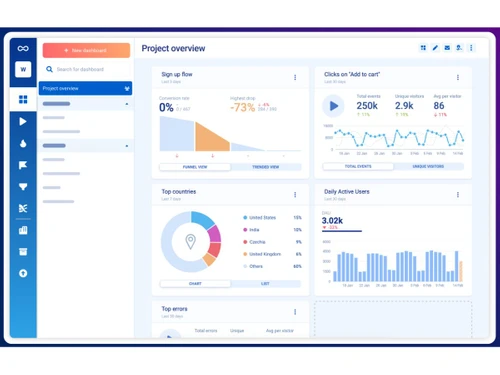
Smartlook-dashboard
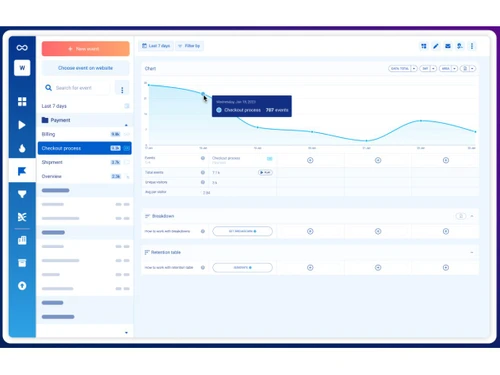
Smartlook-event analytics

Smartlook

Brand: Cisco Systems

  • No Ratings & Reviews

Smartlook helps businesses track website and app user interactions through session recordings, heatmaps, and event analytics.

See More

Have you used Smartlook before?

Share your insights for better experience

Add a Review
Starting Price
$55

View plans

100% Genuine
Products
Best Price
Guaranteed
Safe & Secure
Payment
  • Description

  • Pricing

  • Features

  • Specification

  • Review

  • Compare

  • Alternatives

  • FAQ

Starting at $55

Smartlook Software Overview

What is Smartlook?

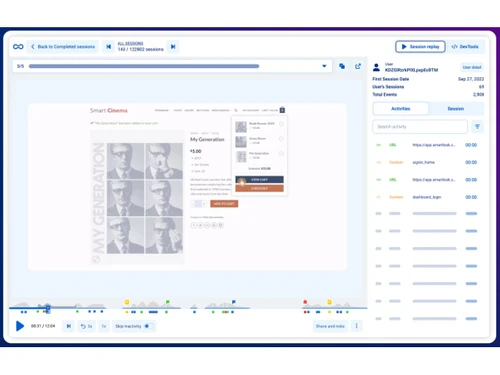
Smartlook is a product analytics software that helps businesses understand how people use their websites and mobile apps. It records user sessions so companies can see where users click, scroll, and face problems while using a product.

The software provides heatmaps, event tracking, funnels, and session replays to analyze customer behavior easily. Businesses use Smartlook to improve website design, app performance, and customer experience.

It helps teams identify bugs, errors, and user drop-off points quickly. Smartlook works for websites, Android apps, and iOS apps from one dashboard. The platform also provides real-time analytics and reports to track user activity and conversions.

Product managers, marketers, developers, and UX teams use Smartlook to make better business decisions.

Why Choose Smartlook Software?

  • Session Recordings: Smartlook records real user sessions, helping businesses understand user behavior in detail.
  • Heatmap Analysis: It provides heatmaps to track clicks, scrolling, and user engagement on websites and apps.
  • Event Tracking: The software automatically tracks important user actions and custom events.
  • Conversion Funnel Insights: Smartlook helps identify where users drop off during the conversion process.
  • Easy Integration: It integrates smoothly with websites, mobile apps, and popular third-party platforms.
  • Real-Time Monitoring: Businesses can monitor user activity in real time for quicker decision-making.
  • User-Friendly Dashboard: The platform offers a simple and intuitive interface for easy navigation.
  • Mobile App Analytics: Smartlook supports analytics for both Android and iOS applications.
  • Automatic Event Detection: The software automatically captures events without complex setup requirements.

Benefits of Smartlook Software

  • Performance Optimization: It helps improve website and app performance by identifying usability issues.
  • Advanced Filtering: Users can filter recordings and analytics data based on specific criteria.
  • Cross-Platform Support: Smartlook works efficiently across web platforms and mobile devices.
  • GDPR Compliance: The platform follows strong privacy and data protection standards.
  • Team Collaboration: Teams can share insights and recordings to improve collaboration and productivity.
  • Detailed User Journey Tracking: Businesses can analyze complete customer journeys from start to finish.
  • Error Detection: Smartlook helps detect bugs and technical issues affecting user experience.
  • Customizable Analytics: Users can create custom events and reports based on business needs.
  • Improved Customer Experience: The platform helps businesses optimize interfaces for better customer satisfaction.
  • Actionable Insights: Smartlook delivers data-driven insights that support smarter business decisions.

Smartlook Pricing

Smartlook price starts at USD 55 at techjockey.com.

The pricing model is based on different parameters, including extra features, deployment type, and the total number of users. For further queries related to the product, you can contact our product team and learn more about the pricing and offers.

Read more

Cisco Systems Company Details

Founded Year:  1984

Cisco develops, manufactures, and sells networking hardware, telecommunications equipment, and other technology services and products.

Director/Founders Leonard Bosack, Sandy Lerner
Company Size 1000+ Employees

Smartlook Pricing & Plans

Pro
Key Features
  • From 5,000 monthly sessions
  • More advanced product analytics capabilities
  • Daily anomaly reporting
  • Exports to CSV
  • All premium integrations
  • DevTools and product analytics add-ons
Starting at $55
    • Licenses

      Licenses
      Licenses
    • Monthly

      Monthly
      Monthly

Key Features

  • From 5,000 monthly sessions

  • More advanced product analytics capabilities

  • Daily anomaly reporting

  • Exports to CSV

  • All premium integrations

  • DevTools and product analytics add-ons

Smartlook Features

  • icon_check Session Recording
    Records real user sessions to replay clicks, scrolls, and interactions for deep behavioral analysis.
  • icon_check Heatmaps
    Visualizes click, scroll, and movement patterns to identify popular areas and ignored sections.
  • icon_check Event Tracking
    Tracks custom user actions like button clicks, form submissions, and feature usage events.
  • icon_check Conversion Funnels
    Analyzes step-by-step user journeys to detect drop-offs and optimize conversion paths.
  • icon_check User Behavior Analytics
    Combines qualitative session replays with quantitative data to understand user intent clearly.
  • icon_check Reporting
    Links app crashes with session recordings to help teams identify and fix issues faster.
  • icon_check Automatic Detection
    Automatically detects common UI interactions without manual event setup or coding effort.
  • icon_check Advanced Filters
    Filters sessions by device, location, behavior, events, or traffic source for targeted insights.
  • icon_check User Segmentation
    Groups users based on behavior, attributes, or actions for deeper analysis and personalization.
  • icon_check Privacy Control
    Masks sensitive data and supports GDPR compliance with secure data handling options.
  • icon_check Custom Dashboards
    Builds visual dashboards to monitor KPIs, trends, and behavioral metrics in one place.
  • icon_check Integrations
    Connects with tools like Google Analytics, Mixpanel, Slack, and Jira for unified workflows.
  • icon_check Conversion Analytics
    Measures how users interact with key elements influencing sign-ups, purchases, or retention.
  • icon_check Cross-Platform Tracking
    Provides unified insights across web and mobile platforms for consistent user experience analysis.
Smartlook Demo Video play icon

Get Smartlook Demo

Watch the demo video to explore key features, real workflows, and how the software fits your business needs.

Understand
Key Features
Personal
Demo Insights
Interactive
Demo Support

Smartlook Specifications

Supported Platforms
Windows Windows MacOS MacOS Linux Linux
Devices
Desktop Desktop
Deployment
Cloud-Based Cloud-Based
Suitable For
All Industries
Business Specific
All Businesses
Business Size
Small Business Startups Medium Business Enterprises
Customer Support
Email Communities
Language
English
Training Resources
Videos
Compliance Regulation
PCI DSS

Explore the Best Alternative Solutions Similar to Your Business Size and Needs

Smartlook Review

Be the First to Review

This product has no reviews yet. Be the first to leave your feedback.

Add Review
Compare Smartlook With other Product Analytics Software

Products
Ratings
Pricing
Device Supported
Deployment
Supported Platforms
  • img

    Smartlook

  • Price On Request

  • Desktop

    Mobile

  • Web based

    On Premises

  • Windows

    Mac OS

  • img

    Kubit

  • 4.1

  • Price On Request

  • Desktop

    Mobile

  • Web based

    On Premises

  • Windows

    Mac OS

  • img

    InnerTrends

  • 4.4

  • Price On Request

  • Desktop

    Mobile

  • Web based

    On Premises

  • Windows

    Mac OS

  • img

    LogRocket

  • 4.5

  • Price On Request

  • Desktop

    Mobile

  • Web based

    On Premises

  • Windows

    Mac OS

  • img

    Statsig

  • 4.5

  • Price On Request

  • Desktop

    Mobile

  • Web based

    On Premises

  • Windows

    Mac OS

  • img

    June Analytics

  • 4.5

  • Price On Request

  • Desktop

    Mobile

  • Web based

    On Premises

  • Windows

    Mac OS

  • img

    Mitzu

  • 4.4

  • Price On Request

  • Desktop

    Mobile

  • Web based

    On Premises

  • Windows

    Mac OS

  • img

    Sprig Analysis

  • 4.3

  • Price On Request

  • Desktop

    Mobile

  • Web based

    On Premises

  • Windows

    Mac OS

  • img

    Countly

  • 4.5

  • Price On Request

  • Desktop

    Mobile

  • Web based

    On Premises

  • Windows

    Mac OS

  • img

    NetSpring

  • 4.5

  • Price On Request

  • Desktop

    Mobile

  • Web based

    On Premises

  • Windows

    Mac OS

  • img

    UXCam

  • Price On Request

  • Desktop

    Mobile

  • Web based

    On Premises

  • Windows

    Mac OS

(2) Product(s) selected

Smartlook Alternatives

See All Smartlook Alternatives

Starting Price:

$2,500

Available

Price on Request

Available

Price on Request

Available

Price on Request

How much does Smartlook Software cost?

Smartlook price starts at USD 55 at techjockey.com.

Is there a mobile app available for Smartlook Software?

No, Smartlook does not offer mobile apps.

Which operating systems are compatible with Smartlook Software?

Smartlook is compatible with Windows, macOS, and Linux.

Does Smartlook Software offer a free trial?

Yes, Smartlook offers a free trial for users to explore its features before purchasing.

How does Smartlook Software function?

Smartlook functions by tracking user interactions through session recordings, heatmaps, and analytics tools.

Who uses Smartlook Software?

Smartlook is used by marketers, developers, UX designers, startups, and enterprises to improve user experience.

Is a free demo available for Smartlook Software?

Yes, Smartlook provides a free demo and product walkthrough for potential users.

Is Smartlook Software available for free?

Yes, Smartlook offers a free plan with limited features for small businesses and beginners.

20,000+ Software Listed

Best Price Guranteed

Free Expert Consultation

2M+ Happy Customers

Terms and Condtions

close

Users with registered businesses can purchase goods from merchants on the platform to satisfy their business needs. Users are not permitted to utilize any products acquired through the platform for resale, advertising, business, or further distribution.

For each purchase made, users will receive a Tax Invoice (or 'GST invoice') that includes specific details such as:

  • the GSTIN of the user associated with their registered business, and

  • the specified Entity Name for their business.

It should be noted that not all products are eligible for GST Invoice. Only the products displayed by participating sellers with the 'GST-based Invoice Available' callout on the product description page would qualify.

Certain goods and services are not eligible to get a GST Invoice, including items with VAS, i.e., Value Added Services (e.g., Total Mobile Protection/Assured Buyback) and those involving an exchange offer at the time of purchase.

Users must ensure the accuracy of the GSTIN, and business entity name provided for the GST Invoice. Requests for corrections into GST Invoice would not be accommodated by Techjockey.com or any Seller, and any issues arising from user-provided information are the sole responsibility of users.

Techjockey.com is not liable for the GST Invoice or any associated input tax credit. To efficiently claim an input tax credit, users should select the registered place of business address as per the GST authority's data and follow the provisions of the GST Act and rules.

To claim an input tax credit, the delivery and billing addresses must match. Furthermore, input tax credits will not be granted if the delivery address and GSTIN on the invoice are from different states. In case of incorrect GST details provided during the order placement, the order will be canceled automatically.