linkedin
Snort logo
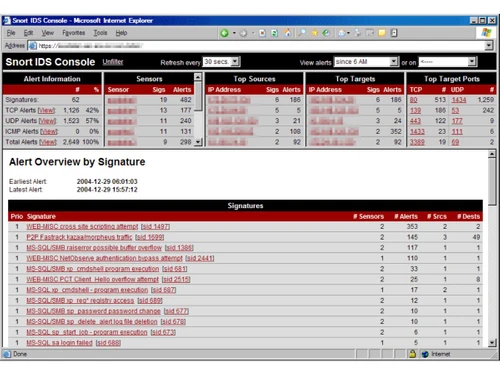
Snort-console
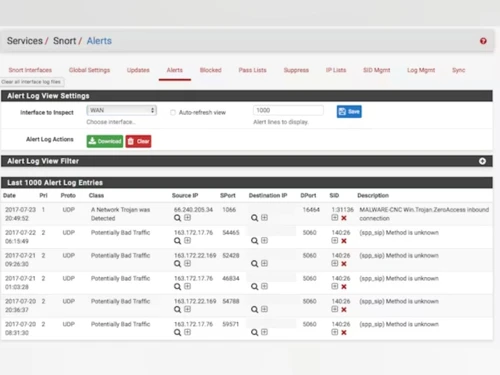
Snort-alerts
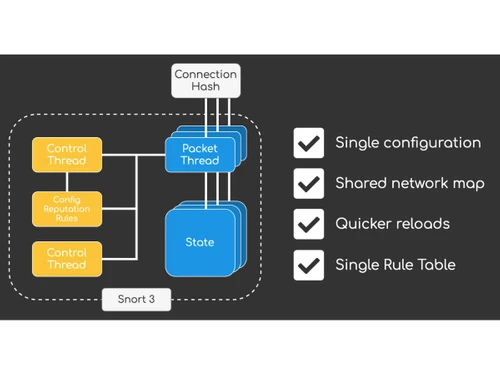
Snort-control thread

Snort

Brand: Cisco Systems

  • 4.1

  • 3 Ratings

A network security tool that detects and prevents network intrusions in real time.

See More

Have you used Snort before?

Share your insights for better experience

Add a Review

Free Forever

Get started immediately at no cost. Upgrade anytime if your business demand more.

100% Genuine
Products
Best Price
Guaranteed
Safe & Secure
Payment
  • Description

  • Pricing

  • Features

  • Specification

  • Review

  • FAQ

Snort Software Overview

What is Snort?

Snort is an open-source network security tool that functions as an intrusion detection and prevention system.

It monitors network traffic in real time, logs data packets, and identifies suspicious activity using customizable rules. Snort can operate as a packet sniffer, a packet logger, or a full intrusion prevention system to alert or block threats.

It is widely used in both personal and enterprise cybersecurity environments.

Why Choose Snort Software?

  • Open-Source Platform: Snort is completely free and open-source, allowing users to access its source code, enabling full customization and modification to suit specific network security needs.
  • Real-Time Intrusion Detection: It continuously monitors network traffic as it flows through the system, detecting suspicious or abnormal activity immediately to prevent attacks in real time.
  • Intrusion Prevention Capability: Beyond detection, Snort can actively block or prevent malicious traffic, providing a proactive layer of network defense against threats.
  • Customizable Rules: Users can create and apply their own rules to detect specific threats, allowing organizations to tailor Snort to their unique network environment.
  • High Performance: Snort efficiently handles large volumes of network traffic without slowing down the system, ensuring security monitoring even in high-traffic environments.
  • Extensive Protocol Support: Supports a wide range of network protocols, including TCP, UDP, and ICMP, making it versatile and capable of monitoring diverse network activities.
  • Detailed Logging: Snort records network packets and events for detailed analysis, useful for auditing, troubleshooting, and forensic investigations.
  • Alert System: Generates instant alerts when suspicious activity is detected, allowing administrators to respond quickly to potential threats before damage occurs.

Benefits of Snort Software

  • Flexible Deployment Options: Can operate as a packet sniffer, packet logger, or full intrusion prevention system, fitting various network security strategies.
  • Regular Updates: Snort regularly updates its rules and signatures, ensuring protection against the latest threats and evolving cyberattacks.
  • Integration Friendly: Can be integrated with other cybersecurity tools and SIEM platforms, providing a more comprehensive security monitoring setup.
  • Lightweight Software: Requires minimal system resources to run effectively, making it easy to deploy even in environments with limited hardware capacity.
  • Protocol Analysis: Performs deep packet inspection to analyze network traffic in detail, helping identify subtle or sophisticated attacks.
  • Compliance Support: Helps organizations meet industry regulations like PCI-DSS, improving security compliance and reducing audit risks.
  • Versatile Logging Formats: Supports multiple logging formats including text files, databases, and unified output, making data analysis easier and more adaptable.
  • Real-Time Alerts and Reports: Provides timely notifications along with detailed reporting, enabling administrators to monitor, review, and act on threats effectively.

Snort Pricing

Snort price is available for free at techjockey.com. The pricing model is based on different parameters, including extra features, deployment type, and the total number of users. For further queries related to the product, you can contact our product team and learn more about the pricing and offers.

Read more

Cisco Systems Company Details

Founded Year:  1984

Cisco develops, manufactures, and sells networking hardware, telecommunications equipment, and other technology services and products.

Director/Founders Leonard Bosack, Sandy Lerner
Company Size 1000+ Employees

Snort Pricing & Plans

This Product is Available Free Forever.

Start instantly with no fees, no subscriptions, and no commitments.

  • Full access to basic version available
  • No credit card or sign-up required

Free Forever Plan

Get started immediately at no cost. Upgrade anytime if your business demand more.

Free Forever

Snort Features

  • icon_check Packet Sniffing
    Captures and inspects network packets in real time, enabling detailed analysis of traffic flows for security monitoring.
  • icon_check Intrusion Detection & Prevention System
    Detects malicious activities by analyzing traffic patterns against rule signatures to alert on potential threats quickly.
  • icon_check Deep Packet Inspection
    Inspects packet payloads at multiple protocol layers to identify complex threats that evade basic header-level detection.
  • icon_check Signature-Based Detection
    Uses predefined attack signatures to identify known threats with high accuracy, leveraging regularly updated rule sets.
  • icon_check Protocol Analysis
    Analyzes protocol behavior to detect deviations, malformed packets, or exploitation attempts targeting protocol weaknesses.
  • icon_check Real-Time Traffic Analysis
    Monitors live network traffic continuously to detect unusual behavior or threat indicators as soon as they emerge.
  • icon_check Packet Logging
    Stores captured packets for offline review, enabling forensic analysis and deeper investigation into suspicious events.
  • icon_check Custom Rule Creation
    Supports user-defined rules, allowing administrators to tailor detection logic for unique environments and emerging threats.
  • icon_check Preprocessor Framework
    Uses modular preprocessors to normalize, decode, and analyze traffic to enhance detection accuracy and reduce false alerts.
  • icon_check Flow-Based Detection
    Correlates packets into flows to identify session patterns, improving detection of multi-stage or long-duration attacks.
  • icon_check Flexible Output Plugins
    Supports multiple logging and alerting outputs, including syslog, unified2, and JSON formats for SIEM integration.
  • icon_check Community & Subscriber Rule Sets
    Provides free community rules and premium Talos-maintained rules delivering frequent, high-quality threat signatures.
  • icon_check Multi-Model Support
    Runs in sniffer, packet logger, or inline IPS mode, enabling deployment flexibility across diverse network setups.
  • icon_check High Performance
    Optimizes performance using fast pattern-matching engines and multi-threading (in Snort 3) for high-speed networks.
  • icon_check IPv6 Support
    Fully supports IPv6 packet analysis, ensuring visibility and threat detection across modern dual-stack network environments.
  • icon_check Cross-Platform Compatibility
    Runs on Linux, FreeBSD, Windows, and UNIX-based systems, offering wide deployment flexibility for varied infrastructures.

Snort Specifications

Supported Platforms
Windows Windows MacOS MacOS Linux Linux
Devices
Desktop Desktop
Deployment
Perpetual Perpetual
Suitable For
All Industries
Business Specific
All Businesses
Business Size
Small Business Startups Medium Business Enterprises
Customer Support
Email
Language
English
Training Resources
Videos

Snort Review

4.1

Out of 5

img

Overall Rating

Based on
3 Verified Ratings

Rating Breakdown

  • Features 4.5
  • Value for Money 4.5
  • Ease of Use 4
  • Customer Support 3.8

80% Recommend this Product

Add Review

Be the First to Review

This product has no reviews yet. Be the first to leave your feedback.

Add Review

Articles for Snort

See All Related Articles

How much does Snort cost?

Snort is available for free on techjockey.com.

Is there a mobile app available for Snort Software?

No, Snort does not have a mobile app.

Which operating systems are compatible with Snort Software?

Snort is compatible with Linux, Windows, and macOS.

Does Snort Software offer a free trial?

Snort is free, so no trial is needed.

How does Snort Software function?

Snort monitors network traffic in real-time to detect and prevent intrusions.

Who uses Snort Software?

Snort is used by businesses, government agencies, and cybersecurity professionals.

Is a free demo available for Snort Software?

No demo is needed since Snort is free to use.

Is Snort Software available for free?

Yes, Snort is fully free and open-source.

20,000+ Software Listed

Best Price Guranteed

Free Expert Consultation

2M+ Happy Customers

Terms and Condtions

close

Users with registered businesses can purchase goods from merchants on the platform to satisfy their business needs. Users are not permitted to utilize any products acquired through the platform for resale, advertising, business, or further distribution.

For each purchase made, users will receive a Tax Invoice (or 'GST invoice') that includes specific details such as:

  • the GSTIN of the user associated with their registered business, and

  • the specified Entity Name for their business.

It should be noted that not all products are eligible for GST Invoice. Only the products displayed by participating sellers with the 'GST-based Invoice Available' callout on the product description page would qualify.

Certain goods and services are not eligible to get a GST Invoice, including items with VAS, i.e., Value Added Services (e.g., Total Mobile Protection/Assured Buyback) and those involving an exchange offer at the time of purchase.

Users must ensure the accuracy of the GSTIN, and business entity name provided for the GST Invoice. Requests for corrections into GST Invoice would not be accommodated by Techjockey.com or any Seller, and any issues arising from user-provided information are the sole responsibility of users.

Techjockey.com is not liable for the GST Invoice or any associated input tax credit. To efficiently claim an input tax credit, users should select the registered place of business address as per the GST authority's data and follow the provisions of the GST Act and rules.

To claim an input tax credit, the delivery and billing addresses must match. Furthermore, input tax credits will not be granted if the delivery address and GSTIN on the invoice are from different states. In case of incorrect GST details provided during the order placement, the order will be canceled automatically.