linkedin
SocialBee logo
play How to Use SocialBee’s AI to Generate Your Social Media Strategy | Demo Webinar
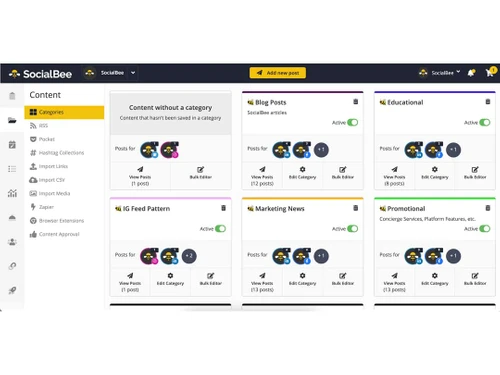
socialbee categories
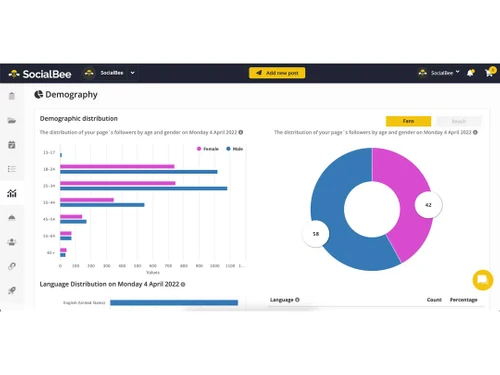
socialbee demography

SocialBee

Brand: SocialBee

  • 4.0

  • 5 Ratings & 1 Review

SocialBee is a social media marketing platform which assists businesses and individuals in scheduling, posting, and tracking content on various social networks. It is a combination of AI-fueled tools, content organization, and automation to simplify social media tasks—from creating the posts to mo...

See More

Have you used SocialBee before?

Share your insights for better experience

Add a Review
Starting Price
$29

View plans

100% Genuine
Products
Best Price
Guaranteed
Safe & Secure
Payment
  • Description

  • Pricing

  • Features

  • Specification

  • Review

  • Compare

  • Alternatives

  • FAQ

Starting at $29

SocialBee Software Overview

What is SocialBee?

SocialBee is a social media management tool designed to help businesses and individuals schedule, publish, and analyze content across multiple platforms like Facebook, Twitter, LinkedIn, and Instagram. It offers content categorization, allowing users to organize posts into evergreen or campaign-based buckets for efficient recycling.

The platform includes AI-powered suggestions, collaboration features for teams, and analytics to track engagement. With automated posting and RSS feed integration, SocialBee simplifies content workflows, making it ideal for marketers, agencies, and small businesses aiming to maintain a consistent online presence. Pricing starts with a free trial, followed by tiered subscription plans.

Top Features of SocialBee

  • Content Categorization: Group content according to unique categories for optimal recycling and balanced diffusion. This helps ensure variety in your feeds while concentrating on top-performing subject matters. Each category can have its own automated posting time for each platform.
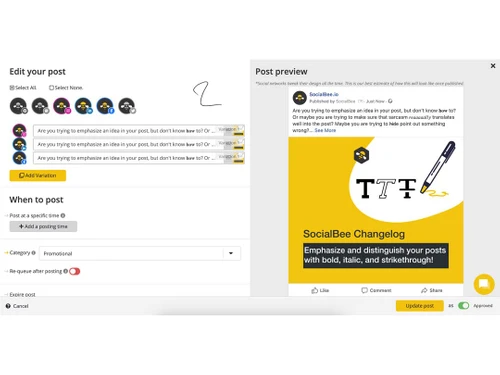
  • AI-powered post Suggestions: Use AI to create optimized post ideas, captions, and hashtags to increase engagement and reach. AI utilizes your industry trends along with past performances to help recommend the most relevant content angles. This one feature alone improves content quality and discoverability while saving hours of brainstorming sessions.
  • Collaboration Tools: Invite entire teams, delegate permissions, and set approval rules for easy social media collaboration. Comments and revisions history documents help keep everyone on the same page during review. Ideal for agencies or marketing teams working with multiple stakeholders.
  • Post Recycling: Automatically reshare your top-performing content at set intervals to increase visibility without the need to manually repost. Add expiration dates to time-sensitive posts to keep content relevant. Perfect for driving sustained traffic to cornerstone content such as blog posts or lead magnets.
  • Custom Posting Schedule: Customize each social platform's schedule along with content categories to ensure uniformity. Time slots can be set for when your audience is most active for maximum engagement. Easily pause or adjust for holidays or special campaigns with no trouble at all.
  • Link Shortening & UTM Tracking: Shorten links and add UTM parameters to monitor traffic sources directly in analytics. Track clicks, conversions, and ROI from specific campaigns or platforms. Integrated with Bitly for branded short links that reinforce your identity.
  • Workspaces & Client Management: Manage multiple brands or clients in separate workspaces with tailored content strategies. Switch between accounts instantly without logging in/out. Client access controls ensure data privacy while enabling collaboration.

Why Businesses Choose SocialBee Software?

  • Strategic Content Organization: SocialBee's categorization system allows businesses to organize content by type and post them in a balanced manner. This assures that audiences do not get fatigued while also allowing crucial messages to be heard multiple times. The automated recycling of evergreen content ensures a maximum ROI on high-performing posts.
  • AI-Driven Efficiency: The AI on the platform analyzes previously collected data to refine its recommendation over time, working as an inbuilt social media strategist. With the estimated captions, hashtags, and posting times provided by the AI, engaging posts can be created effortlessly. Businesses save over five hours a week on just content planning.
  • Team Collaboration Made Simple: Clients are able to provide feedback within the platform, which can be actioned on immediately for quicker revisions. Role-based access, along with approval workflows, helps smoothen collaboration. Real-time comments and version history solve any misunderstanding that arises during content review.
  • Consistent Brand Visibility: Custom schedules guarantee that posts are live on all platforms at the ideal times, even during off-hours. The bulk scheduler and queue system guarantee that businesses maintain an online presence during holidays or team absences. Businesses have reported four times more consistent posting within thirty days of use.
  • Data-Backed Decision-Making: UTM-tracked links paired with detailed analytics enable the determination of which content drives the most traffic and conversions. Custom reports highlight the ROI for each campaign, allowing resource allocation to strategies that perform the best. Exports allow teams to showcase the impact social media has on revenue.

SocialBee Pricing

The initial price of SocialBee is $29 per month.

Pricing Plans:

  • Bootstrap: $29 per month
  • Accelerate: $49 per month
  • Pro: $99 per month
Read more

SocialBee Company Details

Founded Year:  2020

SocialBee is a social media management tool that empowers its users to share content across multiple social networks from one place. Using such a tool, you're able to set a posting schedule, have content shared as planned, and then analyze the performance of your accounts.

Director/Founders SocialBee
Company Size 1-100 Employees

SocialBee Pricing & Plans

Bootstrap
Starting at $29
    • Licenses

      Licenses
      Licenses
    • Monthly

      Monthly
      Monthly

Key Features

  • Connect up to 5 social profiles

  • 1 user/ workspace | 1 workspace

  • Analytics up to 3 months of data

Accelerate
Starting at $49
    • Licenses

      Licenses
      Licenses
    • Monthly

      Monthly
      Monthly

Key Features

  • Connect up to 10 social profiles

  • 1 user/ workspace | 1 workspace

  • Analytics up to 2 years of data

Pro
Starting at $99
    • Licenses

      Licenses
      Licenses
    • Monthly

      Monthly
      Monthly

Key Features

  • Connect up to 25 social profiles

  • 3 users/ workspace | 5 workspaces

  • Analytics up to 2 years of data

SocialBee Features

  • icon_check Social Media Analytics
    Track audience growth, engagement, impressions, and performance metrics in easy dashboards.
  • icon_check Design Integrations
    Built-in Canva, Unsplash, and GIPHY integrations allow easy creation and import of graphics and GIFs.
  • icon_check Team Collaboration
    Manage multiple users, assign roles, and collaborate across teams and client accounts.
  • icon_check Publishing & sharing
    Schedule and automatically share posts across multiple platforms with optimal timing for maximum reach.
  • icon_check RSS Feed
    Automatically import and publish content from RSS feeds to keep social channels consistently updated.
  • icon_check Bulk Scheduler
    Upload and schedule weeks or months of social media content in just a few clicks.
  • icon_check Content Creation
    Use AI-powered tools and Canva integration to quickly create engaging posts and visuals.
  • icon_check Social Media Platform Support
    Manage and publish content across Facebook, Instagram, Twitter, LinkedIn, and more.
  • icon_check Reporting & Analytics
    Track post-performance, audience engagement, and campaign results with detailed analytics.
  • icon_check Audience Engagement
    Monitor and respond to comments while using smart tools to boost interactions.
  • icon_check Integrations
    Connect with popular tools like Canva, Bitly, and Zapier for enhanced functionality.
SocialBee Demo Video play icon

Get SocialBee Demo

Watch the demo video to explore key features, real workflows, and how the software fits your business needs.

Understand
Key Features
Personal
Demo Insights
Interactive
Demo Support

SocialBee Specifications

Supported Platforms
Windows Windows iOS iOS Android Android
Devices
Desktop Desktop
Deployment
Cloud-Based Cloud-Based
Suitable For
All Industries
Business Specific
All Businesses
Business Size
Small Business Medium Business SMBs SMEs MSMBs
Customer Support
Phone Email
Language
English
Training Resources
In Person Live Online

Explore the Best Alternative Solutions Similar to Your Business Size and Needs

SocialBee Review

4.0

Out of 5

img

Overall Rating

Based on
1 Verified Review

Rating Breakdown

  • Features 4
  • Value for Money 3.9
  • Ease of Use 4.1
  • Customer Support 4.3

92% Recommend this Product

Add Review

SocialBee Video Review

youtubeVideoId

4.3

“My Honest Review on SocialBee - Worth the Money?”

Review by: Chris with Minn Media

Compare SocialBee With other Social Media Management Tools

Products
Ratings
Pricing
Device Supported
Deployment
Supported Platforms
  • img

    SocialBee

  • 4.0

  • Price On Request

  • Desktop

    Mobile

  • Web based

    On Premises

  • Windows

    Mac OS

  • img

    Hootsuite

  • 4.1

  • ₹ 2600

  • Desktop

    Mobile

  • Web based

    On Premises

  • Windows

    Mac OS

  • img

    MySampark

  • 5

  • Price On Request

  • Desktop

    Mobile

  • Web based

    On Premises

  • Windows

    Mac OS

  • img

    Loomly

  • 4.0

  • Price On Request

  • Desktop

    Mobile

  • Web based

    On Premises

  • Windows

    Mac OS

  • img

    Inflact

  • 4.4

  • Price On Request

  • Desktop

    Mobile

  • Web based

    On Premises

  • Windows

    Mac OS

  • img

    TubeBuddy

  • 4.5

  • Price On Request

  • Desktop

    Mobile

  • Web based

    On Premises

  • Windows

    Mac OS

  • img

    Predis AI

  • 4.5

  • Price On Request

  • Desktop

    Mobile

  • Web based

    On Premises

  • Windows

    Mac OS

  • img

    Zoho Social

  • 4.6

  • ₹ 900

  • Desktop

    Mobile

  • Web based

    On Premises

  • Windows

    Mac OS

  • img

    Postly

  • 4.3

  • Price On Request

  • Desktop

    Mobile

  • Web based

    On Premises

  • Windows

    Mac OS

  • img

    Buffer

  • 4.7

  • Price On Request

  • Desktop

    Mobile

  • Web based

    On Premises

  • Windows

    Mac OS

  • img

    Postiz

  • 4.5

  • Price On Request

  • Desktop

    Mobile

  • Web based

    On Premises

  • Windows

    Mac OS

(0) Product(s) selected

SocialBee Alternatives

See All SocialBee Alternatives

Available

Price on Request

Starting Price:

$4 /Month

Starting Price:

$29 /Month

Starting Price:

$29 /Month

Starting Price:

$1,249

Starting Price:

$30 /Month

Orlo

4.1

Available

Price on Request

Starting Price:

$37 /Month

Starting Price:

$49 /Month

Articles for SocialBee

See All Related Articles

How does SocialBee work?

SocialBee makes social media management easy by streamlining content scheduling, posting, and performance monitoring in one system. Users arrange posts into buckets, utilize AI-based tools to optimize timing and engagement, and post to several networks with auto-formatting.

How much does SocialBee cost?

The initial price of SocialBee is $29 per month at techjockey.com.

Is SocialBee free?

No, SocialBee is not available for free. However, you can try it for free for 14 days.

Is a free demo available in SocialBee?

Yes, there is a free demo available in SocialBee.

Who can use SocialBee?

The major users of SocialBee are Marketing Teams, Agencies, Bloggers & Content Creators, and Small Businesses.

Is there a mobile app for SocialBee?

Yes, there is a mobile app available for SocialBee Software.

20,000+ Software Listed

Best Price Guranteed

Free Expert Consultation

2M+ Happy Customers

Terms and Condtions

close

Users with registered businesses can purchase goods from merchants on the platform to satisfy their business needs. Users are not permitted to utilize any products acquired through the platform for resale, advertising, business, or further distribution.

For each purchase made, users will receive a Tax Invoice (or 'GST invoice') that includes specific details such as:

  • the GSTIN of the user associated with their registered business, and

  • the specified Entity Name for their business.

It should be noted that not all products are eligible for GST Invoice. Only the products displayed by participating sellers with the 'GST-based Invoice Available' callout on the product description page would qualify.

Certain goods and services are not eligible to get a GST Invoice, including items with VAS, i.e., Value Added Services (e.g., Total Mobile Protection/Assured Buyback) and those involving an exchange offer at the time of purchase.

Users must ensure the accuracy of the GSTIN, and business entity name provided for the GST Invoice. Requests for corrections into GST Invoice would not be accommodated by Techjockey.com or any Seller, and any issues arising from user-provided information are the sole responsibility of users.

Techjockey.com is not liable for the GST Invoice or any associated input tax credit. To efficiently claim an input tax credit, users should select the registered place of business address as per the GST authority's data and follow the provisions of the GST Act and rules.

To claim an input tax credit, the delivery and billing addresses must match. Furthermore, input tax credits will not be granted if the delivery address and GSTIN on the invoice are from different states. In case of incorrect GST details provided during the order placement, the order will be canceled automatically.