 USA
USA UAE
UAESmall Business
Designed for startups and growing businesses


See More





Brand: Pangal Computer Services
Society123 is an online solution for society management that simplifies housing management with billing, accounting, communication, and task automation.
See MoreHave you used Society123 before?
Share your insights for better experience
View plans
 Save upto 18%, Get GST Invoice on your business purchase T&C Buy Now & Pay Later, Check offer on payment page.
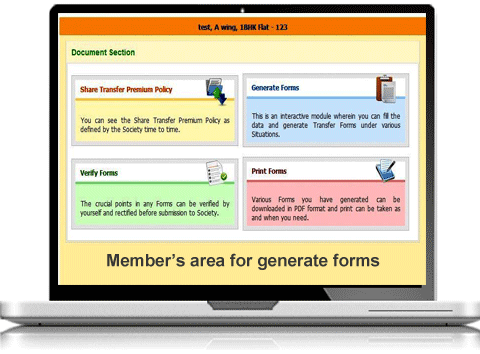
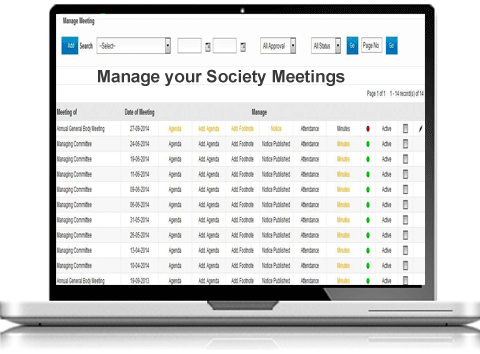
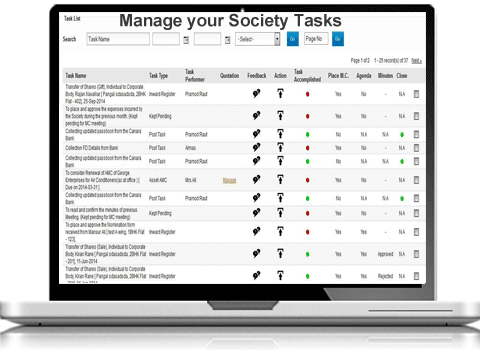
  Manage Registrations Meeting Billing & Invoicing Task Management Notices & Meetings Document Management Complaint Management Facility Management Compliance Management

Watch the demo video to explore key features, real workflows, and how the software fits your business needs.
 Ubuntu
  Windows
  iOS
iOS  Android MacOS
  Linux
Linux  Desktop
  Mobile
  Cloud-Based
  Perpetual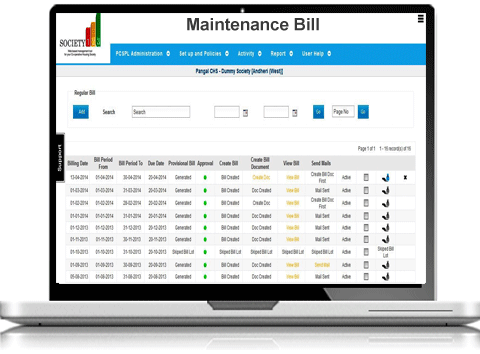
Small Business
Designed for startups and growing businesses
Medium Business
Built for business growth and flexibility
Enterprises
Designed for complex and large-scale business needs
4.3
Out of 5

Overall Rating
Based on
4 Verified Ratings
Rating Breakdown
92% Recommend this Product
Add ReviewTechjockey Trusted Reviews from Verified Users
No reviews are currently available for Society123. Discover similar Apartment Management Software reviews
Mygate
Whats great - Excellent service and aftercare with helping with questions relating to installation. Also a price that is amazing. read more

ApnaComplex
Whats great - ApnaComplex is great for ensuring apartment security. It creates a digital record of incoming and outgoing visitors and apart... read more

SocietyKit
Whats great - Easy to navigate, customer support. read more

Society123
₹ 812.00 excl. GST
Desktop
Mobile
Web based
On Premises
Windows
Mac OS
Mygate
Price On Request
Desktop
Mobile
Web based
On Premises
Windows
Mac OS
SocietyKit
Price On Request
Desktop
Mobile
Web based
On Premises
Windows
Mac OS
ApnaComplex
Price On Request
Desktop
Mobile
Web based
On Premises
Windows
Mac OS

Society Notebook
Price On Request
Desktop
Mobile
Web based
On Premises
Windows
Mac OS

Paperbit Apartment Management Software
₹ 120
Desktop
Mobile
Web based
On Premises
Windows
Mac OS

Society Kingdom SMS
₹ 10
Desktop
Mobile
Web based
On Premises
Windows
Mac OS

Azore
Price On Request
Desktop
Mobile
Web based
On Premises
Windows
Mac OS

Aparto
Price On Request
Desktop
Mobile
Web based
On Premises
Windows
Mac OS

G Gate
Price On Request
Desktop
Mobile
Web based
On Premises
Windows
Mac OS

Aarvi Society Management System
Price On Request
Desktop
Mobile
Web based
On Premises
Windows
Mac OS
(0) Product(s) selected
Available
Price on Request
Available
Price on Request
Available
Price on Request
Available
Price on Request

Available
Price on Request

Available
Price on Request
Starting Price:
₹15

Available
Price on Request

Available
Price on Request

Starting Price:
₹10 /Monthly

Available
Price on Request
Yes, Society123 can integrate with various accounting software for seamless financial management.
Yes, Society123 allows you to set automated reminders for members to pay their maintenance bills.
Use the Document Management module in Society123 to securely upload and share documents.
Yes, Society123 allows you to generate and send invoices to multiple members at once.
Society123 is designed for housing societies, cooperative societies, society managers, committee members, and residents.
Society123 is a cloud-based platform accessible via web browsers and has an Android app for mobile users.
Society123 automates GST calculations, generates tax invoices, and lists data for GST return preparation.
Yes, Society123 offers a demo for potential users to explore its features. For further details contact the expert at www.techjockey.com.
Society123 ensures data security with multi-level login authentication, encryption, and secure cloud storage.
No, Society123 Apartment Management Software is a cloud-based platform and requires an active internet connection to access and operate.
Society123 price in India starts at INR 812. Society123 comes with multiple pricing plans and caters to the diverse customer base.
20,000+ Software Listed
Best Price Guranteed
Free Expert Consultation
2M+ Happy Customers
Terms and Condtions

Users with registered businesses can purchase goods from merchants on the platform to satisfy their business needs. Users are not permitted to utilize any products acquired through the platform for resale, advertising, business, or further distribution.
For each purchase made, users will receive a Tax Invoice (or 'GST invoice') that includes specific details such as:
the GSTIN of the user associated with their registered business, and
the specified Entity Name for their business.
It should be noted that not all products are eligible for GST Invoice. Only the products displayed by participating sellers with the 'GST-based Invoice Available' callout on the product description page would qualify.
Certain goods and services are not eligible to get a GST Invoice, including items with VAS, i.e., Value Added Services (e.g., Total Mobile Protection/Assured Buyback) and those involving an exchange offer at the time of purchase.
Users must ensure the accuracy of the GSTIN, and business entity name provided for the GST Invoice. Requests for corrections into GST Invoice would not be accommodated by Techjockey.com or any Seller, and any issues arising from user-provided information are the sole responsibility of users.
Techjockey.com is not liable for the GST Invoice or any associated input tax credit. To efficiently claim an input tax credit, users should select the registered place of business address as per the GST authority's data and follow the provisions of the GST Act and rules.
To claim an input tax credit, the delivery and billing addresses must match. Furthermore, input tax credits will not be granted if the delivery address and GSTIN on the invoice are from different states. In case of incorrect GST details provided during the order placement, the order will be canceled automatically.


