linkedin
Sophos Mobile Security logo
play Getting Started with Sophos Mobile in Sophos Central #1 Quick Tour
Sophos Mobile Security device
Sophos Mobile Security dashboard

Sophos Mobile Security

Brand: Sophos

  • 4.2

  • 3 Ratings

Sophos Mobile Security is endpoint management software that protects mobile devices with malware defense, app control, and data security.

See More

Have you used Sophos Mobile Security before?

Share your insights for better experience

Add a Review

Price Available on Request

Questions about pricing or customization? We’re here to help, just a click away.

100% Genuine
Products
Best Price
Guaranteed
Safe & Secure
Payment
  • Description

  • Pricing

  • Features

  • Specification

  • Review

  • Compare

  • Alternatives

  • FAQ

Sophos Mobile Security Software Overview

What is Sophos Mobile Security?

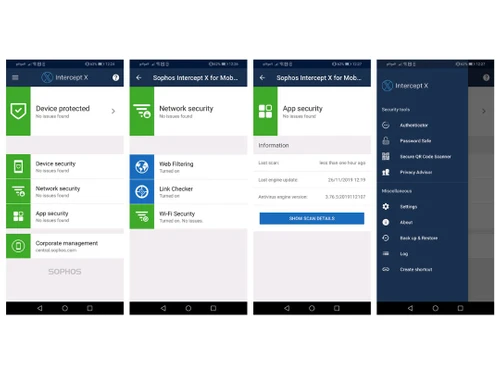
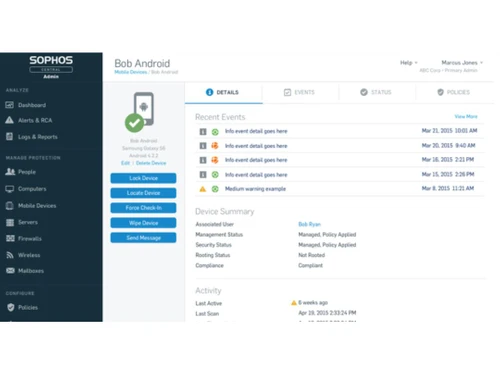
Sophos Mobile Security is an advanced mobile security software that gives cyber security protection to mobile devices. It protects the mobile from malware, phishing, and cyber threats. It scans apps, websites, and system files for risks in multiple devices and provides real-time security alerts. The interface with a simple dashboard displays devices being monitored, security status, active scans, and settings for easy control.

Sophos Mobile Security provides features for personal and corporate devices management. It provides malware detection, app scanning, web protection, and secure Wi-Fi monitoring. It uses Intercept X for Mobile to block ransomware and phishing attacks. The software device management tools help in secure access to corporate resources. With Sophos Central integration, users get cloud-based security monitoring and security reports for analysis.

Why choose Sophos Mobile Security?

  • Malware Protection: Helps to detect and remove mobile threats like viruses, ransomware, and phishing attacks from devices by regular scans.
  • Secure Web Browsing: Blocks malicious websites and phishing attempts, giving a safe internet access without compromising personal data.
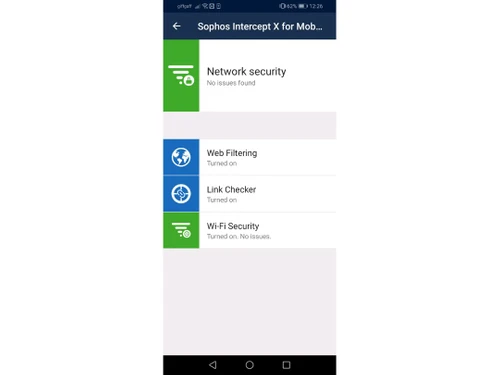
  • App & Network Security: Scans installed apps and Wi-Fi networks to prevent unauthorized access and data breaches.
  • Enterprise Management: Provides secure access to corporate resources while protecting employee privacy on personal and business devices.
  • Anti-Theft Features: It includes remote wipe, lock, and locate functions to protect lost or stolen devices and data theft from these devices.

Benefits of Sophos Mobile Security

  • Better Protection: It helps to protect the devices against malware, phishing, ransomware, and other cyber threats keeping them secure.
  • Secure Web Browsing: Blocks harmful websites, preventing data breaches and online fraud while maintaining privacy.
  • Efficient Device Management: Allows businesses to monitor and control mobile security, ensuring compliance with corporate policies.
  • User Privacy: It separates personal and business data, thus protecting confidential information securely without compromising usability.
  • Cloud-Based Monitoring: It provides centralised security management via Sophos Central, thus giving real-time threat detection.

Pricing of Sophos Mobile Security

Sophos Mobile Security details are available on request at Techjockey.com. It varies based on factors like customization, additional features required, number of users, and the deployment type. Please request a callback for subscription-related details and to avail offers on premium packages.

Read more

Sophos Company Details

Founded Year:  1985

Sophos products are exclusively available through a global channel of more than 47,000 partners and Managed Service Providers (MSPs). Sophos also makes its innovative commercial technologies available to consumers via Sophos Home.

Director/Founders Sophos Gmbh
Company Size 1000+ Employees

Sophos Mobile Security Pricing & Plans

Looking for The Right Pricing?

Share your requirements and get a plan built around your business.

  • Define your business needs
  • Get customised pricing
  • Choose features that fit your workflow

Price Available on Request

Get personalised Sophos Mobile Security pricing that fits your needs. Our team will connect with you.

Sophos Mobile Security Features

  • icon_check Spam Protection
    Filters unwanted emails and messages, blocking phishing scams and fraudulent links to safeguard data.
  • icon_check Antivirus & Malware Protection
    Detects and removes malicious apps, files, and online threats to ensure device security.
  • icon_check Data Theft Protection
    Prevents unauthorised access to sensitive information, securing personal and corporate data from cyber threats.
  • icon_check Data Protection
    Encrypts files and communications, ensuring confidentiality and compliance with security regulations.
  • icon_check Remote Access
    Enables secure connectivity to corporate resources, ensuring safe data handling from any location.
  • icon_check Powerful Containers
    Separates personal and business data, preventing leakage and ensuring controlled access to critical information.
  • icon_check Email Security
    Blocks phishing attempts, spam, and malware in emails, ensuring safe communication and data integrity.
  • icon_check Mobile Security
    Protects devices against malware, network attacks, and unauthorised access, maintaining a secure mobile environment.
Sophos Mobile Security Demo Video play icon

Get Sophos Mobile Security Demo

Watch the demo video to explore key features, real workflows, and how the software fits your business needs.

Understand
Key Features
Personal
Demo Insights
Interactive
Demo Support

Sophos Mobile Security Specification

Supported Platforms
Windows Windows iOS iOS Android Android
Devices
Desktop Desktop Mobile Mobile
Deployment
Web-Based Web-Based
Suitable For
ITES
Business Specific
All Businesses
Language
English

Sophos Mobile Security Review

4.2

Out of 5

img

Overall Rating

Based on
3 Verified Ratings

Rating Breakdown

  • Features 4
  • Value for Money 4.1
  • Ease of Use 4.5
  • Customer Support 4.1

96% Recommend this Product

Add Review

Techjockey Trusted Reviews from Verified Users

No reviews are currently available for Sophos Mobile Security . Discover similar Mobile Security Software reviews

  • Kaspersky Internet Security For Android

    4.5

    Whats great - handle threats very quickly read more

  • K7 Mobile Security - Android

    4.5

    Whats great - very helpful in monitoring harmful ads read more

  • K7 Mobile Security - iOS

    4.4

    Whats great - Good in handling threats read more

Compare Sophos Mobile Security With other Mobile Security Software

Products
Ratings
Pricing
Device Supported
Deployment
Supported Platforms
  • img

    Sophos Mobile Security

  • 4.2

  • Price On Request

  • Desktop

    Mobile

  • Web based

    On Premises

  • Windows

    Mac OS

  • img

    M-Kavach

  • 4.2

  • Price On Request

  • Desktop

    Mobile

  • Web based

    On Premises

  • Windows

    Mac OS

(0) Product(s) selected

Sophos Mobile Security Alternatives

See All Sophos Mobile Security Alternatives

Available

Price on Request

Who uses Sophos Mobile Security?

Sophos Mobile Security is used by businesses, IT administrators, and individuals to protect mobile devices from cyber threats.

How does Sophos Mobile Security work?

Sophos Mobile Security is a Unified Endpoint Management (UEM) software that secures mobile devices by detecting malware, blocking phishing attacks, and meeting compliance with security policies.

How much does Sophos Mobile Security cost?

Sophos Mobile Security details are available on request at Techjockey.com.

On which OS does Sophos Mobile Security run?

Sophos Mobile Security supports Android, iOS, iPadOS, macOS, Windows, and Chrome OS.

Does Sophos Mobile Security provide a demo?

Yes, Sophos Mobile Security offers a free trial.

What security features does Sophos Mobile Security offer?

Sophos Mobile Security includes malware protection, phishing prevention, secure web browsing, app security, and device compliance monitoring.

Can Sophos Mobile Security be managed remotely?

Yes, Sophos Mobile Security is managed via Sophos Central, helping in remote security monitoring and policy enforcement.

Does Sophos Mobile Security support BYOD policies?

Yes, Sophos Mobile Security allows businesses to manage personal and corporate devices securely, meeting privacy and compliance requirements.

Can Sophos Mobile Security detect jailbroken or rooted devices?

Yes, Sophos Mobile Security can identify jailbroken iOS devices and rooted Android devices, ensuring compliance with security policies.

20,000+ Software Listed

Best Price Guranteed

Free Expert Consultation

2M+ Happy Customers

Terms and Condtions

close

Users with registered businesses can purchase goods from merchants on the platform to satisfy their business needs. Users are not permitted to utilize any products acquired through the platform for resale, advertising, business, or further distribution.

For each purchase made, users will receive a Tax Invoice (or 'GST invoice') that includes specific details such as:

  • the GSTIN of the user associated with their registered business, and

  • the specified Entity Name for their business.

It should be noted that not all products are eligible for GST Invoice. Only the products displayed by participating sellers with the 'GST-based Invoice Available' callout on the product description page would qualify.

Certain goods and services are not eligible to get a GST Invoice, including items with VAS, i.e., Value Added Services (e.g., Total Mobile Protection/Assured Buyback) and those involving an exchange offer at the time of purchase.

Users must ensure the accuracy of the GSTIN, and business entity name provided for the GST Invoice. Requests for corrections into GST Invoice would not be accommodated by Techjockey.com or any Seller, and any issues arising from user-provided information are the sole responsibility of users.

Techjockey.com is not liable for the GST Invoice or any associated input tax credit. To efficiently claim an input tax credit, users should select the registered place of business address as per the GST authority's data and follow the provisions of the GST Act and rules.

To claim an input tax credit, the delivery and billing addresses must match. Furthermore, input tax credits will not be granted if the delivery address and GSTIN on the invoice are from different states. In case of incorrect GST details provided during the order placement, the order will be canceled automatically.