linkedin
Kaspersky Internet Security For Android logo
play Kaspersky Internet Security for Android | Best Free Antivirus Software
Kaspersky Internet Security For Android

Kaspersky Internet Security For Android

Brand: Kaspersky

  • 4.5

  • 1 Rating & 1 Review

Kaspersky Internet Security for Android helps protect your device, data, payments, and privacy from viruses, malware, and online threats with comprehensive mobile security.

See More

Have you used Kaspersky Internet Security For Android before?

Share your insights for better experience

Add a Review
Starting Price
₹769 excl.GST
₹ 907 incl. GST

View plans

offer Save upto 18%, Get GST Invoice on your business purchase T&C
offer Buy Now & Pay Later, Check offer on payment page.
Buy Now
100% Genuine
Products
Best Price
Guaranteed
Safe & Secure
Payment
  • Description

  • Pricing

  • Features

  • Specification

  • Review

  • Compare

  • Alternatives

  • FAQ

Starting at ₹769
Buy Now

Kaspersky Internet Security For Android Software Overview

What is Kaspersky Internet Security For Android?

Kaspersky Internet Security For Android is a comprehensive mobile security software designed to provide robust protection for Android smartphones and tablets. It functions as a complete endpoint security solution, safeguarding your device, personal data, and online identity from a wide array of digital threats. This all-in-one application is engineered to defend against viruses, malware, Trojans, and sophisticated online fraud without compromising device performance. It actively blocks malicious applications, dangerous websites, and phishing links, ensuring a secure digital environment for all your mobile activities, from browsing and communication to online banking and shopping.

Why Choose Kaspersky Internet Security For Android?

  • Award-Winning Protection: Kaspersky has a proven track record of excellence, having neutralized 99.9% of threats in independent tests and earning the Recognized Protection for Android Devices 2024 award. This demonstrates its capability to handle even the most sophisticated online threats.
  • Optimized Performance: The application is designed to be powerful yet lightweight. It secures your device with maximum efficiency, ensuring it remains smooth, responsive, and glitch-free without causing battery drain or slowdowns.
  • User-Friendly Interface: Security should be accessible, not complicated. Kaspersky features an intuitive and easy-to-navigate interface, allowing users to access and manage all security features effortlessly.
  • Continuous Innovation: The digital threat landscape is constantly evolving. Kaspersky is committed to continuous product improvement, delivering regular updates to enhance functionality and stay ahead of emerging cyber threats.

Advanced Features of Kaspersky Internet Security For Android

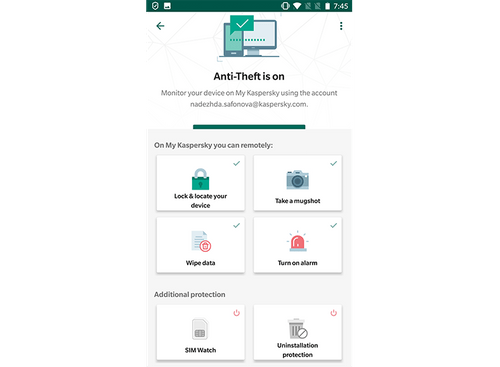
  • Anti-Theft Protection: In the event your device is lost or stolen, this feature provides remote control capabilities. You can locate your device, sound an alarm, lock it, or wipe your personal data to prevent it from falling into the wrong hands.
  • Online Payment Protection: Secure your financial transactions with confidence. This feature ensures that every online purchase or banking session is protected, guarding your financial data from interception and theft.
  • Advanced Anti-Phishing: Proactively blocks fraudulent websites and malicious links delivered through browsers, emails, and messaging apps, protecting you from scams designed to steal your login credentials and personal information.
  • Stalkerware Detection: Enhances your privacy by notifying you of apps that may be secretly monitoring your activities, location, and communications without your consent, including scanning for hidden Bluetooth trackers. All plans are backed by a 30-day money-back guarantee.
  • Wi-Fi Security Check: Automatically scans public Wi-Fi networks for vulnerabilities, protecting your data from being intercepted by attackers on unsecured connections (available in premium versions).
  • Data Leak Checker & Password Manager: Premium tiers include tools to check if your accounts have been compromised in data breaches and a secure vault to manage all your passwords, enhancing your account security.

Key Capabilities of Kaspersky Internet Security For Android

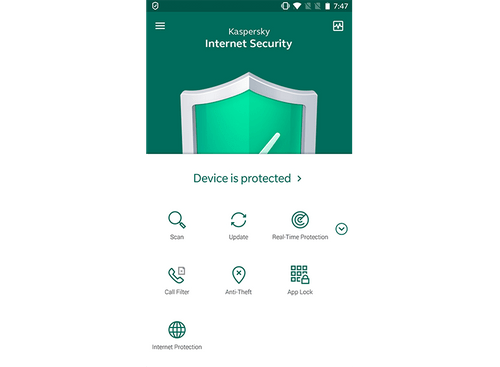
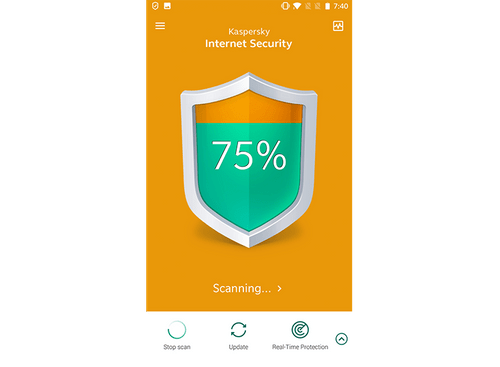
  • Real-time Antivirus & Malware Scanning: The backbone of the application is its powerful antivirus engine. It performs real-time scans of all new apps and files, detects and removes existing malware, viruses, and Trojans, and identifies weak device settings that could be exploited by attackers.
  • Web & Communication Security: It provides strong internet protection by automatically blocking dangerous links and websites. This protection extends to your communications, filtering out unwanted calls and texts and shielding you from malicious links sent via SMS or messaging apps.
  • Identity and Financial Protection: Beyond device security, Kaspersky focuses on protecting your identity. It secures your online transactions, blocks phishing attempts, and offers tools like the Data Leak Checker to ensure your account credentials remain private and secure.

How to Use Kaspersky Internet Security For Android?

  1. Purchase and Download: Acquire a license from the official Kaspersky website or an authorized partner like Techjockey. Download the Kaspersky Security & VPN app from the Google Play Store.
  2. Install and Activate: Open the app after installation and follow the on-screen prompts. Sign in to your My Kaspersky account or create one, and enter your activation code to unlock the premium features.
  3. Grant Permissions: For full functionality, the app will require certain permissions, such as access to files for scanning and accessibility features for web protection. Grant these as prompted.
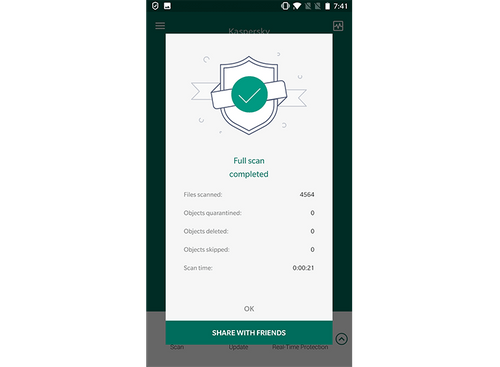
  4. Run an Initial Scan: Perform a full device scan immediately after setup to detect and neutralize any pre-existing threats on your device.
  5. Configure Features: Customize the settings to suit your needs. Enable key features like Anti-Theft, Web Protection, and set up call filtering to maximize your protection.

Kaspersky Internet Security For Android Pricing

Kaspersky Internet Security For Android price starts at INR 769 at techjockey.com.

The pricing model is based on different parameters, including extra features, deployment type, and the total number of users. For further queries related to the product, you can contact our product team and learn more about the pricing and offers.

Read more

Kaspersky Company Details

Founded Year:  1997

Our mission is simple – building a safer world. And in fulfilling that mission we aim to become the global leader in cybersecurity – by securing technology to make sure that the possibilities it brings become opportunities for each and every one of us. Bring on endless possibilities.

Director/Founders Eugene Kaspersky
Company Size 1000+ Employees

Kaspersky Internet Security For Android Pricing & Plans

Internet Security For Android
Key Features
  • Anti Malware
  • Automatic Scan
  • Remote Anti-Theft
  • Phishing Protection
  • Call & SMS Filtering

Calculated Price

769 Exclusive of all taxes
  • Options

    • Quantity (Device(s))

      Quantity (Device(s))
      Quantity (Device(s))
    • Yearly (Year(s))

      Yearly (Year(s))
      Yearly (Year(s))

Key Features

  • Anti Malware

  • Automatic Scan

  • Remote Anti-Theft

  • Phishing Protection

  • Call & SMS Filtering

Kaspersky Internet Security For Android Features

  • icon_check Anti Malware
    Automatically detects and remove viruses, trojans, malware.
  • icon_check Automatic Scan
    Automatically scan your PC to identify viruses.
  • icon_check Remote Anti-Theft
    Allows remote control of lost or stolen devices to protect personal data from falling into the wrong hands.
  • icon_check Phishing Protection
    Protection against phishing attempts coming from website or SMS link.
  • icon_check Call & SMS Filtering
    Helps in keeping contacts and chat private.
Kaspersky Internet Security For Android Demo Video play icon

Get Kaspersky Internet Security For Android Demo

Watch the demo video to explore key features, real workflows, and how the software fits your business needs.

Understand
Key Features
Personal
Demo Insights
Interactive
Demo Support

Kaspersky Internet Security For Android Specifications

Supported Platforms
Android Android
Devices
Mobile Mobile
Deployment
Perpetual Perpetual
Suitable For
ITES
Business Specific
All Businesses
Language
English

Kaspersky Internet Security For Android Review

4.5

Out of 5

img

Overall Rating

Based on
1 Verified Review

Rating Breakdown

  • Features 4.5
  • Value for Money 4.5
  • Ease of Use 4.5
  • Customer Support 4.5

90% Recommend this Product

Add Review

Durga Prasad

User

4.5

Reviewed on: Feb 10, 2020

Techjockey Verified

“Really quick in identification of threats”

Pros

handle threats very quickly

Cons

NO CONS

Compare Kaspersky Internet Security For Android With other Mobile Security Software

Products
Ratings
Pricing
Device Supported
Deployment
Supported Platforms
  • img

    Kaspersky Internet Security For Android

  • 4.5

  • ₹ 769.00 excl. GST

  • Desktop

    Mobile

  • Web based

    On Premises

  • Windows

    Mac OS

  • img

    M-Kavach

  • 4.2

  • Price On Request

  • Desktop

    Mobile

  • Web based

    On Premises

  • Windows

    Mac OS

(0) Product(s) selected

Kaspersky Internet Security For Android Alternatives

See All Kaspersky Internet Security For Android Alternatives

Available

Price on Request

Will this security solution slow down my mobile's life?

Kaspersky Internet Security for Android will not get in your way. It is a combination of protection and efficiency that makes your mobile safer and not slower.

Which operating system does the solution support?

Kaspersky Internet Security for Android supports Android 4.2 version and above.

Is Kaspersky for Android free?

Kaspersky for Android is available in both free and paid versions, with the paid plans like Standard and Premium offering more advanced features such as Online Payment Protection and a Data Leak Checker.

Is Kaspersky good for Android?

Yes, Kaspersky is considered a highly effective security solution for Android, having neutralized 99.9% of threats in tests and earning the Recognized Protection for Android Devices 2024 award.

How much does Kaspersky Internet Security for Android cost?

Kaspersky Internet Security For Android price starts at INR 769 at techjockey.com.

Does Kaspersky slow down Android?

No, Kaspersky for Android is designed to secure your device without slowing it down, ensuring comprehensive data protection with maximum device performance and a smooth user experience.

What is the difference between Kaspersky free and paid for Android?

The paid versions of Kaspersky for Android include advanced security tools not found in the free version, such as Online Payment Protection, Data Leak Checker, Password Manager, and a Who's Spying on Me feature.

Does Kaspersky for Android protect against phishing scams?

Yes, the software provides anti-phishing protection by blocking dangerous URLs and fake websites in your browser, email, and messengers to secure your accounts from fraudulent links.

How does Kaspersky protect my online payments on Android?

It offers strong internet protection for online payments by securing your financial transactions and personal data every time you make a purchase on your device.

Can Kaspersky for Android detect stalkerware on my device?

Yes, the application is designed to shield your device from unauthorized surveillance by notifying you about any stalkerware apps that may be installed.

What is the Data Leak Checker feature in Kaspersky for Android?

The Data Leak Checker is a premium feature that monitors the internet and dark web, alerting you if your private account data is compromised in a new data breach.

Who can use Kaspersky Internet Security for Android?

Kaspersky Internet Security for Android is ideal for individual users, online shoppers, business professionals, and families seeking comprehensive protection for Android devices, data, and online activities.

20,000+ Software Listed

Best Price Guranteed

Free Expert Consultation

2M+ Happy Customers

Terms and Condtions

close

Users with registered businesses can purchase goods from merchants on the platform to satisfy their business needs. Users are not permitted to utilize any products acquired through the platform for resale, advertising, business, or further distribution.

For each purchase made, users will receive a Tax Invoice (or 'GST invoice') that includes specific details such as:

  • the GSTIN of the user associated with their registered business, and

  • the specified Entity Name for their business.

It should be noted that not all products are eligible for GST Invoice. Only the products displayed by participating sellers with the 'GST-based Invoice Available' callout on the product description page would qualify.

Certain goods and services are not eligible to get a GST Invoice, including items with VAS, i.e., Value Added Services (e.g., Total Mobile Protection/Assured Buyback) and those involving an exchange offer at the time of purchase.

Users must ensure the accuracy of the GSTIN, and business entity name provided for the GST Invoice. Requests for corrections into GST Invoice would not be accommodated by Techjockey.com or any Seller, and any issues arising from user-provided information are the sole responsibility of users.

Techjockey.com is not liable for the GST Invoice or any associated input tax credit. To efficiently claim an input tax credit, users should select the registered place of business address as per the GST authority's data and follow the provisions of the GST Act and rules.

To claim an input tax credit, the delivery and billing addresses must match. Furthermore, input tax credits will not be granted if the delivery address and GSTIN on the invoice are from different states. In case of incorrect GST details provided during the order placement, the order will be canceled automatically.