linkedin
Spica logo
play Time&Space workforce management solution
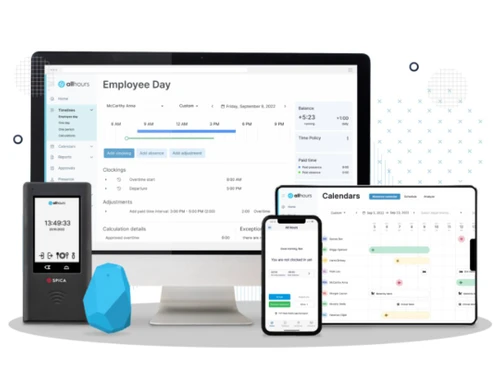
Spica Dashboard
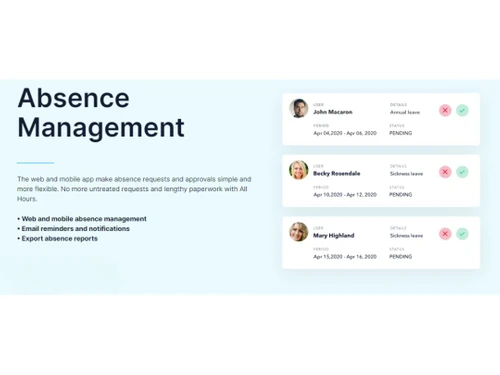
Spica Absence Mangement

Spica

Brand: Spica

  • 4.3

  • 3 Ratings

Manage your workforce effortlessly with a tool that handles scheduling, time tracking, absences, payroll automation, and more.

See More

Have you used Spica before?

Share your insights for better experience

Add a Review
Starting Price
€175

View plans

100% Genuine
Products
Best Price
Guaranteed
Safe & Secure
Payment
  • Description

  • Pricing

  • Features

  • Specification

  • Review

  • Compare

  • Alternatives

  • FAQ

Starting at €175

Spica Software Overview

What is Spica Workforce Management Software?

Spica is a workforce management software designed to streamline various HR tasks, including employee scheduling, time tracking, and task management. It offers features such as shift planning, absence management, and performance tracking to ensure efficient workforce operations.

Spica workforce management system provides businesses with tools to automate routine HR processes, optimize staffing levels, and improve employee productivity. With its user-friendly interface and customizable features, Spica caters to the diverse needs of organizations across industries. It enhances workforce efficiency by facilitating better communication, collaboration, and resource allocation within the organization.

Key Features of Spica Software 

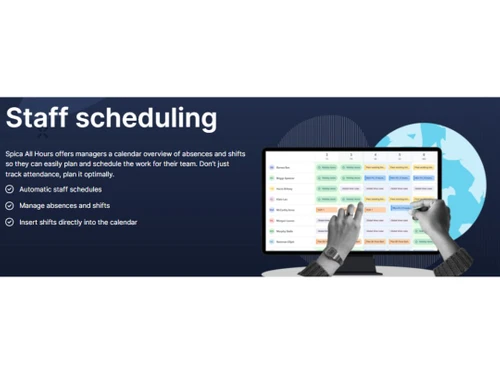
  • Staff Scheduling: Easily assign shifts and plan work hours for your team, ensuring coverage while avoiding overwork.
  • Clocking: Employees can clock in and out using their mobile, web, Bluetooth, Wi-Fi, or a terminal—flexible options for all.
  • Time & Attendance: Keep track of when employees arrive, leave, work remotely, do overtime, or take breaks.
  • Absence Management: Approve or manage time off requests quickly with just a click—whether it’s for sick leave or vacation.
  • Overtime Tracking: Approve, monitor, and calculate overtime hours to ensure accurate pay and work hour management.
  • Payroll Integrations: Automatically sync attendance data with payroll systems, reducing the time and effort needed to process payments.

Why Choose Spica Software?

  • Workforce Management: It offers a complete suite of workforce management solutions, consolidating HR tasks into one efficient platform, including employee scheduling, time and attendance tracking, and task management.
  • Increased Efficiency: By automating routine HR processes and providing intuitive tools for scheduling and resource allocation, it enhances workforce efficiency, saving time and reducing administrative burden for HR teams.
  • Enhanced Employee Engagement: With features such as shift planning, absence management, and performance tracking, it fosters better communication and collaboration among employees, leading to higher engagement and satisfaction levels.
  • Scalability and Adaptability: It is scalable to accommodate the needs of businesses of all sizes and adaptable to evolving workforce requirements, ensuring that organizations can effectively manage growth and change.
  • Data-Driven Insights: The software provides valuable data and analytics on workforce performance, attendance trends, and labor costs, empowering businesses to make informed decisions and optimize their workforce strategies for better outcomes.
  • Seamless Integration: It seamlessly integrates with existing HR systems and tools, enabling organizations to leverage their existing infrastructure and maximize the value of their technology investments.

Benefits of Spica Workforce Management Software

  • Streamlined Communication: It facilitates streamlined communication between HR departments and employees, ensuring clarity in scheduling, task assignments, and performance tracking, leading to improved collaboration and productivity.
  • Compliance Management: It helps businesses ensure compliance with labor regulations and company policies by automating time tracking, leave management, and reporting processes, reducing the risk of non-compliance and associated penalties.
  • Cost Control: It enables businesses to optimize labor costs by accurately tracking employee hours, identifying inefficiencies, and making data-driven decisions to improve resource allocation and minimize overtime expenses.
  • Employee Empowerment: With features like self-service portals and mobile access, it empowers employees to manage their schedules, request time off, and track their performance, fostering autonomy and accountability within the workforce.
  • Real-time Insights: It provides real-time insights into workforce operations, allowing HR teams to quickly identify issues, make timely adjustments, and respond effectively to changing business needs, ensuring operational efficiency and agility.
  • Employee Satisfaction: By ensuring fair and transparent scheduling, providing tools for self-service, and offering opportunities for feedback and collaboration, it contributes to higher employee satisfaction levels, leading to reduced turnover and improved retention rates.

Pricing of Spica Workforce Management Software

Spica offers a flexible pricing plan for businesses of all sizes, starting at €3.5 per user per month, billed monthly. You can save 14% with an annual plan. The software includes features like staff scheduling, time tracking, absence management, and payroll exports, plus customizable reports and easy third-party integrations.

Read more

Spica Pricing & Plans

Time & Attendance
Key Features
  • Clocking on web & mobile apps
  • Geofencing
  • Staff scheduling
  • Automatic shift detection
  • Absence management
Starting at €175
    • Users

      Users
      Users
    • Monthly

      Monthly
      Monthly

Key Features

  • Clocking on web & mobile apps

  • Geofencing

  • Staff scheduling

  • Automatic shift detection

  • Absence management

Spica Features

  • icon_check Budgeting & Forecasting
    It enables efficient planning and allocation of workforce expenses through budgeting and forecasting tools.
  • icon_check Contractors Management
    It streamlines contractor management processes, including onboarding, scheduling, and payment handling.
  • icon_check Employee Lifecycle Management
    It facilitates the management of employees from recruitment to offboarding, ensuring smooth transitions at every stage.
  • icon_check Labor Projection
    It forecasts staffing needs based on historical data and future demand, optimizing workforce planning.
  • icon_check Scheduling
    It optimizes shifts to ensure adequate coverage and minimize over- or understaffing.
  • icon_check Time & Attendance
    It tracks employee hours accurately and efficiently, simplifying time and attendance management.
  • icon_check Workforce Management
    It provides comprehensive solutions for managing scheduling, time tracking, and performance, streamlining HR processes.
  • icon_check Dashboard
    It offers customizable dashboards for real-time insights into workforce operations, aiding in informed decision-making.
  • icon_check Absence Management
    It automates leave requests, approvals, and tracking, ensuring compliance with company policies and regulations.
Spica Demo Video play icon

Get Spica Demo

Watch the demo video to explore key features, real workflows, and how the software fits your business needs.

Understand
Key Features
Personal
Demo Insights
Interactive
Demo Support

Spica Specifications

Supported Platforms
Ubuntu Ubuntu Windows Windows Android Android MacOS MacOS Linux Linux
Devices
Desktop Desktop Mobile Mobile Tablet Tablet
Deployment
Cloud-Based Cloud-Based
Suitable For
All Industries
Business Specific
All Businesses
Business Size
Small Business Startups Medium Business Enterprises
Customer Support
Email Communities
Language
English
Training Resources
Videos

Explore the Best Alternative Solutions Similar to Your Business Size and Needs

Spica Review

4.3

Out of 5

img

Overall Rating

Based on
3 Verified Ratings

Rating Breakdown

  • Features 4.1
  • Value for Money 4.3
  • Ease of Use 4.3
  • Customer Support 4.5

93% Recommend this Product

Add Review

Techjockey Trusted Reviews from Verified Users

No reviews are currently available for Spica. Discover similar Workforce Management Software reviews
  • Workstatus

    4.6

    Whats great - Workstatus can monitor your team's performance through screenshots and tracking their assigned tasks. Installation is simple ... read more

  • Cubiloon

    4.3

    Whats great - Scalable features and responsive support team. read more

  • Rippling

    4.4

    Whats great - Combines multiple HR functions, user-friendly interface, and good automation. read more

Compare Spica With other Workforce Management Software

Products
Ratings
Pricing
Device Supported
Deployment
Supported Platforms
  • img

    Spica

  • 4.3

  • Price On Request

  • Desktop

    Mobile

  • Web based

    On Premises

  • Windows

    Mac OS

  • img

    Workstatus

  • 4.5

  • ₹ 399

  • Desktop

    Mobile

  • Web based

    On Premises

  • Windows

    Mac OS

  • img

    Payoneer WFM

  • 4.1

  • Price On Request

  • Desktop

    Mobile

  • Web based

    On Premises

  • Windows

    Mac OS

  • img

    GoodDay

  • 4.4

  • Price On Request

  • Desktop

    Mobile

  • Web based

    On Premises

  • Windows

    Mac OS

  • img

    ProHance

  • 4.3

  • Price On Request

  • Desktop

    Mobile

  • Web based

    On Premises

  • Windows

    Mac OS

  • img

    Trackforce

  • 4.3

  • Price On Request

  • Desktop

    Mobile

  • Web based

    On Premises

  • Windows

    Mac OS

  • img

    Jolt

  • 4.6

  • Price On Request

  • Desktop

    Mobile

  • Web based

    On Premises

  • Windows

    Mac OS

  • img

    T3Workforce

  • 3.8

  • ₹ 80

  • Desktop

    Mobile

  • Web based

    On Premises

  • Windows

    Mac OS

  • img

    TeamWise

  • 4.5

  • Price On Request

  • Desktop

    Mobile

  • Web based

    On Premises

  • Windows

    Mac OS

  • img

    WorkMax

  • 4.4

  • Price On Request

  • Desktop

    Mobile

  • Web based

    On Premises

  • Windows

    Mac OS

(0) Product(s) selected

Spica Alternatives

See All Spica Alternatives

Starting Price:

$6

Available

Price on Request

Available

Price on Request

Jolt

4.6

Available

Price on Request

Starting Price:

₹30 /Month
Available

Price on Request

Available

Price on Request
Available

Price on Request

Starting Price:

$8 /Month

Available

Price on Request

Is there any Spica Software App?

Yes, the Spica Software app is available for Android app users.

How much does Spica Software Cost?

The Spica pricing plan starts at €3.5 per user per month at Techjockey.com. You can save 14% with an annual plan.

Is there any free demo for Spica Software?

Yes, a demo of Spica is available at Techjockey.com.

How can you download Spica Software?

Spica Software installation is not required, as it is web-based. Just open the Setup Wizard to get started.

How Does Spica Software Work?

Spica Software automates workforce management tasks like scheduling, time tracking, and performance monitoring to streamline HR processes and improve efficiency.

20,000+ Software Listed

Best Price Guranteed

Free Expert Consultation

2M+ Happy Customers

Terms and Condtions

close

Users with registered businesses can purchase goods from merchants on the platform to satisfy their business needs. Users are not permitted to utilize any products acquired through the platform for resale, advertising, business, or further distribution.

For each purchase made, users will receive a Tax Invoice (or 'GST invoice') that includes specific details such as:

  • the GSTIN of the user associated with their registered business, and

  • the specified Entity Name for their business.

It should be noted that not all products are eligible for GST Invoice. Only the products displayed by participating sellers with the 'GST-based Invoice Available' callout on the product description page would qualify.

Certain goods and services are not eligible to get a GST Invoice, including items with VAS, i.e., Value Added Services (e.g., Total Mobile Protection/Assured Buyback) and those involving an exchange offer at the time of purchase.

Users must ensure the accuracy of the GSTIN, and business entity name provided for the GST Invoice. Requests for corrections into GST Invoice would not be accommodated by Techjockey.com or any Seller, and any issues arising from user-provided information are the sole responsibility of users.

Techjockey.com is not liable for the GST Invoice or any associated input tax credit. To efficiently claim an input tax credit, users should select the registered place of business address as per the GST authority's data and follow the provisions of the GST Act and rules.

To claim an input tax credit, the delivery and billing addresses must match. Furthermore, input tax credits will not be granted if the delivery address and GSTIN on the invoice are from different states. In case of incorrect GST details provided during the order placement, the order will be canceled automatically.