linkedin
Stable Audio logo
play Stability AI Launches (FREE) AI Powered Music Generator: Stable Audio - Tutorial
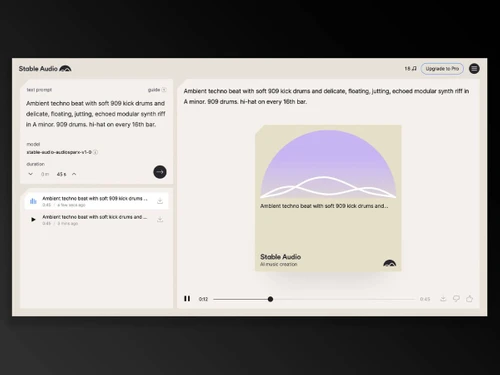
stable audio-audio
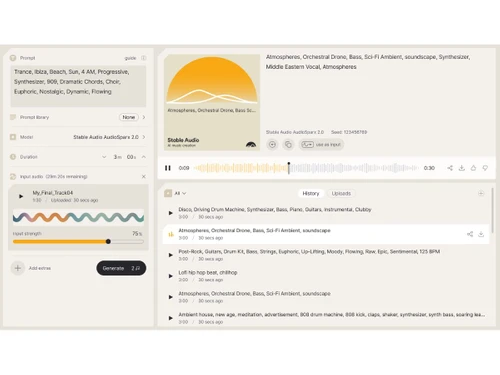
stable audio-dashboard

Stable Audio

Brand: Stability.ai

  • 4.3

  • 4 Ratings

Have you used Stable Audio before?

Share your insights for better experience

Add a Review
Starting Price
$12

View plans

100% Genuine
Products
Best Price
Guaranteed
Safe & Secure
Payment
  • Description

  • Pricing

  • Features

  • Specification

  • Review

Starting at $12

Stable Audio Software Overview

Stability.ai Company Details

Founded Year:  2019

Stability AI is an AI-driven visual art startup that designs and implements an open AI tool to create images based on text input given.

Director/Founders Emad Mostaque
Company Size 1-100 Employees

Stable Audio Pricing & Plans

Pro
Starting at $12
    • Licenses

      Licenses
      Licenses
    • Monthly

      Monthly
      Monthly

Key Features

  • Monthly track generations-250

  • Track duration-Up to 3 minutes

  • Monthly upload amount-30 minutes Cropped at 3 minu

  • Creator license

Studio
Starting at $30
    • Licenses

      Licenses
      Licenses
    • Monthly

      Monthly
      Monthly

Key Features

  • Monthly track generations-675

  • Track duration-Up to 3 minutes

  • Monthly upload amount-60 minutes Cropped at 3 minu

  • Creator license

Max
Starting at $90
    • Licenses

      Licenses
      Licenses
    • Monthly

      Monthly
      Monthly

Key Features

  • Monthly track generations-2,250

  • Track duration-Up to 3 minutes

  • Monthly upload amount-90 minutes Cropped at 3 minu

  • Creator license

Stable Audio Features

  • icon_check Upload Management
    Upload, organize, and reuse input files with visual history and management tools directly inside the dashboard.
  • icon_check Copyright Detection
    System detects copyrighted uploads and still counts them toward your quota to promote fair usage compliance.
  • icon_check Integrated Generation Panel
    All generation tools including prompt input, audio upload, sliders, and model options are unified in one panel.
  • icon_check Text to Audio Generation
    Generate original music tracks or sound effects from natural language prompts with control over mood, genre, and tempo.
  • icon_check Audio to Audio Transformation
    Upload existing audio and guide its transformation using prompts to create new music or modify existing sounds.
  • icon_check Custom Prompts
    Use structured prompts with descriptors like genre, instruments, BPM, and mood to fine-tune generated output.
  • icon_check Style Transfer
    Apply stylistic elements such as genre or tone to both generated and uploaded audio for refined creative results.
  • icon_check Multi-Model Support
    Select from multiple model versions like Stable Audio 1.0 and 2.0 for better output quality and advanced processing.
  • icon_check Seed Based Reproducibility
    Set a random seed to ensure consistent output across sessions for prompt-driven or audio-driven generations.
  • icon_check Diffusion Steps Control
    Manually adjust the number of inference steps to balance generation quality with performance and speed.
  • icon_check Prompt Influence Slider
    Modify how strongly the text prompt affects the generated result for better creative direction and fidelity.
  • icon_check Audio Influence Slider
    Adjust how much the uploaded input audio affects the output, enabling subtle to strong transformations.
  • icon_check Template Library
    Access a curated list of preset prompt templates to speed up ideation and simplify the creative process.
  • icon_check Batch Generation
    Generate up to 5 audio results simultaneously with a single prompt to explore variations and creative directions.
Stable Audio Demo Video play icon

Get Stable Audio Demo

Watch the demo video to explore key features, real workflows, and how the software fits your business needs.

Understand
Key Features
Personal
Demo Insights
Interactive
Demo Support

Stable Audio Specifications

Supported Platforms
Ubuntu Ubuntu Windows Windows MacOS MacOS Linux Linux
Devices
Desktop Desktop
Deployment
Cloud-Based Cloud-Based
Suitable For
Media House
Business Specific
Media
Business Size
Individual Small Business Startups Medium Business Enterprises SMBs SMEs MSMBs MSMEs Freelancers
Customer Support
Email Communities
Language
English
Training Resources
Videos
AI Features
AI Integrated

Stable Audio Review

4.3

Out of 5

img

Overall Rating

Based on
4 Verified Ratings

Rating Breakdown

  • Features 4.2
  • Value for Money 4.2
  • Ease of Use 4.6
  • Customer Support 4.2

80% Recommend this Product

Add Review

Be the First to Review

This product has no reviews yet. Be the first to leave your feedback.

Add Review

20,000+ Software Listed

Best Price Guranteed

Free Expert Consultation

2M+ Happy Customers

Terms and Condtions

close

Users with registered businesses can purchase goods from merchants on the platform to satisfy their business needs. Users are not permitted to utilize any products acquired through the platform for resale, advertising, business, or further distribution.

For each purchase made, users will receive a Tax Invoice (or 'GST invoice') that includes specific details such as:

  • the GSTIN of the user associated with their registered business, and

  • the specified Entity Name for their business.

It should be noted that not all products are eligible for GST Invoice. Only the products displayed by participating sellers with the 'GST-based Invoice Available' callout on the product description page would qualify.

Certain goods and services are not eligible to get a GST Invoice, including items with VAS, i.e., Value Added Services (e.g., Total Mobile Protection/Assured Buyback) and those involving an exchange offer at the time of purchase.

Users must ensure the accuracy of the GSTIN, and business entity name provided for the GST Invoice. Requests for corrections into GST Invoice would not be accommodated by Techjockey.com or any Seller, and any issues arising from user-provided information are the sole responsibility of users.

Techjockey.com is not liable for the GST Invoice or any associated input tax credit. To efficiently claim an input tax credit, users should select the registered place of business address as per the GST authority's data and follow the provisions of the GST Act and rules.

To claim an input tax credit, the delivery and billing addresses must match. Furthermore, input tax credits will not be granted if the delivery address and GSTIN on the invoice are from different states. In case of incorrect GST details provided during the order placement, the order will be canceled automatically.