linkedin
StackState logo
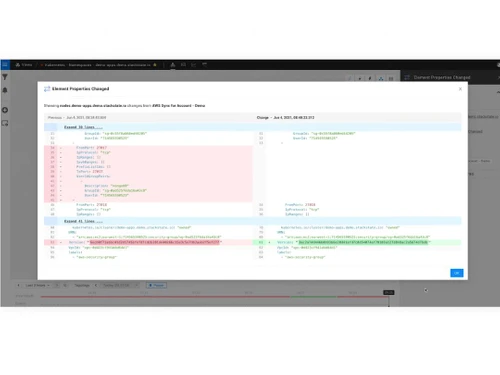
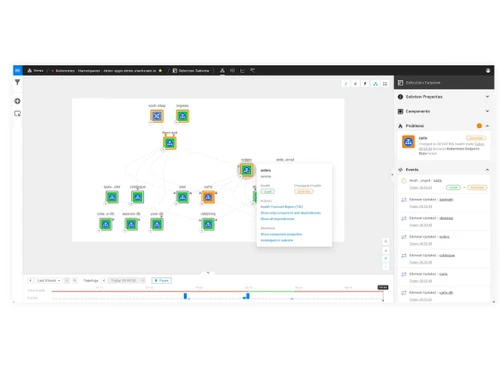
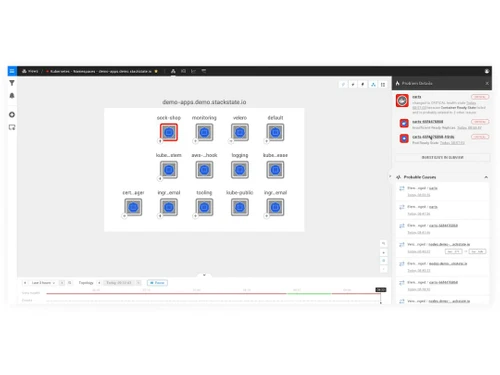
stackstate dashboard
stackstate settings
stackstate workflows

StackState

Brand: StackState

  • 4.3

  • 6 Ratings

StackState is a full-stack monitoring and observability platform that provides a unified view of an organization's IT infrastructure, applications, and dependencies, enabling end-to-end visibility.

See More

Have you used StackState before?

Share your insights for better experience

Add a Review
Starting Price
$20

View plans

100% Genuine
Products
Best Price
Guaranteed
Safe & Secure
Payment
  • Description

  • Pricing

  • Features

  • Specification

  • Review

  • Compare

  • Alternatives

  • FAQ

Starting at $20

StackState Software Overview

What is StackState?

StackState is a full-stack monitoring and observability platform that provides a unified view of an organization's entire IT stack, including applications, infrastructure, and dependencies. It uses real-time topology mapping to visualize and understand the relationships between different components, enabling end-to-end observability. StackState leverages machine learning and AI to automatically detect anomalies and potential issues, enabling proactive identification and resolution of problems.

The platform offers comprehensive visibility across applications, infrastructure, containers, and cloud environments, providing a single pane of glass for monitoring and troubleshooting. StackState provides:

Expert guidance, Step-by-step playbooks, and Actionable insights to accelerate troubleshooting and reduce mean time to resolution (MTTR).

It is designed to be open and extensible, integrating with various tools and data sources, including OpenTelemetry, Splunk, and major cloud platforms.

Why Choose StackState Software?

  • Topology-Powered Observability: Provides topology-powered observability with real-time mapping to visualize and understand dependencies in the IT stack.
  • Full-Stack Visibility: Offers comprehensive visibility across applications, infrastructure, containers, and cloud environments for unified monitoring and troubleshooting.
  • Automated Anomaly Detection: Machine learning and AI automatically detect anomalies and potential issues, enabling proactive identification and resolution.
  • Intelligent Troubleshooting: Provides expert guidance, step-by-step playbooks, and actionable insights to accelerate troubleshooting and reduce MTTR.
  • Kubernetes Troubleshooting: Includes specific capabilities for monitoring and troubleshooting Kubernetes-based applications, enhancing efficiency.
  • Open and Extensible: Designed to integrate with various tools and data sources, including OpenTelemetry, Splunk, and major cloud platforms.
  • Cloud-Native Observability: Offers cloud-native observability for large-scale containerized and serverless applications, relating changes to impact.
  • Air-Gapped Environment Support: Provides observability solutions for air-gapped environments, addressing monitoring and troubleshooting in isolated networks.
  • Knowledge Sharing: Enables sharing of platform team knowledge as 'policies' across development teams to ensure best practices during application deployment.
  • Cloud Platform Integration: Integrates with major cloud platforms like AWS, offering specific support for AWS and containerized environments.

Benefits of StackState Software

  • Broaden Understanding: Shares platform team knowledge as 'policies' across development teams for optimal configurations and faster deployments.
  • SUSE Kubernetes Compatibility: Supports RKE and K3s, providing robust observability and troubleshooting for Kubernetes clusters.
  • Resource Dependency Visibility: Automates dependency mapping within Kubernetes clusters, offering a transparent view of component interactions.
  • Augmented Security: Integrates with RKE2 to provide insights into application reliability and health.
  • Real-Time Dependency Maps: Offers real-time maps of IT stack dependencies for easy navigation.
  • Unified View: Correlates all metrics, logs, events, changes, and resources in a single data fabric for faster troubleshooting.
  • Enhanced Customer Experience: Improves customer experience with real-time insights and automated ticket resolution, reducing problem resolution time.
  • Reduced Downtime: Minimizes downtime and innovation interruption with a comprehensive view of the entire stack for reliable services.
  • Increased Productivity: Boosts productivity with a unified, contextual view, enabling quick issue resolution.

Pricing of StackState

StackState price in India starts at $20 at techjockey.com.

The pricing model is based on different parameters, including extra features, deployment type, and the total number of users. For further queries related to the product, you can contact our product team and learn more about the pricing and offers.

Read more

StackState Company Details

Founded Year:  2015

StackState

Director/Founders Lodewijk Bogaards, Mark Bakker
Company Size 101-500 Employees

StackState Pricing & Plans

Infrastructure Edition
Starting at $20
    • Licenses

      Licenses
      Licenses

Key Features

  • Up to 50 nodes

  • Up to 5 clusters

  • Unlimited users

  • Out of the box issue detection

  • Guided remediation

  • Visibility into all Kubernetes resources

  • Certificate expiration detection

  • PromQL based metrics

  • Log analysis

  • Telemetry retention (metrics, logs, traces, events

Application Edition
Starting at $35
    • Licenses

      Licenses
      Licenses

Key Features

  • Up to 100 nodes

  • Up to 10 clusters

  • Unlimited users

  • Out of the box issue detection

  • Guided remediation

  • Visibility into all Kubernetes resources

  • Certificate expiration detection

  • PromQL based metrics

  • Log analysis

  • Telemetry retention (metrics, logs, traces, events

StackState Features

  • icon_check Guided Remediation
    Offers step-by-step guidance to resolve issues efficiently and effectively.
  • icon_check Infinite Dependency Maps
    Provides dynamic and comprehensive maps of IT dependencies, enabling clear visualization of relationships.
  • icon_check Certificate Expiration Detection
    Automatically detects and alerts on certificate expirations, ensuring uninterrupted security.
  • icon_check Infrastructure Metrics
    Monitors and analyzes metrics related to infrastructure performance and health.
  • icon_check PromQL Based Metrics
    Utilizes PromQL language for querying and analyzing Prometheus metrics, enhancing flexibility and compatibility.
  • icon_check Log Analysis
    Analyzes logs for insights into system behaviour, performance, and potential issues.
  • icon_check Business Impact Mapping
    Maps IT components to business services, facilitating prioritization and impact analysis.
  • icon_check Application Metrics
    Monitors and tracks metrics specific to applications, enabling performance optimization and troubleshooting.
  • icon_check Role Based Access Control
    Enforces security by granting access to resources based on predefined roles and permissions.
  • icon_check Data Lake Integrations
    Integrates with data lakes for storing and analyzing large IT operational data volumes, enabling deeper insights.

StackState Specifications

Supported Platforms
Ubuntu Ubuntu Windows Windows MacOS MacOS Linux Linux
Devices
Desktop Desktop
Deployment
Cloud-Based Cloud-Based
Suitable For
ITES
Business Specific
All Businesses
Business Size
Small Business Startups Medium Business Enterprises
Customer Support
Email Communities
Language
English
Training Resources
Webinars Documentation Videos

Explore the Best Alternative Solutions Similar to Your Business Size and Needs

StackState Review

4.3

Out of 5

img

Overall Rating

Based on
6 Verified Ratings

Rating Breakdown

  • Features 4.5
  • Value for Money 4.2
  • Ease of Use 4.2
  • Customer Support 4.5

90% Recommend this Product

Add Review

Techjockey Trusted Reviews from Verified Users

No reviews are currently available for StackState. Discover similar AIOps Tools reviews

  • New Relic

    4.5

    Whats great - The real-time app monitoring, deep visibility, and unified views are very helpful. read more

  • Zenoss Cloud Monitoring

    4.5

    Whats great - 1.Immediate Root-Cause Analysis: Swift identification and resolution of issues, reducing downtime. 2.Real-time Insights: Pro... read more

  • Dynatrace

    4.0

    Whats great - Live Alerts and Synthetic Monitoring: Dynatrace excels in delivering live alerts and synthetic monitoring for online or cloud... read more

Compare StackState With other AIOps Tools

Products
Ratings
Pricing
Device Supported
Deployment
Supported Platforms
  • img

    StackState

  • 4.3

  • Price On Request

  • Desktop

    Mobile

  • Web based

    On Premises

  • Windows

    Mac OS

  • img

    PromptLayer

  • 4.2

  • Price On Request

  • Desktop

    Mobile

  • Web based

    On Premises

  • Windows

    Mac OS

  • img

    Bmc Truesight

  • 4.3

  • Price On Request

  • Desktop

    Mobile

  • Web based

    On Premises

  • Windows

    Mac OS

  • img

    CloudFabrix

  • 4.2

  • Price On Request

  • Desktop

    Mobile

  • Web based

    On Premises

  • Windows

    Mac OS

  • img

    PagerDuty AIOps

  • 4.1

  • Price On Request

  • Desktop

    Mobile

  • Web based

    On Premises

  • Windows

    Mac OS

  • img

    OpsRamp

  • 4.1

  • Price On Request

  • Desktop

    Mobile

  • Web based

    On Premises

  • Windows

    Mac OS

  • img

    Netreo

  • 4.0

  • Price On Request

  • Desktop

    Mobile

  • Web based

    On Premises

  • Windows

    Mac OS

  • img

    PromptX

  • 4.1

  • Price On Request

  • Desktop

    Mobile

  • Web based

    On Premises

  • Windows

    Mac OS

  • img

    Moogsoft

  • 4.1

  • Price On Request

  • Desktop

    Mobile

  • Web based

    On Premises

  • Windows

    Mac OS

  • img

    ScienceLogic SL 1

  • 4.2

  • Price On Request

  • Desktop

    Mobile

  • Web based

    On Premises

  • Windows

    Mac OS

  • img

    BigPanda

  • 4.2

  • Price On Request

  • Desktop

    Mobile

  • Web based

    On Premises

  • Windows

    Mac OS

(0) Product(s) selected

StackState Alternatives

See All StackState Alternatives

Available

Price on Request

What is the pricing structure for StackState Software?

The starting price of StackState in India is $20 on techjockey.com.

Does StackState Software have a dedicated mobile application?

StackState does not have a dedicated mobile application.

On which operating systems does StackState Software run?

StackState Software is compatible with Ubuntu, Windows, MacOS, and Linux operating systems.

Can users access a trial version of StackState Software?

Yes, users can access a free trial of StackState Software.

How does the functionality of StackState Software operate?

StackState Software provides full-stack monitoring and observability, offering a unified view of data across systems, applications, and technologies, enabling pinpoint root cause analysis and improved customer satisfaction.

Who comprises the target audience for StackState Software?

The target audience for StackState Software includes business and IT teams, industry leaders, and organizations seeking to optimize performance, address issues, and ensure the reliability of business-critical services.

20,000+ Software Listed

Best Price Guranteed

Free Expert Consultation

2M+ Happy Customers

Terms and Condtions

close

Users with registered businesses can purchase goods from merchants on the platform to satisfy their business needs. Users are not permitted to utilize any products acquired through the platform for resale, advertising, business, or further distribution.

For each purchase made, users will receive a Tax Invoice (or 'GST invoice') that includes specific details such as:

  • the GSTIN of the user associated with their registered business, and

  • the specified Entity Name for their business.

It should be noted that not all products are eligible for GST Invoice. Only the products displayed by participating sellers with the 'GST-based Invoice Available' callout on the product description page would qualify.

Certain goods and services are not eligible to get a GST Invoice, including items with VAS, i.e., Value Added Services (e.g., Total Mobile Protection/Assured Buyback) and those involving an exchange offer at the time of purchase.

Users must ensure the accuracy of the GSTIN, and business entity name provided for the GST Invoice. Requests for corrections into GST Invoice would not be accommodated by Techjockey.com or any Seller, and any issues arising from user-provided information are the sole responsibility of users.

Techjockey.com is not liable for the GST Invoice or any associated input tax credit. To efficiently claim an input tax credit, users should select the registered place of business address as per the GST authority's data and follow the provisions of the GST Act and rules.

To claim an input tax credit, the delivery and billing addresses must match. Furthermore, input tax credits will not be granted if the delivery address and GSTIN on the invoice are from different states. In case of incorrect GST details provided during the order placement, the order will be canceled automatically.