linkedin
SwiftKanban logo
play Learn to Work with Business Rules Feature
SwiftKanban board
SwiftKanban to do

SwiftKanban

Brand: NimbleWork

  • 4.5

  • 3 Ratings

Powerful Kanban solution with extensive customization, seamless integration, and insightful metrics.

See More

Have you used SwiftKanban before?

Share your insights for better experience

Add a Review
Starting Price
$7

View plans

100% Genuine
Products
Best Price
Guaranteed
Safe & Secure
Payment
  • Description

  • Pricing

  • Features

  • Specification

  • Review

  • Compare

  • Alternatives

  • FAQ

Starting at $7

SwiftKanban Software Overview

What is SwiftKanban?

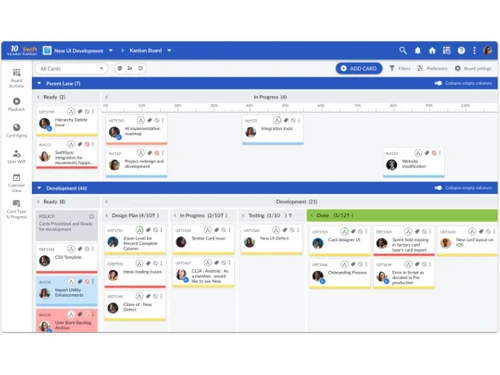
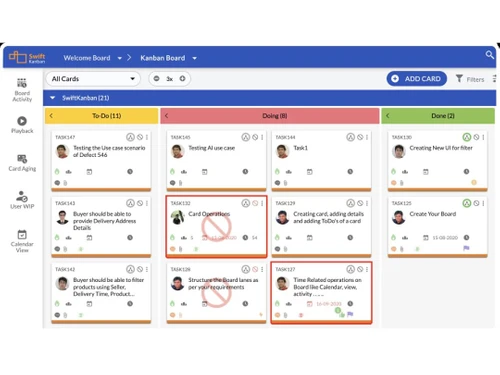
SwiftKanban is a premier platform for Kanban visualization. This project management platform boasts a robust WYSIWYG board editor that simplifies the modeling of intricate value streams. SwiftKanban elevates visual planning to new heights, allowing teams to intuitively design and optimize their workflows. Moreover, SwiftKanban integrates a range of advanced features, including the ability to define Work-In-Progress (WIP) limits, customize card colors, and identify bottlenecks, thereby empowering teams to manage their workflows with unparalleled efficiency.

One of SwiftKanban's key strengths is its ability to facilitate flexible backlog definition, enabling product owners to articulate their priorities seamlessly. Teams can decompose high-level stories into granular feature cards using a powerful mind-map interface, ensuring clarity and alignment throughout the project lifecycle. This granular approach extends to work execution, where team members can effortlessly move cards across the board while adhering to predefined policies. The software also fosters seamless collaboration among team members, providing a centralized platform for communication and coordination, particularly crucial for distributed teams.

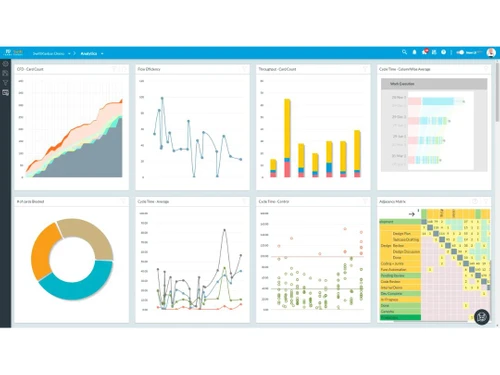
SwiftKanban's adaptability through its extensive customization options allows organizations to tailor the platform to their unique requirements. Whether it's defining custom card types or configuring multiple attributes for each type, SwiftKanban ensures that teams can adapt their workflows to suit diverse scenarios and domains. Combined with comprehensive metrics and analytics, this platform empowers teams to measure progress, identify areas for improvement, and continuously refine their processes for optimal efficiency and productivity.

Why Choose SwiftKanban Project Management Software?

  • Simplified Kanban Implementation: Implement Kanban effortlessly using powerful visualization tools for a streamlined workflow.
  • Enhanced Productivity: Increase team productivity through the seamless execution of workflows on the SwiftKanban platform.
  • Valuable Project Insights: Gain valuable insights into project progress and performance, facilitating informed decision-making.
  • Adaptability: Ensure adaptability to varying project needs with an array of extensive customization options.
  • Collaboration Across Teams: Foster collaboration and communication, especially for distributed teams, enhancing overall team synergy.
  • Efficient Integration: Seamlessly integrate with existing tools and platforms, ensuring enhanced overall efficiency in project management.

Benefits of using SwiftKanban

  • Effortless Workflow Planning: Streamline project workflows with intuitive visualization tools for efficient planning.
  • Enhanced Collaboration: Foster team collaboration and communication, promoting synergy and shared understanding.
  • Process Efficiency: Improve overall efficiency by leveraging insightful metrics and analytics to optimize workflows.
  • Seamless Integration: Enable smooth integration with popular tools like Jira and Excel, enhancing interoperability.
  • Flexible Customization: Facilitate adaptability to diverse project requirements through highly flexible customization options.
  • Progress Review Features: Provide a unique edge with features like board playback, offering a comprehensive review of project progress.

Pricing of SwiftKanban

The pricing of SwiftKanban starts at $7 on techjockey.com.

The pricing model is based on different parameters, including extra features, deployment type, and total users. For further queries related to the SwiftKanban, you can contact our SwiftKanban team and learn more about the pricing and offers.

Read more

NimbleWork Company Details

Founded Year:  2002

NimbleWork is a leading B2B SaaS provider of collaborative AI-powered Enterprise Adaptive Work and Project Management products and solutions.

Director/Founders NimbleWork
Company Size 101-500 Employees

SwiftKanban Pricing & Plans

Group
Starting at $7
    • Users

      Users
      Users
    • Monthly

      Monthly
      Monthly

Key Features

  • 50 Users, 20 Boards (max)

  • 10 Custom Card Types

  • 10 Custom Card Types

  • Custom Templates

  • Advanced Reports

  • Scrumban Features

  • Data Import/ Export

Enterprise
Starting at $15
    • Users

      Users
      Users
    • Monthly

      Monthly
      Monthly

Key Features

  • Everything in Group +

  • Unlimited Users, Boards

  • Unlimited Card Types

  • Dashboards

  • Exhaustive Analytics

  • Enterprise Boards

  • Card Hierarchy

  • Portfolio Lane

  • API Access

  • Integration Adaptors (ADD-ON)

SwiftKanban Features

  • icon_check Personal/ Team Kanban
    Tailored Kanban boards for individual or team-level task management and visualization.
  • icon_check Enterprise/ Portfolio Kanban
    Scalable Kanban solution designed to manage projects at the enterprise or portfolio level.
  • icon_check Scrum/ Scrumban
    Seamlessly integrate Scrum methodologies into Kanban workflows for agile project management.
  • icon_check Predictive Flow Metrics
    Utilize advanced analytics to forecast project flow and identify potential bottlenecks.
  • icon_check SwiftESP
    Employ SwiftESP (Enterprise Services Planning) for holistic management of enterprise-level services and projects.
  • icon_check Story Mapping
    Visualize and prioritize user stories to better understand and plan product development.
  • icon_check Business Rules
    Define and enforce custom rules and policies to govern workflow behavior and decision-making.
  • icon_check Roadmap
    Create and maintain project roadmaps to provide a strategic overview of project objectives and milestones.
  • icon_check Open REST/ SOAP API
    Leverage open API for seamless integration with third-party tools and systems.
  • icon_check Seamless Collaboration
    Foster effective communication and collaboration among team members.
SwiftKanban Demo Video play icon

Get SwiftKanban Demo

Watch the demo video to explore key features, real workflows, and how the software fits your business needs.

Understand
Key Features
Personal
Demo Insights
Interactive
Demo Support

SwiftKanban Specifications

Supported Platforms
Ubuntu Ubuntu Windows Windows iOS iOS Android Android MacOS MacOS Linux Linux
Devices
Desktop Desktop Mobile Mobile Tablet Tablet iPad iPad
Deployment
Cloud-Based Cloud-Based
Suitable For
All Industries
Business Specific
All Businesses
Business Size
Small Business Startups Medium Business Enterprises
Customer Support
Phone Email Live Chat Communities
Language
English
Integration
API Integration
Training Resources
Webinars Videos
AI Features
AI Integrated

Explore the Best Alternative Solutions Similar to Your Business Size and Needs

Small Business

Designed for startups and growing businesses

Kanriapp

4.4

Godello

4.2

Donko

4.3

See More

SwiftKanban Review

4.5

Out of 5

img

Overall Rating

Based on
3 Verified Ratings

Rating Breakdown

  • Features 4.3
  • Value for Money 4.3
  • Ease of Use 4.8
  • Customer Support 4.6

93% Recommend this Product

Add Review

Techjockey Trusted Reviews from Verified Users

No reviews are currently available for SwiftKanban. Discover similar Kanban Tools reviews

  • Jira

    4.5

    Whats great - Jira's emphasis on visuals when tracking performance and tickets is something I appreciate. Since our project is a support pr... read more

  • Monday.com

    4.0

    Whats great - monday.com’s design and functionality make it a perfect choice for managing projects. read more

  • Wrike

    4.0

    Whats great - ssions and manage user rights, ensuring that sensitive information is only available to the right people. Further, the two-fa... read more

Compare SwiftKanban With other Kanban Tools

Products
Ratings
Pricing
Device Supported
Deployment
Supported Platforms
  • img

    SwiftKanban

  • 4.5

  • Price On Request

  • Desktop

    Mobile

  • Web based

    On Premises

  • Windows

    Mac OS

  • img

    Kanban Zone

  • 4.6

  • ₹ 703

  • Desktop

    Mobile

  • Web based

    On Premises

  • Windows

    Mac OS

  • img

    Taiga

  • 4.5

  • Price On Request

  • Desktop

    Mobile

  • Web based

    On Premises

  • Windows

    Mac OS

  • img

    Kanban One

  • 4.5

  • Price On Request

  • Desktop

    Mobile

  • Web based

    On Premises

  • Windows

    Mac OS

  • img

    Kanban Pro

  • 4.4

  • Price On Request

  • Desktop

    Mobile

  • Web based

    On Premises

  • Windows

    Mac OS

  • img

    Kanbanflow

  • 4.5

  • Price On Request

  • Desktop

    Mobile

  • Web based

    On Premises

  • Windows

    Mac OS

  • img

    WebTCards

  • 4.4

  • Price On Request

  • Desktop

    Mobile

  • Web based

    On Premises

  • Windows

    Mac OS

  • img

    Kanboard

  • 4.0

  • Price On Request

  • Desktop

    Mobile

  • Web based

    On Premises

  • Windows

    Mac OS

  • img

    Kanriapp

  • 4.4

  • Price On Request

  • Desktop

    Mobile

  • Web based

    On Premises

  • Windows

    Mac OS

  • img

    Godello

  • 4.2

  • Price On Request

  • Desktop

    Mobile

  • Web based

    On Premises

  • Windows

    Mac OS

  • img

    Donko

  • 4.3

  • Price On Request

  • Desktop

    Mobile

  • Web based

    On Premises

  • Windows

    Mac OS

(2) Product(s) selected

SwiftKanban Alternatives

See All SwiftKanban Alternatives

Available

Price on Request

Articles for SwiftKanban

See All Related Articles

Which operating system does SwiftKanban support?

SwiftKanban is compatible with Ubuntu, Windows, iOS, Android, MacOS, and Linux device systems.

Is there any SwiftKanban App?

SwiftKanban app is available for Android and iOS devices.

What is the deployment type of SwiftKanban?

SwiftKanban supports web-based deployment.

How much does SwiftKanban cost?

SwiftKanban pricing starts at $7 on techjockey.com.

Who are the potential users of SwiftKanban?

SwiftKanban caters to a diverse range of users, from small teams to large enterprises, seeking streamlined project management with Kanban methodology.

Is there any free trial or demo for SwiftKanban?

SwiftKanban platform demo is available for free with techjockey.com.

Is SwiftKanban Free?

SwiftKanban does offer a free trial.

Does SwiftKanban Offer a Free Trial?

Yes, SwiftKanban project Management Software offers a free trial.

How can you download SwiftKanban?

Since the product supports web-based deployment there is no need for software installation. Just open the setup wizard and get started.

How does SwiftKanban Work?

SwiftKanban simplifies project management by providing intuitive visualization tools, seamless collaboration features, and comprehensive metrics, ensuring efficient workflow execution and optimization.

20,000+ Software Listed

Best Price Guranteed

Free Expert Consultation

2M+ Happy Customers

Terms and Condtions

close

Users with registered businesses can purchase goods from merchants on the platform to satisfy their business needs. Users are not permitted to utilize any products acquired through the platform for resale, advertising, business, or further distribution.

For each purchase made, users will receive a Tax Invoice (or 'GST invoice') that includes specific details such as:

  • the GSTIN of the user associated with their registered business, and

  • the specified Entity Name for their business.

It should be noted that not all products are eligible for GST Invoice. Only the products displayed by participating sellers with the 'GST-based Invoice Available' callout on the product description page would qualify.

Certain goods and services are not eligible to get a GST Invoice, including items with VAS, i.e., Value Added Services (e.g., Total Mobile Protection/Assured Buyback) and those involving an exchange offer at the time of purchase.

Users must ensure the accuracy of the GSTIN, and business entity name provided for the GST Invoice. Requests for corrections into GST Invoice would not be accommodated by Techjockey.com or any Seller, and any issues arising from user-provided information are the sole responsibility of users.

Techjockey.com is not liable for the GST Invoice or any associated input tax credit. To efficiently claim an input tax credit, users should select the registered place of business address as per the GST authority's data and follow the provisions of the GST Act and rules.

To claim an input tax credit, the delivery and billing addresses must match. Furthermore, input tax credits will not be granted if the delivery address and GSTIN on the invoice are from different states. In case of incorrect GST details provided during the order placement, the order will be canceled automatically.