USA
USA UAE
UAESmall Business
Designed for startups and growing businesses

See More


Brand: Parker Software
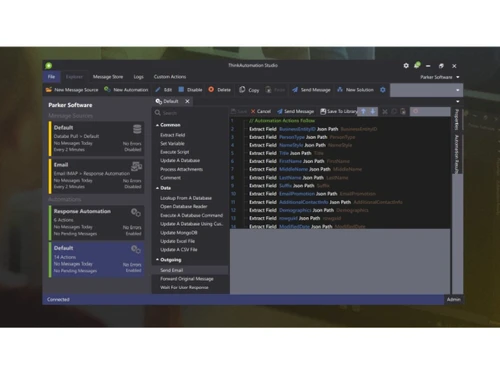
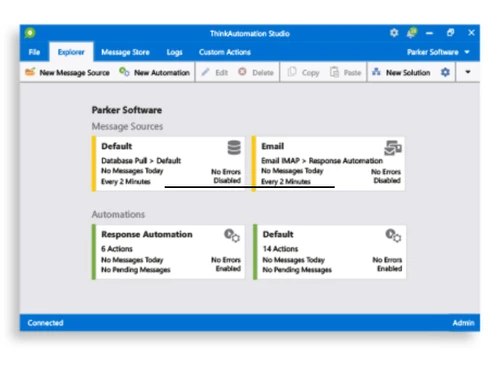
Think Automation lets you automate your complex tasks and unburden yourself. This software takes innumerable labor-intensive processes out of your hands, leaving you with more time to focus on your business. Think Automation is a uniquely advanced business process automation solution, which enables ...
See MoreHave you used Think Automation before?
Share your insights for better experience
Brand: Parker Software
Founded Year: 2003
Parker Software
 CRM SharePoint List Google Drive Support Save Each DOC in Separate PDF Networking Instant messaging Sentiment Analysis Database Management Social Media Integration Document Management Collaboration Analytics & Reporting Language Translator CRM Text Messaging
  Windows
  Desktop
  Cloud-Based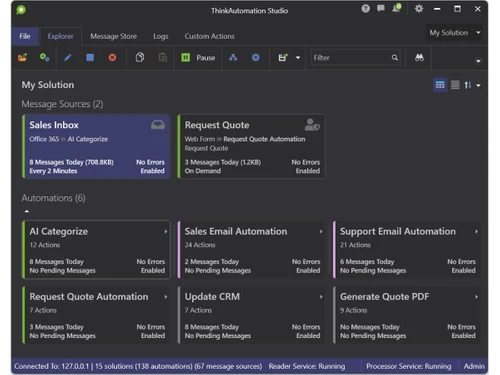
Small Business
Designed for startups and growing businesses
Medium Business
Built for business growth and flexibility
Enterprises
Designed for complex and large-scale business needs
4.2
Out of 5

Overall Rating
Based on
6 Verified Ratings
Rating Breakdown
88% Recommend this Product
Add ReviewTechjockey Trusted Reviews from Verified Users
No reviews are currently available for Think Automation. Discover similar BPM Software reviews

Bonita BPM
Whats great - I found Bonita Software. It delivers vital capabilities like assigning roles and permissions, developing composite applicatio... read more

OnexFlow
Whats great - Onex flow has been a genuinely significant part of our organization. Without leaving my desks, I can collaborate with staff f... read more

Newton BPM
Whats great - Newton is a decent decision, usability for the new clients, and when you dive in there's a strong framework to help. read more
Think Automation
Price On Request
Desktop
Mobile
Web based
On Premises
Windows
Mac OS

CollabCRM
Price On Request
Desktop
Mobile
Web based
On Premises
Windows
Mac OS
Bonita BPM
Price On Request
Desktop
Mobile
Web based
On Premises
Windows
Mac OS

Pronnel
Price On Request
Desktop
Mobile
Web based
On Premises
Windows
Mac OS

Gravity Flow
Price On Request
Desktop
Mobile
Web based
On Premises
Windows
Mac OS
OnexFlow
Price On Request
Desktop
Mobile
Web based
On Premises
Windows
Mac OS

Posse
Price On Request
Desktop
Mobile
Web based
On Premises
Windows
Mac OS
Prime BPM
Price On Request
Desktop
Mobile
Web based
On Premises
Windows
Mac OS

Automaited
Price On Request
Desktop
Mobile
Web based
On Premises
Windows
Mac OS

Modelio
Price On Request
Desktop
Mobile
Web based
On Premises
Windows
Mac OS

Camunda-Platform
Price On Request
Desktop
Mobile
Web based
On Premises
Windows
Mac OS
(0) Product(s) selected
Available
Price on Request
Starting Price:
$99 /Year
Available
Price on Request
Available
Price on Request
Available
Price on Request
Available
Price on Request

Available
Price on Request

Available
Price on Request

Available
Price on Request

Available
Price on Request

Starting Price:
$500 /Month
Think Automation BPM Software is compatible with Windows operating systems.
Think Automation BPM Software app is not available.
Think Automation BPM Software supports Web-Based.
Think Automation BPM Software pricing starts at Rs.8050.00.
Think Automation BPM Software is typically used in All Industries.
Think Automation BPM Software demo is available for free with Techjockey.com
Think Automation BPM Software offers a free trial. However, the premium plan with advanced features available at Techjockey .
For Think Automation BPM Software installation, insert the given CD/USB flash storage in your system and open the Setup Wizard to get started.
Think Automation BPM Software helps with Database Management,Social Media Integration,Document Management and Collaboration. It's a complete solution for Analytics & Reporting,Language Translator,CRM and Text Messaging.
20,000+ Software Listed
Best Price Guranteed
Free Expert Consultation
2M+ Happy Customers
Terms and Condtions

Users with registered businesses can purchase goods from merchants on the platform to satisfy their business needs. Users are not permitted to utilize any products acquired through the platform for resale, advertising, business, or further distribution.
For each purchase made, users will receive a Tax Invoice (or 'GST invoice') that includes specific details such as:
the GSTIN of the user associated with their registered business, and
the specified Entity Name for their business.
It should be noted that not all products are eligible for GST Invoice. Only the products displayed by participating sellers with the 'GST-based Invoice Available' callout on the product description page would qualify.
Certain goods and services are not eligible to get a GST Invoice, including items with VAS, i.e., Value Added Services (e.g., Total Mobile Protection/Assured Buyback) and those involving an exchange offer at the time of purchase.
Users must ensure the accuracy of the GSTIN, and business entity name provided for the GST Invoice. Requests for corrections into GST Invoice would not be accommodated by Techjockey.com or any Seller, and any issues arising from user-provided information are the sole responsibility of users.
Techjockey.com is not liable for the GST Invoice or any associated input tax credit. To efficiently claim an input tax credit, users should select the registered place of business address as per the GST authority's data and follow the provisions of the GST Act and rules.
To claim an input tax credit, the delivery and billing addresses must match. Furthermore, input tax credits will not be granted if the delivery address and GSTIN on the invoice are from different states. In case of incorrect GST details provided during the order placement, the order will be canceled automatically.


.png)