linkedin
TrackKing logo
TrackKing tack
TrackKing status
TrackKing GPS

TrackKing

Brand: Tapadia Tech

  • 4.5

  • 1 Rating & 1 Review

Ensure student safety with TrackKing, the best vehicle tracking system offering real-time tracking, route replay, geo-fencing, and parent alerts on web & app.

See More

Have you used TrackKing before?

Share your insights for better experience

Add a Review

Price Available on Request

Questions about pricing or customization? We’re here to help, just a click away.

100% Genuine
Products
Best Price
Guaranteed
Safe & Secure
Payment
  • Description

  • Pricing

  • Features

  • Specification

  • Review

  • Compare

  • Alternatives

  • FAQ

TrackKing Software Overview

What is TrackKing?

TrackKing is a sophisticated, location-based GPS Vehicle Tracking System designed to provide real-time monitoring and management of vehicles. Developed by Tapadia Tech, it is engineered to deliver precise data on a vehicle's location, speed, scheduled stops, and travel history. While versatile enough for various fleet management needs, TrackKing is particularly specialized for school bus tracking, emphasizing the safety and security of students. The system operates through a user-friendly interface accessible via both a web portal and a dedicated Android application, making it a comprehensive solution for organizations seeking to enhance operational efficiency, ensure driver accountability, and significantly improve the safety of their fleet and passengers.

The core of the system lies in its ability to translate raw GPS data into actionable intelligence. It goes beyond simple dot-on-a-map tracking by incorporating a suite of advanced features that allow administrators to set up alerts, analyze historical routes, and communicate critical information to relevant stakeholders, such as parents awaiting their child's arrival. This makes it an indispensable tool for modern fleet oversight.

Why Choose TrackKing?

  • Enhanced Safety and Security: The primary benefit of TrackKing is the significant boost in safety. For school buses, it provides peace of mind to parents and school administrators by offering real-time location data, over-speeding alerts, and notifications for route deviations.
  • Operational Efficiency: By monitoring routes and vehicle activity, organizations can optimize travel paths, reduce fuel consumption, and minimize vehicle idling time. Route replay functionality allows for the analysis and improvement of driver performance and route planning.
  • Real-Time Visibility: With access via both a web platform and an Android app, stakeholders can track vehicles from anywhere, at any time. This constant visibility is crucial for making timely decisions and responding to incidents promptly.
  • Accountability and Performance Monitoring: The system logs detailed data on driver behavior, including speed, stops, and adherence to predefined routes. This information is invaluable for performance reviews, training, and ensuring compliance with company policies.
  • User-Friendly Interface: TrackKing is designed for simplicity. Its intuitive dashboard allows users to quickly access key information without requiring extensive technical training, ensuring a smooth and efficient user experience.

Advanced Features of TrackKing

  • Real-Time Tracking: Monitor the exact, live location of every vehicle in your fleet on a detailed map. This feature is accessible 24/7 through the web portal and Android application, providing up-to-the-minute information.
  • Route Replay: This function allows you to review the historical travel path of any vehicle. You can replay a journey from a specific day to analyze the route taken, stops made, and speed at various points, which is essential for incident investigation and performance analysis.
  • Geo-Fencing: Create virtual boundaries or fences around specific geographic areas. The system will automatically send an alert to administrators if a vehicle enters or exits a designated zone, ensuring vehicles remain on their authorized routes.
  • Parent Alerts: A critical feature for school bus tracking, this system sends automated notifications to parents regarding the bus's location, estimated arrival time, or any delays, enhancing child safety and parent communication.
  • Over-Speeding Alerts: Promote safer driving habits by setting speed limits for your vehicles. If a driver exceeds the predefined limit, an instant alert is triggered, allowing for immediate intervention and record-keeping.
  • Geo-Tagging: Mark and save important locations or points of interest on the map, such as pickup/drop-off points, service centers, or restricted areas. This helps in better route planning and management.

Key Capabilities of TrackKing

  1. Live Monitoring and Control: The system's primary capability is providing a live, bird's-eye view of your entire fleet. This includes not only seeing vehicle locations but also their status (moving, stopped, idling) and speed. The ability to set up geo-fences and receive instant alerts gives administrators proactive control over fleet operations.
  2. Safety and Security Management: TrackKing is built with safety as a priority. Capabilities like over-speeding alerts, route deviation notifications, and real-time tracking help enforce safe driving policies and provide a rapid response mechanism in case of an emergency. For school buses, parent alerts add an essential layer of security and communication.
  3. Reporting and Historical Analysis: The platform is a powerful analytical tool. By storing historical data, it enables managers to run reports on vehicle usage, driver behavior, and route efficiency. The route replay function is a key part of this, allowing for detailed reviews of past trips to identify areas for improvement and ensure compliance.

How to Use TrackKing?

  1. Hardware Installation: A certified technician installs a compact GPS tracking device in each vehicle. This device is discreet and connects to the vehicle's power source to transmit location data.
  2. Account Setup: Your organization receives login credentials for the TrackKing software platform. Administrators can then set up user accounts, add vehicles to the system, and configure basic settings.
  3. Platform Access: Log in to the TrackKing dashboard via any web browser or download the dedicated Android application from the app store to access the system on the go.
  4. Configuration of Alerts: Customize the system to meet your specific needs. Set up geo-fences for approved routes, define speed limits for over-speeding alerts, and configure parent notifications if applicable.
  5. Monitor and Analyze: Begin monitoring your fleet in real-time. Use the dashboard to view live locations, and leverage the reporting and route replay features to analyze historical data for continuous improvement.

TrackKing Price

TrackKing price is available on request at Techjockey. The pricing model is based on different parameters, including extra features, deployment type, and the total number of users. For further queries related to the product, you can contact our product expert and learn more about the pricing and offers.

Read more

Tapadia Tech Company Details

Founded Year:  2001

Tapadia Tech

Director/Founders Jay Tapadia
Company Size 1-100

TrackKing Pricing & Plans

Looking for The Right Pricing?

Share your requirements and get a plan built around your business.

  • Define your business needs
  • Get customised pricing
  • Choose features that fit your workflow

Price Available on Request

Get personalised TrackKing pricing that fits your needs. Our team will connect with you.

TrackKing Features

  • icon_check Real Time Tracking
    Track your bus real time on Web & Android App
  • icon_check Route replay
    Replay the route that a bus has taken
  • icon_check Geo fence
    Get an alert as soon as the bus leaves a certain area
  • icon_check Geo Tagging
    Each bus stop is marked on map to know bus position relative to school stops
  • icon_check Parent Alerts
    Know the school bus Location Anytime Anywhere , SMS Alert- Bus Arival Time(Early, Delay, On-time).
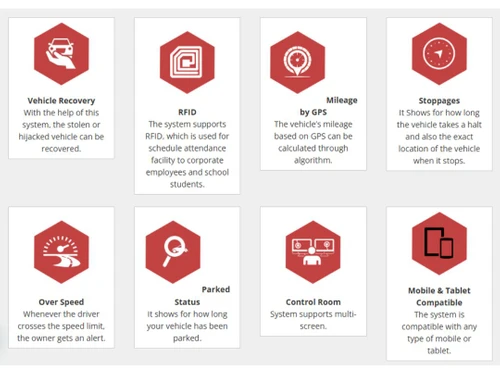
  • icon_check RFID
  • icon_check Tamper Proof
  • icon_check Mileage Tracking
  • icon_check Mobile Support

TrackKing Specifications

Supported Platforms
Windows Windows
Devices
Desktop Desktop
Deployment
Cloud-Based Cloud-Based
Suitable For
Automobiles
Business Specific
School/Colleges
Business Size
Small Business Startups Medium Business Enterprises
Customer Support
Email Communities
Language
English
Training Resources
Videos

Explore the Best Alternative Solutions Similar to Your Business Size and Needs

TrackKing Review

4.5

Out of 5

img

Overall Rating

Based on
1 Verified Review

Rating Breakdown

  • Features 4.5
  • Value for Money 4.5
  • Ease of Use 4.5
  • Customer Support 4.5

80% Recommend this Product

Add Review

Nishant Goyal

User

4.5

Reviewed on: Mar 20, 2019

Techjockey Verified

“Track your kids school vehicle on the go”

Pros

Adaptability and usability. Fantastically easy to understand and next to no expectation to absorb information for end clients. I cherish how adaptable this is and how much yet in we have had, in addition to it helps enormously with our accreditation endeavors.

Cons

NO CONS

Compare TrackKing With other GPS Vehicle Tracking System

Products
Ratings
Pricing
Device Supported
Deployment
Supported Platforms
  • img

    TrackKing

  • 4.5

  • Price On Request

  • Desktop

    Mobile

  • Web based

    On Premises

  • Windows

    Mac OS

  • img

    VTMS

  • 4.5

  • ₹ 550

  • Desktop

    Mobile

  • Web based

    On Premises

  • Windows

    Mac OS

  • img

    Trakom

  • 4.6

  • ₹ 45

  • Desktop

    Mobile

  • Web based

    On Premises

  • Windows

    Mac OS

  • img

    Lynktrac

  • 4.6

  • ₹ 4200

  • Desktop

    Mobile

  • Web based

    On Premises

  • Windows

    Mac OS

  • img

    CarX

  • 4.1

  • Price On Request

  • Desktop

    Mobile

  • Web based

    On Premises

  • Windows

    Mac OS

  • img

    Falcon Trackers

  • 4.1

  • Price On Request

  • Desktop

    Mobile

  • Web based

    On Premises

  • Windows

    Mac OS

  • img

    Fleet Stack

  • 5

  • ₹ 3499

  • Desktop

    Mobile

  • Web based

    On Premises

  • Windows

    Mac OS

  • img

    SeTrack

  • 4.3

  • Price On Request

  • Desktop

    Mobile

  • Web based

    On Premises

  • Windows

    Mac OS

(0) Product(s) selected

TrackKing Alternatives

See All TrackKing Alternatives

CarX

4.1

Available

Price on Request

Available

Price on Request

Available

Price on Request

Available

Price on Request

Available

Price on Request

Articles for TrackKing

See All Related Articles

Which operating system does School Bus Tracking support?

School Bus Tracking GPS Vehicle Tracking System is compatible with Windows operating systems.

Is there any School Bus Tracking app?

School Bus Tracking GPS Vehicle Tracking System app is not available.

What is deployment type of School Bus Tracking?

School Bus Tracking GPS Vehicle Tracking System supports Web-Based.

Who are the potential users of School Bus Tracking?

School Bus Tracking GPS Vehicle Tracking System is typically used in Automobiles.

Is there any free trial or demo for School Bus Tracking?

School Bus Tracking GPS Vehicle Tracking System demo is available for free at Techjockey.

Is School Bus Tracking free?

School Bus Tracking GPS Vehicle Tracking System offers a free trial. However, the premium plan with advanced features available at Techjockey.

How can you download School Bus Tracking?

For School Bus Tracking GPS Vehicle Tracking System installation, insert the given CD/USB flash storage in your system and open the Setup Wizard to get started.

How does School Bus Tracking work?

School Bus Tracking GPS Vehicle Tracking System helps with Real Time Tracking,Route replay,Geo fence and Geo Tagging. It's a complete solution for Parent Alerts,RFID,Tamper Proof and Mileage Tracking.

How do I track my vehicle with TrackKing?

You can track your vehicle in real-time using the TrackKing web portal or the dedicated Android application.

What is the use of TrackKing app?

The TrackKing app is used for real-time location tracking of vehicles like school buses, monitoring their speed, route, and stops to ensure safety and provide alerts to users.

How do I log into TrackKing?

You can log into your TrackKing account through the official web portal or by using the Android mobile application with your registered credentials.

How much does TrackKing cost?

TrackKing price is available on request at Techjockey.com.

Is TrackKing a good GPS tracker?

TrackKing is considered an effective GPS tracking system, equipped with features like real-time tracking, geo-fencing, over-speeding alerts, and route replay for comprehensive vehicle monitoring.

What is geo-fencing in TrackKing?

Geo-fencing in TrackKing allows you to set a virtual boundary for a vehicle, and the system will send an alert if the vehicle leaves the specified route or area.

Can I see the past routes a vehicle has taken with TrackKing?

Yes, TrackKing includes a route replay feature that allows you to play back the historical route that a vehicle has traveled on a specific day.

Does TrackKing provide alerts for over-speeding?

Yes, the software is equipped with an over-speeding alert feature that notifies you whenever a vehicle exceeds the pre-set speed limit.

How does TrackKing help parents monitor their child's school bus?

TrackKing provides parent alerts and real-time tracking, allowing parents to monitor the school bus's location, speed, and scheduled stops for their child's safety.

Who can use TrackKing?

TrackKing is designed for schools, fleet operators, logistics companies, cab and taxi services, and any organization managing vehicles or field employees. It's especially suited for school administrators and transport managers who need real-time visibility and safety alerts, as well as businesses tracking trucks, bikes, or personal cars.

20,000+ Software Listed

Best Price Guranteed

Free Expert Consultation

2M+ Happy Customers

Terms and Condtions

close

Users with registered businesses can purchase goods from merchants on the platform to satisfy their business needs. Users are not permitted to utilize any products acquired through the platform for resale, advertising, business, or further distribution.

For each purchase made, users will receive a Tax Invoice (or 'GST invoice') that includes specific details such as:

  • the GSTIN of the user associated with their registered business, and

  • the specified Entity Name for their business.

It should be noted that not all products are eligible for GST Invoice. Only the products displayed by participating sellers with the 'GST-based Invoice Available' callout on the product description page would qualify.

Certain goods and services are not eligible to get a GST Invoice, including items with VAS, i.e., Value Added Services (e.g., Total Mobile Protection/Assured Buyback) and those involving an exchange offer at the time of purchase.

Users must ensure the accuracy of the GSTIN, and business entity name provided for the GST Invoice. Requests for corrections into GST Invoice would not be accommodated by Techjockey.com or any Seller, and any issues arising from user-provided information are the sole responsibility of users.

Techjockey.com is not liable for the GST Invoice or any associated input tax credit. To efficiently claim an input tax credit, users should select the registered place of business address as per the GST authority's data and follow the provisions of the GST Act and rules.

To claim an input tax credit, the delivery and billing addresses must match. Furthermore, input tax credits will not be granted if the delivery address and GSTIN on the invoice are from different states. In case of incorrect GST details provided during the order placement, the order will be canceled automatically.