linkedin
Vcita logo
play vcitas demo
VCita
VCita

Vcita

Brand: Vcita

  • 4.5

  • 4 Ratings

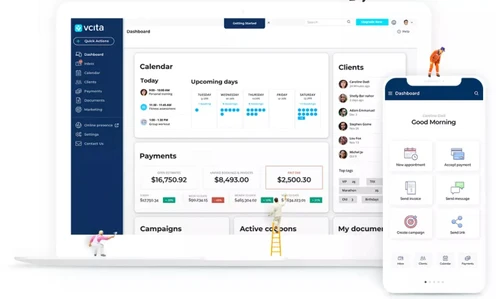
Vcita helps service-based businesses manage scheduling, payments, client relationships, and marketing from a single dashboard.

See More

Have you used Vcita before?

Share your insights for better experience

Add a Review

Price Available on Request

Questions about pricing or customization? We’re here to help, just a click away.

100% Genuine
Products
Best Price
Guaranteed
Safe & Secure
Payment
  • Description

  • Pricing

  • Features

  • Specification

  • Review

  • Compare

  • Alternatives

  • FAQ

Vcita Software Overview

What is Vcita?

Vcita BPM (Business Process Management) software is an easy-to-use all-in-one platform designed mainly for small businesses to manage their operations smoothly.

It helps businesses handle client management, appointment scheduling, payment collection, invoicing, and communication all in one place.

Vcita includes an AI assistant called BizAI that automates repetitive tasks like booking and replying to clients, saving time. Clients can book appointments online anytime through a self-service calendar that syncs with business schedules.

The software also supports marketing through email and SMS campaigns to help businesses grow. It offers a secure client portal where customers can book, pay, and communicate directly with the business.

Vcita integrates easily with popular tools like Stripe, PayPal, QuickBooks, and Zoom. The platform makes managing staff schedules, tracking payments, and running reports simple, even without technical skills.

Why Choose Vcita BPM Software?

  • All-in-One Business Solution: Combines scheduling, payments, client management, and marketing in one platform.
  • User-Friendly Interface: Offers a simple, intuitive dashboard for easy navigation and use.
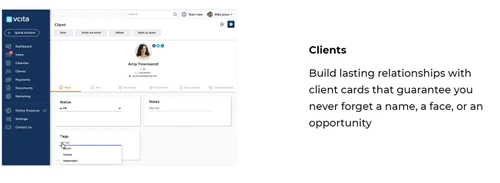
  • Powerful CRM Capabilities: Helps manage client relationships, track interactions, and store client data.
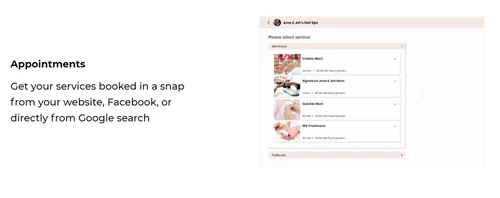
  • Automated Scheduling: Allows clients to book appointments online, reducing manual work.
  • Integrated Payment Processing: Enables secure, quick transactions through popular payment gateways.
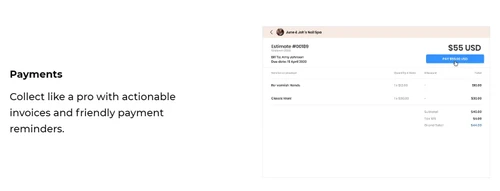
  • Invoice & Billing Management: Simplifies invoice creation, sending, and payment tracking.
  • AI-Powered Assistant (BizAI): Automates daily tasks and provides smart business insights.
  • Marketing Automation Tools: Runs targeted email and SMS campaigns to engage clients.
  • Customizable Client Portal: Provides clients a personalized space for bookings, payments, and communication.

Benefits of Vcita Software

  • Mobile App Availability: Lets users manage business operations anytime via mobile devices.
  • Team Collaboration Features: Supports internal communication, task delegation, and progress tracking.
  • Calendar Integration: This BPM software syncs with Google, Outlook, and iCal to avoid scheduling conflicts.
  • Data Security and Compliance: Ensures data safety with encryption and regulatory compliance.
  • Client Communication Hub: Centralizes all client messages and notifications in one place.
  • Custom Branding Options: Allows adding logos and colors for a branded client experience.
  • Analytics and Reporting: Delivers real-time insights into performance and financial data.
  • Lead Capture and Nurturing: Vcita BPM software collects leads from your website and automates follow-up messages.
  • Integration with Popular Tools: Connects seamlessly with Zoom, QuickBooks, and Mailchimp.
  • Excellent Customer Support: Provides dependable assistance through chat, email, and guides.
  • Scalable for Business Growth: Adapts to businesses of any size, from solo users to large teams.

Vcita Pricing

Vcita price starts at $24 at techjockey.com.

The pricing model is based on different parameters, including extra features, deployment type, and the total number of users. For further queries related to the product, you can contact our product team and learn more about the pricing and offers.

Read more

Vcita Pricing & Plans

ESSENTIALS
Key Features
  • Client management
  • Secure client portal
  • Online lead capturing widget
  • Client management
  • Customized billing & invoicing workflows
  • E-signable estimates
  • Accept payments through various integrations: Stri
  • Automated campaigns

Calculated Price

$ 24 Exclusive of all taxes
    • Licenses

      Licenses
      Licenses
    • Monthly

      Monthly
      Monthly

Key Features

  • Client management

  • Secure client portal

  • Online lead capturing widget

  • Client management

  • Customized billing & invoicing workflows

  • E-signable estimates

  • Accept payments through various integrations: Stri

  • Automated campaigns

Vcita Features

  • icon_check Appointment Scheduling
    Let clients book and reschedule appointments online while keeping your business calendar organized and up to date.
  • icon_check Marketing Automation
    Automate welcome messages, reminders, re-engagement campaigns, birthday greetings, and other client communications.
  • icon_check Client Relationship Management
    Centralize client information, communication, appointments, payments, notes, and documents in one organized workspace.
  • icon_check Billing & Invoicing
    Create customized invoices, send them to clients, track payments, and automate reminders for outstanding balances.
  • icon_check Client Portal
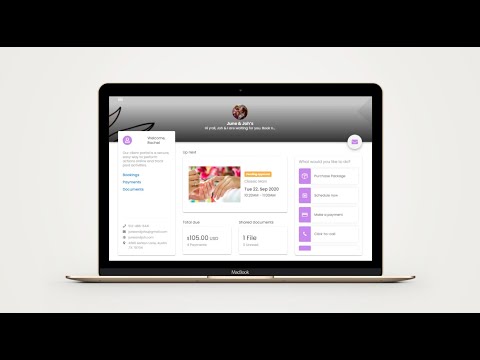
    Provide a secure branded portal where clients can book services, make payments, share documents, and communicate.
  • icon_check Email Marketing
    Create branded email campaigns with templates, personalized content, calls to action, and performance tracking.
  • icon_check SMS Marketing
    Send promotional messages, updates, and offers through SMS to engage clients and encourage repeat business.
  • icon_check Alerts & Notifications
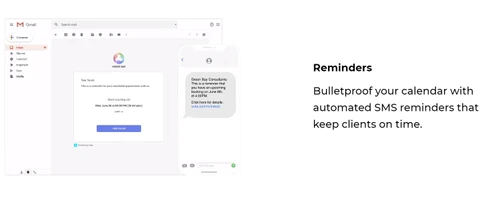
    Send automated email or SMS reminders for upcoming appointments and help reduce missed meetings and no-shows.
  • icon_check Reviews Management
    Automatically request client reviews after appointments and manage feedback to strengthen online reputation.
  • icon_check Client Management
    Manage client profiles, interactions, tags, documents, payment history, and other information from one platform.
  • icon_check Calendar Management
    Manage appointments, meetings, staff availability, and schedules while syncing with supported external calendars.
  • icon_check Lead Management
    Capture, organize, track, and convert leads into clients using CRM tools, notifications, and automated workflows.
  • icon_check Reports & Analytics
    Monitor bookings, payments, clients, marketing, and staff performance through business reports and insights.
Vcita Demo Video play icon

Get Vcita Demo

Watch the demo video to explore key features, real workflows, and how the software fits your business needs.

Understand
Key Features
Personal
Demo Insights
Interactive
Demo Support

Vcita Specifications

Supported Platforms
Ubuntu Ubuntu Windows Windows iOS iOS Android Android MacOS MacOS Linux Linux
Devices
Desktop Desktop Mobile Mobile
Deployment
Cloud-Based Cloud-Based
Suitable For
All Industries
Business Specific
All Businesses
Business Size
Small Business Medium Business SMBs SMEs MSMBs
Customer Support
Email Live Chat Forums
Language
English français Español
Integration
API Integration
Training Resources
Webinars Videos
AI Features
AI Integrated

Explore the Best Alternative Solutions Similar to Your Business Size and Needs

Vcita Review

4.5

Out of 5

img

Overall Rating

Based on
4 Verified Ratings

Rating Breakdown

  • Features 4.2
  • Value for Money 4.5
  • Ease of Use 4.5
  • Customer Support 4.7

85% Recommend this Product

Add Review

Techjockey Trusted Reviews from Verified Users

No reviews are currently available for Vcita. Discover similar BPM Software reviews

  • Bonita BPM

    4.4

    Whats great - I found Bonita Software. It delivers vital capabilities like assigning roles and permissions, developing composite applicatio... read more

  • OnexFlow

    5.0

    Whats great - Onex flow has been a genuinely significant part of our organization. Without leaving my desks, I can collaborate with staff f... read more

  • Newton BPM

    4.6

    Whats great - Newton is a decent decision, usability for the new clients, and when you dive in there's a strong framework to help. read more
Compare Vcita With other BPM Software

Products
Ratings
Pricing
Device Supported
Deployment
Supported Platforms
  • img

    Vcita

  • 4.5

  • Price On Request

  • Desktop

    Mobile

  • Web based

    On Premises

  • Windows

    Mac OS

  • img

    CollabCRM

  • 4.2

  • Price On Request

  • Desktop

    Mobile

  • Web based

    On Premises

  • Windows

    Mac OS

  • img

    Bonita BPM

  • 4.4

  • Price On Request

  • Desktop

    Mobile

  • Web based

    On Premises

  • Windows

    Mac OS

  • img

    Pronnel

  • 4.8

  • Price On Request

  • Desktop

    Mobile

  • Web based

    On Premises

  • Windows

    Mac OS

  • img

    Gravity Flow

  • 4.1

  • Price On Request

  • Desktop

    Mobile

  • Web based

    On Premises

  • Windows

    Mac OS

  • img

    OnexFlow

  • 5

  • Price On Request

  • Desktop

    Mobile

  • Web based

    On Premises

  • Windows

    Mac OS

  • img

    Posse

  • 4.4

  • Price On Request

  • Desktop

    Mobile

  • Web based

    On Premises

  • Windows

    Mac OS

  • img

    Prime BPM

  • 4.1

  • Price On Request

  • Desktop

    Mobile

  • Web based

    On Premises

  • Windows

    Mac OS

  • img

    Automaited

  • 4.2

  • Price On Request

  • Desktop

    Mobile

  • Web based

    On Premises

  • Windows

    Mac OS

  • img

    Modelio

  • 4.3

  • Price On Request

  • Desktop

    Mobile

  • Web based

    On Premises

  • Windows

    Mac OS

  • img

    Camunda-Platform

  • 4.0

  • Price On Request

  • Desktop

    Mobile

  • Web based

    On Premises

  • Windows

    Mac OS

(2) Product(s) selected

Vcita Alternatives

See All Vcita Alternatives

Available

Price on Request

Available

Price on Request

Available

Price on Request

Available

Price on Request

Available

Price on Request

Available

Price on Request

Available

Price on Request

Available

Price on Request

Articles for Vcita

See All Related Articles

How much does Vcita Software cost?

Vcita Software pricing starts at $24 on techjockey.com.

Is there a mobile app available for Vcita BPM Software?

Yes, Vcita offers an Android and iOS mobile app for both Android and iOS users.

Which operating systems are compatible with Vcita Software?

Vcita is compatible with Windows, macOS, Android, Ubuntu, Linux and iOS operating systems.

Does Vcita Software offer a free trial?

Yes, Vcita provides a free trial for new users to explore its features.

How does Vcita Software function?

Vcita BPM software functions as an all-in-one business management platform for scheduling, billing, CRM, and marketing.

Who uses Vcita Software?

Vcita is used by small businesses, consultants, coaches, tutors, and service providers.

Is a free demo available for Vcita BPM Software?

Yes, a free demo of Vcita BPM Software is available upon request.

Is Vcita Software available for free?

No, Vcita is a paid software, but Vcita offers a free trial period.

20,000+ Software Listed

Best Price Guranteed

Free Expert Consultation

2M+ Happy Customers

Terms and Condtions

close

Users with registered businesses can purchase goods from merchants on the platform to satisfy their business needs. Users are not permitted to utilize any products acquired through the platform for resale, advertising, business, or further distribution.

For each purchase made, users will receive a Tax Invoice (or 'GST invoice') that includes specific details such as:

  • the GSTIN of the user associated with their registered business, and

  • the specified Entity Name for their business.

It should be noted that not all products are eligible for GST Invoice. Only the products displayed by participating sellers with the 'GST-based Invoice Available' callout on the product description page would qualify.

Certain goods and services are not eligible to get a GST Invoice, including items with VAS, i.e., Value Added Services (e.g., Total Mobile Protection/Assured Buyback) and those involving an exchange offer at the time of purchase.

Users must ensure the accuracy of the GSTIN, and business entity name provided for the GST Invoice. Requests for corrections into GST Invoice would not be accommodated by Techjockey.com or any Seller, and any issues arising from user-provided information are the sole responsibility of users.

Techjockey.com is not liable for the GST Invoice or any associated input tax credit. To efficiently claim an input tax credit, users should select the registered place of business address as per the GST authority's data and follow the provisions of the GST Act and rules.

To claim an input tax credit, the delivery and billing addresses must match. Furthermore, input tax credits will not be granted if the delivery address and GSTIN on the invoice are from different states. In case of incorrect GST details provided during the order placement, the order will be canceled automatically.