linkedin
Visual Copilot logo
play Introducing Visual Copilot - Design to Code in a Click
Visual Copilot AI
Visual Copilot Code Generation

Visual Copilot

Brand: Builder.io

  • 4.4

  • 6 Ratings

Visual Copilot manages Figma-to-code, saving time with AI-powered conversion, extensive framework support, and Builder.io integration.

See More

Have you used Visual Copilot before?

Share your insights for better experience

Add a Review
Starting Price
$19

View plans

100% Genuine
Products
Best Price
Guaranteed
Safe & Secure
Payment
  • Description

  • Pricing

  • Features

  • Specification

  • Review

  • Compare

  • Alternatives

  • FAQ

Starting at $19

Visual Copilot Software Overview

What is Visual Copilot?

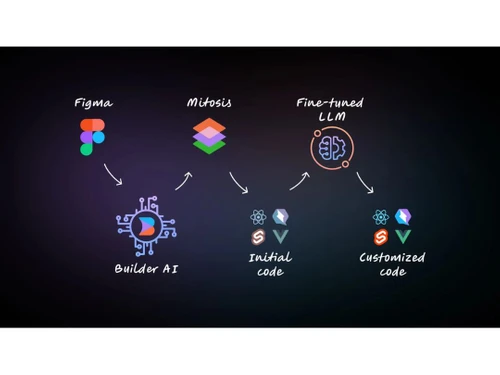
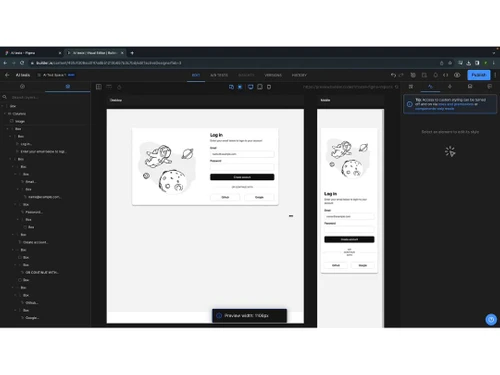
Visual Copilot is a Figma-to-code tool with an intuitive interface. It uses AI to analyze Figma designs and easily converts them into React, Vue, or other frameworks, all in real time. Thus, it easily helps to code Figma designs into desired frameworks. The AI model is trained on 2 million data points and can thus code in real time. It transforms design structures into code hierarchies. The code is refined further using an open-source compiler, Mitosis. With one click, the developers can generate high-quality components and code them with better quality and responsiveness across screen sizes. It allows customizable code structures using various libraries. It can be integrated with Builder.io, which helps to make production deployment live instantly.

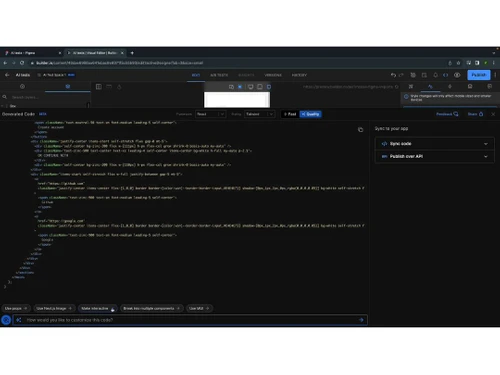
It provides a one-click conversion of Figma designs into high-quality components using AI-powered models. The components are automatically adjustable, giving responsiveness to fit all screen sizes and removing the need for manual adjustments for various devices. This tool supports popular frameworks like React, Vue, Svelte, Angular, Qwik, Solid, and HTML. It also provides styling libraries, including plain CSS, Tailwind, Emotion, Styled Components, etc., to provide clean and easy-to-read code. It allows the developers to structure generated code according to their preferences and supports integration by copying code directly from it. It supports updates of live sites in real-time through a robust publishing API, thus reducing the need for manual code deployment.

Why Choose Visual Copilot Software?

  • Easy conversion:Converting complex Figma designs into clean code is easy and effortless, reducing development time.
  • Framework flexibility:It supports translating diverse Figma designs into Vue, Svelte, or Angular code, ensuring adaptability to various development frameworks.
  • Responsive design automation:It helps automate responsiveness across screen sizes, reducing the need for manual adjustments.
  • Styling library compatibility:Allows for customizing code with preferred styling libraries like Tailwind or Styled Components.
  • Real-Time Deployment with Builder.io:Helps to make the transition from design to live production faster with a single click by deploying designs via Builder.io.

Benefits of Visual Copilot AI Code Generator

  • Time efficiency: Helps to save 50-80% of development time through automation and one-click conversion from Figma to code using AI.
  • Adaptive responsiveness: Automatic screen-size adjustments help to ensure responsive design without manual interventions.
  • Framework versatility: Its support for React, Vue, Angular, etc., offers flexibility and accommodates diverse development needs.
  • Code customization: Allows users to easily customize code structures, ensuring consistency and adaptability.
  • Live deployment: Supports real-time integration with Builder.io, enabling quick publishing and reducing steps from design to live production.

Pricing of Visual Copilot AI Code Generator Platform

Visual Copilot AI code generator platform pricing is available on request at techjockey.com.

Its price in India may vary based on factors like customization, additional features required, number of users, and the deployment type. Please request a call back for subscription-related details and to avail offers on premium packages.

Read more

Builder.io Company Details

Founded Year:  2018

Builder.io caters drag-and-drop visual editor, a headless content management system, and Developer Tools.

Director/Founders Brent Locks, Steve Sewell
Company Size 1-100 Employees

Visual Copilot Pricing & Plans

Pro
Key Features
  • Pay-as-you-go for more usage
  • 128k Context Window
  • 30-day Activity History
  • Standard Support
Starting at $19
    • Users

      Users
      Users
    • Monthly

      Monthly
      Monthly

Key Features

  • Pay-as-you-go for more usage

  • 128k Context Window

  • 30-day Activity History

  • Standard Support

Visual Copilot Features

  • icon_check AI Code Generators
    Use advanced AI models to convert design structures easily and efficiently into clean code.
  • icon_check Artificial Intelligence
    Use specialized AI training with 2 million data points for accurate, adaptive code from Figma designs.
  • icon_check Automatic Responsiveness
    Get flawless user experiences across devices with automatic responsiveness, reducing manual adjustments.
  • icon_check Customizable Code Structure
    Customize generated code to the preferences of styling needs, ensuring flexibility and consistency.
  • icon_check Easy Integration
    Simplify development workflows with code integration, reducing friction in the transition from design to implementation.
  • icon_check Plugins
    Enhance functionality with versatile plugins, extending the capabilities to get a feature-rich experience.
  • icon_check Visual Editing
    Manage design-to-code processes with visual editing tools, helping in a collaborative environment.
  • icon_check Export Code
    Easily export clean, structured code and manage integrating designs into live production.
Visual Copilot Demo Video play icon

Get Visual Copilot Demo

Watch the demo video to explore key features, real workflows, and how the software fits your business needs.

Understand
Key Features
Personal
Demo Insights
Interactive
Demo Support

Visual Copilot Specifications

Supported Platforms
Ubuntu Ubuntu Windows Windows MacOS MacOS Linux Linux
Devices
Desktop Desktop Mobile Mobile Tablet Tablet iPad iPad
Deployment
Cloud-Based Cloud-Based
Suitable For
All Industries
Business Specific
All Businesses
Business Size
Small Business Medium Business Enterprises
Customer Support
Email Communities
Language
English
Training Resources
Videos
AI Features
AI Integrated

Explore the Best Alternative Solutions Similar to Your Business Size and Needs

Visual Copilot Review

4.4

Out of 5

img

Overall Rating

Based on
6 Verified Ratings

Rating Breakdown

  • Features 4.4
  • Value for Money 4.5
  • Ease of Use 4.5
  • Customer Support 4.1

91% Recommend this Product

Add Review

Be the First to Review

This product has no reviews yet. Be the first to leave your feedback.

Add Review

Compare Visual Copilot With other AI Code Generators

Products
Ratings
Pricing
Device Supported
Deployment
Supported Platforms
  • img

    Visual Copilot

  • 4.4

  • Price On Request

  • Desktop

    Mobile

  • Web based

    On Premises

  • Windows

    Mac OS

  • img

    Emergent

  • 3.9

  • Price On Request

  • Desktop

    Mobile

  • Web based

    On Premises

  • Windows

    Mac OS

  • img

    Deepcode AI

  • 4.1

  • Price On Request

  • Desktop

    Mobile

  • Web based

    On Premises

  • Windows

    Mac OS

  • img

    Lovable

  • 4.3

  • Price On Request

  • Desktop

    Mobile

  • Web based

    On Premises

  • Windows

    Mac OS

  • img

    CodeAnt AI

  • 4.4

  • Price On Request

  • Desktop

    Mobile

  • Web based

    On Premises

  • Windows

    Mac OS

  • img

    Anima

  • 4.3

  • ₹ 1999

  • Desktop

    Mobile

  • Web based

    On Premises

  • Windows

    Mac OS

  • img

    Codiga

  • 4.2

  • Price On Request

  • Desktop

    Mobile

  • Web based

    On Premises

  • Windows

    Mac OS

  • img

    BlackBox AI

  • 4.7

  • Price On Request

  • Desktop

    Mobile

  • Web based

    On Premises

  • Windows

    Mac OS

  • img

    Kodezi

  • 4.6

  • Price On Request

  • Desktop

    Mobile

  • Web based

    On Premises

  • Windows

    Mac OS

  • img

    Cursor

  • 4.2

  • Price On Request

  • Desktop

    Mobile

  • Web based

    On Premises

  • Windows

    Mac OS

  • img

    ZZZ Code AI

  • 4.4

  • Price On Request

  • Desktop

    Mobile

  • Web based

    On Premises

  • Windows

    Mac OS

(2) Product(s) selected

Visual Copilot Alternatives

See All Visual Copilot Alternatives

Starting Price:

$20 /Month

Starting Price:

$25 /Month

Available

Price on Request

Starting Price:

$15 /Month

Available

Price on Request

Starting Price:

$19 /Month

Starting Price:

$10 /Month

Articles for Visual Copilot

See All Related Articles

Which operating system does Visual Copilot support?

Visual Copilot is compatible with Windows, MacOS, Linux, and Ubuntu operating systems.

Is there any Visual Copilot app?

Visual Copilot app is not available for mobile devices.

What is the deployment type of Visual Copilot?

Visual Copilot supports web-based deployment.

How much does Visual Copilot cost?

Visual Copilot pricing is available on request at techjockey.com.

Who are the potential users of Visual Copilot?

Visual Copilot is typically used in the coding and web design industry by coders and designers to convert Figma design into clean and responsive code for various web frameworks and styling.

Is there any free trial or demo for Visual Copilot?

Visual Copilot demo is available for free with techjockey.com.

Is Visual Copilot free?

Visual Copilot does not offer a free trial. However, the premium plan with advanced features is available at techjockey.com with exciting deals.

How can you download Visual Copilot?

Visual Copilot installation is not required, as it is web-based/cloud-based. Just open the Setup Wizard to get started.

How does Visual Copilot work?

Visual Copilot helps with development with AI-driven Figma-to-code conversion, automatic responsiveness, customizable structures, easy integration, and Builder.io deployment, increasing efficiency and collaboration.

20,000+ Software Listed

Best Price Guranteed

Free Expert Consultation

2M+ Happy Customers

Terms and Condtions

close

Users with registered businesses can purchase goods from merchants on the platform to satisfy their business needs. Users are not permitted to utilize any products acquired through the platform for resale, advertising, business, or further distribution.

For each purchase made, users will receive a Tax Invoice (or 'GST invoice') that includes specific details such as:

  • the GSTIN of the user associated with their registered business, and

  • the specified Entity Name for their business.

It should be noted that not all products are eligible for GST Invoice. Only the products displayed by participating sellers with the 'GST-based Invoice Available' callout on the product description page would qualify.

Certain goods and services are not eligible to get a GST Invoice, including items with VAS, i.e., Value Added Services (e.g., Total Mobile Protection/Assured Buyback) and those involving an exchange offer at the time of purchase.

Users must ensure the accuracy of the GSTIN, and business entity name provided for the GST Invoice. Requests for corrections into GST Invoice would not be accommodated by Techjockey.com or any Seller, and any issues arising from user-provided information are the sole responsibility of users.

Techjockey.com is not liable for the GST Invoice or any associated input tax credit. To efficiently claim an input tax credit, users should select the registered place of business address as per the GST authority's data and follow the provisions of the GST Act and rules.

To claim an input tax credit, the delivery and billing addresses must match. Furthermore, input tax credits will not be granted if the delivery address and GSTIN on the invoice are from different states. In case of incorrect GST details provided during the order placement, the order will be canceled automatically.