linkedin
Zed logo
Zed-editor
Zed-console
Zed-debugger

Zed

Brand: Zed Industries

  • No Ratings & Reviews

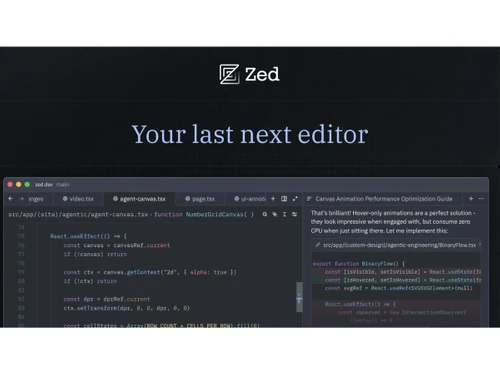
Zed AI helps developers generate, edit, explain, and improve code with built-in AI assistance and real-time collaboration features.

See More

Have you used Zed before?

Share your insights for better experience

Add a Review
Starting Price
$10

View plans

100% Genuine
Products
Best Price
Guaranteed
Safe & Secure
Payment
  • Description

  • Pricing

  • Features

  • Specification

  • Review

  • FAQ

Starting at $10

Zed Software Overview

What is Zed?

Zed AI is an AI code generator designed to help developers write, edit, and understand code more efficiently. It combines a high-performance coding environment with built-in AI assistance. Developers can use AI to generate code, complete functions, explain code snippets, and fix errors. The platform supports collaborative coding, allowing teams to work together in real time.

Zed integrates with large language models to provide intelligent coding suggestions directly within the editor. It helps speed up software development by reducing repetitive coding tasks. The editor is designed to be fast, responsive, and optimized for modern development workflows. Developers can use it for multiple programming languages and projects. Zed also provides features for code navigation, editing, and project management. Its goal is to improve developer productivity by combining a powerful code editor with AI-driven coding assistance.

Why Choose Zed Software?

  • High-Speed Performance: Zed is built for speed, ensuring smooth coding and fast project navigation.
  • Open-Source Platform: Developers can inspect, customize, and contribute to the software freely.
  • AI-Powered Coding Assistance: Integrated AI features help generate, edit, and optimize code efficiently.
  • Real-Time Collaboration: Teams can work together on the same codebase simultaneously.
  • Built with Rust: Its Rust-based architecture provides reliability, security, and performance.
  • Modern User Interface: The clean and intuitive interface improves developer productivity.
  • Lightweight Resource Usage: Zed consumes fewer system resources compared to many traditional IDEs.
  • Cross-Platform Support: It works across multiple operating systems, providing flexibility for developers.
  • Fast Startup Time: The editor launches quickly, reducing delays in development workflows.

Benefits of Zed Software

  • Advanced Code Editing Tools: Offers intelligent editing features for faster and more accurate coding.
  • Git Integration: Built-in Git support simplifies version control and code management.
  • Extensible Functionality: Developers can enhance capabilities through extensions and plugins.
  • Multi-Language Support: Supports a wide range of programming languages and frameworks.
  • Efficient Project Management: Handles large projects smoothly without compromising performance.
  • Enhanced Developer Productivity: Automation and smart features help reduce repetitive tasks.
  • Collaborative Development Environment: Ideal for distributed teams working on shared projects.
  • Regular Updates: Frequent improvements ensure access to the latest features and fixes.
  • Secure Development Experience: Modern security practices help protect development environments.
  • Community-Driven Innovation: An active developer community contributes to continuous enhancements.
  • Future-Ready Technology: Zed combines AI, collaboration, and high performance to meet evolving development needs.

Zed Pricing

Zed price starts at USD 10 at techjockey.com.

The pricing model is based on different parameters, including extra features, deployment type, and the total number of users. For further queries related to the product, you can contact our product team and learn more about the pricing and offers.

Read more

Zed Industries Company Details

Founded Year:  2021

Zed Industries is a designer of a multi-user code editor.

Director/Founders Antonio Scandurra, Max Brunsfeld, Nathan Sobo
Company Size 1-100 Employees

Zed Pricing & Plans

Pro
Starting at $10
    • Licenses

      Licenses
      Licenses
    • Monthly

      Monthly
      Monthly

Key Features

  • Unlimited edit predictions

  • $5 of tokens included

  • Usage-based billing beyond $5

Business
Starting at $30
    • Licenses

      Licenses
      Licenses
    • Monthly

      Monthly
      Monthly

Key Features

  • Org-wide AI model policies

  • Data governance controls

  • Unified spend visibility

  • Unlimited edit predictions

  • Role-based access controls

Zed Features

  • icon_check AI Code Completion
    Provides intelligent real-time code suggestions to accelerate development and reduce repetitive coding tasks.
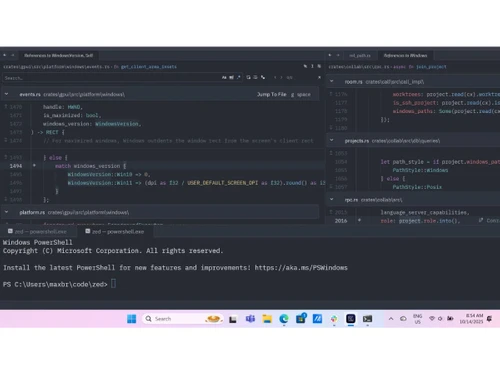
  • icon_check Integrated Terminal
    Allows developers to run shell commands and scripts directly inside the editor without switching apps.
  • icon_check Version Control
    Supports Git-based workflows for tracking code changes, branching, commits, and collaboration tasks.
  • icon_check Real-Time Collaboration
    Enables multiple developers to edit and review code together simultaneously within shared sessions.
  • icon_check Workspace Management
    Helps organize projects, files, tabs, and development environments for efficient productivity.
  • icon_check Split Screen
    Enables developers to work on multiple files side-by-side for easier navigation and comparison.
  • icon_check AI Chat Assistant
    Includes conversational AI assistance for debugging, code generation, explanations, and refactoring.
  • icon_check Cross-Platform Compatibility
    Works across Windows, Linux, and macOS systems to provide a consistent development experience.
  • icon_check Customizable Themes
    Allows developers to personalize editor appearance with themes, fonts, and layout configurations.
  • icon_check File Explorer
    Provides structured navigation and management of project directories and development resources.
  • icon_check Low Latency
    Delivers fast response times and smooth editing performance using a Rust-based architecture.
  • icon_check Plugin Support
    Enables third-party extensions to add specialized developer tools and workflow enhancements.
  • icon_check Code Refactoring
    Helps restructure and optimize code safely while maintaining functionality and improving readability.

Zed Specifications

Supported Platforms
Windows Windows MacOS MacOS Linux Linux
Devices
Desktop Desktop
Deployment
Cloud-Based Cloud-Based
Suitable For
All Industries
Business Specific
All Businesses
Business Size
Individual Small Business Startups Medium Business Enterprises SMBs SMEs Freelancers
Customer Support
Email Communities Forums
Language
English
Integration
API Integration
Training Resources
Documentation Videos
AI Features
AI Integrated
Technology
Next Generation

Zed Review

Be the First to Review

This product has no reviews yet. Be the first to leave your feedback.

Add Review

How much does Zed Software cost?

Zed Software pricing starts at USD 10 per month on techjockey.

Is there a mobile app available for Zed Software?

No, Zed is primarily a desktop-based code editor and does not currently offer a dedicated mobile app.

Which operating systems are compatible with Zed Software?

Zed is compatible with MacOS, Linux, and Windows.

Does Zed Software offer a free trial?

Yes, Zed offers a free trial.

How does Zed Software function?

Zed functions as a high-performance code editor that provides AI assistance, real-time collaboration, and advanced development tools.

Who uses Zed Software?

Software developers, programmers, engineering teams, and technology companies use Zed for coding and collaboration.

Is a free demo available for Zed Software?

Yes, users can explore the software through its free version and available documentation.

Is Zed Software available for free?

Yes, Zed is open-source and offers a free version for individual developers.

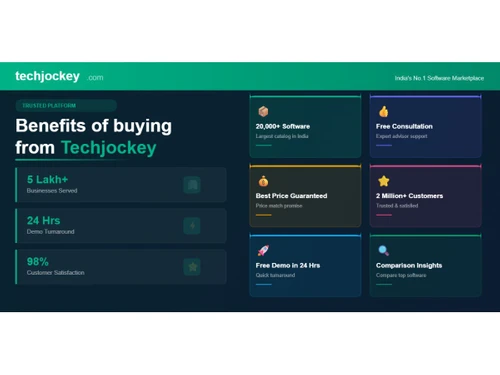
20,000+ Software Listed

Best Price Guranteed

Free Expert Consultation

2M+ Happy Customers

Terms and Condtions

close

Users with registered businesses can purchase goods from merchants on the platform to satisfy their business needs. Users are not permitted to utilize any products acquired through the platform for resale, advertising, business, or further distribution.

For each purchase made, users will receive a Tax Invoice (or 'GST invoice') that includes specific details such as:

  • the GSTIN of the user associated with their registered business, and

  • the specified Entity Name for their business.

It should be noted that not all products are eligible for GST Invoice. Only the products displayed by participating sellers with the 'GST-based Invoice Available' callout on the product description page would qualify.

Certain goods and services are not eligible to get a GST Invoice, including items with VAS, i.e., Value Added Services (e.g., Total Mobile Protection/Assured Buyback) and those involving an exchange offer at the time of purchase.

Users must ensure the accuracy of the GSTIN, and business entity name provided for the GST Invoice. Requests for corrections into GST Invoice would not be accommodated by Techjockey.com or any Seller, and any issues arising from user-provided information are the sole responsibility of users.

Techjockey.com is not liable for the GST Invoice or any associated input tax credit. To efficiently claim an input tax credit, users should select the registered place of business address as per the GST authority's data and follow the provisions of the GST Act and rules.

To claim an input tax credit, the delivery and billing addresses must match. Furthermore, input tax credits will not be granted if the delivery address and GSTIN on the invoice are from different states. In case of incorrect GST details provided during the order placement, the order will be canceled automatically.