linkedin
Woocommerce logo
play What is WooCommerce?
WooCommerce
WooCommerce

Woocommerce

Brand: Woocommerce

  • 4.2

  • 5 Ratings & 1 Review

WooCommerce is a website builder that integrates seamlessly with WooCommerce, providing tools to enhance customer satisfaction and improve operational efficiency.

See More

Have you used Woocommerce before?

Share your insights for better experience

Add a Review

Price Available on Request

Questions about pricing or customization? We’re here to help, just a click away.

100% Genuine
Products
Best Price
Guaranteed
Safe & Secure
Payment
  • Description

  • Pricing

  • Features

  • Specification

  • Review

  • Compare

  • Alternatives

  • FAQ

  • Questions

Woocommerce Software Overview

What is WooCommerce?

WooCommerce is a system designed for online stores to handle returns, exchanges, and refunds effectively. As part of the powerful suite of website development tools, this plugin works with the popular WooCommerce platform, which is used by millions of e-commerce businesses worldwide. It provides businesses with essential business software tools to automate and manage return requests, enhancing the overall customer experience.

With WooCommerce , businesses can simplify the process of handling customer returns and refunds. The plugin allows businesses to create custom return policies, track product returns, and manage all aspects of the return process, such as refunds, exchanges, or store credits. This tool ensures smooth operations, helping businesses stay organized while ensuring customer satisfaction.

Why Choose WooCommerce Website Building Software?

  • Easy to Use: WooCommerce integrates easily with WooCommerce, making it simple to set up and manage return requests.
  • Improve Customer Experience: It allows customers to initiate returns directly, ensuring faster processing and increased satisfaction.
  • Customizable Options: WooCommerce allows businesses to customize return policies according to their specific needs, giving them flexibility.
  • Streamlined Process: The system automates many tasks associated with returns, saving businesses time and reducing errors.
  • Increased Efficiency: By managing returns, refunds, and exchanges in one place, businesses can improve overall efficiency and focus on growth.

Benefits of WooCommerce

  • Simplifies Returns and Refunds: WooCommerce makes returns and refunds easy to manage, improving customer satisfaction.
  • Enhances Customer Service: By providing a clear return process, businesses can offer better customer service.
  • Boosts Customer Trust: A straightforward returns policy can build trust with customers, encouraging repeat business.
  • Flexible Customization: Businesses can set up return policies, emails, and workflows that suit their unique needs.
  • Organizes Inventory: The system helps track returned items and manage stock levels, improving inventory accuracy.
  • Reduces Manual Work: Automated processes reduce the need for manual interventions, saving time and effort.
  • Store Credit and Refund Options: WooCommerce allows businesses to issue store credits or process refunds, offering flexibility to customers.
  • Better Management of Returns: With tools to track each return, businesses can ensure nothing gets lost or overlooked.
  • Detailed Reporting: The plugin provides insights into return patterns and reasons, helping businesses make informed decisions.
  • Improves Operational Efficiency: By automating key tasks, WooCommerce helps businesses streamline their processes, allowing for better resource allocation.

Pricing of WooCommerce

WooCommerce price is available on request at techjockey.com.

The pricing model is based on different parameters, including extra features, deployment type, and the total number of users. For further queries related to the product, you can contact our product team and learn more about the pricing and offers.

Read more

Woocommerce Pricing & Plans

Looking for The Right Pricing?

Share your requirements and get a plan built around your business.

  • Define your business needs
  • Get customised pricing
  • Choose features that fit your workflow

Price Available on Request

Get personalised Woocommerce pricing that fits your needs. Our team will connect with you.

Woocommerce Features

  • icon_check Return Management
    Streamline and track the process of handling returns, refunds, and exchanges, making it more efficient.
  • icon_check Returns, Refunds and Store Credits
    Simplifies the process for issuing returns, refunds, and store credits, improving customer satisfaction.
  • icon_check Customize
    Create custom return policies, email templates, and workflows based on specific business needs.
  • icon_check Stock Management
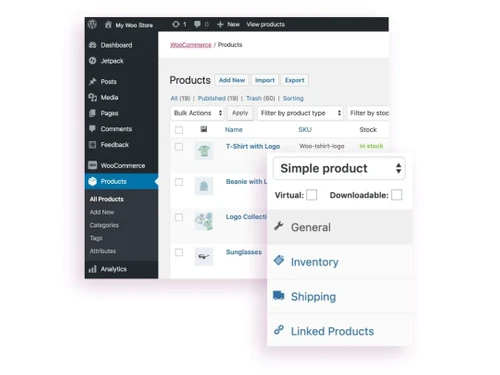
    Track the stock levels of returned items and manage inventory effectively with the system’s built-in tools.
  • icon_check Inventory Management
    Ensure that returned items are processed correctly in the inventory system to avoid stock discrepancies.
  • icon_check Order Management
    Simplify the management of orders, including those marked for return, exchange, or refund, in one place.
  • icon_check Email Templates
    Customize email notifications for returns, exchanges, or refunds to keep customers informed at each step.
  • icon_check Dashboards
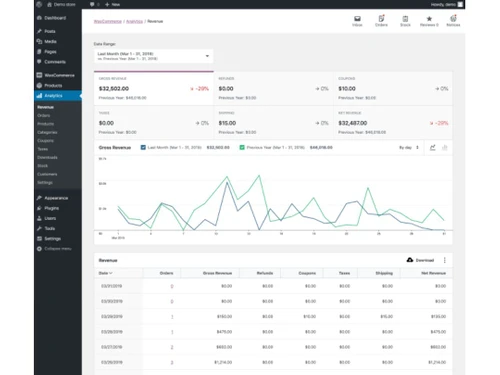
    Access user-friendly dashboards that provide an overview of the return process, orders, and customer interactions.
  • icon_check Reporting
    Get detailed insights and reports on return activities, helping businesses improve their policies and procedures.
Woocommerce Demo Video play icon

Get Woocommerce Demo

Watch the demo video to explore key features, real workflows, and how the software fits your business needs.

Understand
Key Features
Personal
Demo Insights
Interactive
Demo Support

Woocommerce Specifications

Supported Platforms
Windows Windows
Devices
Desktop Desktop
Deployment
Cloud-Based Cloud-Based
Suitable For
All Industries
Business Specific
All Businesses
Business Size
Small Business Medium Business SMBs
Customer Support
Email
Language
English
Training Resources
Documentation

Explore the Best Alternative Solutions Similar to Your Business Size and Needs

Woocommerce Review

4.2

Out of 5

img

Overall Rating

Based on
1 Verified Review

Rating Breakdown

  • Features 4
  • Value for Money 4.2
  • Ease of Use 4.4
  • Customer Support 4.4

90% Recommend this Product

Add Review

Woocommerce Video Review

youtubeVideoId

4.3

“WooCommerce Review 2025 – Is It Still the Best WordPress eCommerce Plugin”

Review by: WPGIZ

Compare Woocommerce With other Website Builder

Products
Ratings
Pricing
Device Supported
Deployment
Supported Platforms
  • img

    Woocommerce

  • 4.2

  • Price On Request

  • Desktop

    Mobile

  • Web based

    On Premises

  • Windows

    Mac OS

  • img

    Framer

  • 4.4

  • ₹ 4332

  • Desktop

    Mobile

  • Web based

    On Premises

  • Windows

    Mac OS

  • img

    Creative AI

  • 5

  • Price On Request

  • Desktop

    Mobile

  • Web based

    On Premises

  • Windows

    Mac OS

  • img

    Zoho Sites

  • 4.5

  • ₹ 280

  • Desktop

    Mobile

  • Web based

    On Premises

  • Windows

    Mac OS

  • img

    Readdy AI

  • 4.5

  • Price On Request

  • Desktop

    Mobile

  • Web based

    On Premises

  • Windows

    Mac OS

  • img

    Boost 360

  • 4.5

  • Price On Request

  • Desktop

    Mobile

  • Web based

    On Premises

  • Windows

    Mac OS

  • img

    Durable

  • 4.7

  • Price On Request

  • Desktop

    Mobile

  • Web based

    On Premises

  • Windows

    Mac OS

  • img

    Wegic AI

  • 4.2

  • Price On Request

  • Desktop

    Mobile

  • Web based

    On Premises

  • Windows

    Mac OS

  • img

    Webneed

  • 4.3

  • Price On Request

  • Desktop

    Mobile

  • Web based

    On Premises

  • Windows

    Mac OS

(0) Product(s) selected

Woocommerce Alternatives

See All Woocommerce Alternatives

Starting Price:

$25 /Month

Starting Price:

$15

Starting Price:

$24 /Month $40

SAVE UPTO 40%

Starting Price:

$49 /Month

Mixo

4.3

Starting Price:

$10

Starting Price:

$5 /Month

Starting Price:

$14

Articles for Woocommerce

See All Related Articles

What is WooCommerce?

WooCommerce is a plugin for WooCommerce that allows businesses to manage returns, refunds, and exchanges effectively. It simplifies the return process and helps businesses stay organized.

How does WooCommerce improve customer experience?

By allowing customers to easily initiate returns and exchanges, WooCommerce improves transparency and ensures faster resolution, leading to higher customer satisfaction.

Can I customize my return policy with WooCommerce?

Yes, WooCommerce allows businesses to create customized return policies that fit their specific requirements, offering flexibility in how returns are handled.

Does WooCommerce help with inventory management?

Yes, WooCommerce helps track returned items and manage stock levels efficiently, reducing inventory discrepancies.

How can WooCommerce streamline the return process?

The plugin automates many tasks associated with returns and refunds, reducing manual work and speeding up the process for businesses.

Can customers receive store credits through WooCommerce ?

Yes, WooCommerce allows businesses to issue store credits in addition to processing refunds, providing flexibility to customers.

Is WooCommerce easy to integrate with WooCommerce?

Yes, WooCommerce integrates seamlessly with WooCommerce, making it easy to set up and manage returns directly from your store.

How can WooCommerce improve operational efficiency?

By automating the return and refund processes, WooCommerce helps businesses save time, reduce errors, and focus on other areas of the business.

Can I track return reasons with WooCommerce ?

Yes, WooCommerce offers reporting tools that track return reasons, providing valuable insights to improve your business operations.

What kind of reporting features does WooCommerce offer?

WooCommerce provides detailed reports on return activities, helping businesses analyze return patterns and improve their processes.

Woocommerce Questions

A:

For digital products, Shopify, Gumroad, Podia, and SendOwl offer strong built-in delivery and licensing.

Dharminder Singh • Sep 19, 2026
Q:

Why do people switch away from WooCommerce?

Sumit Patel • Aug 12, 2026
A:

Users switch over plugin maintenance, hosting and security overhead, and performance, moving to hosted Shopify or BigCommerce.

Mukesh Kumar • Aug 26, 2026
A:

Avoid September 16–22, 2025, due to WooCommerce Subscriptions 7.9.0 and WooCommerce 10.2.1 releases, which include database updates and feature freezes.

rohan • Dec 8, 2025
A:

KPIs to prove the WooCommerce Subscriptions update improved team productivity without increasing risk, include reduced average ticket resolution time, fewer subscription-related escalations, increased first-contact resolution rate, and stable error or incident rates post-update.

Varun Chadha • Nov 28, 2025
Q:

How to set up a payment gateway in WooCommerce?

kawsali chakraborty • Sep 29, 2025
A:

To set up a payment gateway in WooCommerce:

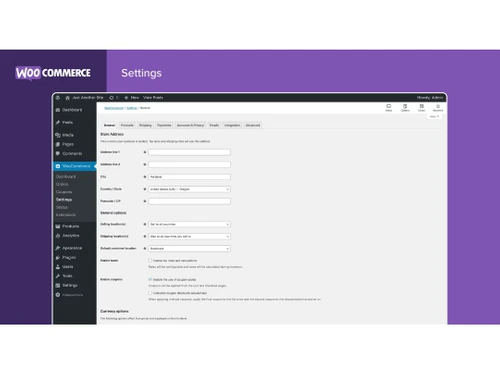
  • In your WordPress dashboard, go to WooCommerce > Settings > Payments.
  • Enable a payment method like Stripe or PayPal.
  • If not already installed, WooCommerce will prompt you to install the relevant plugin (e.g., WooCommerce Stripe Payment Gateway).
  • After installing, click Set up and enter your API credentials from your payment provider’s dashboard (test and live keys).
  • Enable test mode if you want to simulate transactions before going live.
  • Configure accepted payment methods (e.g., Visa, Mastercard) and optional settings like custom checkout messages or logging.
  • Test the checkout process using test card numbers (e.g., Stripe’s 4242 4242 4242 4242) to ensure the gateway works.
  • Customers will complete payments through the normal WooCommerce checkout page—not via a shared link.
  • View and manage transactions in WooCommerce > Orders.
  • Using services like Stripe or PayPal helps offload PCI compliance, since sensitive data is handled on their secure servers.
Gayatri Ware • Oct 8, 2025
See All Woocommerce Questions

20,000+ Software Listed

Best Price Guranteed

Free Expert Consultation

2M+ Happy Customers

Terms and Condtions

close

Users with registered businesses can purchase goods from merchants on the platform to satisfy their business needs. Users are not permitted to utilize any products acquired through the platform for resale, advertising, business, or further distribution.

For each purchase made, users will receive a Tax Invoice (or 'GST invoice') that includes specific details such as:

  • the GSTIN of the user associated with their registered business, and

  • the specified Entity Name for their business.

It should be noted that not all products are eligible for GST Invoice. Only the products displayed by participating sellers with the 'GST-based Invoice Available' callout on the product description page would qualify.

Certain goods and services are not eligible to get a GST Invoice, including items with VAS, i.e., Value Added Services (e.g., Total Mobile Protection/Assured Buyback) and those involving an exchange offer at the time of purchase.

Users must ensure the accuracy of the GSTIN, and business entity name provided for the GST Invoice. Requests for corrections into GST Invoice would not be accommodated by Techjockey.com or any Seller, and any issues arising from user-provided information are the sole responsibility of users.

Techjockey.com is not liable for the GST Invoice or any associated input tax credit. To efficiently claim an input tax credit, users should select the registered place of business address as per the GST authority's data and follow the provisions of the GST Act and rules.

To claim an input tax credit, the delivery and billing addresses must match. Furthermore, input tax credits will not be granted if the delivery address and GSTIN on the invoice are from different states. In case of incorrect GST details provided during the order placement, the order will be canceled automatically.