USA
USA UAE
UAESmall Business
Designed for startups and growing businesses
See More




Brand: Zerodha
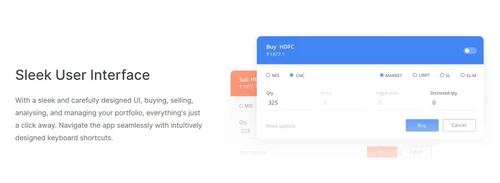
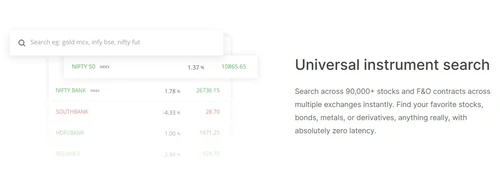
Zerodha Kite is one of the most secure trading platforms for those who want to invest in share market. This investment platform allows users to scan across 90,000 plus stock options, bonds, derivatives, etc. The user-friendly interface of Zerodha Kite makes it easy for the beginners to learn the nuances of buying and selling and managing a stock portfolio. Zerodha Kite app provides access to the ...
See MoreHave you used Zerodha Kite before?
Share your insights for better experience
Brand: Zerodha
Founded Year: 2010
Zerodha is an Indian financial services company that offers brokerage-free equity investments, institutional broking, and commodities trading.
Looking for The Right Pricing?
Share your requirements and get a plan built around your business.
Price Available on Request
Get personalised Zerodha Kite pricing that fits your needs. Our team will connect with you.
Core Features
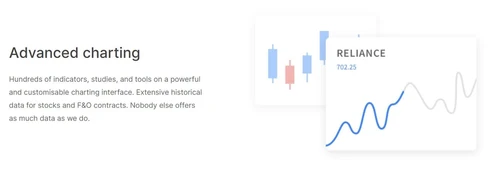
 Portfolio Management Market Data Watchlist Charting Tools Order Control Order Execution
 Order Execution
Limit Order Market Order Stop (Loss) Order Stop Limit Orders Trailing Stop Order Research and Analysis
Technical Analysis Fundamental Analysis Pattern Recognition Scanning Tools Backtesting and Optimization Smart drawing tools Trading Options
Mutual Funds Paper Trading Intraday Trading Algorithm Trading Options Trading Futures Trading Forex Trading Automatic Trading Margin Trading (MTF) Stock SIP Crypto Trading Account Management
Multi-Factor Authentication (MFA) Demat Account Creation Platform Migration Customizable User Interface Integrations
API Integration Financial Tools Integration Reporting & Analytics
Dashboards Automated Reports Report Customization P&L Report Contract Note Financial Transaction Report (CashLedger) Alerts & Notification
Price Alert Real Time Market Updates News Alerts Volume Alerts 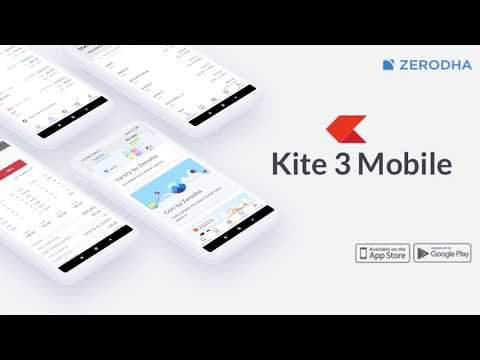

Watch the demo video to explore key features, real workflows, and how the software fits your business needs.
 iOS
iOS  Android
  Mobile
  Cloud-Based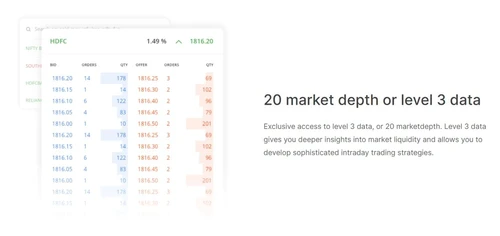
Small Business
Designed for startups and growing businesses
Medium Business
Built for business growth and flexibility
Enterprises
Designed for complex and large-scale business needs
4.2
Out of 5

Overall Rating
Based on
16 Verified Reviews
Rating Breakdown
77% Recommend this Product
Add ReviewCustomer sentiment towards Zerodha Kite is mixed, with a significant divide in experiences. Many users appreciate its user-friendly interface, innovative features, and robust support for both novice and experienced traders, highlighting its effectiveness for trading and educational resources. However, some users express frustration with customer service and compliance issues, citing delays and poor communication as major drawbacks. Overall, while many recommend Zerodha Kite for its trading capabilities, concerns about support and responsiveness persist.
Pros
"all thank to oliver that help me out is hard for me over three months now i have know peace of mind i lost everything i have."
"A unique trading platform that has a lot of unique features and tools. This is a many-in-one solution that is suited for both experienced and novice traders."
"Zerodha Kite is a simple to use but powerful trading platform for trading stocks, commodities, and options."
Cons
"Kite Platform, trading and investing,Technical Issues, No Physical Branch Support open only for promotion and advertisement, Very Poor Support teams for handling coustomer issues."
"if not for a best recovery expert that help me out through my pains and sorrow i will be grateful for your support and honest."
"Guys don't even schedule the call they not going to give you information about zerodha kite they have there another app and they want to sell that app. That's it."


Jan 13, 2021
Techjockey Verified
“Zerodha Kite - Trading made simple”
Pros
Trading is no longer a hassle, thanks to Zerodha KITE. It's a powerful front-end application that allows you to trade at BSE, NSE and MCX. It supports up to 10 regional languages and offers a simple, elegant interface. It's a free service, which is supported by Zerodha. Zerodha KITE is the best trading platform in India.
Cons
There are some minor issues with some charts, Otherwise it's good.
Reason to switch
Zerodha Kite has a ton of features that I haven't seen in any other trading platform
Feb 17, 2021
Techjockey Verified
“The simple, fast and free way to trade on the stock market with zerodha trading platform”
Pros
Zerodha KITE is a sleek, easy-to-use trading platform that's built on the latest technology. The platform offers a variety of services like Charts/Quotes, Portfolio Management, Intraday Trading, and Mobile Trading. The best part is, that I didn't need to pay any trading charges. I'm glad I tried out KITE.
Cons
Backtesting is not possible in Zerodha
Reason to switch
It's user-friendly, customizable, and offers a lot of new features from its competitors.
Dec 15, 2021
Techjockey Verified
“Build Trading Strategies in Minutes - Zerodha Kite”
Pros
Zerodha Kite is very well suited to retail traders in India. It is a light-weight version of the Zerodha trading platform. Zerodha Kite is user-friendly and easy to navigate. It is a great platform for those who are just starting out in the market and don't want to be spending a lot of time on the trading platform.
Cons
Although it does have a few drawbacks like a limited amount of charting tools and indicators.
Reason to switch
Zerodha kite is very well and suitable all types

Zerodha Kite
Price On Request
Desktop
Mobile
Web based
On Premises
Windows
Mac OS

Masterswift 2.0
Price On Request
Desktop
Mobile
Web based
On Premises
Windows
Mac OS
AlgoTest
Price On Request
Desktop
Mobile
Web based
On Premises
Windows
Mac OS

Pocketful
Price On Request
Desktop
Mobile
Web based
On Premises
Windows
Mac OS

StockMock
₹ 349
Desktop
Mobile
Web based
On Premises
Windows
Mac OS

Bajaj Broking
Price On Request
Desktop
Mobile
Web based
On Premises
Windows
Mac OS

Edelweiss TX3
Price On Request
Desktop
Mobile
Web based
On Premises
Windows
Mac OS

Bigul
Price On Request
Desktop
Mobile
Web based
On Premises
Windows
Mac OS
Trading Terminal
Price On Request
Desktop
Mobile
Web based
On Premises
Windows
Mac OS

QuantShare
Price On Request
Desktop
Mobile
Web based
On Premises
Windows
Mac OS

Fidelity
Price On Request
Desktop
Mobile
Web based
On Premises
Windows
Mac OS
(2) Product(s) selected
Starting Price:
$99
Available
Price on Request

Available
Price on Request
Available
Price on Request

Available
Price on Request

Available
Price on Request

Available
Price on Request

Available
Price on Request

Available
Price on Request
Only app installation is free. To start trading and investing, you need to open an account. The equity delivery investments have no brokerage fee and direct mutual fund investments have nil commissions and DP charges. For most other options, there are charges involved.
No. Kite is Zerodha brokerage firm’s flagship investment and trading platform. Zerodha offers products like Kite mobile, Kite Connect API, Smallcase, Coin, Sentinel, Streak. It has various other solutions like Zerodha Sensibull options trading platform too.
Yes, Kite is a trading platform by Zerodha. It uses security features like two factor authentication, biometric login, and more to ensure safe usage. Zerodha is regulated by SEBI and has not been involved in any major regulation violation. However, just like aby other trading platform, you should make wise trading and investment decisions to avoid monetary loss.
Zerodha Kite app is the mobile version of the zerodha Kite web trading platform. It is available for both Android and iOS.
Yes. The app is lightweight, has intuitive UI, and enables trading/ investment on the go. It also provides biometric login feature for better security.
Log in to Zerodha Kite account. Select the shares that you wish to purchase from your watchlist. Enter the quantity depending on the number of shares you want to buy. Click Cash and Carry (CNC) under the product section. Select Market as the order type. You can also place a limit, SL, or SLM order just like intraday shares.
Go to Zerodha Kite login. Add future scrip to your watchlist. For this, enter the name of the stock followed by space and F in search box. Click on the stock from your watchlist that you wish to buy. Click on buy in the trading window that opens. For intraday order, select MIS as product type, otherwise choose NRM in the new screen. In order type, select market to execute trade at current market rate or limit for a predefined price. For a regular order, select RGLR from variety section. Select DAY under validity. After ensuring you entered all details, click buy.
Use Zerodha Coin. Once you log in, type the name of an AMC or fund in the search bar. You will be shown performance, cost, and other important details related to the fund. You can view the mutual fund scheme documents with the exact terms and conditions by clicking on the link towards the end. Once you are sure, click on Buy direct option.
To add Nifty index, type ‘index’, or ‘nifty 50 index’ in the universal search bar. Add it to market watch by clicking on the '+' sign on the right of the result.
Log in to Zerodha Kite app. Search for the holdings you want to sell. Add it to your market watch by clicking on the '+' symbol. Click the sell option.
Log in to Zerodha Kite mobile app. Add funds to your Zerodha account. Add the desired shares to Market Watch. Place Buy order by clicking on buy and choosing the desired options based on intraday or long-term trading
Log in to the Zerodha Kite app. Search for the shares you want to sell and add it to market watch by clicking on the ‘+’ symbol. Tap the sell symbol and click the sell option.
After Zerodha Kite 3.0 login, go to the Funds page. Click on the Add Funds button. Enter the amount you want to add and select the payment method. Authorize the payment to complete the transaction. Amount will be reflected on your trading terminal after some time.
Visit Kite web platform or install mobile app. Enter the login ID and password given by Zerodha via email to your registered email address. A set of security questions will be prompted. Set them and you will be able to access the platform. You can also change the initial password if you want.
RSI is a widely used leading indicator that provides strong signals in sideways and non-trending market ranges.
7 0
Parabolic SAR, RSI, and Bollinger Bands are some of the popularly used indicators for swing trading in zerodha.
1 0
RSI (Relative Strength Index), MACD (Moving Average Convergence Divergence), Bollinger Bands, and Parabolic SAR (Stop and Reverse) are the best indicators for option trading in Zerodha.
3 1
Steps to add a nominee in Zerodha:
0 0
20,000+ Software Listed
Best Price Guranteed
Free Expert Consultation
2M+ Happy Customers
Terms and Condtions

Users with registered businesses can purchase goods from merchants on the platform to satisfy their business needs. Users are not permitted to utilize any products acquired through the platform for resale, advertising, business, or further distribution.
For each purchase made, users will receive a Tax Invoice (or 'GST invoice') that includes specific details such as:
the GSTIN of the user associated with their registered business, and
the specified Entity Name for their business.
It should be noted that not all products are eligible for GST Invoice. Only the products displayed by participating sellers with the 'GST-based Invoice Available' callout on the product description page would qualify.
Certain goods and services are not eligible to get a GST Invoice, including items with VAS, i.e., Value Added Services (e.g., Total Mobile Protection/Assured Buyback) and those involving an exchange offer at the time of purchase.
Users must ensure the accuracy of the GSTIN, and business entity name provided for the GST Invoice. Requests for corrections into GST Invoice would not be accommodated by Techjockey.com or any Seller, and any issues arising from user-provided information are the sole responsibility of users.
Techjockey.com is not liable for the GST Invoice or any associated input tax credit. To efficiently claim an input tax credit, users should select the registered place of business address as per the GST authority's data and follow the provisions of the GST Act and rules.
To claim an input tax credit, the delivery and billing addresses must match. Furthermore, input tax credits will not be granted if the delivery address and GSTIN on the invoice are from different states. In case of incorrect GST details provided during the order placement, the order will be canceled automatically.