linkedin
Bigul logo
play One Click Strategy
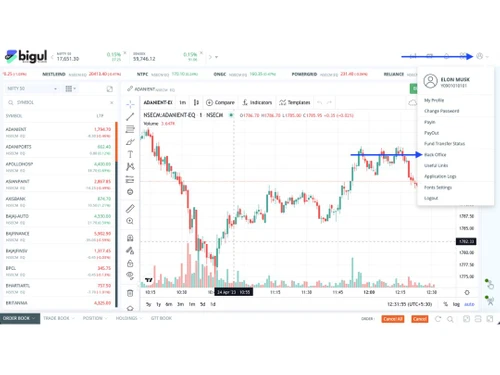
bigul-dashboard
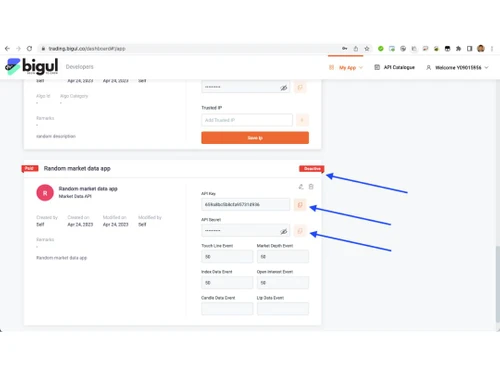
bigul-developer

Bigul

Brand: Bigul

  • 4.2

  • 12 Ratings & 12 Reviews

Bigul is a stock market software that offers trading and investing services to traders and investors with various tools.

See More

Have you used Bigul before?

Share your insights for better experience

Add a Review

Price Available on Request

Questions about pricing or customization? We’re here to help, just a click away.

100% Genuine
Products
Best Price
Guaranteed
Safe & Secure
Payment
  • Description

  • Pricing

  • Features

  • Specification

  • Review

  • Compare

  • Alternatives

  • FAQ

  • Questions

Bigul Software Overview

What is Bigul?

Bigul is an online trading and investment platform designed for the Indian market offering a wide range of features including algo trading, stock screener, stock SIP, market watch, and many more. Stock market software is popular for providing pre-built trading strategies, 130+ indicators, advanced charts, and 20+ orders in one click.

This platform is designed for traders’ help, let them make informed decisions, reduce risk, and achieve investment objectives. Bigul provides financial technologists and experts to tackle traders’ challenges and improve their trading skills.

Notable Features of Bigul

Some of the most notable features of Bigul are the following:

  • Stock SIP: Bigul offers stock SIP to traders that help them invest fixed amounts at regular periods in individual stocks. It helps them to create a stock portfolio over time. Bigul allows you to choose intervals according to your needs such as every day, every week, every month, etc.
  • Stock Screener: The Stock scanner offered by Bigul provides a powerful screener to navigate the complexities of the market. This feature provides real-time insights, updates, live positions, and trading opportunities, allowing them to enhance trading experience.
  • Stock Baskets: This feature is specifically designed for investors who want to analyze stocks in different sectors, such as IT, FMCG, Defence, and others. It is a personalized portfolio of stocks chosen by top analysts.
  • Option Chain: Bigul provides an option chain feature to help traders analyze market expectations, formulate strategies, and make informed decisions. Option strategies are also available in the software. The user-friendly interface helps investors with easy navigation and makes their journey simple in the stock market.
  • Portfolio Evaluator: A portfolio evaluator is another core feature of Bigul. It gives portfolio scores based on technical and fundamental analysis of the market. It evaluates the risk and performance of the portfolio using various metrics including returns, risks, cost, etc.
  • AI-Powered Stock Advisor: Having an AI-powered stock advisor is very helpful for investment optimization. Bigul is a great place to utilize AI-powered stock advisors as it analyzes a high amount of financial data, manages portfolios, and compresses thousands of parameters. Its artificial intelligence algorithms allow traders to execute orders automatically.
  • Algo Trading: An automated trading offered by Bigul enables traders to access a suite of pre-built and tested strategy templates. The platform helps traders whether new or experts to navigate and understand the financial market easily.

Why choose Bigul for the Stock Market?

There are several reasons to choose Bigul. Some of them are the following:

  • Bigul is known as a comprehensive or multi-faceted platform as it caters to both investors and traders with numerous features and tools for trading. It enables stock analysis using charting tools, fundamental analysis, and other technical indicators.
  • Traders and investors can filter stocks based on multiple criteria such as volume, price, financial metrics, and other factors. This helps in identifying potential trading opportunities.
  • Bigul also serves useful investment ideas and recommendations to traders and investors depending on market trends and indicators.
  • Understanding a specific company’s financial condition is also important. Thus, Bigul provides many fundamental analysis tools including Balance Sheet, Cash Flow, Ratio, and others.
  • Traders can also have quick trade that allows them to execute their orders quickly and enter/exit their trades without any delay. With a single click, traders or investors can execute their orders.

Benefits of Bigul

  • Bigul offers a user-friendly interface that helps traders and investors of all levels to navigate the market easily.
  • It is easy to trade directly from Bigul’s platform after an integration process with multiple brokers.
  • Bigul has a mobile app that allows you to trade and manage their activities anywhere and anytime on the go.
  • A wide range of education resources are available for help and knowledge including webinars, videos, newsletters, and more.
  • Continuous updates are available on the platform to make it work smoothly and seamlessly by adding new features and addressing users’ feedback.
  • Bigul provides highly customizable options to fulfill one’s preferences, like changing the layout, adding widgets, and creating custom alerts.

Bigul’s Pricing

Bigul’s pricing is based on multiple elements and thus, custom charges are applied. To get the exact amount for services, contact Techjockey.com.

Read more

Bigul Company Details

Founded Year:  2021

We are working to provide investors and traders like you with the right tools to succeed. We believe there is the right strategy for everyone and matched with the right stocks and right tools, everyone can win the game.

Director/Founders Atul Parakh
Company Size 1-100 Employees

Bigul Pricing & Plans

Looking for The Right Pricing?

Share your requirements and get a plan built around your business.

  • Define your business needs
  • Get customised pricing
  • Choose features that fit your workflow

Price Available on Request

Get personalised Bigul pricing that fits your needs. Our team will connect with you.

Bigul Features

Core Features

  • icon_check Portfolio Management
    Track investments and assess performance effectively.
  • icon_check Market Data
    Real-time stock prices and market trends for informed trading decisions.
  • icon_check Watchlist
    Customizable list of securities for easy monitoring of price movements.
  • icon_check Charting Tools
    Visual tools to analyze price movements and trends using various chart types.
  • icon_check Order Control
    Manage and modify trades efficiently to align with trading strategies.
  • icon_check Order Execution
    Complete trades by placing, modifying, and canceling orders.

Order Execution

  • icon_check Limit Order
    Buy/sell at a specified price or better for control over trade execution.
  • icon_check Market Order
    Immediate buy/sell at current market price prioritizing speed.
  • icon_check Stop (Loss) Order
    Sell when the price hits a certain level to limit losses.
  • icon_check Stop Limit Orders
    Triggers a limit order once a specified stop price is reached.
  • icon_check Trailing Stop Order
    Adjusts the stop price with favorable market movement for profit protection.

Research and Analysis

  • icon_check Technical Analysis
    Use price movements and volume data to predict future price trends.
  • icon_check Fundamental Analysis
    Evaluate a security's value by analyzing financial data and economic factors.
  • icon_check Scanning Tools
    Filter stocks based on specific criteria to spot trading opportunities.
  • icon_check Backtesting and Optimization
    Test strategies against historical data to assess effectiveness.
  • icon_check Pattern Recognition
    Identify significant historical price patterns for future forecasting.
  • icon_check Smart drawing tools
    Annotate charts with trend lines and levels for better analysis.

Trading Options

  • icon_check Mutual Funds
    Invest in professionally managed portfolios for diversified exposure.
  • icon_check Paper Trading
    Simulate trading without real money to test strategies.
  • icon_check Intraday Trading
    Buy/sell securities within the same trading day for short-term gains.
  • icon_check Algorithm Trading
    Automate trading strategies for faster execution without emotional bias.
  • icon_check Options Trading
    Buy/sell options contracts for strategic market exposure.
  • icon_check Futures Trading
    Trade contracts obligate the purchase/sale of an asset at a future date.
  • icon_check Forex Trading
    Trade currency pairs to profit from exchange rate fluctuations.
  • icon_check Crypto Trading
    Trade cryptocurrencies to benefit from market volatility.
  • icon_check Automatic Trading
    Execute trades automatically based on set criteria.
  • icon_check Margin Trading (MTF)
    Borrow funds to trade larger positions than account balance allows.
  • icon_check Stock SIP
    Allows for systematic investment in stocks over time to build a portfolio gradually.

Account Management

  • icon_check Demat Account Creation
    Facilitate the opening of electronic securities accounts.
  • icon_check Platform Migration
    Assist in transferring accounts or data from one platform to another.
  • icon_check Multi-Factor Authentication (MFA)
    Enhance security with multiple verification methods.
  • icon_check Customizable User Interface
    Personalize trading environments for ease of use.

Integrations

  • icon_check API Integration
    Connect third-party apps to enhance platform functionality.
  • icon_check Financial Tools Integration
    Incorporate various financial analysis tools for improved insights.

Reporting & Analytics

  • icon_check Dashboards
    Visual summaries of key performance metrics for quick assessments.
  • icon_check P&L Report
    Summarize profits and losses over a specified period.
  • icon_check Contract Note
    Document detailing trade specifics, including prices and fees.
  • icon_check Automated Reports
    Generate regular reports on trading activity and performance automatically.
  • icon_check Report Customization
    Tailor reports to meet specific user requirements for relevance.
  • icon_check Financial Transaction Report (CashLedger)
    Track cash inflows and outflows in the trading account.

Alerts & Notification

  • icon_check Price Alert
    Notifications when securities hit specified price points.
  • icon_check Real Time Market Updates
    Instant notifications on significant market changes and events.
  • icon_check News Alerts
    Updates on news events that could impact markets.
  • icon_check Volume Alerts
    Alerts for unusual trading volumes in securities.
Bigul Demo Video play icon

Get Bigul Demo

Watch the demo video to explore key features, real workflows, and how the software fits your business needs.

Understand
Key Features
Personal
Demo Insights
Interactive
Demo Support

Bigul Specifications

Supported Platforms
Ubuntu Ubuntu Windows Windows iOS iOS Android Android MacOS MacOS Linux Linux
Devices
Desktop Desktop Mobile Mobile
Deployment
Cloud-Based Cloud-Based
Suitable For
Stock Market
Business Specific
Traders Finance Services
Business Size
Small Business Startups Medium Business Enterprises Freelancers
Customer Support
Phone Email Communities
Language
English
Integration
API Integration
Training Resources
Webinars Videos
AI Features
AI Integrated

Explore the Best Alternative Solutions Similar to Your Business Size and Needs

Bigul Reviews

4.2

Out of 5

img

Overall Rating

Based on
12 Verified Reviews

Rating Breakdown

  • Features 4.0
  • Value for Money 4.3
  • Ease of Use 4.4
  • Customer Support 4.3

80% Recommend this Product

Add Review

Pros

  • "The algo trading feature on Bigul is great for traders like me who prefer automation. I can apply pre-built strategies and let the platform handle the rest, which saves time."

    Ritika ManochaSep 5, 2024

  • "Bigul provides data-driven stock suggestions, making it easier to choose stocks based on factual analysis. Additionally, it ensures secure data transmission."

    Prince Jun 14, 2024

Cons

  • "The absence of 24/7 customer service makes it hard to get quick support during off-hours. "

    NISHAT AHMED ATTARISep 10, 2024

  • "The platform doesn’t offer round-the-clock customer service, which can be a problem when trading outside of regular hours. "

    Kritika SharmaSep 4, 2024

Bigul Video Review

youtubeVideoId

4.3

“bigul app option trading || bigul app review || bigul app brokerage charges ||”

Review by: KE Pawan

Sunil Bhardwaj

Civil Engineer

Industry: Project Management

1

Reviewed on: May 5, 2025

Techjockey Verified

“About Bigul Very Bad experience”

Pros

Not satisfied

Cons

Not proper guidance given and also not respond well, miscommunication was there, also i am facing lot of issues from Bigul and i also lost my money on their platform. i am suggesting. Please be aware this type of broker. Because this is your own money.

Switched from TradeStation

Reason to switch

very Bad

Padmavathi

Manager

Industry: SAAS User since: 2+ years

5

Reviewed on: Sep 3, 2024

Techjockey Verified

“A Great Option for people like me who are looking for more automation features.”

The Option Chain feature is something I’ve used frequently to plan and execute options strategies based on market trends.

Pros

The stock SIP feature is my favorite aspect of Bigul. It allows me to schedule regular investments in specific stocks. The algo trading tools are also useful, providing pre-built strategies that you can apply without needing to build one from scratch.

Cons

Nothing to dislike so far.

Switched from AmiBroker

Reason to switch

I was looking for change.

Prince

Accountant

Industry: SAAS User since: 1-2 years

4.5

Reviewed on: Jun 14, 2024

Techjockey Verified

“A Well-known platform for stock marketing”

The stock screener is another valuable tool. It helps narrow down stocks based on specific parameters.

Pros

Bigul provides data-driven stock suggestions, making it easier to choose stocks based on factual analysis. Additionally, it ensures secure data transmission.

Cons

Limited data integration

Reason to switch

I wanted more features like customizable user-interface, API access, Algorithm trading.

See All Bigul Reviews

Compare Bigul With other Trading Platforms

Products
Ratings
Pricing
Device Supported
Deployment
Supported Platforms
  • img

    Bigul

  • 4.2

  • Price On Request

  • Desktop

    Mobile

  • Web based

    On Premises

  • Windows

    Mac OS

  • img

    Pocketful

  • 4.9

  • Price On Request

  • Desktop

    Mobile

  • Web based

    On Premises

  • Windows

    Mac OS

  • img

    Masterswift 2.0

  • 4.3

  • Price On Request

  • Desktop

    Mobile

  • Web based

    On Premises

  • Windows

    Mac OS

  • img

    AlgoTest

  • 4.6

  • Price On Request

  • Desktop

    Mobile

  • Web based

    On Premises

  • Windows

    Mac OS

  • img

    StockMock

  • 4.5

  • ₹ 349

  • Desktop

    Mobile

  • Web based

    On Premises

  • Windows

    Mac OS

  • img

    Bajaj Broking

  • 4.5

  • Price On Request

  • Desktop

    Mobile

  • Web based

    On Premises

  • Windows

    Mac OS

  • img

    Edelweiss TX3

  • 4.2

  • Price On Request

  • Desktop

    Mobile

  • Web based

    On Premises

  • Windows

    Mac OS

  • img

    Zerodha Kite

  • 4.2

  • Price On Request

  • Desktop

    Mobile

  • Web based

    On Premises

  • Windows

    Mac OS

  • img

    Trading Terminal

  • 4.4

  • Price On Request

  • Desktop

    Mobile

  • Web based

    On Premises

  • Windows

    Mac OS

  • img

    QuantShare

  • 4.3

  • Price On Request

  • Desktop

    Mobile

  • Web based

    On Premises

  • Windows

    Mac OS

  • img

    Fidelity

  • 4.3

  • Price On Request

  • Desktop

    Mobile

  • Web based

    On Premises

  • Windows

    Mac OS

(2) Product(s) selected

Bigul Alternatives

See All Bigul Alternatives

Available

Price on Request

Available

Price on Request

Available

Price on Request

Available

Price on Request

Dhan

4.2

Available

Price on Request

Articles for Bigul

See All Related Articles

What is Bigul?

Bigul is a stock market software that offers various trading features and tools for traders and investors.

Is Bigul legal in India?

Yes, Bigul is a legal platform in India as it is registered under SEBI.

Is Algo trading free in Bigul?

No, algo trading is not free in Bigul. However, the prices may depend on the services you are using, fees associated with data access, and other factors.

What are some scans available in Bigul’s stock scanner?

There are various scans available in Bigul including gap-up stocks, double-bottom patterns, and stock closing above 5-day highs. Additionally, derivative chain scans are also available.

Can I customize the scans in Bigul?

Yes, you can customize the criteria of scans in Bigul according to your unique trading preferences.

Can starting and stopping my stock SIP be possible in Bigul?

Yes, Bigul allows you to start and stop your stock SIP at any time according to your financial goals and potential risks.

Bigul Questions

Q:

Is it possible to customize trading sessions on Bigul?

ANKITA KAYASTHA Sep 20, 2024
A:

Yes, customizing trading sessions on Bigul is possible and easy.

  1. You can set specific trading hours according to your strategies.
  2. You can define the days and times for trade execution.
  3. It allows you to execute your trade on weekends or holidays.
Sitara Bi Sep 20, 2024
A:

Here are the types of order execution methods available on Bigul:

  1. Buy and Sell Market
  2. Buy and Sell Limit
  3. Buy and Sell Stop
  4. Buy and Sell Stop-Limit
  5. Buy and Sell Trailing Stop
Anuj Shrivastava Sep 20, 2024
Q:

How can I track the performance of multiple algorithms on Bigul?

Mohammad Shakir Shaikh Sep 20, 2024
A:

Bigul offers various tools to track the performance of multiple algorithms including:

  • Performance Dashboard: It provides Profit/Loss, ROI, Sharpe Ratio, Win Rate, and others.
  • Backtest Reports: It generates backtest reports for all the algorithms.
  • Comparison Tools: Offers tools to compare the performance of various algorithms.
MUKESH KHAJURIA Sep 20, 2024
A:

To tackle this problem, you can address the issues using the following steps:

  • Review Backtesting Results
  • Evaluate Algorithm Logic
  • Adjust Parameters
  • Consider Market Conditions
  • Update Data and Indicators
  • Monitor Execution Quality and Seek Advice
Anita BINIYANI Sep 20, 2024
Q:

How does Bigul handle slippage during trading?

HARDIK KINHIKAR Sep 20, 2024
A:

Bigul uses various methods to handle slippage during trading. They are:

  • Smart Order Routing
  • Limit Orders
  • Time-in-Force Settings
  • Algorithm Optimization
S Raju Sep 20, 2024
See All Bigul Questions

20,000+ Software Listed

Best Price Guranteed

Free Expert Consultation

2M+ Happy Customers

Terms and Condtions

close

Users with registered businesses can purchase goods from merchants on the platform to satisfy their business needs. Users are not permitted to utilize any products acquired through the platform for resale, advertising, business, or further distribution.

For each purchase made, users will receive a Tax Invoice (or 'GST invoice') that includes specific details such as:

  • the GSTIN of the user associated with their registered business, and

  • the specified Entity Name for their business.

It should be noted that not all products are eligible for GST Invoice. Only the products displayed by participating sellers with the 'GST-based Invoice Available' callout on the product description page would qualify.

Certain goods and services are not eligible to get a GST Invoice, including items with VAS, i.e., Value Added Services (e.g., Total Mobile Protection/Assured Buyback) and those involving an exchange offer at the time of purchase.

Users must ensure the accuracy of the GSTIN, and business entity name provided for the GST Invoice. Requests for corrections into GST Invoice would not be accommodated by Techjockey.com or any Seller, and any issues arising from user-provided information are the sole responsibility of users.

Techjockey.com is not liable for the GST Invoice or any associated input tax credit. To efficiently claim an input tax credit, users should select the registered place of business address as per the GST authority's data and follow the provisions of the GST Act and rules.

To claim an input tax credit, the delivery and billing addresses must match. Furthermore, input tax credits will not be granted if the delivery address and GSTIN on the invoice are from different states. In case of incorrect GST details provided during the order placement, the order will be canceled automatically.