linkedin
Trading Terminal logo
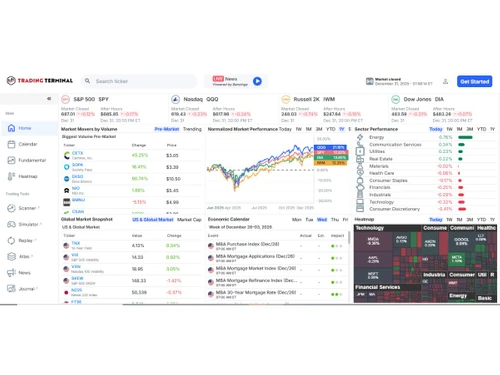
tarding terminal-interface
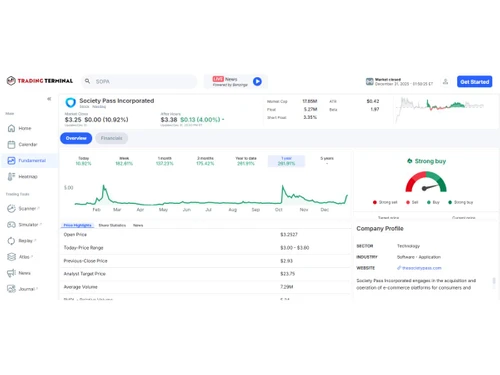
tarding terminal-analytics
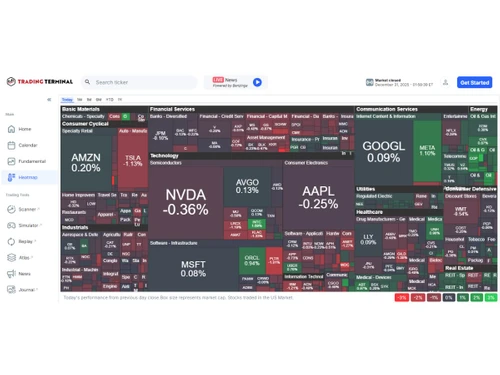
tarding terminal-trading

Trading Terminal

Brand: Trading Terminal

  • 4.4

  • 4 Ratings

Trading Terminal is a trading platform that consolidates market insights and provides tools to help users analyze markets and make informed trading decisions.

See More

Have you used Trading Terminal before?

Share your insights for better experience

Add a Review

Price Available on Request

Questions about pricing or customization? We’re here to help, just a click away.

100% Genuine
Products
Best Price
Guaranteed
Safe & Secure
Payment
  • Description

  • Pricing

  • Features

  • Specification

  • Review

  • Compare

  • Alternatives

  • FAQ

Trading Terminal Software Overview

What is Trading Terminal?

Trading Terminal is a sophisticated, all-in-one software platform engineered for modern traders, investors, and financial analysts. It serves as a centralized command center, consolidating essential market data and advanced analytical tools into a single, intuitive interface. The platform is designed to provide a distinct competitive edge by streamlining workflows and enabling data-driven decision-making across a wide spectrum of financial markets.

The system offers comprehensive coverage of major market sectors, including Technology, Energy, Financials, and Industrials. It provides detailed information and analytics on individual securities, such as Apple Inc. (AAPL), Microsoft Corporation (MSFT), and Oracle Corporation (ORCL), allowing users to move seamlessly from a high-level market overview to in-depth single-stock analysis. By integrating disparate sources of information, Trading Terminal eliminates the need for multiple subscriptions and applications, creating a more efficient and powerful trading environment.

Why Choose Trading Terminal?

  • Unified Trading Ecosystem: The platform's core value lies in its 'all-in-one' philosophy. It brings together real-time data feeds, advanced charting, news, and portfolio management, preventing the fragmentation and inefficiency of using multiple disconnected tools.
  • Comprehensive Market Coverage: Gain deep insights across key economic sectors. Whether your focus is on technology innovators like Salesforce (CRM) and Adobe (ADBE) or industrial mainstays, the platform provides the necessary data to stay ahead.
  • Enhanced Decision-Making: By presenting complex market data in a clear and actionable format, Trading Terminal empowers users to identify opportunities, manage risk, and execute strategies with greater confidence and precision.
  • Speed and Efficiency: In trading, every second counts. The platform is optimized for low-latency data processing and rapid order execution, ensuring users can react to market movements without delay.
  • Customizable Workspace: Tailor the interface to your unique trading style. Arrange windows, set up personalized watchlists, and configure alerts to focus on the information that matters most to you, creating a truly bespoke trading dashboard.

Advanced Features of Trading Terminal

  • Market Data & Level 2: Access stock market data, charts, market heatmaps, and fundamentals, with premium features including Nasdaq TotalView and CME futures Level 2 market depth for analyzing order flow and liquidity.
  • Sophisticated Charting Suite: Utilize a comprehensive library of technical indicators, drawing tools, and chart types. Conduct multi-timeframe analysis and overlay different securities for comparative performance evaluation.
  • Customizable Watchlists and Alerts: Create dynamic watchlists to track specific securities like Palantir (PLTR) or SAP SE (SAP). Set complex, multi-conditional alerts based on price, volume, or technical indicator values to never miss a trading opportunity.
  • Integrated News and Research Engine: Stay informed with a built-in feed of market-moving news, press releases, and regulatory filings, all linked directly to the relevant securities.
  • Advanced Sector Analysis: Drill down into industry and sector performance with powerful screening tools. Identify leading and lagging sectors to inform your asset allocation strategy.
  • Portfolio Management & Analytics: Track your portfolio's performance in real-time with detailed analytics, including P&L, risk exposure, and performance attribution.

Key Capabilities of Trading Terminal

  • Market Intelligence Dashboard: This is your central hub, providing a high-level overview of market conditions, top movers, sector performance, and your personalized watchlist at a glance.
  • Technical Analysis Workbench: A dedicated environment for deep technical study. Access advanced charting tools, backtesting capabilities, and pattern recognition features to refine your trading strategies.
  • Fundamental Research Center: Dive into the fundamentals of any company. Access financial statements, key ratios, earnings estimates, and corporate profiles directly within the platform.
  • Trading Simulator and Replay: Practice trading in real-time market conditions without risking capital, and replay historical market sessions to test strategies and improve execution.
  • Trading Journal & Analytics: Track trades, performance metrics, P&L, win rates, and trading patterns in a data-driven journal designed to help traders analyze and improve their strategies.

How to Use Trading Terminal?

  1. Setup and Customization: Begin by configuring your user profile and personalizing the workspace. Create and populate watchlists with securities of interest and set up your preferred layout of charts, news, and data windows.
  2. Market Research and Discovery: Leverage the platform scanners and sector analysis tools to identify potential trading opportunities that align with your criteria.
  3. In-Depth Analysis: Once an opportunity is identified, use the Technical Analysis Workbench and Fundamental Research Center to perform a thorough evaluation and build a strong case for your trade.
  4. Strategy Testing: Use the Trading Simulator and Replay features to practice strategies in real-time market conditions or review historical sessions before applying your approach to live markets.
  5. Monitor and Manage: Use the Portfolio Management & Analytics module to track the performance of your open positions in real-time. Adjust or close positions as your strategy and market conditions dictate.

Trading Terminal Pricing

Trading Terminal pricing details are available on request on techjockey.com.

The pricing model is based on different parameters, including extra features, deployment type, and the total number of users. For further queries related to the product, you can contact our product team and learn more about the pricing and offers.

Read more

Trading Terminal Company Details

Founded Year:  2021

Trading Terminal is developing the most comprehensive trading and investing tools for active traders.

Director/Founders Ardi Aaziznia
Company Size 1-100 Employees

Trading Terminal Pricing & Plans

Looking for The Right Pricing?

Share your requirements and get a plan built around your business.

  • Define your business needs
  • Get customised pricing
  • Choose features that fit your workflow

Price Available on Request

Get personalised Trading Terminal pricing that fits your needs. Our team will connect with you.

Trading Terminal Features

Core Features

  • icon_check Portfolio Management
    Manage and track virtual or simulated portfolios across multiple watchlists.
  • icon_check Market Data
    Provides real-time market data, including Level 2 OrderMap (Market Atlas).
  • icon_check Watchlist
    Customizable watchlists to track multiple symbols with real-time updates.
  • icon_check Charting Tools
    Professional-grade charting with multi-timeframe and multi-chart views.
  • icon_check Order Control
    Simulated order management to modify or cancel trades in the simulator.
  • icon_check Order Execution
    Fast simulated execution within the real-time trading simulator.

Order Execution

  • icon_check Limit Order
    Supports placing limit orders within the trading simulator.
  • icon_check Market Order
    Standard market order functionality for instant simulated entry/exit.
  • icon_check Stop (Loss) Order
    Essential risk management tool available in the simulator.
  • icon_check Stop Limit Orders
    Advanced order type supported to control entry price after a trigger.
  • icon_check Trailing Stop Order
    Adjusts the stop price with favorable market movement for profit protection.

Research and Analysis

  • icon_check Technical Analysis
    Features advanced charting with numerous indicators and drawing tools.
  • icon_check Fundamental Analysis
    Includes a dedicated Fundamentals tab with key financial ratios and data.
  • icon_check Pattern Recognition
    Advanced scanners identify real-time chart patterns and technical setups.
  • icon_check Scanning Tools
    Powerful real-time scanners for top gainers, volume bursts, and patterns.
  • icon_check Backtesting and Optimization
    Features Market Replay for historical strategy backtesting.
  • icon_check Smart drawing tools
    Includes various intelligent tools for trendlines, Fibonacci, and more.

Trading Options

  • icon_check Paper Trading
    High-fidelity real-time trading simulator for risk-free strategy testing.
  • icon_check Intraday Trading
    Built for intraday analysis with real-time scanners and short-term charts.
  • icon_check Algorithm Trading
    Automate trading strategies for faster execution without emotional bias.
  • icon_check Options Trading
    Buy/sell options contracts for strategic market exposure.
  • icon_check Futures Trading
    Trade contracts obligate the purchase/sale of an asset at a future date.
  • icon_check Forex Trading
    Trade currency pairs to profit from exchange rate fluctuations.
  • icon_check Crypto Trading
    Trade cryptocurrencies to benefit from market volatility.
  • icon_check Mutual Funds
    Invest in professionally managed portfolios for diversified exposure.
  • icon_check Automatic Trading
    Execute trades automatically based on set criteria.
  • icon_check Margin Trading (MTF)
    Borrow funds to trade larger positions than account balance allows.
  • icon_check Stock SIP
    Allows for systematic investment in stocks over time to build a portfolio gradually.

Account Management

  • icon_check Multi-Factor Authentication (MFA)
    Standard security protocols for account login and data protection.
  • icon_check Customizable User Interface
    Layouts are highly modular, allowing users to resize and move windows.
  • icon_check Demat Account Creation
    Facilitate the opening of electronic securities accounts.
  • icon_check Platform Migration
    Assist in transferring accounts or data from one platform to another.

Integrations

  • icon_check Financial Tools Integration
    Integrates news squawk, earnings calendars, and scanners in one view.
  • icon_check API Integration
    Connect third-party apps to enhance platform functionality.

Reporting & Analytics

  • icon_check Dashboards
    Comprehensive layouts with heatmaps, news, and market performance snapshots.
  • icon_check P&L Report
    Tracks realized and unrealized P&L within the simulator environment.
  • icon_check Automated Reports
    Generate regular reports on trading activity and performance automatically.
  • icon_check Report Customization
    Tailor reports to meet specific user requirements for relevance.
  • icon_check Contract Note
    Document detailing trade specifics, including prices and fees.
  • icon_check Financial Transaction Report (CashLedger)
    Track cash inflows and outflows in the trading account.

Alerts & Notification

  • icon_check Price Alert
    Integrated real-time alerts for price movements and technical triggers.
  • icon_check Real Time Market Updates
    Offers sub-second real-time price updates and news feeds.
  • icon_check News Alerts
    Features a Live Squawk and breaking news feed for instant updates.
  • icon_check Volume Alerts
    Scanners specifically target high-volume movers and unusual activity.

Trading Terminal Specifications

Supported Platforms
Ubuntu Ubuntu Windows Windows MacOS MacOS Linux Linux
Devices
Desktop Desktop
Deployment
Cloud-Based Cloud-Based
Suitable For
Stock Market
Business Specific
All Businesses
Business Size
Individual Freelancers
Customer Support
Email Communities
Language
English
Training Resources
Videos

Explore the Best Alternative Solutions Similar to Your Business Size and Needs

Trading Terminal Review

4.4

Out of 5

img

Overall Rating

Based on
4 Verified Ratings

Rating Breakdown

  • Features 4.3
  • Value for Money 4.3
  • Ease of Use 4.6
  • Customer Support 4.3

80% Recommend this Product

Add Review

Techjockey Trusted Reviews from Verified Users

No reviews are currently available for Trading Terminal. Discover similar Trading Platforms reviews

  • Masterswift 2.0

    4.4

    Whats great - The charting tools in Masterswift 2.0 are one of its strongest features. I can customize the charts with different technical ... read more

  • Edelweiss TX3

    4.2

    Whats great - Customer service is prompt and helpful. read more

  • Zerodha Kite

    4.1

    Whats great - Trading is no longer a hassle, thanks to Zerodha KITE. It's a powerful front-end application that allows you to trade at BSE,... read more
Compare Trading Terminal With other Trading Platforms

Products
Ratings
Pricing
Device Supported
Deployment
Supported Platforms
  • img

    Trading Terminal

  • 4.4

  • Price On Request

  • Desktop

    Mobile

  • Web based

    On Premises

  • Windows

    Mac OS

  • img

    Masterswift 2.0

  • 4.3

  • Price On Request

  • Desktop

    Mobile

  • Web based

    On Premises

  • Windows

    Mac OS

  • img

    AlgoTest

  • 4.6

  • Price On Request

  • Desktop

    Mobile

  • Web based

    On Premises

  • Windows

    Mac OS

  • img

    Pocketful

  • 4.9

  • Price On Request

  • Desktop

    Mobile

  • Web based

    On Premises

  • Windows

    Mac OS

  • img

    StockMock

  • 4.5

  • ₹ 349

  • Desktop

    Mobile

  • Web based

    On Premises

  • Windows

    Mac OS

  • img

    Edelweiss TX3

  • 4.2

  • Price On Request

  • Desktop

    Mobile

  • Web based

    On Premises

  • Windows

    Mac OS

  • img

    Zerodha Kite

  • 4.2

  • Price On Request

  • Desktop

    Mobile

  • Web based

    On Premises

  • Windows

    Mac OS

  • img

    Bajaj Broking

  • 4.5

  • Price On Request

  • Desktop

    Mobile

  • Web based

    On Premises

  • Windows

    Mac OS

  • img

    Bigul

  • 4.2

  • Price On Request

  • Desktop

    Mobile

  • Web based

    On Premises

  • Windows

    Mac OS

  • img

    QuantShare

  • 4.3

  • Price On Request

  • Desktop

    Mobile

  • Web based

    On Premises

  • Windows

    Mac OS

  • img

    Fidelity

  • 4.3

  • Price On Request

  • Desktop

    Mobile

  • Web based

    On Premises

  • Windows

    Mac OS

(0) Product(s) selected

Trading Terminal Alternatives

See All Trading Terminal Alternatives

Available

Price on Request

Available

Price on Request

Available

Price on Request

Available

Price on Request

Available

Price on Request

Dhan

4.2

Available

Price on Request

Articles for Trading Terminal

See All Related Articles

What is Trading Terminal used for?

Trading Terminal is used to provide traders with a comprehensive platform to gain a trading edge, consolidating various tools and information needed for market analysis and potentially trade execution in one place.

How much does Trading Terminal cost?

Trading Terminal pricing details are available on request on techjockey.com.

What features should a trading terminal have?

A robust trading terminal generally offers comprehensive tools for market analysis, access to data across various sectors like Technology and Financials, and functionalities to provide a complete trading edge in one integrated platform.

Who can use Trading Terminal?

Trading Terminal is designed for traders and investors seeking a comprehensive edge in the market, particularly those interested in sectors like Technology, Energy, Financials, and Industrials, and specific companies such as Apple, Oracle, and Microsoft.

What benefits does Trading Terminal's all in one place approach offer?

The all in one place approach of the Trading Terminal aims to streamline the trading process by consolidating all necessary tools and information, thereby enhancing efficiency and providing a unified trading edge.

What types of markets or assets does Trading Terminal support?

Trading Terminal supports analysis and trading across major sectors including Technology, Energy, Financials, and Industrials, and provides insights into specific companies like Apple Inc., Oracle Corporation, and Microsoft Corporation.

How does Trading Terminal help users gain a trading edge?

The Trading Terminal helps users gain a trading edge by providing a centralized platform that consolidates critical information and tools, enabling more informed decisions and strategic market participation.

21,000+ Software Listed

Best Price Guranteed

Free Expert Consultation

5M+ Happy Customers

Terms and Condtions

close

Users with registered businesses can purchase goods from merchants on the platform to satisfy their business needs. Users are not permitted to utilize any products acquired through the platform for resale, advertising, business, or further distribution.

For each purchase made, users will receive a Tax Invoice (or 'GST invoice') that includes specific details such as:

  • the GSTIN of the user associated with their registered business, and

  • the specified Entity Name for their business.

It should be noted that not all products are eligible for GST Invoice. Only the products displayed by participating sellers with the 'GST-based Invoice Available' callout on the product description page would qualify.

Certain goods and services are not eligible to get a GST Invoice, including items with VAS, i.e., Value Added Services (e.g., Total Mobile Protection/Assured Buyback) and those involving an exchange offer at the time of purchase.

Users must ensure the accuracy of the GSTIN, and business entity name provided for the GST Invoice. Requests for corrections into GST Invoice would not be accommodated by Techjockey.com or any Seller, and any issues arising from user-provided information are the sole responsibility of users.

Techjockey.com is not liable for the GST Invoice or any associated input tax credit. To efficiently claim an input tax credit, users should select the registered place of business address as per the GST authority's data and follow the provisions of the GST Act and rules.

To claim an input tax credit, the delivery and billing addresses must match. Furthermore, input tax credits will not be granted if the delivery address and GSTIN on the invoice are from different states. In case of incorrect GST details provided during the order placement, the order will be canceled automatically.