linkedin
Zoom Workplace logo
play Welcome to Zoom Workplace, your AI-powered collaboration platform
zoom-workplace-video
zoom-workplace offer

Zoom Workplace

Brand: Zoom Communications

  • 4.0

  • 3 Ratings

Zoom Workplace is a software that helps teams work together using AI, video meetings, chat, and tools to boost communication and productivity.

See More

Have you used Zoom Workplace before?

Share your insights for better experience

Add a Review
Starting Price
₹1,449 excl.GST
₹ 1,710 incl. GST

View plans

offer Save upto 18%, Get GST Invoice on your business purchase T&C
offer Buy Now & Pay Later, Check offer on payment page.
Buy Now
100% Genuine
Products
Best Price
Guaranteed
Safe & Secure
Payment
  • Description

  • Pricing

  • Features

  • Specification

  • Review

  • FAQ

Starting at ₹1,449
Buy Now

Zoom Workplace Software Overview

What is Zoom Workplace?

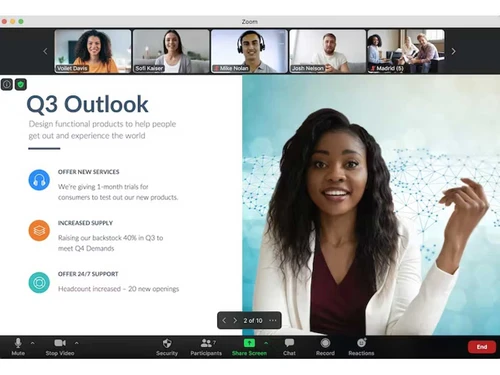
Zoom Workplace is a collaboration software that helps teams communicate and work together easily. It uses AI Companion to make tasks like writing emails, creating documents, or translating content in 36 languages simpler, at no extra cost.

It includes tools like video meetings, team chat, phone, mail, and calendar to streamline communication and reduce silos. The platform supports global teams with multi-language features and integrates with third-party apps for smooth workflows.

It also boosts productivity with tools like virtual whiteboards and AI-powered meeting summaries.

Why Choose Zoom Workplace Software?

  • Jumpstart Content Creation: Easily begin drafting documents, emails, chats, or designing whiteboards with AI Companion's assistance.
  • Collaborate Globally: Translate content seamlessly across 36 languages to support effective global teamwork.
  • Make Faster, Smarter Decisions: Stay equipped with timely, relevant information to make informed choices.
  • Focus on Priorities: Highlight critical tasks with voicemail prioritization and task management tools.
  • High Quality with Flexibility: Zoom’s unique federated approach allows flexible selection and deployment of AI models for top-notch results.
  • User-Friendly Experience: AI Companion features are seamlessly integrated into Zoom’s familiar, intuitive platform, encouraging easy adoption.
  • Platform-Wide Access: Utilize AI Companion across Zoom’s ecosystem, including Meetings, Team Chat, Phone, Mail, Whiteboard, Notes, and compatible third-party apps.
  • Trusted and Secure: Zoom ensures customer data isn’t used to train its or third-party AI models, offering admin controls and clear visibility when AI Companion is active in meetings.

Benefits of Zoom Workplace Software

  • AI Companion at No Additional Cost: Maximize impact with Zoom’s AI Companion, available at no additional charge for all paid plans.
  • Open Platform: Streamline workflows by seamlessly integrating Zoom with your favorite business applications.
  • Cost-Effective: Enhance business value while reducing total ownership costs with a scalable, all-in-one platform.
  • Reliable and User-Friendly: Rely on intuitive, dependable technology that’s built for simplicity and performance.
  • Innovative: Stay ahead of changing business needs with Zoom’s rapid pace of innovation and feature updates.
  • Boost Productivity: Boost productivity with one AI-powered platform that is simple to use and manage.
  • Enhance Employee Experience: Improve employee experience with an open platform that seamlessly integrates with your existing systems.
  • Improve Employee Engagement: Enhance employee engagement with intelligent features and inclusive meeting experiences.
  • Workflow Automation: It allows you to build powerful workflows by using Zoom's AI Companion for better focus and actionable insights.

Zoom Workplace Pricing

Zoom Workplace price starts at INR 1,449 at techjockey.com.

The pricing model is based on different parameters, including extra features, deployment type, and the total number of users. For further queries related to the product, you can contact our product team and learn more about the pricing and offers

Read more

Zoom Communications Company Details

Founded Year:  2011

Zoom is a software company that offers a communications platform that connects people through video, voice, chat, and content sharing.

Director/Founders Eric Yuan
Company Size 1000+ Employees

Zoom Workplace Pricing & Plans

Pro

Calculated Price

₹ 1449 Exclusive of all taxes
    • Licenses

      Licenses
      Licenses
    • Monthly

      Monthly
      Monthly

Key Features

  • Meetingsup to 30 hours per meeting

  • 100 Participants per meeting

  • AI Companion

  • Cloud Storage10GB

  • Docs Unlimited

  • Tasks AI-first task management

  • Clips Plus Unlimited videos

Business

Calculated Price

₹ 1999 Exclusive of all taxes
    • Licenses

      Licenses
      Licenses
    • Monthly

      Monthly
      Monthly

Key Features

  • Everything in Pro

  • 300 Participants per meeting

  • WhiteboardUnlimited boards

  • Scheduler

  • Extras SSO, managed domains & more

Zoom Workplace Features

  • icon_check HD Video Conferencing
    Host high-quality video meetings with live messaging and content sharing for effective team communication.
  • icon_check Whiteboard & Visual Collaboration
    Use interactive virtual whiteboards for brainstorming and real-time collaboration with your team.
  • icon_check Zoom Clips & Notes
    Create and share short video messages or collaborative notes to enhance team communication and alignment.
  • icon_check Tasks & Surveys
    Manage action items and gather feedback through integrated task tracking and survey tools.
  • icon_check Visitor Management
    Securely register and manage guests with entry badges for in-office visits.
  • icon_check Integrations
    Connect with nearly 3,000 apps to streamline workflows and enhance Zoom Workplace functionality.
  • icon_check Calendar Management
    Sync with email and calendars to schedule meetings and share availability effortlessly.
Zoom Workplace Demo Video play icon

Get Zoom Workplace Demo

Watch the demo video to explore key features, real workflows, and how the software fits your business needs.

Understand
Key Features
Personal
Demo Insights
Interactive
Demo Support

Zoom Workplace Specifications

Supported Platforms
Windows Windows iOS iOS Android Android MacOS MacOS Linux Linux
Devices
Desktop Desktop Mobile Mobile
Deployment
Cloud-Based Cloud-Based
Suitable For
All Industries
Business Specific
All Businesses
Business Size
Small Business Startups Medium Business Enterprises SMBs SMEs MSMBs MSMEs Freelancers
Customer Support
Email Live Chat Forums
Language
English
Training Resources
Live Online Documentation Videos
AI Features
AI Integrated

Zoom Workplace Review

4.0

Out of 5

img

Overall Rating

Based on
3 Verified Ratings

Rating Breakdown

  • Features 4
  • Value for Money 4.3
  • Ease of Use 3.8
  • Customer Support 4.1

80% Recommend this Product

Add Review

Techjockey Trusted Reviews from Verified Users

No reviews are currently available for Zoom Workplace. Discover similar AI Tools reviews

  • Chatrly

    5.0

    Whats great - Natural voice and chat experience, easy integration, real-time responsiveness, lead generation, user-friendly interface, exce... read more

  • SyncMonster

    4.3

    Whats great - syncMonster is a User-friendly product and its provides high-quality results read more

  • Krutrim AI

    4.4

    Whats great - It helped me communicate and get information in my preferred language. The AI is also easy to use and helped me generate good... read more


Articles for Zoom Workplace

See All Related Articles

How much does Zoom Workplace Software cost?

Zoom Workplace pricing starts at INR 1,449, as listed on techjockey.com.

Is there a mobile app available for Zoom Workplace Software?

Yes, Zoom Workplace is available on iOS and Android apps.

Which operating systems are compatible with Zoom Workplace Software?

Zoom Workplace works on Windows, Linux and MacOS.

Does Zoom Workplace Software offer a free trial?

Yes, Zoom Workplace offers a free trial.

How does Zoom Workplace Software function?

Zoom Workplace integrates video meetings, team chat, phone, whiteboards, calendars, and AI tools for seamless team collaboration.

Who uses Zoom Workplace Software?

Teams of all sizes, from small businesses to large enterprises, use Zoom Workplace for communication and productivity.

Is a free demo available for Zoom Workplace Software?

No, Zoom Workplace does not offer a free demo.

Is Zoom Workplace Software available for free?

No, Zoom Workplace is not available for free.

20,000+ Software Listed

Best Price Guranteed

Free Expert Consultation

2M+ Happy Customers

Terms and Condtions

close

Users with registered businesses can purchase goods from merchants on the platform to satisfy their business needs. Users are not permitted to utilize any products acquired through the platform for resale, advertising, business, or further distribution.

For each purchase made, users will receive a Tax Invoice (or 'GST invoice') that includes specific details such as:

  • the GSTIN of the user associated with their registered business, and

  • the specified Entity Name for their business.

It should be noted that not all products are eligible for GST Invoice. Only the products displayed by participating sellers with the 'GST-based Invoice Available' callout on the product description page would qualify.

Certain goods and services are not eligible to get a GST Invoice, including items with VAS, i.e., Value Added Services (e.g., Total Mobile Protection/Assured Buyback) and those involving an exchange offer at the time of purchase.

Users must ensure the accuracy of the GSTIN, and business entity name provided for the GST Invoice. Requests for corrections into GST Invoice would not be accommodated by Techjockey.com or any Seller, and any issues arising from user-provided information are the sole responsibility of users.

Techjockey.com is not liable for the GST Invoice or any associated input tax credit. To efficiently claim an input tax credit, users should select the registered place of business address as per the GST authority's data and follow the provisions of the GST Act and rules.

To claim an input tax credit, the delivery and billing addresses must match. Furthermore, input tax credits will not be granted if the delivery address and GSTIN on the invoice are from different states. In case of incorrect GST details provided during the order placement, the order will be canceled automatically.