linkedin
Amadine logo
play Amadine Intro for Mac, iPad and iPhone
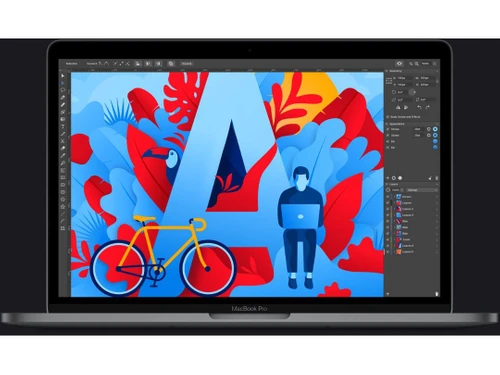
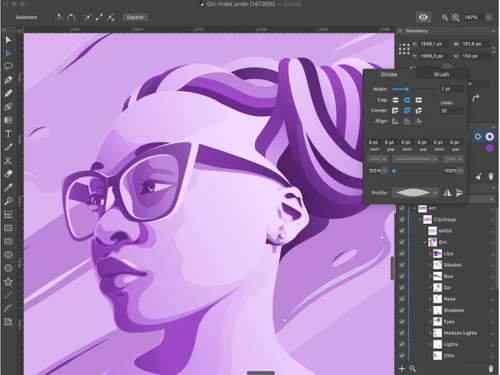
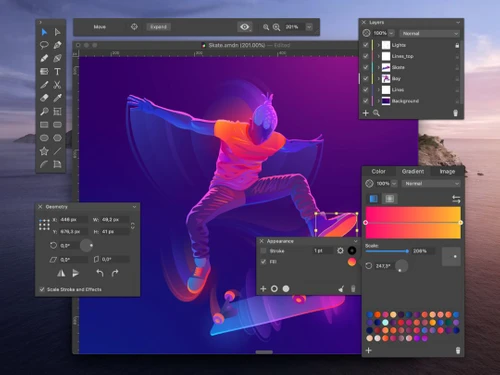
Amadine Interface
Amadine Tools

Amadine

Brand: BeLight Software

  • 4.2

  • 6 Ratings

Amadine is a vector graphics application for Mac, iPad, and iPhone with extensive tools for bringing ideas to life.

See More

Have you used Amadine before?

Share your insights for better experience

Add a Review
Starting Price
$30

View plans

100% Genuine
Products
Best Price
Guaranteed
Safe & Secure
Payment
  • Description

  • Pricing

  • Features

  • Specification

  • Review

  • Compare

  • Alternatives

  • FAQ

Starting at $30

Amadine Software Overview

What is Amadine?

Amadine is a powerful vector graphics application for Mac, iPad, and iPhone. It provides a comprehensive set of tools that help users create detailed vector artwork, edit, add text, reshape, and add effects like blur shadows. The user-friendly interface makes navigation easier and provides access to thirty tools like fusion tools, editing tools, width tools, drawing tools, etc.

It provides a text flow feature, text on path feature, and recoloring option using a single touch. The designs can be saved in SVG and PDF formats and exported to SVG, PDF, TIFF, PG, and JPEG formats. It allows the creation of custom shapes and built-in shapes and stores them in the library. It helps to easily round the corner of a shape for natural, soft designs. Complex shapes can be created by merging contours or lines using fusion tools. It allows integration with image stocks, supports CMYK and RGB color modes, and supports Metal, Apple Pencil, CMYK, RGB, iCloud, and Apple Silicon.

Why Choose Amadine Software?

  • Design Logos: Create intricate and scalable logos with precision tools and effects for branding and identity.
  • Create Illustrations: Craft detailed vector illustrations for books, web graphics, charts, and marketing materials using advanced drawing and editing features.
  • Develop UI Elements: Design user interface components like icons and mockups with customizable shapes and text tools for app and web development.
  • Text Editing for Branding: Customize the text with advanced typography tools to create impactful brand names and slogans and adjust fonts and styles.
  • Fusion Creation for Complex Shapes: Combine multiple contours and lines using the Fusion tool to create intricate and unique vector shapes.
  • Tools: Utilize over 30 tools to create precise and unique icons, combining drawing, editing, and path adjustments.

Benefits of Amadine Platform

  • Comprehensive Tools: Over 30 tools enable precise vector design, from complex shapes to detailed illustrations.
  • Ease of Use: Intuitive interface and user-friendly design make complex tasks accessible for beginners and pros.
  • Text and Image Editing: Advanced text formatting and image integration enhance design flexibility and professional results.
  • Storing: Lifetime license and local/cloud storage options ensure data security and access across devices.
  • Import and Export: Supports multiple file formats, allowing seamless integration with other apps and easy sharing.

Pricing of Amadine

Amadine price in India starts at $ 30. Amadine comes with multiple pricing plans and caters to a diverse customer base.

For subscription-related details and offers on premium packages, please request a call back from our product experts.

Read more

BeLight Software Company Details

Founded Year:  2003

Software development company specializing in graphic design, interior design, desktop publishing and utility apps.

Director/Founders Stanislav Sedashov
Company Size 1-100 Employees

Amadine Pricing & Plans

Lifetime License
Key Features
  • Text Editing
  • Strokes and Fills
  • Object Editing
  • Layers
Starting at $30
    • Licenses

      Licenses
      Licenses

Key Features

  • Text Editing

  • Strokes and Fills

  • Object Editing

  • Layers

Amadine Features

  • icon_check Layering System
    Efficiently organize and manipulate multiple layers for complex designs, ensuring clear separation and easy adjustments.
  • icon_check Intuitive User Interfaces
    Enjoy a streamlined experience with a user-friendly interface, making navigation and tool access straightforward and quick.
  • icon_check Illustration for Design
    Create detailed and scalable vector illustrations for various design projects, enhancing visual appeal and functionality.
  • icon_check Custom Branding
    Design unique logos and brand materials with precise control over shapes, text, and color schemes.
  • icon_check Web Design
    Build and refine web elements like icons and banners with vector precision for a polished online presence.
  • icon_check Distinct Effects
    Apply diverse effects like shadows and glows to add depth and style to your vector graphics.
  • icon_check Text Editor
    Utilize advanced text editing features for dynamic typography, enhancing readability and design impact in your projects.
  • icon_check Templates
    Access a range of templates for quick design setups, saving time and ensuring professional-quality results.
  • icon_check Data Import/Export
    Import various file formats and export your designs seamlessly, facilitating smooth integration.
Amadine Demo Video play icon

Get Amadine Demo

Watch the demo video to explore key features, real workflows, and how the software fits your business needs.

Understand
Key Features
Personal
Demo Insights
Interactive
Demo Support

Amadine Specifications

Supported Platforms
iOS iOS MacOS MacOS
Devices
Desktop Desktop Mobile Mobile iPad iPad
Deployment
Cloud-Based Cloud-Based
Suitable For
All Industries
Business Specific
All Businesses
Business Size
Small Business Startups Medium Business Enterprises
Customer Support
Email Communities
Language
English
Training Resources
Videos

Explore the Best Alternative Solutions Similar to Your Business Size and Needs

Amadine Review

4.2

Out of 5

img

Overall Rating

Based on
6 Verified Ratings

Rating Breakdown

  • Features 4.3
  • Value for Money 4.3
  • Ease of Use 4.2
  • Customer Support 4.0

91% Recommend this Product

Add Review

Techjockey Trusted Reviews from Verified Users

No reviews are currently available for Amadine. Discover similar Desktop Publishing Software reviews

  • Adobe FrameMaker

    4.5

    Whats great - I used to be surprised at how clean it became to open a huge ditamap created out of doors of adobe framemaker and how quick i... read more

  • QuarkXPress

    4.4

    Whats great - Since I initially utilized this product in school (which was more than some time prior) in spite of the fact that it has chan... read more

  • Movavi Pdf Editor

    4.5

    Whats great - Doesn't gobble up space and RAM. The interface is straightforward. Selected structure like Browser. Has fundamental Edi... read more

Compare Amadine With other Desktop Publishing Software

Products
Ratings
Pricing
Device Supported
Deployment
Supported Platforms
  • img

    Amadine

  • 4.2

  • Price On Request

  • Desktop

    Mobile

  • Web based

    On Premises

  • Windows

    Mac OS

  • img

    Swift Publisher

  • 4.2

  • Price On Request

  • Desktop

    Mobile

  • Web based

    On Premises

  • Windows

    Mac OS

  • img

    iStudio Publisher

  • 4.4

  • Price On Request

  • Desktop

    Mobile

  • Web based

    On Premises

  • Windows

    Mac OS

  • img

    Adobe FrameMaker

  • 4.5

  • Price On Request

  • Desktop

    Mobile

  • Web based

    On Premises

  • Windows

    Mac OS

  • img

    QuarkXPress

  • 4.3

  • ₹ 23317

  • Desktop

    Mobile

  • Web based

    On Premises

  • Windows

    Mac OS

  • img

    Marq

  • 4.3

  • Price On Request

  • Desktop

    Mobile

  • Web based

    On Premises

  • Windows

    Mac OS

  • img

    Scribus

  • 4.3

  • Price On Request

  • Desktop

    Mobile

  • Web based

    On Premises

  • Windows

    Mac OS

  • img

    Affinity Publisher

  • 4.2

  • Price On Request

  • Desktop

    Mobile

  • Web based

    On Premises

  • Windows

    Mac OS

  • img

    Xara Designer Pro

  • 4.3

  • Price On Request

  • Desktop

    Mobile

  • Web based

    On Premises

  • Windows

    Mac OS

(2) Product(s) selected

Amadine Alternatives

See All Amadine Alternatives

Marq

4.3

Starting Price:

$3

Available

Price on Request

Articles for Amadine

See All Related Articles

What types of users can use Amadine?

Amadine is ideal for professional and hobbyist designers who want to design versatile vector graphics.

Does Amadine support CMYK color mode?

Yes, Amadine supports both CMYK and RGB color spaces.

What can I create with Amadine software?

Amadine helps to create design logos, illustrations, UI elements, print materials, and web graphics.

Which devices is Amadine compatible with?

Amadine works on Mac, iPad, and iPhone devices.

What operating systems does the Amadine tool require?

Amadine requires macOS 10.12 or higher and iPadOS/iOS 13 and above.

Can I use an external input device like a tablet or stylus while using Amadine?

Amadine can work with Apple Pencil on iPad and pressure-sensitive tablets on Mac for precise control.

Is there a free trial available for Amadine?

Yes, a free trial is available for Amadine for iPad and iPhone users, allowing users to test the app before buying.

Can I import files from other graphic design software into Amadine?

Amadine supports importing SVG, PDF, AI, JPEG, TIFF, PG, and HEIC files.

What file formats does Amadine help to export my designs to?

For sharing and printing, you can export designs using Amadine, such as SVG, PDF, TIFF, PG, or JPEG.

20,000+ Software Listed

Best Price Guranteed

Free Expert Consultation

2M+ Happy Customers

Terms and Condtions

close

Users with registered businesses can purchase goods from merchants on the platform to satisfy their business needs. Users are not permitted to utilize any products acquired through the platform for resale, advertising, business, or further distribution.

For each purchase made, users will receive a Tax Invoice (or 'GST invoice') that includes specific details such as:

  • the GSTIN of the user associated with their registered business, and

  • the specified Entity Name for their business.

It should be noted that not all products are eligible for GST Invoice. Only the products displayed by participating sellers with the 'GST-based Invoice Available' callout on the product description page would qualify.

Certain goods and services are not eligible to get a GST Invoice, including items with VAS, i.e., Value Added Services (e.g., Total Mobile Protection/Assured Buyback) and those involving an exchange offer at the time of purchase.

Users must ensure the accuracy of the GSTIN, and business entity name provided for the GST Invoice. Requests for corrections into GST Invoice would not be accommodated by Techjockey.com or any Seller, and any issues arising from user-provided information are the sole responsibility of users.

Techjockey.com is not liable for the GST Invoice or any associated input tax credit. To efficiently claim an input tax credit, users should select the registered place of business address as per the GST authority's data and follow the provisions of the GST Act and rules.

To claim an input tax credit, the delivery and billing addresses must match. Furthermore, input tax credits will not be granted if the delivery address and GSTIN on the invoice are from different states. In case of incorrect GST details provided during the order placement, the order will be canceled automatically.