 USA
USA UAE
UAESmall Business
Designed for startups and growing businesses


See More




Brand: Movavi
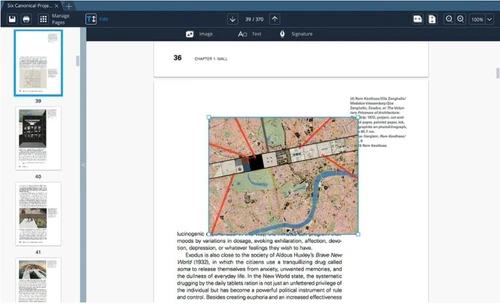
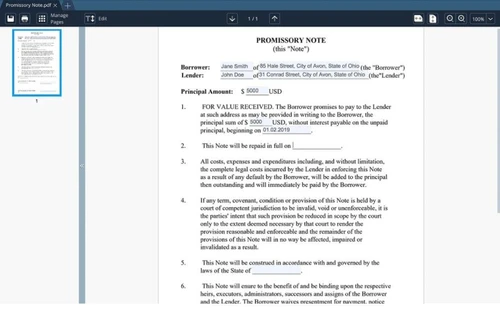
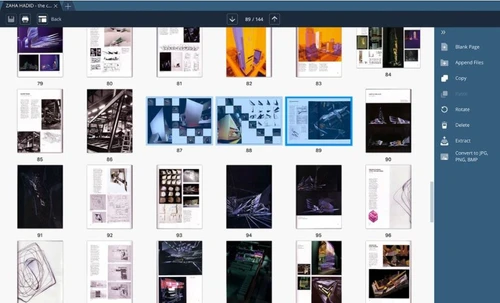
Movavi PDF Editor is a smart PDF editing solution that enables users to handle usual tasks related to PDFs without putting their sensitive information at risk. This PDF software offers a friendly user interface, enabling users to rotate PDF files or images while preventing unauthorized copying, use, distribution, or access to those files. Further, they can add or remove pages from a document, mer...
See MoreHave you used Movavi Pdf Editor before?
Share your insights for better experience
View plans
 Save upto 18%, Get GST Invoice on your business purchase T&C Buy Now & Pay Later, Check offer on payment page.
 Brand: Movavi
Founded Year: 2004
Movavi offers a wide variety of multimedia programs that help you have fun with your videos, music, and photos on any platform and any device.
 View image files Document Management Merge Files Export Section File Transfer

Watch the demo video to explore key features, real workflows, and how the software fits your business needs.
 Windows
  iOS
iOS  Desktop
  Perpetual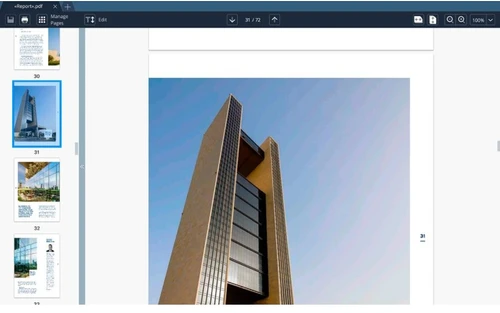
Small Business
Designed for startups and growing businesses
Medium Business
Built for business growth and flexibility
Enterprises
Designed for complex and large-scale business needs
4.4
Out of 5

Overall Rating
Based on
4 Verified Reviews
Rating Breakdown
85% Recommend this Product
Add ReviewUsers appreciate Movavi Pdf Editor for its user-friendly interface and efficient performance, noting that it doesn't consume excessive system resources. Many find value in its straightforward design and essential editing capabilities. However, some users have expressed a desire for additional features, such as a highlight option. Overall, the sentiment is positive, with users feeling satisfied with the service and support received, particularly from Techjockey, which has been praised for its responsiveness and helpfulness in software selection.


Feb 19, 2019
Techjockey Verified
“Great interface”
Pros
Doesn't gobble up space and RAM. The interface is straightforward. Selected structure like Browser. Has fundamental Editing Stuff.
Cons
Highlight option should be there
Jun 6, 2018
Techjockey Verified
“best service & quality”
Pros
In the sea of choices and criteria for success, Techjockey listened and made relevant suggestions. They were prompt and professional. I am glad to have found them.
Cons
N/A
May 30, 2018
Techjockey Verified
“Techjockey is a good place to go”
Pros
Techjockey gathered what I wanted from a software and presented me with many options. As well as, contacted many companies for me to set up appointments to review each software company individually. I found a software company that works perfect for my company. Most importantly, they save you time and show you options that you may miss!
Cons
N/A

Movavi Pdf Editor
₹ 1269.00 excl. GST
Desktop
Mobile
Web based
On Premises
Windows
Mac OS
PDFChef
₹ 2263
Desktop
Mobile
Web based
On Premises
Windows
Mac OS

Foxit PDF Editor
₹ 12000
Desktop
Mobile
Web based
On Premises
Windows
Mac OS

Gravity PDF
Price On Request
Desktop
Mobile
Web based
On Premises
Windows
Mac OS

Zoho PDF Editor
Price On Request
Desktop
Mobile
Web based
On Premises
Windows
Mac OS

PDF Expert
₹ 7200
Desktop
Mobile
Web based
On Premises
Windows
Mac OS

Adobe Acrobat Pro DC for teams
₹ 23864
Desktop
Mobile
Web based
On Premises
Windows
Mac OS
JOPDF
Price On Request
Desktop
Mobile
Web based
On Premises
Windows
Mac OS

Hybiscus
Price On Request
Desktop
Mobile
Web based
On Premises
Windows
Mac OS

Soda PDF
₹ 1111
Desktop
Mobile
Web based
On Premises
Windows
Mac OS

BentoPDF
Price On Request
Desktop
Mobile
Web based
On Premises
Windows
Mac OS
(0) Product(s) selected
Starting Price:
AUD199 /Year
Starting Price:
₹7,200 /year
Available
Price on Request
Starting Price:
$20 /Month
Starting Price:
$79 /Lifetime $99
Starting Price:
₹11,499 /License

Starting Price:
₹2,999

Starting Price:
$28 /year

Starting Price:
$20 3 Years

Starting Price:
$13
Yes, you can convert your PDFs into other formats like HTML, EPUB, TXT and Microsoft word Doc.
The PDF software provides its users with a library of pre-built templates for legal documents.
Yes, techjockey provides an online demo of Movavi PDF Editor. We will get back to you, as per your mentioned date and time for the demo.
Movavi Video Editor system requirements are: Windows: RAM: 2GB RAM Processor: 1GHz Intel, AMD or any other compatible Processor Hard Disk: 75MB for installation and 250MB for other ongoing operations. MacOS: RAM:1GB RAM Processor: 64-bit Intel processor Hard Disk: 80MB for installation and 250 MB for other ongoing operations.
No, Movavi PDF Editor does not have a mobile app as of now.
20,000+ Software Listed
Best Price Guranteed
Free Expert Consultation
2M+ Happy Customers
Terms and Condtions

Users with registered businesses can purchase goods from merchants on the platform to satisfy their business needs. Users are not permitted to utilize any products acquired through the platform for resale, advertising, business, or further distribution.
For each purchase made, users will receive a Tax Invoice (or 'GST invoice') that includes specific details such as:
the GSTIN of the user associated with their registered business, and
the specified Entity Name for their business.
It should be noted that not all products are eligible for GST Invoice. Only the products displayed by participating sellers with the 'GST-based Invoice Available' callout on the product description page would qualify.
Certain goods and services are not eligible to get a GST Invoice, including items with VAS, i.e., Value Added Services (e.g., Total Mobile Protection/Assured Buyback) and those involving an exchange offer at the time of purchase.
Users must ensure the accuracy of the GSTIN, and business entity name provided for the GST Invoice. Requests for corrections into GST Invoice would not be accommodated by Techjockey.com or any Seller, and any issues arising from user-provided information are the sole responsibility of users.
Techjockey.com is not liable for the GST Invoice or any associated input tax credit. To efficiently claim an input tax credit, users should select the registered place of business address as per the GST authority's data and follow the provisions of the GST Act and rules.
To claim an input tax credit, the delivery and billing addresses must match. Furthermore, input tax credits will not be granted if the delivery address and GSTIN on the invoice are from different states. In case of incorrect GST details provided during the order placement, the order will be canceled automatically.







