linkedin
PDF Expert logo
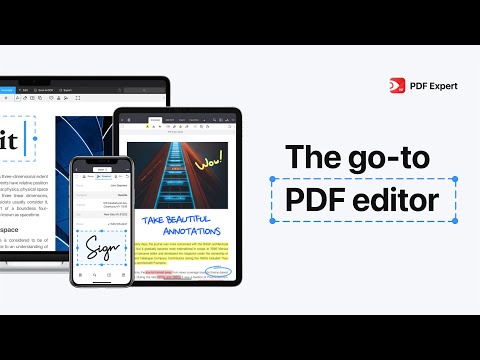
play Meet the all-new PDF Expert – the go-to PDF editor for iPhone, iPad, and Mac
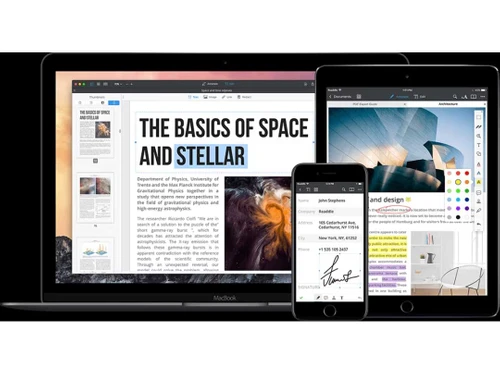
pdfexpert document tagging
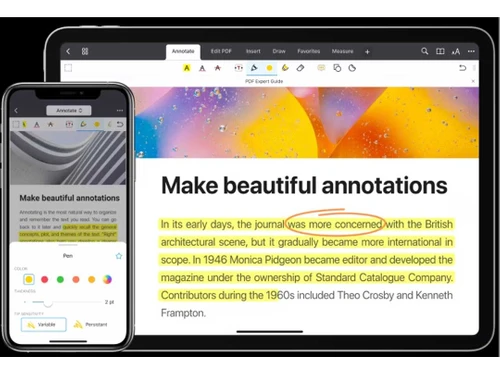
pdfexpert annotate

PDF Expert

Brand: Readdle Limited

  • 4.4

  • 5 Ratings & 1 Review

A utility software that lets you easily edit, sign, annotate, and manage PDFs on Apple devices.

See More

Have you used PDF Expert before?

Share your insights for better experience

Add a Review
Starting Price
₹7,200 excl.GST
₹ 8,496 incl. GST

View plans

offer Save upto 18%, Get GST Invoice on your business purchase T&C
offer Buy Now & Pay Later, Check offer on payment page.
Buy Now
100% Genuine
Products
Best Price
Guaranteed
Safe & Secure
Payment
  • Description

  • Pricing

  • Features

  • Specification

  • Review

  • Compare

  • Alternatives

  • FAQ

Starting at ₹7,200
Buy Now

PDF Expert Software Overview

What is a PDF Expert?

PDF Expert is one of the most powerful PDF software products designed by Readdle but is specific to the macOS and iOS devices only. It has numerous features such as PDF reading, annotation, editing, and organizing the PDF files. It is easy to highlight, underline and add notes to the documents of users, fill in forms and sign them.

It makes navigation and management of documents very easy due to the friendly interface. This utility software is popular because of its innovative features, including text editing, merging, splitting PDFs, and smooth synchronization with several devices. Users who want to have an advanced and versatile PDF management tool prefer it.

Why Choose PDF Expert Software?

  • Simple Navigation: User friendly interface to provide easy navigation and use of tools.
  • Compatibility Across Devices: Can be used across iOS devices and macOS for consistent use of the application across different platforms.
  • Seamless Cloud Integration: Integrates with cloud services and stores, accesses, and collaborates easily.
  • Regular Software Updates: Updates the software more frequently which offers the latest features and upgrading security.
  • Reliable Customer Support: If you need any help while using PDF Expert, a friendly support team is always there who is ready to help.
  • Offline Access Anytime: You never need the internet to use any feature and it is great for travel and in meetings or anywhere where there is no Wi-Fi.

Benefits of PDF Expert

  • Enhanced Reading Experience: Night mode and text-to-speech features improve reading comfort and accessibility.
  • Form Creation and Editing: Create and fill in forms easily directly within the software interface.
  • Versatile Document Conversion: Translate PDFs into different formats to open up possibilities of their use on other platforms.
  • Streamlined Batch Processing: Serve several documents at once and complete the tasks in the shortest possible time.
  • Interactive Content Integration: Add multimedia and hyperlink to improve interactivity of a document.
  • Document Comparison Tools: Determine the differences between versions of documents to simplify multiple edits.
  • Simple Page Manipulation: Insert, rearrange or remove pages in documents easily.
  • Quick Content Capture: You can now capture specific content areas with the snapshot tool and then share them easily.

PDF Expert Pricing

PDF Expert price starts from INR 7200 per year at techjockey.com. The pricing model is based on different parameters, including extra features, deployment type, and the total number of users. For further queries related to the product, you can contact our product team and learn more about the pricing and offers.

Read more

Readdle Limited Company Details

Founded Year:  2007

Readdle creates innovative business and productivity applications that shape the Future of work. People can get things done faster and much more efficiently while using Readdle apps such as Spark, Documents, Scanner Pro, PDF Expert, Calendars, Printer Pro, etc.

Director/Founders Readdle
Company Size 101-500 Employees

PDF Expert Pricing & Plans

Yearly (Rs.600.00 /month billed yearly)

Calculated Price

7200 Exclusive of all taxes
    • Yearly

      Yearly
      Yearly

Key Features

  • Big updates and new features

  • iPhone and iPad version

  • Mac version

  • Annotate like a Pro

  • Recognize text (OCR)/ Sign documents

Lifetime
Starting at ₹14900
    • Quantity (One time)

      Quantity (One time)
      Quantity (One time)

Key Features

  • Mac version

  • Annotate like a Pro

  • Edit PDF text, images, and links

  • Convert PDF to Word, Excel, PPT

  • Recognize text (OCR)/ Sign documents

PDF Expert Features

  • icon_check Image Replacement Tool
    Enables the seamless addition, removal, or resizing of images within your PDF files to create professional-looking documents.
  • icon_check Native Text Editing
    Allows you to easily modify existing text in your PDF documents, changing font, size, and opacity without losing any formatting.
  • icon_check Hyperlink Integration
    Allows users to link bits of text or images to specific pages or external websites for better navigation and interactivity.
  • icon_check Secure Redaction Tool
    Permanently black out or erase sensitive information from your documents to protect private data before sharing with others.
  • icon_check Electronic Signatures
    Streamlines your workflow by allowing you to sign contracts and legal forms with a few clicks using a saved digital signature.
  • icon_check Edit PDFs
    Allows editing of your text, images or links in the PDF file just like editing a Word file.
  • icon_check Page Management Suite
    Provides an easy way to reorder, rotate, or delete pages, as well as merge multiple PDF files into one single document fast.
  • icon_check Merge & Split PDFs
    Combine multiple PDFs to one or separate one PDF into several files with a few clicks.
  • icon_check Annotation Tools
    Offers a variety of highlighting, underlining, and strikethrough tools to make notes and collaborate on documents effectively.
  • icon_check Sign Documents
    Sign any PDF document digitally without printing and scanning the document.
  • icon_check Cloud Storage Syncing
    Connects with Dropbox, Google Drive, and iCloud to keep your documents synchronized across your Mac, iPad, and iPhone devices.
  • icon_check Annotate PDFs
    Highlight text, write notes, or draw shapes to review and share your thoughts on PDFs.
  • icon_check File Size Compressor
    Reduces the size of heavy PDF files without significant quality loss, making them much easier to send via email or message.
  • icon_check PDF Protection
    Allows you to set a password or blocks access to a given document or contents of any document.
  • icon_check Convert to PDF
    Word, Excel or image files to PDF without losing layout or long delays.
  • icon_check Full Text Search
    Search within a PDF quickly to find a word or a sentence as you would in a web-page using Ctrl+F.
  • icon_check OCR Text in PDF
    Search and edit PDF files by converting scanned paper or scanned image files to text.
PDF Expert Demo Video play icon

Get PDF Expert Demo

Watch the demo video to explore key features, real workflows, and how the software fits your business needs.

Understand
Key Features
Personal
Demo Insights
Interactive
Demo Support

PDF Expert Specifications

Supported Platforms
Windows Windows iOS iOS Android Android MacOS MacOS
Devices
Desktop Desktop Mobile Mobile Tablet Tablet iPad iPad
Deployment
Cloud-Based Cloud-Based
Suitable For
All Industries
Business Specific
All Businesses
Business Size
Small Business Startups Medium Business Enterprises SMBs SMEs MSMBs MSMEs
Customer Support
Phone Email Communities
Language
English
Training Resources
Webinars Documentation Videos
AI Features
AI Integrated

Explore the Best Alternative Solutions Similar to Your Business Size and Needs

PDF Expert Review

4.4

Out of 5

img

Overall Rating

Based on
1 Verified Review

Rating Breakdown

  • Features 4.4
  • Value for Money 4.6
  • Ease of Use 4.3
  • Customer Support 4.4

84% Recommend this Product

Add Review

PDF Expert Video Review

youtubeVideoId

4.1

“PDF Expert Review - Best PDF Tool Out There”

Review by: The Inventar

Compare PDF Expert With other PDF Software

Products
Ratings
Pricing
Device Supported
Deployment
Supported Platforms
  • img

    PDF Expert

  • 4.4

  • ₹ 7200.00 excl. GST

  • Desktop

    Mobile

  • Web based

    On Premises

  • Windows

    Mac OS

  • img

    Foxit PDF Editor

  • 4.3

  • ₹ 12000

  • Desktop

    Mobile

  • Web based

    On Premises

  • Windows

    Mac OS

  • img

    Gravity PDF

  • 4.3

  • Price On Request

  • Desktop

    Mobile

  • Web based

    On Premises

  • Windows

    Mac OS

  • img

    Zoho PDF Editor

  • 4.3

  • Price On Request

  • Desktop

    Mobile

  • Web based

    On Premises

  • Windows

    Mac OS

  • img

    JOPDF

  • 4.1

  • Price On Request

  • Desktop

    Mobile

  • Web based

    On Premises

  • Windows

    Mac OS

  • img

    Hybiscus

  • 4.2

  • Price On Request

  • Desktop

    Mobile

  • Web based

    On Premises

  • Windows

    Mac OS

  • img

    Soda PDF

  • 4.1

  • ₹ 1111

  • Desktop

    Mobile

  • Web based

    On Premises

  • Windows

    Mac OS

  • img

    BentoPDF

  • 4.3

  • Price On Request

  • Desktop

    Mobile

  • Web based

    On Premises

  • Windows

    Mac OS

(0) Product(s) selected

PDF Expert Alternatives

See All PDF Expert Alternatives

Available

Price on Request

Starting Price:

$20 /Month

Starting Price:

$49 /Lifetime

Starting Price:

$20 3 Years

Starting Price:

$50

Articles for PDF Expert

See All Related Articles

How much does PDF Expert cost?

PDF Expert price starts from INR 7200 per year at techjockey.com.

Who uses PDF Expert?

PDF Expert is used by students, teachers, professionals, and businesses who need to manage, edit, or sign PDF files easily.

How does PDF Expert work?

PDF Expert lets you open, edit, sign, and organize PDFs using simple tools on your iPhone, iPad, or Mac device.

Can I use PDF Expert for free?

Yes, you can download and try PDF Expert for free, but advanced tools require a paid subscription to unlock.

Is PDF Expert available for Android?

No, PDF Expert is only available for Apple devices like iPhone, iPad, and Mac.

Does PDF Expert save automatically?

Yes, PDF Expert automatically saves changes you make, so you don’t lose any work while editing or annotating PDFs.

How to remove watermarks in PDF Expert?

To remove watermarks, upgrade to the paid version and export files without the trial watermark.

Does PDF Expert have AI?

Yes, PDF Expert uses AI to enhance scanned PDFs by cleaning up shadows and improving text clarity for better reading.

How Does PDF Expert Utility Software Work?

PDF Expert allows users to open PDF documents within the software interface, where they can edit, annotate, and manage the content as needed, providing a seamless and intuitive experience for PDF document handling.

20,000+ Software Listed

Best Price Guranteed

Free Expert Consultation

2M+ Happy Customers

Terms and Condtions

close

Users with registered businesses can purchase goods from merchants on the platform to satisfy their business needs. Users are not permitted to utilize any products acquired through the platform for resale, advertising, business, or further distribution.

For each purchase made, users will receive a Tax Invoice (or 'GST invoice') that includes specific details such as:

  • the GSTIN of the user associated with their registered business, and

  • the specified Entity Name for their business.

It should be noted that not all products are eligible for GST Invoice. Only the products displayed by participating sellers with the 'GST-based Invoice Available' callout on the product description page would qualify.

Certain goods and services are not eligible to get a GST Invoice, including items with VAS, i.e., Value Added Services (e.g., Total Mobile Protection/Assured Buyback) and those involving an exchange offer at the time of purchase.

Users must ensure the accuracy of the GSTIN, and business entity name provided for the GST Invoice. Requests for corrections into GST Invoice would not be accommodated by Techjockey.com or any Seller, and any issues arising from user-provided information are the sole responsibility of users.

Techjockey.com is not liable for the GST Invoice or any associated input tax credit. To efficiently claim an input tax credit, users should select the registered place of business address as per the GST authority's data and follow the provisions of the GST Act and rules.

To claim an input tax credit, the delivery and billing addresses must match. Furthermore, input tax credits will not be granted if the delivery address and GSTIN on the invoice are from different states. In case of incorrect GST details provided during the order placement, the order will be canceled automatically.