USA
USA UAE
UAESmall Business
Designed for startups and growing businesses
See More





Brand: Adobe
Adobe FrameMaker is one of the best Desktop Publishing Software in India. Adobe FrameMaker is a comprehensive document processor that is designed for editing and writing large and complex documents, which also include structured documents. Adobe FrameMaker helps create rich and mesmerizing content that has unparalleled image handling capabilities. Previously developed by Frame Technology Corporat...
See MoreHave you used Adobe FrameMaker before?
Share your insights for better experience
Brand: Adobe
Founded Year: 1982
Adobe is the global leader in digital media and digital marketing solutions.
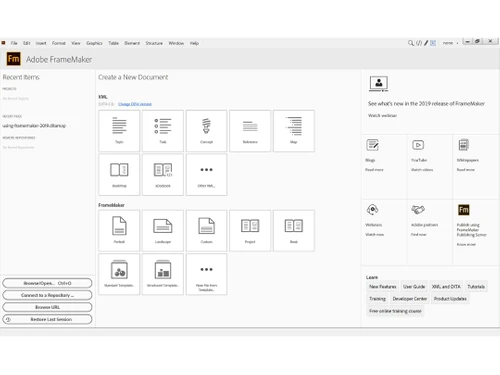
 Support for high resolution displays Bigger and better welcome screen Search for menu commands New Project Manager Responsive Layout (HTML5) Search faster with autocomplete Customisable Basic HTML5 output Reorganised menu Enhanced designer pods Slick new “insert image” experience

Watch the demo video to explore key features, real workflows, and how the software fits your business needs.
 Windows
  iOS
iOS  Android
  Desktop
  Mobile
  Perpetual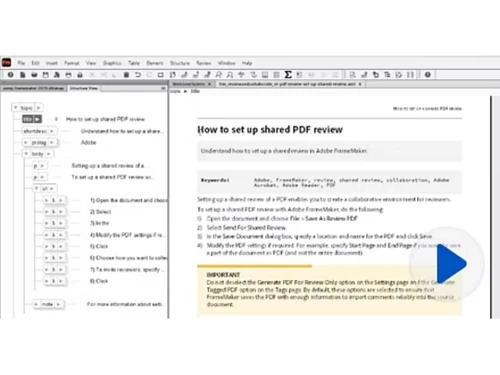
Small Business
Designed for startups and growing businesses
Medium Business
Built for business growth and flexibility
Enterprises
Designed for complex and large-scale business needs
4.5
Out of 5

Overall Rating
Based on
3 Verified Reviews
Rating Breakdown
93% Recommend this Product
Add ReviewUsers generally appreciate Adobe FrameMaker for its efficiency in handling large documentation projects and its versatility in creating both print and online materials from a single source. The ability to auto-generate tables of contents and easily update document styles is frequently highlighted as a significant advantage. However, while feedback is largely positive, there are few reviews, indicating a limited user base, which may affect the overall perception of the product's performance and support.

Apr 23, 2019
Techjockey Verified
“Amazed by Adobe FrameMaker”
Pros
I used to be surprised at how clean it became to open a huge ditamap created out of doors of adobe framemaker and how quick is opened over three hundred topics.
Cons
NO CONS
Apr 17, 2019
Techjockey Verified
“Complete solution for documentation”
Pros
Framemaker is a complete choice for specialized documentation. The program handles huge reports great and enables you to make online assistance documents from a similar source as your print/PDF manuals. The capacity to auto-create tables of substance and lists is incredible. Framemaker likewise enables you to refresh the style of your archives effectively through the writing of new formats. You can send out the report to numerous yields and make crosslinks, inward references, and so forth. You can make a far reaching set of factors that enable you to refresh institutionalized terms actually effectively, for example, copyright dates and creators.
Cons
NO CONS
Mar 27, 2018
Techjockey Verified
“amazing idea”
Pros
Great service, Great advice, No strings attached!!
Cons
N/A

Adobe FrameMaker
Price On Request
Desktop
Mobile
Web based
On Premises
Windows
Mac OS

Adobe PageMaker 7.0
Price On Request
Desktop
Mobile
Web based
On Premises
Windows
Mac OS

Adobe RoboHelp Office
Price On Request
Desktop
Mobile
Web based
On Premises
Windows
Mac OS

Adobe InDesign
Price On Request
Desktop
Mobile
Web based
On Premises
Windows
Mac OS

iStudio Publisher
Price On Request
Desktop
Mobile
Web based
On Premises
Windows
Mac OS

QuarkXPress
₹ 23317
Desktop
Mobile
Web based
On Premises
Windows
Mac OS

Marq
Price On Request
Desktop
Mobile
Web based
On Premises
Windows
Mac OS

Scribus
Price On Request
Desktop
Mobile
Web based
On Premises
Windows
Mac OS

Amadine
Price On Request
Desktop
Mobile
Web based
On Premises
Windows
Mac OS

Swift Publisher
Price On Request
Desktop
Mobile
Web based
On Premises
Windows
Mac OS

Affinity Publisher
Price On Request
Desktop
Mobile
Web based
On Premises
Windows
Mac OS
(0) Product(s) selected
Starting Price:
$30 /Licenses
Available
Price on Request
Starting Price:
$30 /Licenses
Starting Price:
$20 /Licenses
Adobe FrameMaker online (2017 release) is the complete solution for authoring and publishing multilingual technical writing content across mobile, web, desktop, and print. Easily work with unstructured and structured content in the same documentation. Work faster and smarter with advanced XML/ DITA capabilities. Publish content as Responsive HTML5, Mobile App, PDF, EPUB, and more. After Adobe FrameMaker Download, one can effortlessly manage content by integrating with leading CMSs.
FrameMaker for mac or other systems (2017 release) is ideal for technical communicators, information architects, designers, developers, engineers, web developers, and other documentation specialists who need a scalable bidirectional authoring and publishing solution to natively single-source popular standards- compliant? content and publish it to multiple channels, formats, and devices. Users of earlier releases of FrameMaker who upgrade can work more productively with support for HD displays, a new welcome screen, a brand-new project manager, and reorganized menu. Users can do more with advanced XML and DITA capabilities, deliver next-generation HTML5 layouts with an intuitive navigation experience, and help end users find relevant content faster with best-in-class search, including search autocomplete. Even subject matter experts and casual authors will be able to create XML content easily, by simply filling in form-like templates which can be custom-designed for them.
Special upgrade pricing is available to customers who have valid licenses for Adobe FrameMaker and want to upgrade to Adobe FrameMaker (2017 release) or Adobe Technical Communication Suite (2017 release).
Adobe FrameMaker (2017 release) is the complete solution for authoring and publishing technical content. Work smarter with an intuitive workspace, optimized for HD displays. Do more with advanced XML/DITA capabilities. Create next-generation HTML5 layouts with first-of-its-kind search autocomplete. Easily integrate with leading CMSs.
No, MathFlow™ licenses are not offered with FrameMaker versions(2017 release). However, a 30-day free trial version of MathFlow™ is included with FrameMaker adobe (2017 release). Support is provided for Structure and Style MathFlow™ editors.
20,000+ Software Listed
Best Price Guranteed
Free Expert Consultation
2M+ Happy Customers
Terms and Condtions

Users with registered businesses can purchase goods from merchants on the platform to satisfy their business needs. Users are not permitted to utilize any products acquired through the platform for resale, advertising, business, or further distribution.
For each purchase made, users will receive a Tax Invoice (or 'GST invoice') that includes specific details such as:
the GSTIN of the user associated with their registered business, and
the specified Entity Name for their business.
It should be noted that not all products are eligible for GST Invoice. Only the products displayed by participating sellers with the 'GST-based Invoice Available' callout on the product description page would qualify.
Certain goods and services are not eligible to get a GST Invoice, including items with VAS, i.e., Value Added Services (e.g., Total Mobile Protection/Assured Buyback) and those involving an exchange offer at the time of purchase.
Users must ensure the accuracy of the GSTIN, and business entity name provided for the GST Invoice. Requests for corrections into GST Invoice would not be accommodated by Techjockey.com or any Seller, and any issues arising from user-provided information are the sole responsibility of users.
Techjockey.com is not liable for the GST Invoice or any associated input tax credit. To efficiently claim an input tax credit, users should select the registered place of business address as per the GST authority's data and follow the provisions of the GST Act and rules.
To claim an input tax credit, the delivery and billing addresses must match. Furthermore, input tax credits will not be granted if the delivery address and GSTIN on the invoice are from different states. In case of incorrect GST details provided during the order placement, the order will be canceled automatically.