linkedin
Adobe After Effects CC for teams logo
play Video for adobe after effect demo
adobe after effects
adobe after effects text

Adobe After Effects CC for teams

Brand: Adobe

  • 4.5

  • 1 Rating & 1 Review

Adobe After Effects CC for Teams is one of the most important graphic design software for cinematic editing. A regular video can be edited and polished to look extremely professional in After Effects. With the help of this software, you can animate logo or any character. The tool offers a variety of animations to texts. Users can create amazing After effects are highly regarded in professions and...

See More

Have you used Adobe After Effects CC for teams before?

Share your insights for better experience

Add a Review
Starting Price
₹29628

View plans

100% Genuine
Products
Best Price
Guaranteed
Safe & Secure
Payment
  • Description

  • Pricing

  • Features

  • Specification

  • Review

  • Compare

  • Alternatives

  • FAQ

  • Questions

Starting at ₹29,628

Adobe After Effects CC for teams Software Overview

What is Adobe After Effects CC?

Adobe After Effects CC for Teams is one of the most important graphic design software for cinematic editing. A regular video can be edited and polished to look extremely professional in After Effects. With the help of this software, you can animate logo or any character. The tool offers a variety of animations to texts.

Users can create amazing After effects are highly regarded in professions and businesses where video editing is seen as invaluable. After effects provide you with all the best features. Viz a viz motion tracking, multiple templates for text animation, logo animation, filters, moving graphs among other things. It works on the following platforms Windows, Linux, Android, Apple, and Web-based platforms.

Adobe After Effects CC Price:

Adobe After Effects CC price for Teams comes with a yearly subscription and the ranges from Rs 29628 to Rs 31560. The price regulates on the basis of users.

Features of Adobe After Effects CC:

There is nothing that you can’t create with Adobe After Effects CC. It consists all sorts of functions, from commonly needed functions like cropping of a video and putting texts to newly added functions like content-aware fill which you can use it to remove any unnecessary item(s) quickly. The new updates have added improved features like 3D Depth effects, animations, etc and the systems have been improved significantly to make editing easier and faster and identifying error automatically in your commands.

After Effects CC has a visual Keyboard shortcut editor that lets you create your own keyboard shortcut for your comfort. In After Effects you can create a virtual reality environment with the feature called “Create VR Environment.” After effects work seamlessly in synchronization with Photoshop, Illustrator, Character Animator, Adobe XD, and Animate. It has a wide variety of functions and plug-ins, which is bound to add a lot of benefit to your organization.

Adobe After Effects CC Latest Version:

Adobe InCopy CC 2019 (16.0.1.48) is the latest version of this software.

Adobe After Effects CC System Requirements:

Adobe After Effects CC for Windows

  • Intel® Core™2 Duo or AMD Phenom® II processor; 64-bit support required
  • Microsoft® Windows® 7 with Service Pack 1, Windows 8 and Windows 8.1. See the CS6 FAQ for more information about Windows 8 support.*
  • 4 GB of RAM (8 GB recommended)
  • 3 GB of available hard-disk space; additional free space required during installation (cannot install on removable flash storage devices)
  • Additional disk space for disk cache (10 GB recommended)
  • 1280 x 900 display
  • OpenGL 2.0-capable system
  • DVD-ROM drive for installation from DVD media
  • QuickTime 7.6.6 software required for QuickTime features
  • Optional: Adobe-certified GPU card for GPU-accelerated ray-traced 3D renderer*

Adobe After Effects CC for MAC OS

  • Multicore Intel processor with 64-bit support
  • macOS v10.6.8, v10.7, v10.8, or v10.9**
  • 4 GB of RAM (8 GB recommended)
  • 4 GB of available hard-disk space for installation; additional free space required during installation (cannot install on a volume that uses a case-sensitive file system or on removable flash storage devices)
  • Additional disk space for disk cache (10 GB recommended)
  • 1280×900 display
  • OpenGL 2.0–capable system
  • DVD-ROM drive for installation from DVD media
  • QuickTime 7.6.6 software required for QuickTime features
  • Optional: Adobe-certified GPU card for GPU-accelerated ray-traced 3D renderer*
Read more

Adobe Company Details

Founded Year:  1982

Adobe is the global leader in digital media and digital marketing solutions.

Director/Founders Charles Geschke, Jason Lemkin
Company Size 1000+ Employees

Adobe After Effects CC for teams Pricing & Plans

After Effects
Level 1 (1 - 9) Licenses
Starting at ₹29628
    • Users

      Users
      Users
    • Yearly

      Yearly
      Yearly
Level 2 (10 - 49) Licenses
Starting at ₹285960
    • Users

      Users
      Users
    • Yearly

      Yearly
      Yearly
Level 12 (10 - 49) Licenses (VIP Select 3 year commit)
Starting at ₹272520
    • Users

      Users
      Users
    • Yearly

      Yearly
      Yearly

Adobe After Effects CC for teams Features

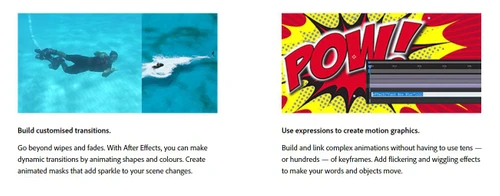
  • icon_check Roll credits. Spin words. Twirl titles.
    Adobe After Effects CC for teams lets you create twirled titles and spin words.
  • icon_check Explosive effects. Mind-blowing results.
    Now creating explosive effects will come easy with Adobe After Effects CC for teams.  
  • icon_check Get animated.
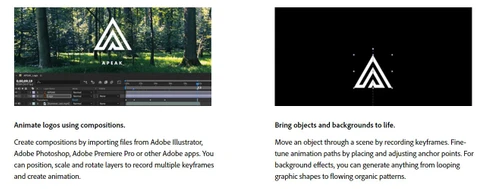
    This graphic design software lets you use shapes, logos, cartoons and get some super cool results.  
  • icon_check Plays well with others.
    Adobe After Effects CC for teams lets you seamlessly sync with other Adobe apps.
  • icon_check Data-driven animation
    It also makes you use graphs, charts, tables and more so that data becomes easier to comprehend. 
  • icon_check Immersive VR editing
    It comes with some integrated immersive VR editing tools.   
  • icon_check Keyboard shortcut mapping
    It lets you easily use keyboard shortcuts to make your work easy and fast.    
  • icon_check Performance Based Navigation ( PBN )
    It improves your performance by providing you with better navigation options.  
Adobe After Effects CC for teams Demo Video play icon

Get Adobe After Effects CC for teams Demo

Watch the demo video to explore key features, real workflows, and how the software fits your business needs.

Understand
Key Features
Personal
Demo Insights
Interactive
Demo Support

Adobe After Effects CC for teams Specifications

Supported Platforms
Windows Windows iOS iOS Android Android MacOS MacOS
Devices
Desktop Desktop Mobile Mobile Tablet Tablet iPad iPad
Deployment
Cloud-Based Cloud-Based
Suitable For
Media House
Business Specific
Media
Language
English

Explore the Best Alternative Solutions Similar to Your Business Size and Needs

Adobe After Effects CC for teams Review

4.5

Out of 5

img

Overall Rating

Based on
1 Verified Review

Rating Breakdown

  • Features 5
  • Value for Money 4
  • Ease of Use 4
  • Customer Support 5

90% Recommend this Product

Add Review

Aviral Bajpai linkedin_verify

Graphic Designer

Industry: Design User since: 2+ years

4.5

Reviewed on: Jan 4, 2023

Techjockey Verified

“The only animation software you will ever need”

Pros

Streamlined workflow and User-friendly workspace.

Cons

Steep learning curve and highly resource intensive

Reason to switch

You can perform just about anything related to motion design or animation with After Effects. It has one of the greatest number of community plugins that can help you do even the most complicated actions with ease. For beginners, the base software itself comes with hundreds of presets to get you started on your motion design journey. When it comes to more advanced users, writing expressions and parenting layer attributes can take your animations to a whole new level.

Compare Adobe After Effects CC for teams With other Graphic Design Software

Products
Ratings
Pricing
Device Supported
Deployment
Supported Platforms
  • img

    Adobe After Effects CC for teams

  • 4.5

  • Price On Request

  • Desktop

    Mobile

  • Web based

    On Premises

  • Windows

    Mac OS

  • img

    Adobe Express

  • 4.2

  • Price On Request

  • Desktop

    Mobile

  • Web based

    On Premises

  • Windows

    Mac OS

  • img

    Behance

  • 4.2

  • Price On Request

  • Desktop

    Mobile

  • Web based

    On Premises

  • Windows

    Mac OS

  • img

    Spark by Adobe

  • 4.8

  • Price On Request

  • Desktop

    Mobile

  • Web based

    On Premises

  • Windows

    Mac OS

  • img

    Pixelied

  • 4.2

  • Price On Request

  • Desktop

    Mobile

  • Web based

    On Premises

  • Windows

    Mac OS

  • img

    Studio Polotno

  • 4.3

  • Price On Request

  • Desktop

    Mobile

  • Web based

    On Premises

  • Windows

    Mac OS

  • img

    Lunacy

  • 4.2

  • Price On Request

  • Desktop

    Mobile

  • Web based

    On Premises

  • Windows

    Mac OS

  • img

    Zoviz

  • 3.8

  • ₹ 999

  • Desktop

    Mobile

  • Web based

    On Premises

  • Windows

    Mac OS

  • img

    PosterMyWall

  • 4.5

  • ₹ 390

  • Desktop

    Mobile

  • Web based

    On Premises

  • Windows

    Mac OS

(0) Product(s) selected

Adobe After Effects CC for teams Alternatives

See All Adobe After Effects CC for teams Alternatives

Starting Price:

₹798 /Month

Starting Price:

$47 /Year

Starting Price:

$15 /User/Month

Available

Price on Request

Starting Price:

$9 /Month

Available

Price on Request

Articles for Adobe After Effects CC for teams

See All Related Articles

How do I download and install Adobe After Effects CC for teams?

Adobe After Effects CC for teams can be easily downloaded from the Creative Cloud apps catalogue. Sign in with your Adobe ID and password to complete the download. You can also check, how to install older versions or check for updates.

Can I get a free demo or trial of the software I am going to purchase?

Yes. Techjockey provides free demo of all the services it provides to help you give a glimpse of what you are going to get. It greatly helps customers make the right choice and open avenues to make businesses grow.

Can I install Adobe After Effects CC for teams on another computer?

Adobe After Effects CC for teams can be downloaded for up to two computers at a time. In case, you want to install it on a third or fourth computer, you'll need to deactivate it on your previous machines.

Adobe After Effects CC for teams Questions

A:

To troubleshoot rendering errors in Adobe After Effects:

  • Check error messages in the Render Queue log or use the Console panel (Window > Console) for more technical details.
  • Verify your output settings in Render Queue > Output Module or use Adobe Media Encoder for better codec support (e.g., H.264).
  • Update After Effects, GPU drivers, and any third-party plugins you’re using.
  • Purge memory and cache via Edit > Purge > All Memory & Disk Cache to remove corrupted render data.
  • Check for corrupted assets or comps: Try rendering a different composition or isolate layers to pinpoint the issue.
  • Reduce render complexity: Pre-render heavy comps, lower output resolution, or reduce effects like 3D, motion blur, or third-party plugins.
  • Use Media Encoder for more stable rendering of compressed formats like H.264, instead of exporting directly from After Effects.
  • Disable Multi-Frame Rendering under Preferences > Memory & Performance only if you suspect it's causing instability.
  • Check disk space and write permissions on your output drive.
  • If the issue persists, reset After Effects preferences (hold Ctrl+Alt+Shift while launching), and contact Adobe Support with your project file and error logs.
Tarun Vasdev • Oct 22, 2025
Q:

How to fix rendering errors in After Effects?

Sukanta Besra • Aug 10, 2025
A:

To fix rendering errors in After Effects, start by updating the software and checking for corrupted project files or assets.

Ashutosh Kumar • Aug 14, 2025
Q:

How to merge layers in After Effects?

Syed firoz Ahmed • Apr 27, 2024
A:

Although the concept of merging the layer does not exist in After Effects like it does in Photoshop, still there are some alternatives that might help you out.

To merge layers in After Effects, follow the steps given below:

  • Select the two layers
  • Choose to Pre-compose
  • Make a new composition that holds these two videos
  • Now you can work upon this composition.
Arvind Chauhan • Apr 27, 2024
A:

To draw in anime style speed lines using After Effects, follow the steps given below:

  • Sketch a line and then press the Add Button
  • Press the Repeater button
  • Place the Repeater under the Shape Group
  • Open Transform Repeater and set the value of ‘X Position’ to 0
  • At last, Change the copies number to 20.
Nilankur Das • Mar 19, 2024
Q:

How to delete layer in After Effects?

Mohd. Imran • Mar 19, 2024
A:

To delete layer in After Effects, follow the steps given below:

  • Open Composition menu
  • Select the layer that you want to Delete
  • Press the Delete button.
Nilankur Das • Mar 19, 2024
See All Adobe After Effects CC for teams Questions

20,000+ Software Listed

Best Price Guranteed

Free Expert Consultation

2M+ Happy Customers

Terms and Condtions

close

Users with registered businesses can purchase goods from merchants on the platform to satisfy their business needs. Users are not permitted to utilize any products acquired through the platform for resale, advertising, business, or further distribution.

For each purchase made, users will receive a Tax Invoice (or 'GST invoice') that includes specific details such as:

  • the GSTIN of the user associated with their registered business, and

  • the specified Entity Name for their business.

It should be noted that not all products are eligible for GST Invoice. Only the products displayed by participating sellers with the 'GST-based Invoice Available' callout on the product description page would qualify.

Certain goods and services are not eligible to get a GST Invoice, including items with VAS, i.e., Value Added Services (e.g., Total Mobile Protection/Assured Buyback) and those involving an exchange offer at the time of purchase.

Users must ensure the accuracy of the GSTIN, and business entity name provided for the GST Invoice. Requests for corrections into GST Invoice would not be accommodated by Techjockey.com or any Seller, and any issues arising from user-provided information are the sole responsibility of users.

Techjockey.com is not liable for the GST Invoice or any associated input tax credit. To efficiently claim an input tax credit, users should select the registered place of business address as per the GST authority's data and follow the provisions of the GST Act and rules.

To claim an input tax credit, the delivery and billing addresses must match. Furthermore, input tax credits will not be granted if the delivery address and GSTIN on the invoice are from different states. In case of incorrect GST details provided during the order placement, the order will be canceled automatically.