linkedin
Adobe Creative Cloud Express logo
play Introducing Adobe Creative Cloud Express - Adobe Creative Cloud Express
adobe creative cloud express adobe stock express
adobe creative cloud express effects

Adobe Creative Cloud Express

Brand: Adobe

  • 4.4

  • 4 Ratings & 1 Review

Adobe Creative Cloud Express is an all-in-one graphic and content design tool that helps to create social posts, images, videos, flyers, etc.

See More

Have you used Adobe Creative Cloud Express before?

Share your insights for better experience

Add a Review
Starting Price
₹338

View plans

100% Genuine
Products
Best Price
Guaranteed
Safe & Secure
Payment
  • Description

  • Pricing

  • Features

  • Specification

  • Review

  • Compare

  • Alternatives

  • FAQ

Starting at ₹338

Adobe Creative Cloud Express Software Overview

What is Adobe Creative Cloud Express?

Adobe Creative Cloud Express is an all-in-one Graphic design tool that helps to create graphics, videos, and images, for social media, presentations, and web pages. It comes with a drag-and-drop interface, making it easy to use. It uses AI technology to assist in content creation and transformation. It provides flexibility of use from any device like desktop, or mobile with web browser. ,

Adobe Creative Cloud Express comprises a vast library of images and videos, and customizable templates. User can start from scratch or use these templates to add images, videos, or content, resize any assets, and download them for sharing. It provides real-time collaboration tools and integration with other Adobe Creative Cloud apps. It comes with a brand kit to ensure your designs meet brand color, images, and preferences.

Why choose Adobe Creative Cloud Express Graphic Design Software?

  • Social Media Graphics: Create engaging social media posts using customizable templates and images for platforms like Instagram.
  • Promotional Flyers: Design professional flyers for events or promotions to effectively communicate key information.
  • Video Content: Edit short videos by combining clips, adding text, and incorporating music for social media.
  • Branding Materials: Create consistent branding elements like logos and business cards for uniform marketing.
  • Web Pages: Build simple web pages for personal projects or small businesses using easy templates.

Benefits of Adobe Creative Cloud Express

  • User-Friendly Interface: Easy drag-and-drop design tools make it accessible for all without prior design experience.
  • Diverse Templates: Thousands of customizable templates help in quick design, saving time and inspiring creativity for various projects.
  • Mobile Accessibility: Create and edit designs on the go using mobile devices, ensuring flexibility.
  • Collaboration: Easily share projects with team members for feedback and collaboration on designs.
  • Assets: Access a vast library of stock images and fonts to enhance design quality.
  • Professional Quality: Provides high-quality assets ensuring visually appealing results.

Pricing of Adobe Creative Cloud Express

Adobe Creative Cloud Express price details are available on request at techjockey.com.

Adobe Creative Cloud Express price in India may vary based on factors like customization, additional features required, number of users, and the deployment type. Please request a call back for subscription-related details and to avail offers on premium packages.

Read more

Adobe Company Details

Founded Year:  1982

Adobe is the global leader in digital media and digital marketing solutions.

Director/Founders Charles Geschke, Jason Lemkin
Company Size 1000+ Employees

Adobe Creative Cloud Express Pricing & Plans

Premium ( individuals)
Starting at ₹399
    • Quantity

      Quantity
      Quantity
    • Monthly

      Monthly
      Monthly

Key Features

  • Devices: Works on desktop browsers and mobile phon

  • Version history: 30 days

  • Storage: 100GB

  • Brand management: Brand kits to maintain consisten

  • Generative AI: 250 generative credits per month to

  • Templates: Access to all premium static and video

Teams (Annual, billed monthly)
Starting at ₹338
    • Licenses

      Licenses
      Licenses
    • Monthly

      Monthly
      Monthly

Key Features

  • 2 seat minimum required

  • Version history: 180 days

  • Storage: 1TB per user (pooled for organisation)

  • Support: 24/7 tech support

  • Generative AI: 250 generative credits per month pe

  • Collaboration: Share Express files for real-time c

Adobe Creative Cloud Express Features

  • icon_check Adobe Stock Images
    Access a vast library of high-quality images, ensuring your designs always stand out. Boosts creativity.
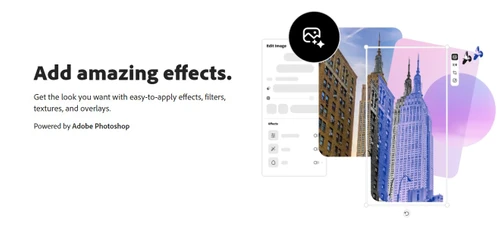
  • icon_check Add Amazing Effects
    Apply stunning visual effects to enhance your designs, making them more engaging and professional.
  • icon_check Remove Background
    Easily remove backgrounds from images for cleaner and more versatile design applications for image editing.
  • icon_check Add Design Elements
    Incorporate various design elements like icons, shapes, and stickers to enrich your visual content.
  • icon_check Video Editing
    Edit videos seamlessly with intuitive tools, creating dynamic and polished visual stories for any purpose.
  • icon_check Play with Text
    Customize text with different fonts, sizes, and colors, adding personality and emphasis to your designs.
Adobe Creative Cloud Express Demo Video play icon

Get Adobe Creative Cloud Express Demo

Watch the demo video to explore key features, real workflows, and how the software fits your business needs.

Understand
Key Features
Personal
Demo Insights
Interactive
Demo Support

Adobe Creative Cloud Express Specifications

Supported Platforms
Windows Windows iOS iOS Android Android MacOS MacOS
Devices
Desktop Desktop Mobile Mobile Tablet Tablet iPad iPad
Deployment
Cloud-Based Cloud-Based
Suitable For
All Industries
Business Specific
All Businesses
Business Size
Small Business Startups Medium Business Enterprises
Customer Support
Phone Email
Language
English
Training Resources
Videos

Explore the Best Alternative Solutions Similar to Your Business Size and Needs

Adobe Creative Cloud Express Review

4.4

Out of 5

img

Overall Rating

Based on
1 Verified Review

Rating Breakdown

  • Features 4.1
  • Value for Money 4.5
  • Ease of Use 4.8
  • Customer Support 4.1

92% Recommend this Product

Add Review

Adobe Creative Cloud Express Video Review

youtubeVideoId

4.4

“Adobe Express - Review and how to use”

Review by: Ray Pastore

Compare Adobe Creative Cloud Express With other Graphic Design Software

Products
Ratings
Pricing
Device Supported
Deployment
Supported Platforms
  • img

    Adobe Creative Cloud Express

  • 4.4

  • Price On Request

  • Desktop

    Mobile

  • Web based

    On Premises

  • Windows

    Mac OS

  • img

    Adobe Express

  • 4.2

  • Price On Request

  • Desktop

    Mobile

  • Web based

    On Premises

  • Windows

    Mac OS

  • img

    Behance

  • 4.2

  • Price On Request

  • Desktop

    Mobile

  • Web based

    On Premises

  • Windows

    Mac OS

  • img

    Spark by Adobe

  • 4.8

  • Price On Request

  • Desktop

    Mobile

  • Web based

    On Premises

  • Windows

    Mac OS

  • img

    Pixelied

  • 4.2

  • Price On Request

  • Desktop

    Mobile

  • Web based

    On Premises

  • Windows

    Mac OS

  • img

    PosterMyWall

  • 4.5

  • ₹ 390

  • Desktop

    Mobile

  • Web based

    On Premises

  • Windows

    Mac OS

  • img

    Studio Polotno

  • 4.3

  • Price On Request

  • Desktop

    Mobile

  • Web based

    On Premises

  • Windows

    Mac OS

  • img

    Lunacy

  • 4.2

  • Price On Request

  • Desktop

    Mobile

  • Web based

    On Premises

  • Windows

    Mac OS

  • img

    Zoviz

  • 3.8

  • ₹ 999

  • Desktop

    Mobile

  • Web based

    On Premises

  • Windows

    Mac OS

(0) Product(s) selected

Adobe Creative Cloud Express Alternatives

See All Adobe Creative Cloud Express Alternatives

Starting Price:

₹798 /Month

Starting Price:

$47 /Year

Starting Price:

$15 /User/Month

Available

Price on Request

Starting Price:

$9 /Month

Available

Price on Request

Articles for Adobe Creative Cloud Express

See All Related Articles

What design formats does Adobe Creative Cloud Express support for exporting designs?

Adobe Creative Cloud Express allows users to export designs in various formats, including JPG, PG, and PDF.

How can I customize the text in Adobe Creative Cloud Express?

Adobe Creative Cloud Express allows you to play with text, customizing fonts, sizes, and colors for emphasis.

Is there a demo available for Adobe Creative Cloud Express?

Yes, Adobe Creative Cloud Express offers a free plan, allowing users to explore its features.

What operating systems can Adobe Creative Cloud Express run on?

Adobe Creative Cloud Express is web-based and runs on any operating system with a browser.

Who can use Adobe Creative Cloud Express?

Adobe Creative Cloud Express is designed for beginners, small businesses, and marketers looking for easy design solutions.

What types of projects can I create with Adobe Creative Cloud Express?

Users can create social media graphics, flyers, videos, web pages, and branding materials with Adobe Creative Cloud Express.

Can I use Adobe Creative Cloud Express to create vector graphics?

Yes, Adobe Creative Cloud Express allows for vector graphic creation and editing, without loss of quality.

What file formats does Adobe Creative Cloud Express support for video imports?

Adobe Creative Cloud Express supports various formats like MP4, MOV, and AVI for importing and editing videos.

Can I automate repetitive design tasks in Adobe Creative Cloud Express?

Yes, Adobe Creative Cloud Express includes automation features for tasks like resizing images and batch processing.

How secure is Adobe Creative Cloud Express for storing design files?

Adobe Creative Cloud Express uses cloud storage with robust encryption to ensure the security and privacy of your files.

20,000+ Software Listed

Best Price Guranteed

Free Expert Consultation

2M+ Happy Customers

Terms and Condtions

close

Users with registered businesses can purchase goods from merchants on the platform to satisfy their business needs. Users are not permitted to utilize any products acquired through the platform for resale, advertising, business, or further distribution.

For each purchase made, users will receive a Tax Invoice (or 'GST invoice') that includes specific details such as:

  • the GSTIN of the user associated with their registered business, and

  • the specified Entity Name for their business.

It should be noted that not all products are eligible for GST Invoice. Only the products displayed by participating sellers with the 'GST-based Invoice Available' callout on the product description page would qualify.

Certain goods and services are not eligible to get a GST Invoice, including items with VAS, i.e., Value Added Services (e.g., Total Mobile Protection/Assured Buyback) and those involving an exchange offer at the time of purchase.

Users must ensure the accuracy of the GSTIN, and business entity name provided for the GST Invoice. Requests for corrections into GST Invoice would not be accommodated by Techjockey.com or any Seller, and any issues arising from user-provided information are the sole responsibility of users.

Techjockey.com is not liable for the GST Invoice or any associated input tax credit. To efficiently claim an input tax credit, users should select the registered place of business address as per the GST authority's data and follow the provisions of the GST Act and rules.

To claim an input tax credit, the delivery and billing addresses must match. Furthermore, input tax credits will not be granted if the delivery address and GSTIN on the invoice are from different states. In case of incorrect GST details provided during the order placement, the order will be canceled automatically.