linkedin
Adobe Express logo
play Generate the Perfect Presentation in #AdobeExpress | Adobe Express
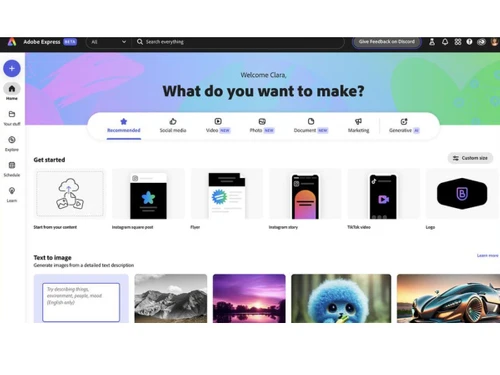
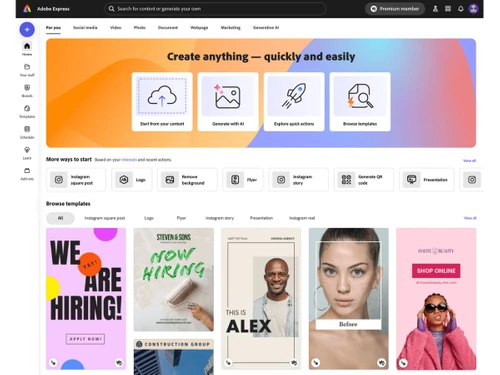
adobe express-dashboard
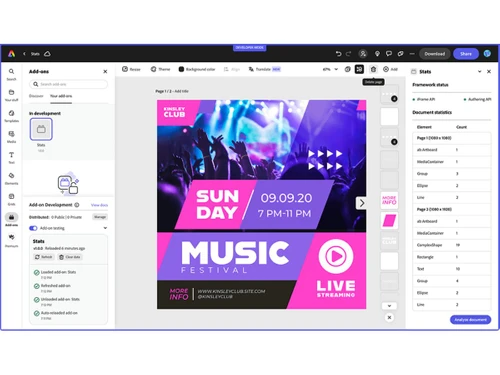
adobe express-creation

Adobe Express

Brand: Adobe

  • 4.2

  • 5 Ratings & 1 Review

An easy-to-use online and mobile design tool for creating graphics, videos, social posts, and more with templates and AI features.

See More

Have you used Adobe Express before?

Share your insights for better experience

Add a Review
Starting Price
₹399

View plans

100% Genuine
Products
Best Price
Guaranteed
Safe & Secure
Payment
  • Description

  • Pricing

  • Features

  • Specification

  • Review

  • FAQ

Starting at ₹399

Adobe Express Software Overview

What is Adobe Express?

Adobe Express is a cloud-based graphic design software that lets you easily make graphics, social media posts, videos, flyers, and more using simple drag-and-drop tools and templates.

It works in your web browser or mobile device so you can design anywhere. Adobe Express includes built-in editing features for photos, videos, text, and layouts to help content look professional.

The platform also offers generative AI tools to speed up design and generate creative elements. You can start with ready-made templates or build from scratch to match your style.

It connects smoothly with other Adobe apps like Photoshop and Illustrator for advanced work. Adobe Express is suitable for beginners and experienced creators alike.

Millions of people use it for personal, business, and educational projects. It also supports branded content and team collaboration for organizations.

Why Choose Adobe Express?

  • All-in-One Design Tool: Create images, videos, flyers, and social posts in one place.
  • Drag-and-Drop Ease: Simple interface for anyone to design quickly.
  • AI-Powered Tools: Generate and enhance content using AI features.
  • Ready-Made Templates: Thousands of professional templates to start from.
  • Safe for Commercial Use: AI and content tools designed for business use.
  • Extensive Asset Library: Access millions of free photos, videos, and graphics.
  • Variety of Fonts: Use thousands of Adobe Fonts for creative text.
  • Quick Photo Editing: Crop, enhance, and adjust images easily.
  • Video Editing Made Simple: Trim, animate, and resize videos fast.
  • PDF Tools: Edit, convert, and manage PDFs efficiently.
  • AI Assistant: Get automated creative suggestions and edits.
  • Bulk Content Creation: Generate multiple designs at once.
  • Auto-Resize: Resize content instantly for any social platform.

Benefits of Adobe Express

  • Adobe Ecosystem Integration: Works seamlessly with Photoshop and Illustrator.
  • Mobile & Desktop Access: Design anytime, anywhere.
  • Content Scheduling: Plan and schedule posts in advance.
  • Professional Output: Designs suitable for personal and business use.
  • Template Locking: Protect brand standards in team projects.
  • Multilingual AI: Create content in multiple languages.
  • Instant Background Removal: Remove image backgrounds with one click.
  • Animation Features: Add motion and effects to visuals.
  • Direct Social Sharing: Publish designs directly to social platforms.
  • Adobe Stock Access: Use professional stock assets in your designs.

Adobe Express Pricing

Adobe Express price starts at INR 399, as listed on techjockey.com. The pricing model is based on different parameters, including extra features, deployment type, and the total number of users. For further queries related to the product, you can contact our product team and learn more about the pricing and offers.

Read more

Adobe Company Details

Founded Year:  1982

Adobe is the global leader in digital media and digital marketing solutions.

Director/Founders Charles Geschke, Jason Lemkin
Company Size 1000+ Employees

Adobe Express Pricing & Plans

Adobe Express Premium
Key Features
  • Professionally designed templates-350,000+
  • Template recommendations
  • Adobe Stock photos-200M+
  • Adobe Stock videos-90,000+
  • Adobe Stock audio/music-2,000+
  • Adobe Stock sound effects-15,000+
  • Watermark premium content-No watermark
  • Adobe Stock backgrounds-50,000+
Starting at ₹399
    • Licenses

      Licenses
      Licenses
    • Monthly

      Monthly
      Monthly

Key Features

  • Professionally designed templates-350,000+

  • Template recommendations

  • Adobe Stock photos-200M+

  • Adobe Stock videos-90,000+

  • Adobe Stock audio/music-2,000+

  • Adobe Stock sound effects-15,000+

  • Watermark premium content-No watermark

  • Adobe Stock backgrounds-50,000+

Adobe Express Features

  • icon_check Editor
    Create social posts, flyers, videos, PDFs and more using a single unified web/editor workspace.
  • icon_check Template Library
    Access thousands of ready-made static and video templates for posts, flyers, logos, presentations, and more.
  • icon_check Text Effects
    Apply creative text styles or generate standout typography effects using generative AI.
  • icon_check Drag and Drop Functionality
    Combine video clips, images, music and animations easily by dragging and dropping — no prior video editing needed.
  • icon_check Video Creation and Editing
    Create social videos, reels, promos — trim, combine clips, add audio, animations and export/share.
  • icon_check Background Removal
    Remove image or video backgrounds with one click for clean, professional visuals.
  • icon_check Brand Kit Integration
    Upload and apply your brand’s logo, colors, fonts across designs — ensure consistency across all content.
  • icon_check Multi-Channel Output
    Resize designs or videos for different social media dimensions automatically with one click.
  • icon_check Collaboration Tools
    Invite teammates to edit, comment, review or approve assets in real-time — ideal for team workflows.
  • icon_check Scheduling and Publishing
    Plan, schedule and auto-publish social posts from within Express for supported networks.
  • icon_check Animation and Motion Effects
    Add animated effects to text, shapes, images or video for dynamic, engaging content.
  • icon_check PDF and Document Editing
    Import, edit or convert PDFs — including editing text/images, useful for flyers, brochures or docs.
  • icon_check Version History
    Store projects in cloud, track versions and revert changes as needed — ensures safe editing.
  • icon_check Bulk Create and Variations
    Generate multiple design or video variations at once — great for campaigns, A/B testing or seasonal content.
  • icon_check Cross app Integration
    Import assets from other Adobe tools (like Photoshop, Lightroom) and continue editing in Express.
  • icon_check AI Assistant
    Use natural-language prompts to create or edit designs automatically — helps speed up workflows and lower design barrier.
Adobe Express Demo Video play icon

Get Adobe Express Demo

Watch the demo video to explore key features, real workflows, and how the software fits your business needs.

Understand
Key Features
Personal
Demo Insights
Interactive
Demo Support

Adobe Express Specifications

Supported Platforms
Windows Windows iOS iOS Android Android MacOS MacOS
Devices
Desktop Desktop Mobile Mobile Tablet Tablet iPad iPad
Deployment
Cloud-Based Cloud-Based
Suitable For
All Industries
Business Specific
All Businesses
Business Size
Individual Small Business Startups Medium Business Enterprises SMBs SMEs MSMBs MSMEs Freelancers
Customer Support
Email Communities
Language
English
Integration
API Integration
Training Resources
Videos
AI Features
AI Integrated
Compliance Regulation
COPPA

Adobe Express Review

4.2

Out of 5

img

Overall Rating

Based on
1 Verified Review

Rating Breakdown

  • Features 4.6
  • Value for Money 3.8
  • Ease of Use 4.3
  • Customer Support 4.3

82% Recommend this Product

Add Review

Adobe Express Video Review

youtubeVideoId

4.1

“Everything Nonprofits Need to Know | Adobe Express”

Review by: Nancy

Articles for Adobe Express

See All Related Articles

How much does Adobe Expresscost ?

Adobe Express price starts at INR 399, as listed on techjockey.com.

Is there a mobile app available for Adobe Express Software?

Yes, Adobe Express has mobile apps available on iOS and Android.

Which operating systems are compatible with Adobe Express Software?

Adobe Express works on Windows and MacOS.

Does Adobe Express Software offer a free trial?

Yes, Adobe Express offers a free plan with limited features to try before subscribing.

How does Adobe Express Software function?

Adobe Express allows users to create graphics, videos, and social media content using templates, drag-and-drop tools, and AI features.

Who uses Adobe Express Software?

Adobe Express is used by students, marketers, social media creators, small businesses, and designers.

Is a free demo available for Adobe Express Software?

There is no separate demo, users can explore the free plan to experience its features.

Is Adobe Express Software available for free?

Yes, a free plan is available with basic features for individuals and small projects.

20,000+ Software Listed

Best Price Guranteed

Free Expert Consultation

2M+ Happy Customers

Terms and Condtions

close

Users with registered businesses can purchase goods from merchants on the platform to satisfy their business needs. Users are not permitted to utilize any products acquired through the platform for resale, advertising, business, or further distribution.

For each purchase made, users will receive a Tax Invoice (or 'GST invoice') that includes specific details such as:

  • the GSTIN of the user associated with their registered business, and

  • the specified Entity Name for their business.

It should be noted that not all products are eligible for GST Invoice. Only the products displayed by participating sellers with the 'GST-based Invoice Available' callout on the product description page would qualify.

Certain goods and services are not eligible to get a GST Invoice, including items with VAS, i.e., Value Added Services (e.g., Total Mobile Protection/Assured Buyback) and those involving an exchange offer at the time of purchase.

Users must ensure the accuracy of the GSTIN, and business entity name provided for the GST Invoice. Requests for corrections into GST Invoice would not be accommodated by Techjockey.com or any Seller, and any issues arising from user-provided information are the sole responsibility of users.

Techjockey.com is not liable for the GST Invoice or any associated input tax credit. To efficiently claim an input tax credit, users should select the registered place of business address as per the GST authority's data and follow the provisions of the GST Act and rules.

To claim an input tax credit, the delivery and billing addresses must match. Furthermore, input tax credits will not be granted if the delivery address and GSTIN on the invoice are from different states. In case of incorrect GST details provided during the order placement, the order will be canceled automatically.