USA
USA UAE
UAESmall Business
Designed for startups and growing businesses

See More





Brand: Adobe
Adobe Creative Cloud for Teams is a suite of creative apps and services that is used for video editing, graphic design, photography, web development, and a lot more. This designing software offers a cluster of creative services and apps which helps in brand-building and business growth. This platform allows you to share your creative assets, reduce rework, and drive consistency across brochures, ...
See MoreHave you used Adobe Creative Cloud for Teams All Apps before?
Share your insights for better experience
Brand: Adobe
Founded Year: 1982
Adobe is the global leader in digital media and digital marketing solutions.
 Stunning visual stories in minutes Amazing Photos Interactive experiences on every screen Video that's always a cut above Centralized Admin Console Creative Cloud Libraries 24/7 support Cloud Storage for Teams Adobe Firefly Integration Billing system Cloud Desktop App Stock Integration Mobile App Cutting-edge creativity Seamless collaboration Licence Management

Watch the demo video to explore key features, real workflows, and how the software fits your business needs.
 Windows
  MacOS
MacOS  Desktop
  Mobile
  Cloud-Based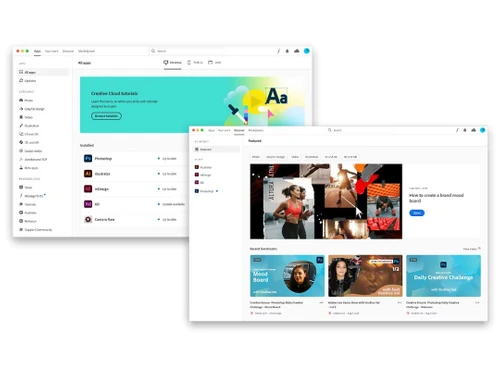



Small Business
Designed for startups and growing businesses
Medium Business
Built for business growth and flexibility
Enterprises
Designed for complex and large-scale business needs
4.4
Out of 5

Overall Rating
Based on
10 Verified Reviews
Rating Breakdown
89% Recommend this Product
Add ReviewCustomers generally appreciate Adobe Creative Cloud for Teams for its ability to facilitate collaboration and ease of use, particularly for design projects. Many users highlight the convenience of syncing work across devices and the effectiveness of real-time feedback. However, some common complaints include challenges with image resizing, occasional crashes, and a time-consuming licensing process. Despite these issues, the overall sentiment remains positive, with users recommending the software for its robust features and excellent customer support.
Pros
"It is secure. ... You can easily transfer data and documents across different platforms without losing formatting or coding."
"Great company! Excellent customer service and just generally smooth sailing. Would highly recommend."
Cons
"Honestly, I don't have issues with Adobe Creative Cloud. Any challenges usually stem from our job's licensing setup rather than the Creative Cloud itself."
"The device licensing process is time-consuming, otherwise nothing else is trouble as such. "
"I found it really challenging every time I tried to resize any image. "

Jun 5, 2024
Techjockey Verified
“5+ Years of Using Adobe Creative Cloud”
Pros
The convenience of having all my projects synced across devices is a huge plus. Saving to the cloud and accessing work from anywhere is a game-changer. It's also effortless to stay updated with the latest versions of InDesign, Illustrator, and Photoshop.
Cons
Honestly, I don't have issues with Adobe Creative Cloud. Any challenges usually stem from our job's licensing setup rather than the Creative Cloud itself.
Reason to switch
Adobe Creative Cloud empowers me to create content that perfectly aligns with my office's mission and goals. It enhances efficiency, making it easier to produce a variety of items compared to the past.
Jul 26, 2022
Techjockey Verified
““Organize your Design Process with Adobe Creative Cloud for Teams””
Pros
Adobe Creative Cloud for Teams is a great option for organizations that wish to have an organized design process. It has several options for users, and it is easy to create a design project that can be shared with your team. It is a great software to use if you are looking for the best design tool.
Cons
I found it really challenging every time I tried to resize any image.
Reason to switch
Adobe Font Folio is also great software to work with, but I wanted to try a different platform, so I switched to Adobe Creative Cloud for Teams.
Jul 26, 2022
Techjockey Verified
““I must say… it's just what I needed!””
Pros
I am a web developer and designer, and I was looking for a tool that could help me do my work without any hassles. Then, I found Adobe Creative Cloud for Teams and it has made my work a lot easier as I can share my design files with my team members and get their feedback in real-time.
Cons
This software occasionally crashes in between without any prior warnings.
Reason to switch
Sketchbook lacks a few important features like undo button, advanced layering, etc.

Adobe Creative Cloud for Teams All Apps
Price On Request
Desktop
Mobile
Web based
On Premises
Windows
Mac OS

Adobe Premiere Pro CS6
Price On Request
Desktop
Mobile
Web based
On Premises
Windows
Mac OS

Adobe Creative Cloud for Enterprise
Price On Request
Desktop
Mobile
Web based
On Premises
Windows
Mac OS

FreeHand MX
Price On Request
Desktop
Mobile
Web based
On Premises
Windows
Mac OS

Desygner
Price On Request
Desktop
Mobile
Web based
On Premises
Windows
Mac OS
Rapid Resizer
Price On Request
Desktop
Mobile
Web based
On Premises
Windows
Mac OS

Kittl
₹ 1000
Desktop
Mobile
Web based
On Premises
Windows
Mac OS

Placeit
Price On Request
Desktop
Mobile
Web based
On Premises
Windows
Mac OS

Penpot
Price On Request
Desktop
Mobile
Web based
On Premises
Windows
Mac OS

Texware Textile Designing Software
₹ 30000
Desktop
Mobile
Web based
On Premises
Windows
Mac OS

Glyphs
Price On Request
Desktop
Mobile
Web based
On Premises
Windows
Mac OS
(0) Product(s) selected
Starting Price:
₹65,364 /Year
Starting Price:
$19 /Month
Starting Price:
$24 /Year
Starting Price:
$7 /Editor/Month
Starting Price:
€299 /Quantity

Starting Price:
$40 /License

Starting Price:
$20 /Month

Starting Price:
$15 /Month

Starting Price:
$25 /Month

Starting Price:
$19

Starting Price:
$10 /Month





No. Adobe Creative Cloud for Teams offers you the facility to install each application individually whenever you want. One can mix and match whatever he wants- as it provides you with the freedom to choose which applications to install.
Adobe Creative Cloud for teams can be easily downloaded from the Creative Cloud apps catalogue. Sign in with your Adobe ID and password to complete the download. You can also check, how to install older versions or other updates.
Adobe Creative Cloud for Teams demo is available for free with techjockey.com.
Adobe Creative Cloud for Teams is compatible with Windows and macOS operating systems.
Adobe Creative Cloud for Teams is available for iOS and Android devices.
Adobe Creative Cloud for Teams price in India starts at Rs. 69720 at techjockey.com.
Adobe Creative Cloud for Teams is typically used by design shops, agencies, photography studios, etc.
Adobe Creative Cloud for Teams offers a free trial. However, the premium plan with advanced features starts at Rs. 69720.
Adobe Creative Cloud for Teams provides access to Adobe apps and services, offers tools to promote collaboration, streamlines administration, and manages your IP.
Adobe Creative Cloud for Teams offers a web-based admin console to handle licenses, cloud storage of 1TB/user, centralized IT tools for deployment, 24/7 advanced tech support, 1:1 product experts’ session, and more.
Yes, it is possible to install the app on multiple computers and sign in on up to two systems at once.
Adobe Creative Cloud software helps in easy collaboration amongst teams, streamlining the administration process, boosting creativity, and easy integration with different apps.
It offers a data storage capacity of 100 GBs.
Yes, it is completely safe as Adobe gives priority to the users’ security. It completely adheres to all industry-established security policies.
20,000+ Software Listed
Best Price Guranteed
Free Expert Consultation
2M+ Happy Customers
Terms and Condtions

Users with registered businesses can purchase goods from merchants on the platform to satisfy their business needs. Users are not permitted to utilize any products acquired through the platform for resale, advertising, business, or further distribution.
For each purchase made, users will receive a Tax Invoice (or 'GST invoice') that includes specific details such as:
the GSTIN of the user associated with their registered business, and
the specified Entity Name for their business.
It should be noted that not all products are eligible for GST Invoice. Only the products displayed by participating sellers with the 'GST-based Invoice Available' callout on the product description page would qualify.
Certain goods and services are not eligible to get a GST Invoice, including items with VAS, i.e., Value Added Services (e.g., Total Mobile Protection/Assured Buyback) and those involving an exchange offer at the time of purchase.
Users must ensure the accuracy of the GSTIN, and business entity name provided for the GST Invoice. Requests for corrections into GST Invoice would not be accommodated by Techjockey.com or any Seller, and any issues arising from user-provided information are the sole responsibility of users.
Techjockey.com is not liable for the GST Invoice or any associated input tax credit. To efficiently claim an input tax credit, users should select the registered place of business address as per the GST authority's data and follow the provisions of the GST Act and rules.
To claim an input tax credit, the delivery and billing addresses must match. Furthermore, input tax credits will not be granted if the delivery address and GSTIN on the invoice are from different states. In case of incorrect GST details provided during the order placement, the order will be canceled automatically.