linkedin
Penpot logo
play This is Penpot, the open-source collaborative design platform
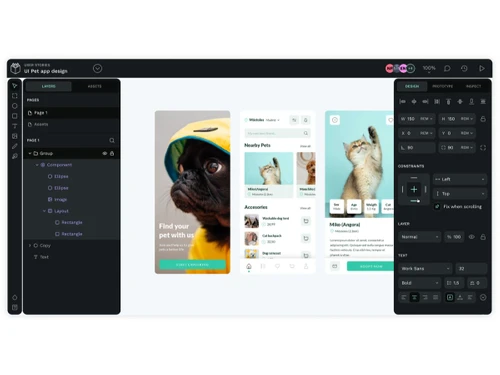
penpot-interface
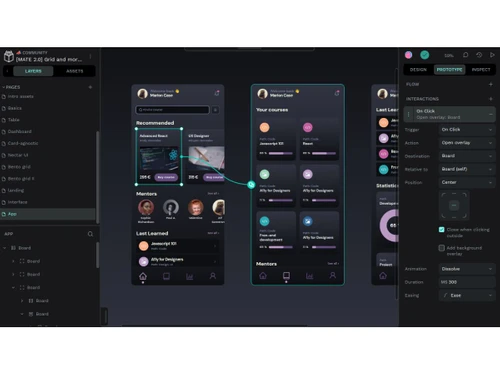
penpot-design

Penpot

Brand: Kaleidos

  • 4.2

  • 3 Ratings

Penpot is an open-source design platform for creating UI and UX designs and interactive prototypes with real-time collaboration.

See More

Have you used Penpot before?

Share your insights for better experience

Add a Review
Starting Price
$7

View plans

100% Genuine
Products
Best Price
Guaranteed
Safe & Secure
Payment
  • Description

  • Pricing

  • Features

  • Specification

  • Review

  • FAQ

Starting at $7

Penpot Software Overview

What is Penpot?

Penpot is an open-source online designing solution that helps teams create UI/UX designs and interactive prototypes for websites and apps.

It works directly in a web browser or can be installed on a server, so there's no need for special software. Penpot allows designers and developers to collaborate in real time, making teamwork easier.

It provides tools for drawing vector graphics, building layouts, and designing interfaces, along with interactive prototyping to show how designs will function.

The platform uses open standards like SVG, HTML, and CSS, which makes designs easy to integrate with code.

Penpot is a great choice for teams that want full control over their designs without subscription fees and is often used as a collaborative and customizable alternative to other design tools.

Why Choose Penpot Software?

  • Open-Source Platform: Penpot designing software is open-source, allowing full customization.
  • Web-Based Tool: Use it directly in a browser without installation.
  • Cross-Platform Compatibility: Works on Windows, macOS, Linux, or any browser device.
  • Collaborative Design: Teams can design and give feedback in real-time.
  • Interactive Prototyping: Create prototypes to show how users will navigate your product.
  • Design System Support: Maintain consistent design systems with reusable components.
  • Developer-Friendly: This designing software can export designs in SVG, HTML, and CSS for easy implementation.
  • Self-Hosting Option: Can be hosted on your own servers for full control and privacy.

Benefits of Penpot Software

  • No Vendor Lock-In: You fully own your projects without licensing or subscription limits.
  • Scalable for Teams: Penpot designing software works for individuals or large teams, supporting smooth collaboration.
  • Flexible Layout Tools: Advanced tools make designing complex interfaces easy and precise.
  • Real-Time Feedback: Team members can comment and approve changes instantly.
  • Version Control: Track changes and revert to previous designs when needed.
  • Supports Multiple File Formats: Import and export in SVG, PNG, PDF, and more.
  • Customizable UI: With Penpot designing software, you can adjust the workspace and tools to fit your workflow.
  • Accessible Anywhere: Cloud-based access lets you work from any device.
  • Strong Community Support: Active open-source community provides updates, plugins, and help.
  • Cost-Effective Solution: Free and open-source, eliminating software costs for teams.

Penpot Pricing

Penpot price starts at $7 at techjockey.com.

The pricing model is based on different parameters, including extra features, deployment type, and the total number of users. For further queries related to the product, you can contact our product team and learn more about the pricing and offers.

Read more

Kaleidos Company Details

Founded Year:  2011

Kaleidos is an international Madrid-based venture infused with private capital. Our focus is free software technology aimed at innovative projects. We harness the best worldwide expertise so we can be your one-stop shop.

Director/Founders Enrique Posner, Pablo Ruiz-Muzquiz
Company Size 1-100 Employees

Penpot Pricing & Plans

Unlimited
Starting at $7
    • Users (Editor)

      Users (Editor)
      Users (Editor)
    • Monthly

      Monthly
      Monthly

Key Features

  • Auto versioning

  • Penpot editor

  • Flex Layout

  • Grid Layout

  • Components

  • Fonts management

  • Create prototypes

  • Interactions

  • Multiplayer edition

  • Share presentations

Enterprise
Starting at $950
    • Organization

      Organization
      Organization
    • Monthly

      Monthly
      Monthly

Key Features

  • Auto versioning

  • Penpot editor

  • Flex Layout

  • Grid Layout

  • Components

  • Fonts management

  • Create prototypes

  • Interactions

  • Multiplayer edition

  • Share presentations

Penpot Features

  • icon_check Vector Editing
    Use SVG-based tools including paths, fills, strokes and boolean operations to craft icons and complex graphics.
  • icon_check Components and Symbols
    Create reusable UI elements (buttons, cards etc.) that maintain consistency and update across your design files.
  • icon_check Variants and Overrides
    Manage component states (hover, active, disabled) by creating variants and overriding properties for scalability.
  • icon_check Design Tokens
    Define centralised values for colors, typography, spacing and shadows to align design and development.
  • icon_check Flex Layout
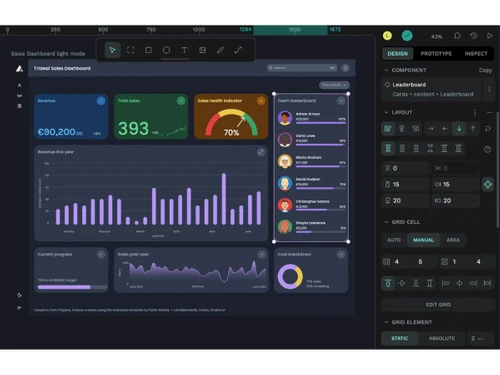
    Build flexible, responsive layouts using Flexbox-style controls that mirror web code standards.
  • icon_check Grid Layout
    Use rows and columns with grid layout features to design precisely and produce code-friendly structure
  • icon_check Prototyping
    Define triggers, actions, transitions and flows to turn static designs into clickable prototypes.
  • icon_check Transitions and Animations
    Add animations like fade, push or pull between states to simulate real product behaviour.
  • icon_check Real-Time Collaboration
    Multiple users work on the same file simultaneously, enabling teamwork in real time.
  • icon_check Comments and Feedback
    Team members and stakeholders can comment directly on designs and prototypes, centralising feedback.
  • icon_check Data Import/Export
    Export objects and files into formats like PDF, SVG, PNG, JPG, and standard or binary file for handoff.
  • icon_check Templates
    Create and share component libraries, templates, UI kits across teams to speed workflows and maintain consistency.
  • icon_check Open Standards Support
    Built with SVG, HTML, CSS, JSON ensuring compatibility, no vendor lock-in and ease of developer integration.
  • icon_check Project Management
    Unlimited teams, projects, pages and users; role-based permissions help manage collaboration at scale.
  • icon_check Layer Management
    Search and filter layers by type, use rulers/guides, grids and snapping for precise design and organisation.
Penpot Demo Video play icon

Get Penpot Demo

Watch the demo video to explore key features, real workflows, and how the software fits your business needs.

Understand
Key Features
Personal
Demo Insights
Interactive
Demo Support

Penpot Specifications

Supported Platforms
Ubuntu Ubuntu Windows Windows MacOS MacOS Linux Linux
Devices
Desktop Desktop
Deployment
Cloud-Based Cloud-Based Perpetual Perpetual
Suitable For
All Industries
Business Specific
All Businesses
Business Size
Individual Small Business Startups Medium Business Enterprises SMBs SMEs MSMBs MSMEs Freelancers
Customer Support
Email Communities
Language
English
Integration
API Integration
Training Resources
Videos

Penpot Review

4.2

Out of 5

img

Overall Rating

Based on
3 Verified Ratings

Rating Breakdown

  • Features 4.5
  • Value for Money 4.1
  • Ease of Use 4.1
  • Customer Support 4.3

80% Recommend this Product

Add Review

Techjockey Trusted Reviews from Verified Users

No reviews are currently available for Penpot. Discover similar Designing Solutions reviews

  • Kittl

    4.3

    Whats great - Kittl helps me create product images for my Etsy listings. read more

  • Adobe Creative Cloud for Teams All Apps

    4.5

    Whats great - The convenience of having all my projects synced across devices is a huge plus. Saving to the cloud and accessing work from a... read more
  • Rapid Resizer

    4.8

    Whats great - If you want to create different types of digital paintings, then Rapid Resizer is all you need. It’s wonderful to create diff... read more

Articles for Penpot

See All Related Articles

How much does Penpot Software cost?

Penpot pricing starts from $7, as listed on techjockey.com.

Is there a mobile app available for Penpot Designing Software?

No, the Penpot mobile app is not available.

Which operating systems are compatible with Penpot Software?

Penpot works on Ubuntu, Windows, MacOS and Linux.

Does Penpot Software offer a free trial?

Yes, Penpot designing software has a free version you can try without cost, and some hosted plans offer trial options.

How does Penpot Software function?

Penpot functions as a browser based design and prototyping tool for creating UI/UX designs collaboratively.

Who uses Penpot Software?

Penpot designing software is used by designers, developers, individuals, and teams of all sizes for UI/UX and product design work.

Is a free demo available for Penpot Designing Software?

Yes, you can access a free demo of Penpot by using its free version online.

Is Penpot Software available for free?

Yes, Penpot is available for free as an open source design platform.

20,000+ Software Listed

Best Price Guranteed

Free Expert Consultation

2M+ Happy Customers

Terms and Condtions

close

Users with registered businesses can purchase goods from merchants on the platform to satisfy their business needs. Users are not permitted to utilize any products acquired through the platform for resale, advertising, business, or further distribution.

For each purchase made, users will receive a Tax Invoice (or 'GST invoice') that includes specific details such as:

  • the GSTIN of the user associated with their registered business, and

  • the specified Entity Name for their business.

It should be noted that not all products are eligible for GST Invoice. Only the products displayed by participating sellers with the 'GST-based Invoice Available' callout on the product description page would qualify.

Certain goods and services are not eligible to get a GST Invoice, including items with VAS, i.e., Value Added Services (e.g., Total Mobile Protection/Assured Buyback) and those involving an exchange offer at the time of purchase.

Users must ensure the accuracy of the GSTIN, and business entity name provided for the GST Invoice. Requests for corrections into GST Invoice would not be accommodated by Techjockey.com or any Seller, and any issues arising from user-provided information are the sole responsibility of users.

Techjockey.com is not liable for the GST Invoice or any associated input tax credit. To efficiently claim an input tax credit, users should select the registered place of business address as per the GST authority's data and follow the provisions of the GST Act and rules.

To claim an input tax credit, the delivery and billing addresses must match. Furthermore, input tax credits will not be granted if the delivery address and GSTIN on the invoice are from different states. In case of incorrect GST details provided during the order placement, the order will be canceled automatically.