linkedin
Flair AI logo
flair ai features
flair ai Benefits
flair ai search tab

Flair AI

Brand: Flair

  • 4.1

  • 5 Ratings

Flair AI is an AI design tool for product photoshoots, allowing users to create stunning visuals with features like 3D elements, drag-and-drop canvas, and real-time collaboration.

See More

Have you used Flair AI before?

Share your insights for better experience

Add a Review
Starting Price
$10

View plans

100% Genuine
Products
Best Price
Guaranteed
Safe & Secure
Payment
  • Description

  • Pricing

  • Features

  • Specification

  • Review

  • Compare

  • Alternatives

  • FAQ

Starting at $10

Flair AI Software Overview

What is Flair AI?

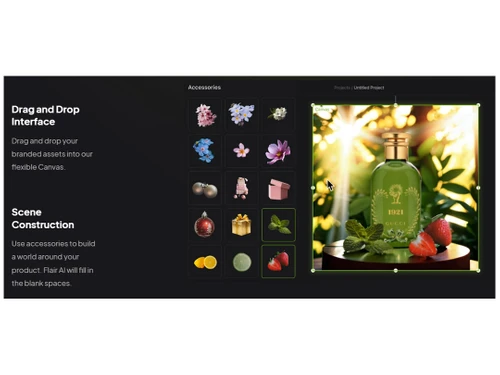
Flair AI is an AI-powered designing solution that revolutionizes product photoshoots. It enables teams to collaborate in real time to create stunning visuals. With Flair AI, users can easily stage scenes digitally using drag-and-drop props and 3D elements, bringing their products to life with AI. The platform offers a drag-and-drop canvas, allowing users to mix and match products with templates to test design concepts that convert customers.

It also facilitates the creation of reusable templates at scale. A new feature allows fitting clothing and jewelry onto AI-generated models while preserving patterns and logos. Flair AI provides familiar AI editing tools for fast design iteration and supports real-time collaboration for building and sharing designs. Additionally, users can train AI on specific products, aesthetics, or clothing to build private models with their brand's data.

Why Choose Flair AI Designing Solutions?

  • Stunning AI Product Photoshoots: Create visually appealing product images using AI.
  • Real-time Collaboration: Work together with your team on designs in real time.
  • 3D Elements: Stage scenes digitally using drag-and-drop props and 3D elements.
  • Drag and Drop Canvas: Mix and match products with templates to test design concepts.
  • Reusable Templates: Build templates that can be used repeatedly at scale.
  • Fashion Photoshoots: Fit clothing and jewelry onto AI-generated models while preserving patterns and logos.
  • AI Editing Tools: Use familiar tools to quickly iterate on designs.
  • Custom AI Models: Train AI on your specific products, aesthetics, or clothing to build private models with your brand's data.

Benefits of Flair AI Designing Solutions

  • Rapid Prototyping: Quickly test various product presentation concepts without the need for physical setups.
  • Cost-Effective Solution: Reduce expenses associated with traditional photoshoots (studio rental, models, photographers).
  • Brand Consistency: Train AI models to maintain a consistent brand aesthetic across all product visuals.
  • Scalable Content Creation: Generate a high volume of product images efficiently, ideal for large catalogs.
  • Accessibility: Democratizes access to high-quality product visuals, regardless of budget or technical skill.
  • Visual Storytelling: Easily compose scenes with adjustable lighting and camera angles to craft compelling product narratives.
  • Pattern and Logo Preservation: Ensure brand elements are accurately represented when generating fashion-related images.
  • Reduced Time-to-Market: Accelerate product launches by streamlining the visual content creation process.
  • Eliminate Logistical Hassle: Remove the complexities of organizing physical photoshoots.
  • Experimentation and Innovation: Encourages creative exploration of product presentation through AI-powered tools.

Flair AI Pricing

Flair AI price starts at $10 per month at Techjockey.com.

The pricing model is based on different parameters, including extra features, deployment type, and the total number of users. For further queries related to the product, you can contact our product team and learn more about the pricing and offers.

Read more

Flair AI Pricing & Plans

Pro
Starting at $10
    • Users

      Users
      Users
    • Monthly

      Monthly
      Monthly

Key Features

  • 5,500 real-time images

  • 2 Video generations

  • Faster Rendering Speed

  • Image Upscales

  • Image Variations

Pro+
Starting at $35
    • Users

      Users
      Users
    • Monthly

      Monthly
      Monthly

Key Features

  • Up to 8 Standard or 2 Fast Custom Models

  • 80 Custom Model images

  • 18,000 real-time images

  • 3 video generations

  • First Priority Rendering Speed

Scale
Starting at $55
    • Users

      Users
      Users
    • Monthly

      Monthly
      Monthly

Key Features

  • Up to 15 Standard or 4 Fast Custom Models

  • 150 Custom Model images

  • 54,000 real-time images

  • 5 video generations

  • First Priority Rendering Speed

Flair AI Features

  • icon_check Background Removal
    Automatically remove image backgrounds with precision, enabling clean product visuals for marketing use.
  • icon_check Template Library
    Access a wide range of pre-designed templates to quickly create ads, banners, and product visuals.
  • icon_check Real-Time Previews
    View instant updates while editing images, ensuring accurate adjustments and faster design workflows.
  • icon_check Collaboration Tools
    Work with team members by sharing projects and designs for collaborative editing and feedback.
  • icon_check API Access
    Integrate Flair AI capabilities into external applications or workflows using developer-friendly APIs.
  • icon_check Effects
    Add realistic lighting and shadow effects to enhance depth and make product images more lifelike.
  • icon_check Brand Kit Management
    Maintain consistent branding with saved colors, fonts, and styles for all generated visual content.
  • icon_check Bulk Image Processing
    Generate and edit multiple product images simultaneously, saving time for large-scale e-commerce needs.
  • icon_check Drag & Drop
    Easily move and arrange design elements without complex tools, making the process quick and intuitive.
  • icon_check Create, edit, manage & export Data
    Enables seamless handling of design assets, from creation to exporting in various formats.
  • icon_check Scene Construciton
    Allows users to build and customize visual scenes with AI-generated elements for realistic compositions.
  • icon_check Smart Prompting
    AI-driven suggestions help refine designs by generating relevant ideas and improvements based on user input.
  • icon_check Image Editing
    Provides powerful editing tools to enhance, retouch, and modify images with AI-assisted precision.

Flair AI Specifications

Supported Platforms
Windows Windows
Devices
Desktop Desktop Mobile Mobile Tablet Tablet iPad iPad
Deployment
Cloud-Based Cloud-Based
Suitable For
All Industries
Business Specific
All Businesses
Business Size
Individual Small Business Startups Medium Business Enterprises SMBs SMEs MSMBs MSMEs Freelancers
Customer Support
Email Live Chat
Language
English
Integration
API Integration
Training Resources
Live Online Webinars Documentation Videos
AI Features
AI Integrated
Technology
Next Generation

Explore the Best Alternative Solutions Similar to Your Business Size and Needs

Flair AI Review

4.1

Out of 5

img

Overall Rating

Based on
5 Verified Ratings

Rating Breakdown

  • Features 4.1
  • Value for Money 4.2
  • Ease of Use 3.8
  • Customer Support 4.4

96% Recommend this Product

Add Review

Techjockey Trusted Reviews from Verified Users

No reviews are currently available for Flair AI. Discover similar Designing Solutions reviews

  • Kittl

    4.3

    Whats great - Kittl helps me create product images for my Etsy listings. read more

  • Adobe Creative Cloud for Teams All Apps

    4.5

    Whats great - The convenience of having all my projects synced across devices is a huge plus. Saving to the cloud and accessing work from a... read more
  • Rapid Resizer

    4.8

    Whats great - If you want to create different types of digital paintings, then Rapid Resizer is all you need. It’s wonderful to create diff... read more

Compare Flair AI With other Designing Solutions

Products
Ratings
Pricing
Device Supported
Deployment
Supported Platforms
  • img

    Flair AI

  • 4.1

  • Price On Request

  • Desktop

    Mobile

  • Web based

    On Premises

  • Windows

    Mac OS

  • img

    Desygner

  • 4.5

  • Price On Request

  • Desktop

    Mobile

  • Web based

    On Premises

  • Windows

    Mac OS

  • img

    Rapid Resizer

  • 4.7

  • Price On Request

  • Desktop

    Mobile

  • Web based

    On Premises

  • Windows

    Mac OS

  • img

    Placeit

  • 4.6

  • Price On Request

  • Desktop

    Mobile

  • Web based

    On Premises

  • Windows

    Mac OS

  • img

    Kittl

  • 4.3

  • ₹ 1000

  • Desktop

    Mobile

  • Web based

    On Premises

  • Windows

    Mac OS

  • img

    Penpot

  • 4.2

  • Price On Request

  • Desktop

    Mobile

  • Web based

    On Premises

  • Windows

    Mac OS

  • img

    MyMemories Suite

  • 4.2

  • Price On Request

  • Desktop

    Mobile

  • Web based

    On Premises

  • Windows

    Mac OS

  • img

    Glyphs

  • 4.4

  • Price On Request

  • Desktop

    Mobile

  • Web based

    On Premises

  • Windows

    Mac OS

(0) Product(s) selected

Flair AI Alternatives

See All Flair AI Alternatives

Starting Price:

$19 /Month

Starting Price:

$24 /Year

Starting Price:

$7 /Editor/Month

Starting Price:

€299 /Quantity

Starting Price:

$20 /Month

Starting Price:

$15 /Month

Starting Price:

$25 /Month
Articles for Flair AI

See All Related Articles

How much does Flair AI cost?

Flair AI pricing starts at $10 per month at Techjockey.com.

Does Flair AI Software have a mobile app?

Currently, Flair AI Software does not have a dedicated mobile app.

Which operating systems support Flair AI Software?

Flair AI Software is cloud-based and works on Windows only.

Is there a free trial available for Flair AI Software?

Yes, Flair AI Software offers a free trial.

How does Flair AI Software work?

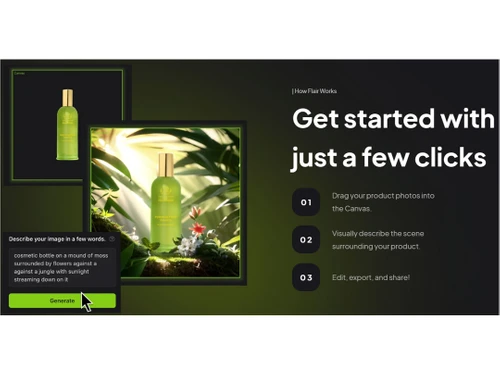
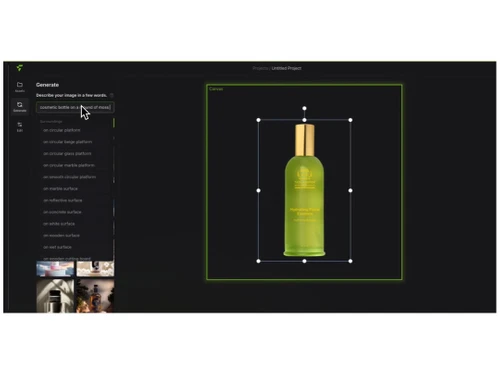
Flair AI allows users to create product photoshoots by dragging and dropping products, props, and 3D assets onto a digital canvas, adjusting lighting and camera angles, and utilizing AI to generate high-quality visuals.

Who uses Flair AI Software?

Designers, marketers, businesses, and content creators can benefit from Flair AI’s automated design capabilities.

Can I get a free demo of Flair AI Software?

Yes, Flair AI Software provides a free demo to showcase its features and functionality.

Is Flair AI Software completely free to use?

No, Flair AI has both free and paid plans, with premium features available in the paid versions.

Does Flair AI require design experience to use?

No, Flair AI is designed for both beginners and professionals with an intuitive, user-friendly interface.

Can I customize designs created with Flair AI?

Yes, users can fully customize designs, including colors, fonts, layouts, and elements.

20,000+ Software Listed

Best Price Guranteed

Free Expert Consultation

2M+ Happy Customers

Terms and Condtions

close

Users with registered businesses can purchase goods from merchants on the platform to satisfy their business needs. Users are not permitted to utilize any products acquired through the platform for resale, advertising, business, or further distribution.

For each purchase made, users will receive a Tax Invoice (or 'GST invoice') that includes specific details such as:

  • the GSTIN of the user associated with their registered business, and

  • the specified Entity Name for their business.

It should be noted that not all products are eligible for GST Invoice. Only the products displayed by participating sellers with the 'GST-based Invoice Available' callout on the product description page would qualify.

Certain goods and services are not eligible to get a GST Invoice, including items with VAS, i.e., Value Added Services (e.g., Total Mobile Protection/Assured Buyback) and those involving an exchange offer at the time of purchase.

Users must ensure the accuracy of the GSTIN, and business entity name provided for the GST Invoice. Requests for corrections into GST Invoice would not be accommodated by Techjockey.com or any Seller, and any issues arising from user-provided information are the sole responsibility of users.

Techjockey.com is not liable for the GST Invoice or any associated input tax credit. To efficiently claim an input tax credit, users should select the registered place of business address as per the GST authority's data and follow the provisions of the GST Act and rules.

To claim an input tax credit, the delivery and billing addresses must match. Furthermore, input tax credits will not be granted if the delivery address and GSTIN on the invoice are from different states. In case of incorrect GST details provided during the order placement, the order will be canceled automatically.