USA
USA UAE
UAESmall Business
Designed for startups and growing businesses

See More



Brand: Rapid Resizer
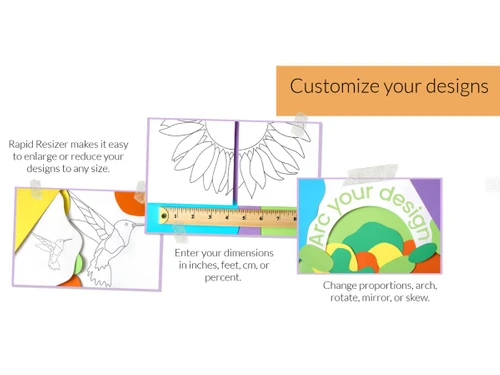
Rapid Resizer graphic design software helps users create, edit, and publish their digital artwork. You can either customize a few existing sketches or create your own in different patterns, colours, fonts, formats, sizes, etc. It allows you to trace photos into a stencil, pattern, sketch or line drawing. These art projects can then be printed with a multiple-page enlargement feature. In addition ...
See MoreHave you used Rapid Resizer before?
Share your insights for better experience
Brand: Rapid Resizer
Founded Year: 1999
RapidResizer.com provides software, education, and inspiration to help you make great art. The business began in 1999 when I saw my mother struggling to enlarge her stained glass patterns.
 Multi Format Support Print Optimization Browser-Based Access Grid Overlay Tool Image Resize Poster Printing Painting Vector Conversion Image Cropping Calligraphy Easy to Use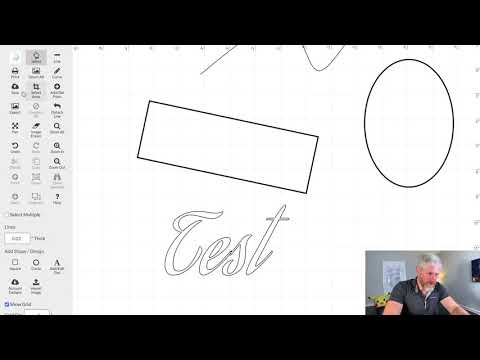

Watch the demo video to explore key features, real workflows, and how the software fits your business needs.
 Windows
  iOS
iOS  Android MacOS
  Desktop
  Mobile
  Tablet
  iPad
iPad  Cloud-Based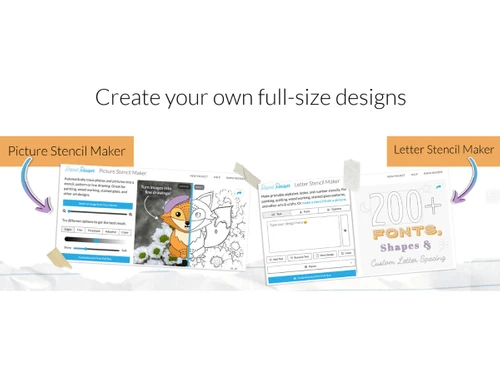

Small Business
Designed for startups and growing businesses
Medium Business
Built for business growth and flexibility
Enterprises
Designed for complex and large-scale business needs
4.7
Out of 5

Overall Rating
Based on
3 Verified Reviews
Rating Breakdown
96% Recommend this Product
Add ReviewUsers generally appreciate Rapid Resizer for its effectiveness in creating digital art and saving time with various editing tools. Many find it particularly useful for crafting wood paintings and sewing patterns, often recommending it for its user-friendly interface. However, some customers have noted limitations, such as a lack of diverse fonts for calligraphy and issues with the resizing feature, which can hinder their experience. Overall, the sentiment is positive, with users valuing its creative potential despite a few drawbacks.

Oct 4, 2022
Techjockey Verified
“Rapid Resizer can be used to create amazing wood paintings.”
Pros
If you want to create different types of digital paintings, then Rapid Resizer is all you need. It’s wonderful to create different types of paintings including tole and decorative paintings. A must-recommended application.
Cons
NO CONS
Reason to switch
Previously I was using Mega Creator for my artwork then I switched to Rapid Resizer because I can create paintings for stained glass work as well.
Oct 10, 2022
Techjockey Verified
“Rapid Resizer is very useful for graphical designers.”
Pros
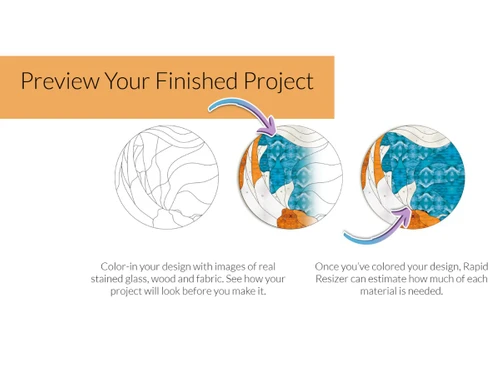
Rapid Resizer has helped me a lot in saving time by providing me with different editing tools to edit my edit work. I can easily change my art font size, colors, patterns directly through this software. Moreover, I can also view the 3D preview of my artwork with this solution.
Cons
Rapid Resizer has limited fonts and symbols to do calligraphy and therefore, I am not able to create various types of calligraphy artwork.
Reason to switch
I liked Rapid Resizer more than Lunacy because it is very easy to use and navigate.
Oct 11, 2022
Techjockey Verified
“Rapid Resizer is an amazing tool for creating digital art.”
Pros
I just love how Rapid Resizer has made it so easy to edit and create my digital art. I am a fashion designer and with this tool I have been able to create amazing sewing patterns so easily. I will surely continue using this tool in the future for all my projects.
Cons
The resize option of Rapid Resizer does not work properly. It hangs a lot, and I cannot resize the image very easily. It worked satisfactorily for me.
Reason to switch
I had Sketch till last year to create graphic illustrations however, I liked Rapid Resizer more because it has more advanced editing features.
Rapid Resizer
Price On Request
Desktop
Mobile
Web based
On Premises
Windows
Mac OS

Adobe Creative Cloud for Teams All Apps
Price On Request
Desktop
Mobile
Web based
On Premises
Windows
Mac OS

Desygner
Price On Request
Desktop
Mobile
Web based
On Premises
Windows
Mac OS

Adobe Premiere Pro CS6
Price On Request
Desktop
Mobile
Web based
On Premises
Windows
Mac OS

Placeit
Price On Request
Desktop
Mobile
Web based
On Premises
Windows
Mac OS

Kittl
₹ 1000
Desktop
Mobile
Web based
On Premises
Windows
Mac OS

Penpot
Price On Request
Desktop
Mobile
Web based
On Premises
Windows
Mac OS

Texware Textile Designing Software
₹ 30000
Desktop
Mobile
Web based
On Premises
Windows
Mac OS

MyMemories Suite
Price On Request
Desktop
Mobile
Web based
On Premises
Windows
Mac OS

Glyphs
Price On Request
Desktop
Mobile
Web based
On Premises
Windows
Mac OS

GoVisually
Price On Request
Desktop
Mobile
Web based
On Premises
Windows
Mac OS
(0) Product(s) selected
Starting Price:
$19 /Month
Starting Price:
$24 /Year
Starting Price:
$7 /Editor/Month
Starting Price:
$40 /License
Starting Price:
€299 /Quantity
Starting Price:
$20 /Month

Starting Price:
₹65,364 /Year

Starting Price:
$15 /Month

Starting Price:
$25 /Month
Starting Price:
$19

Starting Price:
$10 /Month



Rapid Resizer Graphic Design Software is a web-based solution compatible with all operating systems.
Rapid Resizer picture stencil maker supports web-based deployment.
Rapid Resizer picture stencil maker is typically used in fabric stitching, wood designing, art, stained glass designing industries, etc.
Rapid Resizer graphic design software demo is available for free with techjockey.com.
For Rapid Resizer graphic design software, installation is not required as it is a web-based application.
Rapid Resizer picture stencil maker helps with image resizing, creating fabric patterns, calligraphy, etc. It's a complete solution for image enlargement, creating murals, and woodworking designs.
No, Rapid Resizer does not provide API.
Yes, Rapid Resizer works on iPhones and iPads in the Safari web browser.
Rapid Resizer can be used to perform multiple functions such as editing sketches, image resizing, 3D sketch preview, calligraphy, etc.
Rapid Resizer works for Mac when used in recent versions of Safari, Chrome, Brave, and Firefox.
20,000+ Software Listed
Best Price Guranteed
Free Expert Consultation
2M+ Happy Customers
Terms and Condtions

Users with registered businesses can purchase goods from merchants on the platform to satisfy their business needs. Users are not permitted to utilize any products acquired through the platform for resale, advertising, business, or further distribution.
For each purchase made, users will receive a Tax Invoice (or 'GST invoice') that includes specific details such as:
the GSTIN of the user associated with their registered business, and
the specified Entity Name for their business.
It should be noted that not all products are eligible for GST Invoice. Only the products displayed by participating sellers with the 'GST-based Invoice Available' callout on the product description page would qualify.
Certain goods and services are not eligible to get a GST Invoice, including items with VAS, i.e., Value Added Services (e.g., Total Mobile Protection/Assured Buyback) and those involving an exchange offer at the time of purchase.
Users must ensure the accuracy of the GSTIN, and business entity name provided for the GST Invoice. Requests for corrections into GST Invoice would not be accommodated by Techjockey.com or any Seller, and any issues arising from user-provided information are the sole responsibility of users.
Techjockey.com is not liable for the GST Invoice or any associated input tax credit. To efficiently claim an input tax credit, users should select the registered place of business address as per the GST authority's data and follow the provisions of the GST Act and rules.
To claim an input tax credit, the delivery and billing addresses must match. Furthermore, input tax credits will not be granted if the delivery address and GSTIN on the invoice are from different states. In case of incorrect GST details provided during the order placement, the order will be canceled automatically.