USA
USA UAE
UAESmall Business
Designed for startups and growing businesses
See More



Brand: Sketch
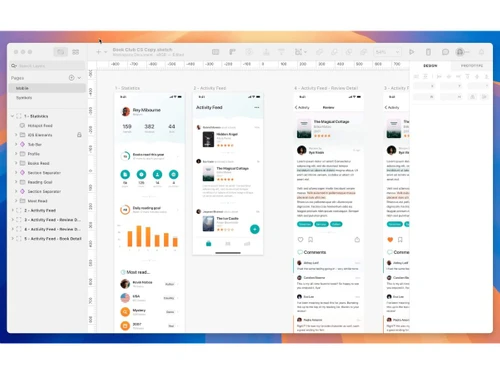
Sketch is a definitive UI/UX design platform built by designers, for designers, combining a powerful native Mac app with tools for prototyping and real-time collaboration.
See MoreHave you used Sketch before?
Share your insights for better experience
Brand: Sketch
Founded Year: 2008
Sketch puts the focus back on you and your work. We’re not a do-everything product. We’re a toolkit for design, prototyping, and collaboration — made by designers, for designers.
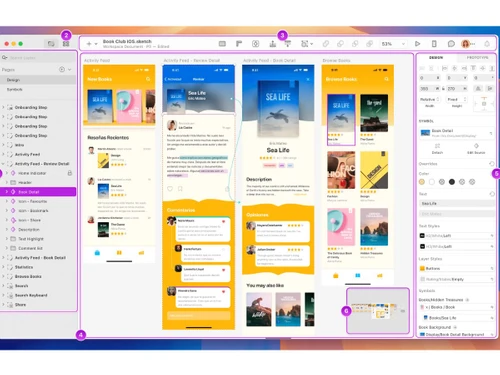
 Vector Design Editing Shared Design Libraries Real-Time Collaboration Interactive Prototyping Smart Layout System Feedback Management Version Control Plugin Integration Design Token Export Artboard Management Preview Functionality Animation and Motion Tools Role-Based Access Control (RBAC) Data Import/Export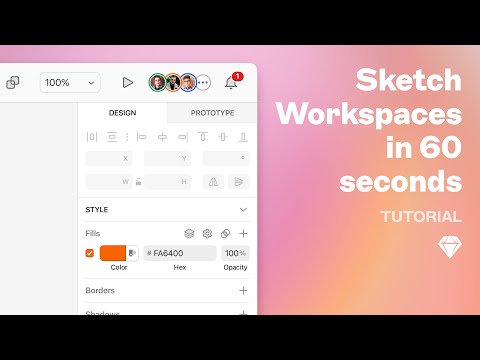

Watch the demo video to explore key features, real workflows, and how the software fits your business needs.
 MacOS
MacOS  Desktop
  Cloud-Based
  Perpetual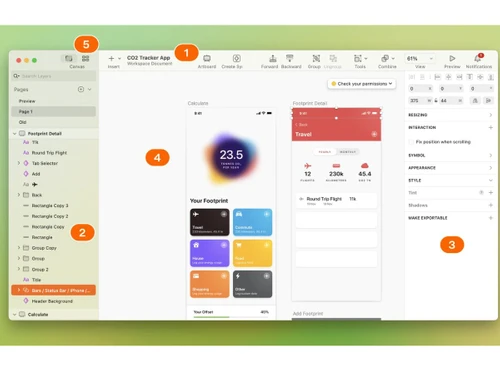
Small Business
Designed for startups and growing businesses
Medium Business
Built for business growth and flexibility
Enterprises
Designed for complex and large-scale business needs
4.5
Out of 5

Overall Rating
Based on
4 Verified Reviews
Rating Breakdown
95% Recommend this Product
Add ReviewPros
"Good for UI/UX designers, You can pretty much do everything and anything & it's SUPER EASY TO USE."
Cons
"Sketch is MAC only. Compatibility with Windows is something they can work on. "


Palak Mashiwal 
Lead
Jan 4, 2023
Techjockey Verified
“Great Tool for UI/UX Designers”
Pros
Good for UI/UX designers, You can pretty much do everything and anything & it's SUPER EASY TO USE.
Cons
Sketch is MAC only. Compatibility with Windows is something they can work on.
Reason to switch
Easy to use.

Sketch
Price On Request
Desktop
Mobile
Web based
On Premises
Windows
Mac OS
Figma
Price On Request
Desktop
Mobile
Web based
On Premises
Windows
Mac OS
Optimal Workshop
Price On Request
Desktop
Mobile
Web based
On Premises
Windows
Mac OS

Uizard
Price On Request
Desktop
Mobile
Web based
On Premises
Windows
Mac OS
Flowmapp
Price On Request
Desktop
Mobile
Web based
On Premises
Windows
Mac OS
Mobbin
₹ 9600
Desktop
Mobile
Web based
On Premises
Windows
Mac OS
Once UI
Price On Request
Desktop
Mobile
Web based
On Premises
Windows
Mac OS

Adobe XD
Price On Request
Desktop
Mobile
Web based
On Premises
Windows
Mac OS

UXPin
Price On Request
Desktop
Mobile
Web based
On Premises
Windows
Mac OS

Galileo AI
Price On Request
Desktop
Mobile
Web based
On Premises
Windows
Mac OS

UX Pilot
Price On Request
Desktop
Mobile
Web based
On Premises
Windows
Mac OS
(0) Product(s) selected
Sketch vector designing software requires macOS High Sierra (10.13.4) or a newer version. It also requires a working internet connection for installation and renewal.
No, due to the technological requirements and Mac exclusive system design, Sketch is and will not be released on Windows or Linux.
Sketch vector designing software’s latest version is Sketch 60.1 that is available in the market.
Yes, Sketch allows personal license users to use it for monetary gains.
Sketch uses a cloud-based system for storage. The software saves all projects related details on the cloud and makes it easily accessible anytime and from anywhere.
Sketch is a native macOS vector graphics editor focused on user interface and user experience design for web and mobile applications. It enables designers to create layouts, build prototypes, and maintain design systems.
The core Sketch design application is exclusive to macOS and only runs on Apple devices. However, developers and stakeholders on Windows or Linux can use the web companion app to inspect designs and collaborate.
Sketch pricing starts at USD 14 at techjockey.com
Yes, Sketch offers a thirty-day free trial for new workspaces, allowing users to test its collaborative environment and design tools. Starting the free trial does not require entering any credit card details.
Yes, workspaces include unlimited free viewers who can access the web application. Viewers can inspect designs, measure specs, download assets, and leave comments without requiring a paid subscription.
The Standard subscription includes the Mac app and web-based workspace collaboration starting at USD 12 monthly (billed annually), while the Mac-only license is a one-time USD 120 payment for local design work without cloud features.
Yes, with a Standard or Business subscription, multiple designers can collaborate on the same document in real-time. This feature is native to the macOS app and syncs design changes instantly.
Sketch is primarily designed for professional UI/UX designers, mobile app designers, product teams, and creative agencies. It also serves front-end developers who need to extract design specifications and assets.
Yes, Sketch offers a free Education plan for students, teachers, and academic institutions. This plan provides eligible academic users with full access to the Mac design application and collaboration workspace.
20,000+ Software Listed
Best Price Guranteed
Free Expert Consultation
2M+ Happy Customers
Terms and Condtions

Users with registered businesses can purchase goods from merchants on the platform to satisfy their business needs. Users are not permitted to utilize any products acquired through the platform for resale, advertising, business, or further distribution.
For each purchase made, users will receive a Tax Invoice (or 'GST invoice') that includes specific details such as:
the GSTIN of the user associated with their registered business, and
the specified Entity Name for their business.
It should be noted that not all products are eligible for GST Invoice. Only the products displayed by participating sellers with the 'GST-based Invoice Available' callout on the product description page would qualify.
Certain goods and services are not eligible to get a GST Invoice, including items with VAS, i.e., Value Added Services (e.g., Total Mobile Protection/Assured Buyback) and those involving an exchange offer at the time of purchase.
Users must ensure the accuracy of the GSTIN, and business entity name provided for the GST Invoice. Requests for corrections into GST Invoice would not be accommodated by Techjockey.com or any Seller, and any issues arising from user-provided information are the sole responsibility of users.
Techjockey.com is not liable for the GST Invoice or any associated input tax credit. To efficiently claim an input tax credit, users should select the registered place of business address as per the GST authority's data and follow the provisions of the GST Act and rules.
To claim an input tax credit, the delivery and billing addresses must match. Furthermore, input tax credits will not be granted if the delivery address and GSTIN on the invoice are from different states. In case of incorrect GST details provided during the order placement, the order will be canceled automatically.