linkedin
Uizard logo
play Uizard Autodesigner: Text to design, automated (COMING SOON)
uizard-canvas
uizard-dashboard

Uizard

Brand: Miro

  • 4.7

  • 1 Rating & 1 Review

Uizard Designing Solutions empowers users with its AI-driven platform to effortlessly transform sketches into interactive prototypes, offering a streamlined design process.

See More

Have you used Uizard before?

Share your insights for better experience

Add a Review
Starting Price
$19

View plans

100% Genuine
Products
Best Price
Guaranteed
Safe & Secure
Payment
  • Description

  • Pricing

  • Features

  • Specification

  • Review

  • Compare

  • Alternatives

  • FAQ

Starting at $19

Uizard Software Overview

What is Uizard Software?

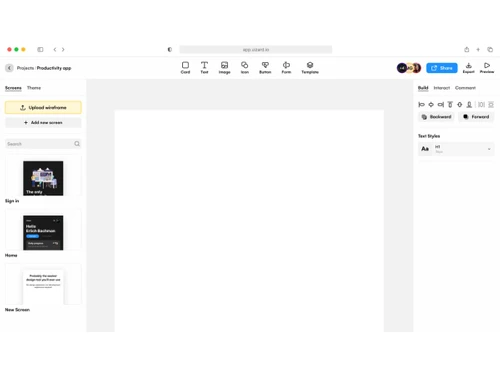
Uizard is an artificial intelligence-based tool that allows quick designing of websites, web apps, and user interface designs. This UI design software provides tools that help design websites, mock-ups, and wireframes, from input text prompts to screenshot images and UI components. It maps your ideas to designs and applications. Its powerful AI tools can convert user hand-drawn design screenshots into editable designs. It also has pre-made templates that support rapid ideation and iteration.

Uizard allows collaboration with the team in real time and allows them to work, share ideas, and get feedback for designs instantly. Its Design Assistant feature, wireframing tool, and mock-up tool allow scanned images or screenshots to be imported and edited. Powerful Text to Image processing helps in mapping your text ideas into designs.

The core functionality of Uizard revolves around its AI-powered conversion engine, which analyzes hand-drawn sketches or wireframes and generates clean and structured digital designs in real time. This process streamlines the initial design phase, saving precious time and effort for designers and facilitating seamless collaboration between teams with different skill sets. Additionally, Uizard offers a range of templates and design elements to accelerate the design process further and inspire creativity.

Another notable aspect of Uizard is its emphasis on user experience. The platform's interface is user-friendly and intuitive, making it accessible to individuals with varying design expertise. Whether you're a professional designer or a hobbyist, Uizard strives to cater to your needs and create an environment that nurtures creativity and productivity.

Moreover, Uizard aims to stay at the forefront of technological advancements, continuously refining its AI capabilities and expanding its feature set. By actively incorporating user feedback and adapting to the evolving design landscape, Uizard strives to become an indispensable tool for designers across industries.

Whether it is an iOS application, SaaS application, website landing page, wireframe, or web app, Uizard makes its design possible quickly without coding skills. The platform has a free-to-use app and web UI templates to help you design.

Why Choose Uizard AI?

Uizard uses AI technology, enabling users to generate mock-ups, convert sketches, and transform screenshots into editable designs, making the design process effortless and efficient. User input text can be converted to designs; handmade designs can be imported as screenshots and images to make editable designs.

With real-time collaboration, designers of all levels can create stunning websites and UIs without barriers. It allows design workflow management and empowers teams to bring their ideas to life in minutes.

Benefits of Uizard Designing Solution

  • Quick Design: It enables users to design websites and interface designs in minutes, saving time.
  • AI-powered technology: The AI technology makes text-to-design conversion and streamlines the design process, making it faster.
  • No special skills: It empowers non-designers and professionals to create designs without any special skills.
  • Collaboration: Real-time collaboration allows design teams to work together.
  • Easy UI tool: It provides simple drag-and-drop tools for easy designs.

Uizard Pricing

Uizard designing platform pricing starts at $19 per month at techjockey.com.

The pricing model is based on different parameters, including extra features, deployment type, and total users. For further queries related to the product, you can contact our product team and learn more about the pricing and offers.

Read more

Miro Company Details

Founded Year:  2011

Miro is an online collaborative whiteboard platform that enables distributed teams to work better together.

Director/Founders Andrey Khusid, Oleg Shardin
Company Size 1-100 Employees

Uizard Pricing & Plans

Pro
Starting at $19
    • Licenses

      Licenses
      Licenses
    • Monthly

      Monthly
      Monthly

Key Features

  • Unlimited free viewers/commenters

  • 500 AI generations per month

  • AI engine: Autodesigner 2.0

  • Developer handoff React CSS

  • up to 100 projects

  • Access to all templates

Business
Starting at $468
    • Licenses

      Licenses
      Licenses
    • Yearly

      Yearly
      Yearly

Key Features

  • Everything from Pro

  • 5,000 AI generations per month

  • Faster AI generation

  • Custom brand kit

  • Unlimited projects

  • Priority support

Uizard Features

  • icon_check Design Creation
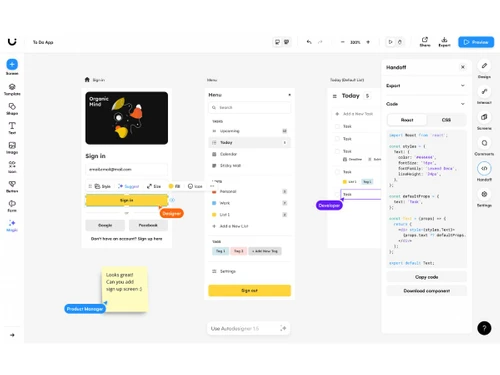
    Enables users to design intuitive user interfaces for web and mobile apps using an interactive canvas.
  • icon_check Prototyping
    Lets users convert designs into interactive prototypes for user testing and presentation instantly.
  • icon_check Wireframe Conversion
    Transforms uploaded wireframes into editable digital mockups for faster design development.
  • icon_check Component Library
    Provides a collection of reusable design components to ensure visual consistency across projects.
  • icon_check Drag and Drop Functionality
    Allows direct manipulation of UI elements for easy layout arrangement and customization.
  • icon_check Theme Management
    Supports creating, editing, and applying custom themes to maintain consistent design identity.
  • icon_check Preview Functionality
    Lets designers preview real-time interactions to validate user experience before development.
  • icon_check Real-Time Collaboration
    Enables multiple team members to design, edit, and review projects together simultaneously.
  • icon_check Templates
    Offers ready-to-use templates for apps and websites to accelerate design workflows.
  • icon_check Asset Management
    Centralizes storage and organization of design assets, icons, and components for reuse.
  • icon_check Version Control
    Records changes and enables designers to revert or compare different versions of a project.
  • icon_check Data Import/Export
    Allows importing existing screens or files for redesigning and iterative improvement.
  • icon_check User Flow Mapping
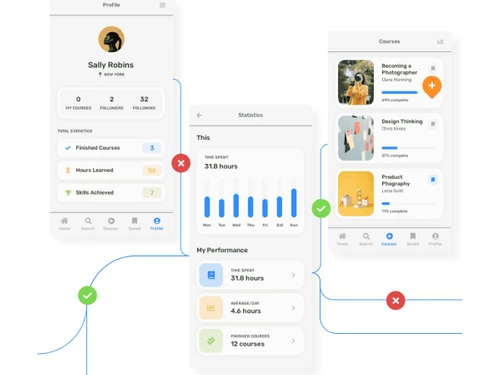
    Visually represents navigation paths to optimize usability and design decision-making.
Uizard Demo Video play icon

Get Uizard Demo

Watch the demo video to explore key features, real workflows, and how the software fits your business needs.

Understand
Key Features
Personal
Demo Insights
Interactive
Demo Support

Uizard Specifications

Supported Platforms
Ubuntu Ubuntu Windows Windows MacOS MacOS Linux Linux
Devices
Desktop Desktop
Deployment
Cloud-Based Cloud-Based
Suitable For
All Industries
Business Specific
All Businesses
Business Size
Individual Small Business Startups Medium Business Enterprises SMBs SMEs MSMBs MSMEs Freelancers
Customer Support
Email Communities
Language
English
Training Resources
Videos
AI Features
AI Integrated

Explore the Best Alternative Solutions Similar to Your Business Size and Needs

Enterprises

Designed for complex and large-scale business needs

Figma

4.5

Sketch

4.5

See More

Uizard Review

4.7

Out of 5

img

Overall Rating

Based on
1 Verified Review

Rating Breakdown

  • Features 4.5
  • Value for Money 5
  • Ease of Use 5
  • Customer Support 4.5

100% Recommend this Product

Add Review

Uizard Video Review

youtubeVideoId

4.8

“Can You Build Websites with AI? | uizard review”

Review by: MeganWeeks

Compare Uizard With other UI/UX Design Tools

Products
Ratings
Pricing
Device Supported
Deployment
Supported Platforms
  • img

    Uizard

  • 4.7

  • Price On Request

  • Desktop

    Mobile

  • Web based

    On Premises

  • Windows

    Mac OS

  • img

    Figma

  • 4.5

  • Price On Request

  • Desktop

    Mobile

  • Web based

    On Premises

  • Windows

    Mac OS

  • img

    Optimal Workshop

  • 4.2

  • Price On Request

  • Desktop

    Mobile

  • Web based

    On Premises

  • Windows

    Mac OS

  • img

    Flowmapp

  • 4.3

  • Price On Request

  • Desktop

    Mobile

  • Web based

    On Premises

  • Windows

    Mac OS

  • img

    Sketch

  • 4.5

  • Price On Request

  • Desktop

    Mobile

  • Web based

    On Premises

  • Windows

    Mac OS

  • img

    Mobbin

  • 4.2

  • ₹ 9600

  • Desktop

    Mobile

  • Web based

    On Premises

  • Windows

    Mac OS

  • img

    Once UI

  • 4.1

  • Price On Request

  • Desktop

    Mobile

  • Web based

    On Premises

  • Windows

    Mac OS

  • img

    Adobe XD

  • 4.6

  • Price On Request

  • Desktop

    Mobile

  • Web based

    On Premises

  • Windows

    Mac OS

  • img

    UXPin

  • 4.3

  • Price On Request

  • Desktop

    Mobile

  • Web based

    On Premises

  • Windows

    Mac OS

  • img

    Galileo AI

  • 4.2

  • Price On Request

  • Desktop

    Mobile

  • Web based

    On Premises

  • Windows

    Mac OS

  • img

    UX Pilot

  • Price On Request

  • Desktop

    Mobile

  • Web based

    On Premises

  • Windows

    Mac OS

(2) Product(s) selected

Uizard Alternatives

See All Uizard Alternatives

Starting Price:

$320 /Year

Starting Price:

$19 /Month

Which operating system does the Uizard Designing Solution support?

Uizard Designing Solution is compatible with Windows and macOS operating systems.

Is there any Uizard Designing app?

Uizard Designing app is not available on Android and iOS devices.

What is the deployment type of the Uizard?

Uizard supports web-based deployment.

How much does the Uizard cost?

Uizard price starts at $19 per month at techjockey.com.

Who are the potential users of the Uizard?

Uizard can be used by photo editors, social media marketers, product photographers, freelancers, and individuals needing a design tool.

Is there any free trial or demo for Uizard?

Uizard Designing’s demo is available for free with techjockey.com.

Is the Uizard Designing free?

Uizard does not offer a free trial.

How can you download the Uizard UI designing tool?

Uizard is a web-based platform. So, you need not download any software or app to use it.

How does the Uizard work?

Uizard is a powerful, AI-driven UI design software that enables users to swiftly create wireframes, mockups, and prototypes. Its rapid and intuitive interface empowers designers to generate designs in minutes, streamlining the creative process.

20,000+ Software Listed

Best Price Guranteed

Free Expert Consultation

2M+ Happy Customers

Terms and Condtions

close

Users with registered businesses can purchase goods from merchants on the platform to satisfy their business needs. Users are not permitted to utilize any products acquired through the platform for resale, advertising, business, or further distribution.

For each purchase made, users will receive a Tax Invoice (or 'GST invoice') that includes specific details such as:

  • the GSTIN of the user associated with their registered business, and

  • the specified Entity Name for their business.

It should be noted that not all products are eligible for GST Invoice. Only the products displayed by participating sellers with the 'GST-based Invoice Available' callout on the product description page would qualify.

Certain goods and services are not eligible to get a GST Invoice, including items with VAS, i.e., Value Added Services (e.g., Total Mobile Protection/Assured Buyback) and those involving an exchange offer at the time of purchase.

Users must ensure the accuracy of the GSTIN, and business entity name provided for the GST Invoice. Requests for corrections into GST Invoice would not be accommodated by Techjockey.com or any Seller, and any issues arising from user-provided information are the sole responsibility of users.

Techjockey.com is not liable for the GST Invoice or any associated input tax credit. To efficiently claim an input tax credit, users should select the registered place of business address as per the GST authority's data and follow the provisions of the GST Act and rules.

To claim an input tax credit, the delivery and billing addresses must match. Furthermore, input tax credits will not be granted if the delivery address and GSTIN on the invoice are from different states. In case of incorrect GST details provided during the order placement, the order will be canceled automatically.