linkedin
Optimal Workshop logo
play Create user experiences that delight with Optimal Workshop
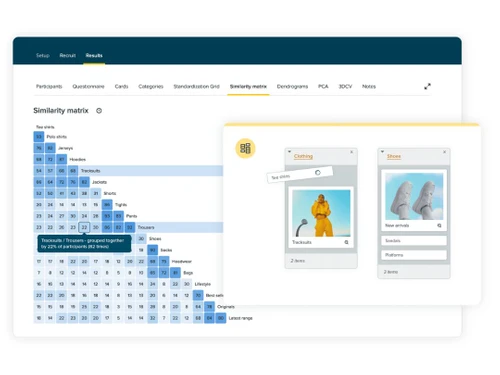
Optimal Workshop card sorting
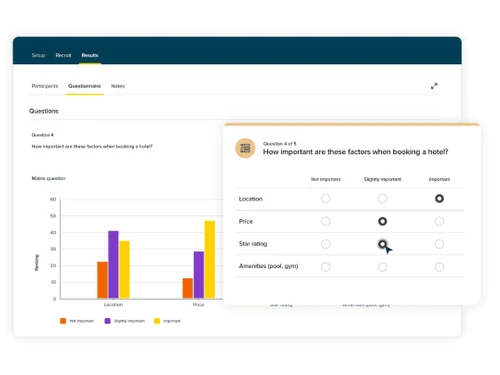
Optimal Workshop online surveys

Optimal Workshop

Brand: Optimal Workshop

  • 4.2

  • 6 Ratings

Optimal Workshop is a comprehensive UX research platform designed to help teams create better digital experiences.

See More

Have you used Optimal Workshop before?

Share your insights for better experience

Add a Review
Starting Price
$2388

View plans

100% Genuine
Products
Best Price
Guaranteed
Safe & Secure
Payment
  • Description

  • Pricing

  • Features

  • Specification

  • Review

  • Compare

  • Alternatives

  • FAQ

Starting at $2,388

Optimal Workshop Software Overview

What is an Optimal Workshop?

Optimal Workshop is a UX research platform designed to enhance digital experience by improving the usability of websites or applications. It helps to improve website usability by understanding how users navigate and interact with information. It provides various kinds of tools for conducting research and gathering insights into user behaviour with websites.

The software addresses the areas of information architecture, usability testing, and card sorting. The platform is user-friendly, with an intuitive interface that simplifies setting up tests and analyzing results.

It provides tools like Card Sorting to understand user categorization.

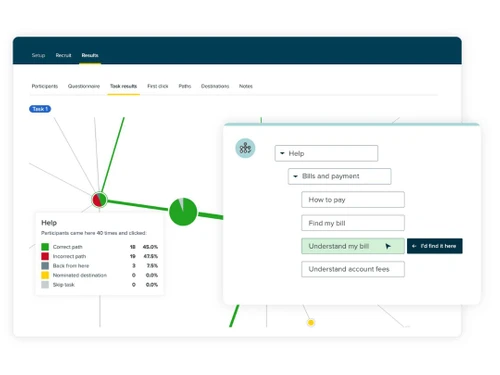
Tree Testing helps to evaluate website structure, and First-Click Testing helps to track initial user interactions with the website. Prototype Testing is used for early design feedback, and Surveys for qualitative insights.

Users can create and share studies, gather data, and generate visual reports to inform design decisions. It provides a reframer for capturing qualitative research insights by analyzing interviews, usability sessions, or any other type of qualitative data.

Why Choose Optimal Workshop Software?

  • Card Sorting: This helps you understand how users categorize information, which is crucial for designing intuitive navigation structures.
  • Tree Testing: Allows you to evaluate the findability of topics in your website’s structure.
  • First-Click Testing: Measures where users click first on a design to ensure they are navigating as intended.
  • Prototype Testing: Lets you test early versions of your designs to gather feedback before full development.
  • Analyze Qualitative Data: Reframer captures and organizes insights from user interviews and usability tests for pattern recognition.

Benefits of Optimal Workshop Platform

  • Improved avigation: Helps identify key click points by testing users' first interactions and designing intuitive site structures based on user categorization.
  • Enhanced Usability: Ensures users can easily find information on your website using OptimalSort allows them to categorize content, optimizing your website’s layout.
  • Early Feedback: Identifies design issues before full development, by gathering users' thoughts on the website's design and usability.
  • User Insights: Gathers qualitative data to inform design decisions through user interviews and usability tests for pattern recognition.
  • Data-Driven Design: Provides visual reports for evidence-based design improvements.

Pricing of Optimal Workshop

Optimal Workshop price in India starts at $ 2388 per year at techjockey.com. Optimal Workshop comes with multiple pricing plans and caters to a diverse customer base.

For subscription-related details and offers on premium packages, please request a call back from our product experts.

Read more

Optimal Workshop Company Details

Founded Year:  2007

Optimal Workshop specializes in UX design, technical architecture planning, and website development solutions.

Director/Founders Trent Mankelow
Company Size 1-100 Employees

Optimal Workshop Pricing & Plans

Starter
Key Features
  • 5 studies launched per year
  • Unlimited seats
  • Unlimited participant responses per study
  • All tools and study types
  • AI-powered analytics and insights
  • SOC II / GDPR compliance
Starting at $2388
    • Licenses

      Licenses
      Licenses
    • Yearly

      Yearly
      Yearly

Key Features

  • 5 studies launched per year

  • Unlimited seats

  • Unlimited participant responses per study

  • All tools and study types

  • AI-powered analytics and insights

  • SOC II / GDPR compliance

Optimal Workshop Features

  • icon_check Card Sorting
    Helps analyze how users categorize information, revealing mental models for intuitive site architecture.
  • icon_check Organization Tree
    Evaluates navigation hierarchy efficiency by tracking how easily users locate specific items or content.
  • icon_check First Click Testing
    Measures initial user interactions to assess interface clarity and optimize click-path efficiency.
  • icon_check Prototype Testing
    Allows usability validation of interactive prototypes to detect issues early in the design process.
  • icon_check Participant Recruitment
    Provides access to a global participant pool for fast, targeted, and high-quality user studies.
  • icon_check Session Analysis
    Records and analyzes participant behavior during studies to uncover friction and usability gaps.
  • icon_check Quantitative Reporting
    Delivers numerical performance insights like completion rates, accuracy, and navigation success.
  • icon_check Team Collaboration
    Enables shared workspaces for teams to co-create studies, review data, and consolidate findings.
  • icon_check Data Import/Export
    Supports export of research results in multiple formats for deeper analysis or stakeholder reporting.
  • icon_check Information Architecture Testing
    Optimizes labeling, hierarchy, and findability across digital products via IA studies.
  • icon_check Task Flow Metrics
    Tracks task completion times and paths to evaluate efficiency and identify confusing navigation.
  • icon_check User Segmentation
    Groups participants by demographics or behavior to uncover targeted usability insights.
  • icon_check Real-Time Reporting
    Generates instant visual feedback on participant actions during or immediately after tests.
Optimal Workshop Demo Video play icon

Get Optimal Workshop Demo

Watch the demo video to explore key features, real workflows, and how the software fits your business needs.

Understand
Key Features
Personal
Demo Insights
Interactive
Demo Support

Optimal Workshop Specifications

Supported Platforms
Ubuntu Ubuntu Windows Windows MacOS MacOS Linux Linux
Devices
Desktop Desktop
Deployment
Cloud-Based Cloud-Based
Suitable For
All Industries
Business Specific
All Businesses
Business Size
Small Business Startups Medium Business Enterprises
Customer Support
Email Communities
Language
English
Training Resources
Videos
AI Features
AI Integrated

Explore the Best Alternative Solutions Similar to Your Business Size and Needs

Medium Business

Built for business growth and flexibility

Adobe XD

4.6

UXPin

4.3

Uizard

4.7

See More

Enterprises

Designed for complex and large-scale business needs

Figma

4.5

Sketch

4.5

See More

Optimal Workshop Review

4.2

Out of 5

img

Overall Rating

Based on
6 Verified Ratings

Rating Breakdown

  • Features 4.4
  • Value for Money 4.1
  • Ease of Use 4.3
  • Customer Support 4

93% Recommend this Product

Add Review

Techjockey Trusted Reviews from Verified Users

No reviews are currently available for Optimal Workshop. Discover similar UI/UX Design Tools reviews

  • Figma

    4.5

    Whats great - User-friendly app for UI designing with numerous plugins available. I really love the real-time collaboration abilities of th... read more

  • Adobe XD

    4.7

    Whats great - I would recommend Adobe XD to all designers and professionals who are working on product development projects. It is very eas... read more

  • Sketch

    4.2

    Whats great - Good for UI/UX designers, You can pretty much do everything and anything & it's SUPER EASY TO USE. read more
Compare Optimal Workshop With other UI/UX Design Tools

Products
Ratings
Pricing
Device Supported
Deployment
Supported Platforms
  • img

    Optimal Workshop

  • 4.2

  • Price On Request

  • Desktop

    Mobile

  • Web based

    On Premises

  • Windows

    Mac OS

  • img

    Figma

  • 4.5

  • Price On Request

  • Desktop

    Mobile

  • Web based

    On Premises

  • Windows

    Mac OS

  • img

    Uizard

  • 4.7

  • Price On Request

  • Desktop

    Mobile

  • Web based

    On Premises

  • Windows

    Mac OS

  • img

    Sketch

  • 4.5

  • Price On Request

  • Desktop

    Mobile

  • Web based

    On Premises

  • Windows

    Mac OS

  • img

    Flowmapp

  • 4.3

  • Price On Request

  • Desktop

    Mobile

  • Web based

    On Premises

  • Windows

    Mac OS

  • img

    Mobbin

  • 4.2

  • ₹ 9600

  • Desktop

    Mobile

  • Web based

    On Premises

  • Windows

    Mac OS

  • img

    Once UI

  • 4.1

  • Price On Request

  • Desktop

    Mobile

  • Web based

    On Premises

  • Windows

    Mac OS

  • img

    Adobe XD

  • 4.6

  • Price On Request

  • Desktop

    Mobile

  • Web based

    On Premises

  • Windows

    Mac OS

  • img

    UXPin

  • 4.3

  • Price On Request

  • Desktop

    Mobile

  • Web based

    On Premises

  • Windows

    Mac OS

  • img

    Galileo AI

  • 4.2

  • Price On Request

  • Desktop

    Mobile

  • Web based

    On Premises

  • Windows

    Mac OS

  • img

    UX Pilot

  • Price On Request

  • Desktop

    Mobile

  • Web based

    On Premises

  • Windows

    Mac OS

(0) Product(s) selected

Optimal Workshop Alternatives

See All Optimal Workshop Alternatives

Starting Price:

$320 /Year

Starting Price:

$19 /Month

On which operating systems can Optimal Workshop run?

Optimal Workshop is web-based and can run on any OS with a modern web browser.

Is a demo available for Optimal Workshop?

Yes, Optimal Workshop offers a free demo to showcase its features and capabilities.

What are the primary uses of Optimal Workshop?

Optimal Workshop is used for UX research, including card sorting, tree testing, and first-click testing.

Can Optimal Workshop handle qualitative analysis?

Yes, Optimal Workshop provides tools for qualitative analysis, helping to gather in-depth user insights.

Does Optimal Workshop offer online surveys?

Yes, Optimal Workshop includes online survey tools to collect user feedback efficiently.

What is tree testing in Optimal Workshop?

Tree testing in Optimal Workshop evaluates the effectiveness of your website’s structure for easy navigation.

How does card sorting work in Optimal Workshop?

Card sorting helps design intuitive navigation by understanding how users categorize information.

What is a Reframer in an Optimal Workshop?

Reframer captures and organizes qualitative data from user research sessions for deeper analysis.

How does Optimal Workshop ensure data security?

Optimal Workshop employs robust security measures to protect sensitive user data and ensure compliance.

20,000+ Software Listed

Best Price Guranteed

Free Expert Consultation

2M+ Happy Customers

Terms and Condtions

close

Users with registered businesses can purchase goods from merchants on the platform to satisfy their business needs. Users are not permitted to utilize any products acquired through the platform for resale, advertising, business, or further distribution.

For each purchase made, users will receive a Tax Invoice (or 'GST invoice') that includes specific details such as:

  • the GSTIN of the user associated with their registered business, and

  • the specified Entity Name for their business.

It should be noted that not all products are eligible for GST Invoice. Only the products displayed by participating sellers with the 'GST-based Invoice Available' callout on the product description page would qualify.

Certain goods and services are not eligible to get a GST Invoice, including items with VAS, i.e., Value Added Services (e.g., Total Mobile Protection/Assured Buyback) and those involving an exchange offer at the time of purchase.

Users must ensure the accuracy of the GSTIN, and business entity name provided for the GST Invoice. Requests for corrections into GST Invoice would not be accommodated by Techjockey.com or any Seller, and any issues arising from user-provided information are the sole responsibility of users.

Techjockey.com is not liable for the GST Invoice or any associated input tax credit. To efficiently claim an input tax credit, users should select the registered place of business address as per the GST authority's data and follow the provisions of the GST Act and rules.

To claim an input tax credit, the delivery and billing addresses must match. Furthermore, input tax credits will not be granted if the delivery address and GSTIN on the invoice are from different states. In case of incorrect GST details provided during the order placement, the order will be canceled automatically.