linkedin
Stitch logo
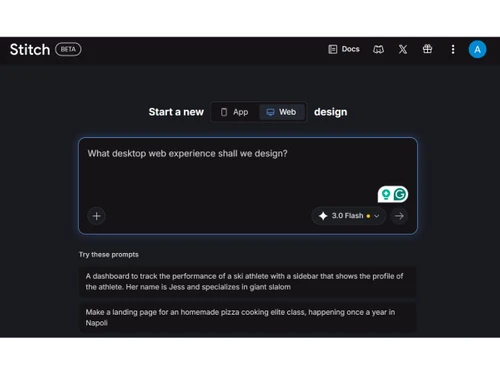
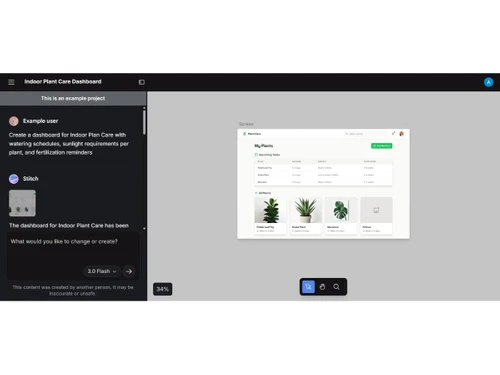
Stitch-dashboard
Stitch-web design
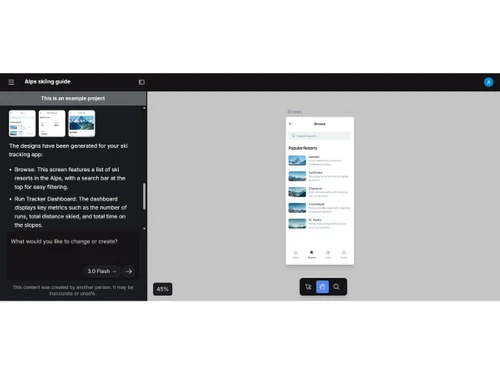
Stitch-app design

Stitch

Brand: Google

  • No Ratings & Reviews

A UI/UX design tool by Google that creates app or website designs and code from simple text, images, or sketches.

See More

Have you used Stitch before?

Share your insights for better experience

Add a Review

Price Available on Request

Questions about pricing or customization? We’re here to help, just a click away.

100% Genuine
Products
Best Price
Guaranteed
Safe & Secure
Payment
  • Description

  • Pricing

  • Features

  • Specification

  • Review

  • FAQ

Stitch Software Overview

What is Stitch?

Stitch is an AI-powered UI/UX design tool by Google that helps users create app or website interfaces using simple text, images, or sketches. It works directly in a web browser, so no installation is needed.

You just describe what you want, and the tool automatically generates a complete user interface. It can create high-quality designs with layout, colors, and components.

Stitch also produces ready-to-use code, like HTML and CSS, for developers. It uses Google's Gemini AI to understand your ideas and turn them into designs.

The tool allows users to edit and improve designs using simple instructions. It helps save time by turning ideas into working prototypes quickly.

Both beginners and professionals can use it without deep design knowledge. It also supports exporting designs to tools like Figma or development platforms.

Why Choose Stitch Software?

  • AI-Powered Design: Uses AI to create app and website designs automatically.
  • Text-to-Design Feature: You can describe your idea in simple words and get a UI.
  • Image-to-UI Support: Converts sketches or screenshots into real designs.
  • Fast Prototyping: Creates designs in minutes instead of hours.
  • No Coding Needed: Beginners can use it without programming knowledge.
  • Generates Real Code: Produces ready-to-use HTML and CSS.
  • Powered by Gemini AI: Uses advanced Google AI for better results.
  • Voice Control Feature: You can design using voice commands.
  • Multi-Screen Generation: Creates multiple app screens at once.
  • High-Quality UI: Generates professional and detailed designs.
  • Interactive Prototypes: Helps create clickable and testable designs.
  • Easy Editing: You can change designs using simple instructions.
  • Collaboration Support: Teams can work together on designs.
  • Theme Customization: Allows changing colors, fonts, and styles.

Benefits of Stitch Software

  • Quick Iteration: Easily test different design ideas.
  • Export Options: Export designs to tools like Figma or code editors.
  • Saves Time: Reduces manual design and coding work.
  • Beginner Friendly: Easy for students and new designers.
  • Useful for Developers: Helps developers quickly get UI code.
  • Supports Product Teams: Helps teams build and test ideas faster.
  • AI Design Suggestions: Gives smart ideas and improvements.
  • Vibe Design Feature: Creates designs based on feelings or goals.
  • Real-Time Updates: Changes designs instantly as you edit.
  • Handles Complex UI: Can design dashboards, apps, and websites.

Stitch Pricing

Stitch price details are available on request at Techjockey. The pricing model is based on different parameters, including extra features, deployment type, and the total number of users. For further queries related to the product, you can contact our product team and learn more about the pricing and offers.

Read more

Google Company Details

Founded Year:  1998

Google is a multinational corporation that specializes in Internet-related services and products.

Director/Founders Easir Arafat, Larry Page, Masudur Rahman, Mohammad Faruk, Sergey Brin
Company Size 1000+ Employees

Stitch Pricing & Plans

Looking for The Right Pricing?

Share your requirements and get a plan built around your business.

  • Define your business needs
  • Get customised pricing
  • Choose features that fit your workflow

Price Available on Request

Get personalised Stitch pricing that fits your needs. Our team will connect with you.

Stitch Features

  • icon_check Text-to-UI Generation
    Converts natural language prompts into complete UI layouts, enabling fast creation of app screens from ideas.
  • icon_check Image-to-UI Conversion
    Transforms sketches or screenshots into structured UI designs with components and layout alignment.
  • icon_check UI Component Generation
    Automatically creates reusable UI elements like buttons, cards, forms, and navigation bars.
  • icon_check Responsive Design
    Generates layouts optimized for mobile, tablet, and desktop with adaptive responsiveness built in.
  • icon_check Design-to-Code Export
    Converts UI designs into clean frontend code such as HTML and CSS for faster development workflows.
  • icon_check Prompt-Based Editing
    Allows iterative UI refinement by modifying prompts instead of manually editing design elements.
  • icon_check Real-Time Previews
    Instantly previews generated UI designs, helping users visualize layouts and make quick adjustments.
  • icon_check Figma Integration
    Enables export of generated designs into Figma for advanced editing, collaboration, and prototyping.
  • icon_check Rapid Prototyping
    Speeds up the creation of interactive prototypes without requiring manual design or coding effort.
  • icon_check Low-Code Workflow
    Reduces dependency on coding by enabling UI creation through prompts and minimal manual input.
  • icon_check Multi-Screen Generation
    Generates multiple related screens like login, dashboard, and profile in a single workflow.
  • icon_check Layout Auto-Generation
    Automatically structures content into organized layouts with proper spacing and alignment rules.
  • icon_check Collaboration
    Supports sharing and iteration of designs across teams for improved product design collaboration.

Stitch Specifications

Supported Platforms
Windows Windows MacOS MacOS
Devices
Desktop Desktop
Deployment
Cloud-Based Cloud-Based
Suitable For
All Industries
Business Specific
All Businesses
Business Size
Small Business Startups Medium Business Enterprises
Customer Support
Email Communities
Language
English
Training Resources
Videos
AI Features
AI Integrated

Stitch Review

Techjockey Trusted Reviews from Verified Users

No reviews are currently available for Stitch. Discover similar UI/UX Design Tools reviews

  • Figma

    4.5

    Whats great - User-friendly app for UI designing with numerous plugins available. I really love the real-time collaboration abilities of th... read more
  • Adobe XD

    4.7

    Whats great - I would recommend Adobe XD to all designers and professionals who are working on product development projects. It is very eas... read more
  • Sketch

    4.2

    Whats great - Good for UI/UX designers, You can pretty much do everything and anything & it's SUPER EASY TO USE. read more

How much does Stitch cost?

Stitch pricing information can be obtained upon request from techjockey.

Is there a mobile app available for Stitch Software?

No, Stitch does not offer a dedicated mobile app.

Which operating systems are compatible with Stitch Software?

Stitch is web-based and works on all major operating systems including Windows, and macOS.

Does Stitch Software offer a free trial?

Yes, Stitch offers a free trial.

How does Stitch Software function?

Stitch works by taking text, images, or sketches as input and using AI (Gemini) to generate UI designs and ready code automatically.

Who uses Stitch Software?

Stitch is used by designers, developers, product managers, students, and startups to quickly create app or website designs.

Is a free demo available for Stitch Software?

Yes, you can use it directly online with a Google account, which works like a live demo.

Is Stitch Software available for free?

Yes, Stitch is free to use (with some usage limits) through Google Labs.

20,000+ Software Listed

Best Price Guranteed

Free Expert Consultation

2M+ Happy Customers

Terms and Condtions

close

Users with registered businesses can purchase goods from merchants on the platform to satisfy their business needs. Users are not permitted to utilize any products acquired through the platform for resale, advertising, business, or further distribution.

For each purchase made, users will receive a Tax Invoice (or 'GST invoice') that includes specific details such as:

  • the GSTIN of the user associated with their registered business, and

  • the specified Entity Name for their business.

It should be noted that not all products are eligible for GST Invoice. Only the products displayed by participating sellers with the 'GST-based Invoice Available' callout on the product description page would qualify.

Certain goods and services are not eligible to get a GST Invoice, including items with VAS, i.e., Value Added Services (e.g., Total Mobile Protection/Assured Buyback) and those involving an exchange offer at the time of purchase.

Users must ensure the accuracy of the GSTIN, and business entity name provided for the GST Invoice. Requests for corrections into GST Invoice would not be accommodated by Techjockey.com or any Seller, and any issues arising from user-provided information are the sole responsibility of users.

Techjockey.com is not liable for the GST Invoice or any associated input tax credit. To efficiently claim an input tax credit, users should select the registered place of business address as per the GST authority's data and follow the provisions of the GST Act and rules.

To claim an input tax credit, the delivery and billing addresses must match. Furthermore, input tax credits will not be granted if the delivery address and GSTIN on the invoice are from different states. In case of incorrect GST details provided during the order placement, the order will be canceled automatically.