linkedin
Adobe Premiere Pro CS6 logo
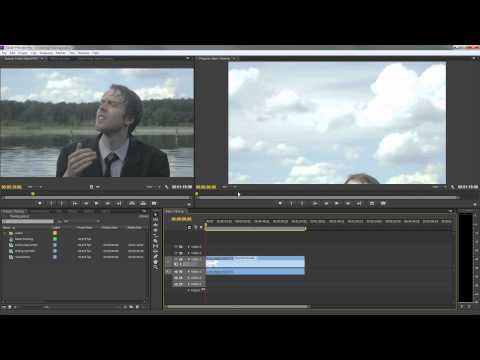
play Premiere Pro CS6: The Workspace
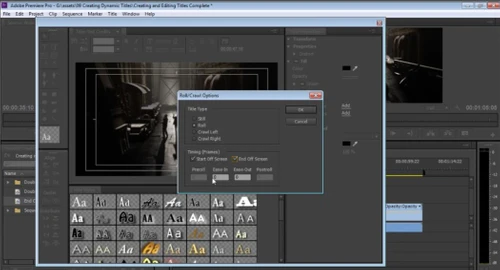
Adobe Premium Pro CS6 crawl options
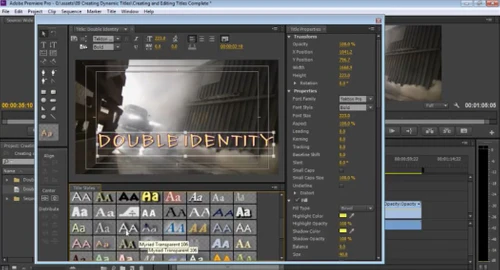
Adobe Premium Pro CS6 double identity

Adobe Premiere Pro CS6

Brand: Adobe

  • 4.7

  • 3 Ratings & 3 Reviews

Adobe Premiere Pro CS6 is a desktop-based video editing application used by freelancers, professionals, and hobbyists. The software is a popularly deployed solution for polishing raw video footage, adding special effects and editing these for developing stunning cinematic visuals. Inbuilt into this video editing software, you would find a highly advanced toolkit for performing more complex tasks ...

See More

Have you used Adobe Premiere Pro CS6 before?

Share your insights for better experience

Add a Review
Starting Price
$23

View plans

100% Genuine
Products
Best Price
Guaranteed
Safe & Secure
Payment
  • Description

  • Pricing

  • Features

  • Specification

  • Review

  • Compare

  • Alternatives

  • FAQ

Starting at $23

Adobe Premiere Pro CS6 Software Overview

What is Adobe Premiere Pro CS6?

Adobe Premiere Pro CS6 is a desktop-based video editing application used by freelancers, professionals, and hobbyists. The software is a popularly deployed solution for polishing raw video footage, adding special effects and editing these for developing stunning cinematic visuals. Inbuilt into this video editing software, you would find a highly advanced toolkit for performing more complex tasks such as green screen editing, colour adjustments, fine-tuning of audios and much more.

Adobe Premiere Pro CS6 is an industry renowned tool for making destructive and non-destructive edits on a video clip simultaneously. Plus, this software works in perfect conjunction with other Adobe products. It enables the users to move data and assets from other adobe media solutions to Premiere Pro CS6 for seamless and uninterrupted workflow.

What are the features offered by Adobe Premiere Pro CS6 video editing software?

Here are some well-known features offered by Adobe Premiere Pro CS6:

  1. Basic video editing functions such as trim, cut, paste, etc.
  2. Simultaneous project handling
  3. Shared projects
  4. Motion graphic templates
  5. Virtual Reality editing
  6. VR video support
  7. VR rotate sphere
  8. Transition slides
  9. Special effects
  10. Type tools with externally added font support
  11. Labelling
  12. Direct publishing
  13. Video libraries
  14. Preferred video
  15. Lumetri support

What are the benefits of using Adobe Premiere Pro CS6?

Some notable benefits for video editors using Adobe Premiere Pro CS6 are:

  1. The software offers an integrated workflow order, which facilitates seamless work across different departments. For instance, an individual from the audio department can create/modify sounds hassle-free using this software. Then there is this team license called Adobe Premiere Pro CS6 that allows editors to work on projects together.
  2. This video editing solution has a highly configurable as well as an easy to use interface for maximum productivity and efficiency. Thus for professionals like video editors, editing every single frame for motion graphics or green screen is highly simplified.
  3. Another achievement of Adobe Premiere Pro CS6 is its VR video support. Since the inception of VR-like 360⁰ videos, their presence has skyrocketed in the market.
  4. Video editors can edit multiple videos or work on different projects simultaneously.

What is Adobe Premiere Pro CS6 price in India?

Please request a call for price related inquiries of Adobe Premiere Pro CS6. Sales team representative from TechJockey would get in touch with you at your convenient time.

Read more

Adobe Company Details

Founded Year:  1982

Adobe is the global leader in digital media and digital marketing solutions.

Director/Founders Charles Geschke, Jason Lemkin
Company Size 1000+ Employees

Adobe Premiere Pro CS6 Pricing & Plans

Adobe Premiere Pro
Key Features
  • Video Editing
  • Audio Editing
  • Smart Trim
Starting at $23
    • Monthly

      Monthly
      Monthly

Key Features

  • Video Editing

  • Audio Editing

  • Smart Trim

Adobe Premiere Pro CS6 Features

  • icon_check Video Editing
    he Premiere Pro CS6 is the standard when it comes to editing videos. The software is used by noted movie makers and video editors
  • icon_check Audio Editing
    Multimedia editors can also use Adobe Premiere Pro CS6 to edit audios of their video clips and enhance their quality as well.
  • icon_check Smart Trim
    The software can be used to smartly trim and paste videos for creating beautiful clips the easier way
  • icon_check Transitions
    In case the editors are making videos that are more in the form of a presentation then they are free to use transition slide
  • icon_check Text and Titles
    Video editors can add text and titles to their videos as well.
  • icon_check User Interface
    Adobe Premiere Pro CS6 has an easy to use interface, which allows everyone to make personalized keyboard shortcuts with ease.
  • icon_check Auto-RIpple edit
    The software uses special ripple effects for adding the same to the videos.
  • icon_check Audio Mixer
    The audio mixer allows users to mix different audios for preparing an instant mix.
  • icon_check Effects
    Adobe Premiere Pro CS6 offers video effects which can be added to the clip for visual enhancement.
Adobe Premiere Pro CS6 Demo Video play icon

Get Adobe Premiere Pro CS6 Demo

Watch the demo video to explore key features, real workflows, and how the software fits your business needs.

Understand
Key Features
Personal
Demo Insights
Interactive
Demo Support

Adobe Premiere Pro CS6 Specifications

Supported Platforms
Windows Windows MacOS MacOS
Devices
Desktop Desktop Mobile Mobile
Deployment
Cloud-Based Cloud-Based
Suitable For
All Industries
Business Specific
All Businesses
Business Size
Small Business Startups Medium Business Enterprises SMBs SMEs MSMBs MSMEs
Customer Support
Email Live Chat Communities
Language
English
Integration
API Integration
Training Resources
Webinars Documentation Videos
AI Features
AI Integrated

Explore the Best Alternative Solutions Similar to Your Business Size and Needs

Adobe Premiere Pro CS6 Reviews

4.7

Out of 5

img

Overall Rating

Based on
3 Verified Reviews

Rating Breakdown

  • Features 4.8
  • Value for Money 4.5
  • Ease of Use 4.6
  • Customer Support 5

93% Recommend this Product

Add Review

Adobe Premiere Pro CS6 Video Reviews

youtubeVideoId

4.8

“Adobe Premiere Pro CS6 Review”

Review by: trustedreviews

youtubeVideoId

4.8

“Adobe Premiere PRO CS6 Software Review”

Review by: KLB_TV

youtubeVideoId

4.8

“Adobe Premiere Pro CS6 Review”

Review by: NerdOnTheStreet

Compare Adobe Premiere Pro CS6 With other Designing Solutions

Products
Ratings
Pricing
Device Supported
Deployment
Supported Platforms
  • img

    Adobe Premiere Pro CS6

  • 4.7

  • Price On Request

  • Desktop

    Mobile

  • Web based

    On Premises

  • Windows

    Mac OS

  • img

    FreeHand MX

  • 4.0

  • Price On Request

  • Desktop

    Mobile

  • Web based

    On Premises

  • Windows

    Mac OS

  • img

    Desygner

  • 4.5

  • Price On Request

  • Desktop

    Mobile

  • Web based

    On Premises

  • Windows

    Mac OS

  • img

    Rapid Resizer

  • 4.7

  • Price On Request

  • Desktop

    Mobile

  • Web based

    On Premises

  • Windows

    Mac OS

  • img

    Placeit

  • 4.6

  • Price On Request

  • Desktop

    Mobile

  • Web based

    On Premises

  • Windows

    Mac OS

  • img

    Kittl

  • 4.3

  • ₹ 1000

  • Desktop

    Mobile

  • Web based

    On Premises

  • Windows

    Mac OS

  • img

    Penpot

  • 4.2

  • Price On Request

  • Desktop

    Mobile

  • Web based

    On Premises

  • Windows

    Mac OS

  • img

    MyMemories Suite

  • 4.2

  • Price On Request

  • Desktop

    Mobile

  • Web based

    On Premises

  • Windows

    Mac OS

(0) Product(s) selected

Adobe Premiere Pro CS6 Alternatives

See All Adobe Premiere Pro CS6 Alternatives

Starting Price:

$19 /Month

Starting Price:

$24 /Year

Starting Price:

$7 /Editor/Month

Starting Price:

€299 /Quantity

Starting Price:

$20 /Month

Starting Price:

$15 /Month

Starting Price:

$25 /Month
Articles for Adobe Premiere Pro CS6

See All Related Articles

Is Adobe Premiere Pro CS6 available for mobile?

Yes, Adobe Premiere Pro CS6 is available for mobile devices.

Are the updates for Adobe Premiere Pro CS6 free?

Yes, Adobe Premiere Pro CS6 uses a subscription-based payment system, which makes you entitled for free updates.

What are the Adobe Premiere Pro CS6 system requirements?

The system requirements of Adobe Premiere Pro CS6: Processor: Intel 7th Gen or newer CPU (for windows), Intel 6th Gen or newer CPU (for Mac) Operating System: Windows 10 64-bit or later, Mac OS v10.13 or later, RAM: 16 GB for HD videos, 32 GB for 4K video, GPU: 4 GB of GPU VRAM, Hard Disk Space: 8 GB (at the bare minimum), Monitor Resolution: 1920 x 1080.

What types of subscription does Adobe Premiere Pro CS6 offer?

Adobe Premiere Pro CS6 offers both monthly and yearly based subscriptions for both single as well as multiple-user licenses.

Can I get a demo for Adobe Premiere Pro CS6?

Yes, please request a call back to get the demo from sales team of TechJockey today.

20,000+ Software Listed

Best Price Guranteed

Free Expert Consultation

2M+ Happy Customers

Terms and Condtions

close

Users with registered businesses can purchase goods from merchants on the platform to satisfy their business needs. Users are not permitted to utilize any products acquired through the platform for resale, advertising, business, or further distribution.

For each purchase made, users will receive a Tax Invoice (or 'GST invoice') that includes specific details such as:

  • the GSTIN of the user associated with their registered business, and

  • the specified Entity Name for their business.

It should be noted that not all products are eligible for GST Invoice. Only the products displayed by participating sellers with the 'GST-based Invoice Available' callout on the product description page would qualify.

Certain goods and services are not eligible to get a GST Invoice, including items with VAS, i.e., Value Added Services (e.g., Total Mobile Protection/Assured Buyback) and those involving an exchange offer at the time of purchase.

Users must ensure the accuracy of the GSTIN, and business entity name provided for the GST Invoice. Requests for corrections into GST Invoice would not be accommodated by Techjockey.com or any Seller, and any issues arising from user-provided information are the sole responsibility of users.

Techjockey.com is not liable for the GST Invoice or any associated input tax credit. To efficiently claim an input tax credit, users should select the registered place of business address as per the GST authority's data and follow the provisions of the GST Act and rules.

To claim an input tax credit, the delivery and billing addresses must match. Furthermore, input tax credits will not be granted if the delivery address and GSTIN on the invoice are from different states. In case of incorrect GST details provided during the order placement, the order will be canceled automatically.