linkedin
Apache OpenOffice Draw logo
play Open Office Draw Basics Tutorial
apache openoffice draw

Apache OpenOffice Draw

Brand: The Apache Software Foundation

  • 4.0

  • 6 Ratings

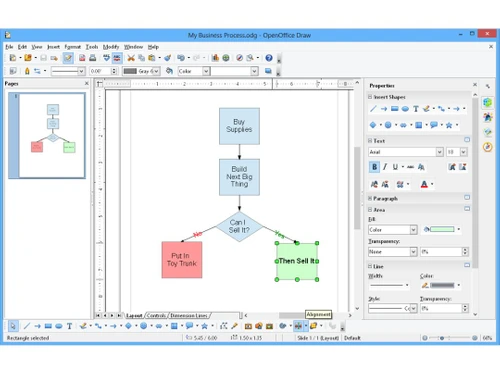
Apache OpenOffice Draw is a free and open-source drawing program that lets you create diagrams, flowcharts, and other visuals. It's a great tool for businesses and individuals who need to create professional-looking graphics.

See More

Have you used Apache OpenOffice Draw before?

Share your insights for better experience

Add a Review

Free Forever

Get started immediately at no cost. Upgrade anytime if your business demand more.

100% Genuine
Products
Best Price
Guaranteed
Safe & Secure
Payment
  • Description

  • Pricing

  • Features

  • Specification

  • Review

  • Compare

  • Alternatives

  • FAQ

Apache OpenOffice Draw Software Overview

What is Apache OpenOffice Draw?

Apache OpenOffice Draw is a free and open-source drawing program that's part of the Apache OpenOffice suite. It's a powerful tool that lets you create diagrams, flowcharts, and other visuals. Think of it as a digital drawing board where you can create professional-looking graphics for presentations, reports, or even web pages. Apache OpenOffice Draw is easy to use, even if you're not a professional graphic designer.

Apache OpenOffice Draw provides a versatile and comprehensive platform for creating professional-quality graphics. It empowers users to visualise data, present information effectively, and enhance the visual appeal of documents, reports, and presentations. The software offers a wide range of tools and features, making it suitable for both simple and complex graphic design projects.

Why Choose Apache OpenOffice Draw Designing Software?

  • Cost-Effective Solution: Apache OpenOffice Draw is free to use and open-source, so you don't have to pay for it or worry about licensing fees. This free and open-source nature makes it an attractive option for individuals and businesses looking to save costs on graphic design software.
  • Professional-Grade Graphics Tools: Apache OpenOffice Draw has all the features you need to create professional-looking graphics, including drawing tools, shapes, and effects. The software provides a range of tools for creating and manipulating shapes, lines, and other graphic elements, enabling users to create visually appealing and professional-looking graphics.
  • Cross-Platform Compatibility for Any Device: Apache OpenOffice Draw works on Windows, macOS, Linux, and Ubuntu, so you can use it on any computer. This cross-platform compatibility ensures that users can access and utilise the software on their preferred operating system.
  • Intuitive Design for Easy Use: Apache OpenOffice Draw is easy to use, even if you're not a professional graphic designer. The software's user-friendly interface and straightforward design make it accessible to individuals of all skill levels, allowing users to create professional-looking graphics without extensive training.

Benefits of Apache OpenOffice Draw

  • Professional-Quality Graphics for Any Project: Apache OpenOffice Draw helps you create professional-looking graphics for presentations, reports, or web pages. The software empowers users to enhance the visual appeal of their projects, improving the overall impact and clarity of their presentations and reports.
  • Saving Time and Money on Graphic Design: Apache OpenOffice Draw is free to use, so you can save time and money on expensive graphic design software. This cost-effective solution eliminates the need for expensive software subscriptions, allowing users to focus their resources on other aspects of their projects.
  • Boosting Productivity for Efficient Design: Apache OpenOffice Draw's easy-to-use interface helps you create graphics quickly and efficiently. The software's user-friendly design and straightforward tools streamline the graphic design process, allowing users to create graphics more efficiently.
  • Collaborative Work for Team Projects: Apache OpenOffice Draw lets you collaborate with others on your graphics projects. The software's collaborative features enable teams to work together on graphic design projects, facilitating seamless communication and sharing of creative ideas.

Pricing Of Apache OpenOffice

Apache OpenOffice Draw pricing is available on request at techjockey.com. The pricing model is based on different parameters, including the amount of bandwidth you need, the number of servers you need, and the features you need. For further queries related to the product, you can contact our product team and learn more about the pricing and offers.

Read more

The Apache Software Foundation Company Details

Founded Year:  1999

Apache Software Foundation provides organizational, legal and financial support for Apache open-source software projects.

Director/Founders Brian Behlendorf, Grant Ingersoll, Isabel Drost-Fromm, Jim Jagielski, Lars Eilebrecht, Patrick Stued
Company Size 1-100 Employees

Apache OpenOffice Draw Pricing & Plans

This Product is Available Free Forever.

Start instantly with no fees, no subscriptions, and no commitments.

  • Full access to basic version available
  • No credit card or sign-up required

Free Forever Plan

Get started immediately at no cost. Upgrade anytime if your business demand more.

Free Forever

Apache OpenOffice Draw Features

  • icon_check Vector Drawings
    Create scalable vector graphics using shapes, lines, curves, and freehand tools without losing quality on resizing.
  • icon_check Library Management
    Access a rich collection of predefined shapes and symbols for diagrams, illustrations, and technical drawings.
  • icon_check Layer Management
    Organize elements in layers to control visibility, locking, and editing of complex drawings efficiently.
  • icon_check Object Grouping
    Group multiple objects into a single unit for easier manipulation, alignment, and consistent transformations.
  • icon_check Alignment & Distribution
    Align and evenly distribute objects with precision using built-in alignment guides and spacing tools.
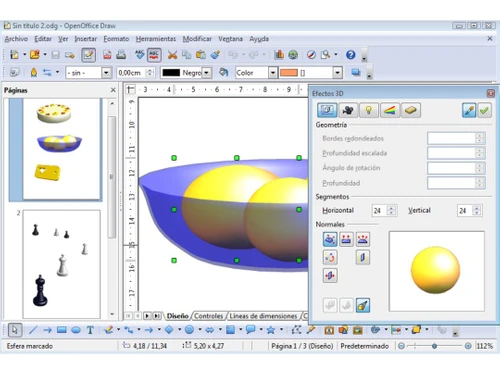
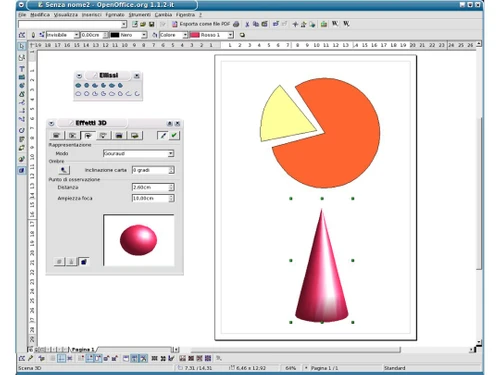
  • icon_check 3D Object Creation
    Create and manipulate 3D shapes like cubes, spheres, and cylinders with rotation and extrusion options.
  • icon_check Styling & Formatting
    Apply colors, gradients, transparency, line styles, and effects to enhance the visual appearance of objects.
  • icon_check Text Handling
    Insert and format text with support for paragraphs, alignment, wrapping, and integration within shapes.
  • icon_check Image Import & Editing
    Import images and adjust brightness, contrast, transparency, and cropping directly within the workspace.
  • icon_check Page Management
    Work with multiple pages in a single document for creating structured diagrams or multi-page designs.
  • icon_check Export Options
    Export drawings to formats like PDF, SVG, and image files for sharing, printing, or web use.
  • icon_check Templates
    Use built-in templates or create custom ones to speed up repetitive design and diagram creation tasks.
  • icon_check Undo/Redo History
    Track and reverse changes easily with multi-step undo and redo functionality for safe editing.
Apache OpenOffice Draw Demo Video play icon

Get Apache OpenOffice Draw Demo

Watch the demo video to explore key features, real workflows, and how the software fits your business needs.

Understand
Key Features
Personal
Demo Insights
Interactive
Demo Support

Apache OpenOffice Draw Specifications

Supported Platforms
Windows Windows MacOS MacOS Linux Linux
Devices
Desktop Desktop
Deployment
Perpetual Perpetual
Suitable For
All Industries
Business Specific
All Businesses
Business Size
Individual Small Business Startups Medium Business Enterprises SMBs SMEs MSMEs Freelancers
Customer Support
Email Communities Forums
Language
English
Training Resources
Documentation Videos

Explore the Best Alternative Solutions Similar to Your Business Size and Needs

Apache OpenOffice Draw Review

4.0

Out of 5

img

Overall Rating

Based on
6 Verified Ratings

Rating Breakdown

  • Features 4.1
  • Value for Money 4.0
  • Ease of Use 3.8
  • Customer Support 4.1

90% Recommend this Product

Add Review

Techjockey Trusted Reviews from Verified Users

No reviews are currently available for Apache OpenOffice Draw. Discover similar Vector Graphics Software reviews

  • Adobe Illustrator

    4.6

    Whats great - No matter how many times I use Adobe Illustrator I still find new features. It has an intuitive user interface, and you can c... read more

  • Kittl

    4.3

    Whats great - Kittl helps me create product images for my Etsy listings. read more

  • Adobe XD

    4.7

    Whats great - I would recommend Adobe XD to all designers and professionals who are working on product development projects. It is very eas... read more

Compare Apache OpenOffice Draw With other Vector Graphics Software

Products
Ratings
Pricing
Device Supported
Deployment
Supported Platforms
  • img

    Apache OpenOffice Draw

  • 4.0

  • FREE

  • Desktop

    Mobile

  • Web based

    On Premises

  • Windows

    Mac OS

  • img

    Corel Vector

  • 4.3

  • Price On Request

  • Desktop

    Mobile

  • Web based

    On Premises

  • Windows

    Mac OS

  • img

    Drawtify

  • 4.6

  • Price On Request

  • Desktop

    Mobile

  • Web based

    On Premises

  • Windows

    Mac OS

  • img

    YouiDraw

  • 4.2

  • Price On Request

  • Desktop

    Mobile

  • Web based

    On Premises

  • Windows

    Mac OS

  • img

    EasyCut Pro

  • Price On Request

  • Desktop

    Mobile

  • Web based

    On Premises

  • Windows

    Mac OS

  • img

    Illustroke

  • 4.4

  • Price On Request

  • Desktop

    Mobile

  • Web based

    On Premises

  • Windows

    Mac OS

  • img

    SaviDraw

  • 4.1

  • Price On Request

  • Desktop

    Mobile

  • Web based

    On Premises

  • Windows

    Mac OS

  • img

    Inkscape

  • 4.1

  • Price On Request

  • Desktop

    Mobile

  • Web based

    On Premises

  • Windows

    Mac OS

  • img

    SVG-edit

  • 4

  • Price On Request

  • Desktop

    Mobile

  • Web based

    On Premises

  • Windows

    Mac OS

  • img

    Vectr

  • 4.6

  • Price On Request

  • Desktop

    Mobile

  • Web based

    On Premises

  • Windows

    Mac OS

(2) Product(s) selected

Apache OpenOffice Draw Alternatives

See All Apache OpenOffice Draw Alternatives

Available

Price on Request

Articles for Apache OpenOffice Draw

See All Related Articles

How much does Apache OpenOffice Draw Platform Cost?

Apache OpenOffice Draw pricing is available on request at techjockey.com.

Is there any Apache OpenOffice Draw App?

Apache OpenOffice Draw is not available as an app for Android or iOS users.

Does Apache OpenOffice Draw offer a free trial or a demo?

Apache OpenOffice Draw is free to use. You can download and install it without any cost.

What features does Apache OpenOffice Draw offer?

Apache OpenOffice Draw offers features like drawing management, 3D modelling, applying graphic styles, designing flowcharts, adding lighting effects, and creating 3D designs. You can contact our product experts for more information.

How does Apache OpenOffice Draw software Work?

Apache OpenOffice Draw is a drawing program that lets you create diagrams, flowcharts, and other visuals. It's like a digital drawing board where you can create professional-looking graphics for presentations, reports, or even web pages.

Who are the potential users of Apache OpenOffice Draw Software?

Apache OpenOffice Draw is designed for anyone who needs to create professional-looking graphics, including businesses, educators, and individuals. It's a great tool for creating presentations, reports, and other documents that need visual elements.

Is Apache OpenOffice Draw suitable for small businesses?

Yes, Apache OpenOffice Draw is suitable for small businesses. It can help them create professional-looking marketing materials, presentations, and other documents.

How secure is Apache OpenOffice Draw?

Apache OpenOffice Draw is a secure program that protects your data. It uses industry-standard security measures to keep your data safe.

Which operating system does Apache OpenOffice Draw Software Support?

Apache OpenOffice Draw supports Ubuntu, Windows, macOS, and Linux operating systems.

20,000+ Software Listed

Best Price Guranteed

Free Expert Consultation

2M+ Happy Customers

Terms and Condtions

close

Users with registered businesses can purchase goods from merchants on the platform to satisfy their business needs. Users are not permitted to utilize any products acquired through the platform for resale, advertising, business, or further distribution.

For each purchase made, users will receive a Tax Invoice (or 'GST invoice') that includes specific details such as:

  • the GSTIN of the user associated with their registered business, and

  • the specified Entity Name for their business.

It should be noted that not all products are eligible for GST Invoice. Only the products displayed by participating sellers with the 'GST-based Invoice Available' callout on the product description page would qualify.

Certain goods and services are not eligible to get a GST Invoice, including items with VAS, i.e., Value Added Services (e.g., Total Mobile Protection/Assured Buyback) and those involving an exchange offer at the time of purchase.

Users must ensure the accuracy of the GSTIN, and business entity name provided for the GST Invoice. Requests for corrections into GST Invoice would not be accommodated by Techjockey.com or any Seller, and any issues arising from user-provided information are the sole responsibility of users.

Techjockey.com is not liable for the GST Invoice or any associated input tax credit. To efficiently claim an input tax credit, users should select the registered place of business address as per the GST authority's data and follow the provisions of the GST Act and rules.

To claim an input tax credit, the delivery and billing addresses must match. Furthermore, input tax credits will not be granted if the delivery address and GSTIN on the invoice are from different states. In case of incorrect GST details provided during the order placement, the order will be canceled automatically.