linkedin
Corel Vector logo
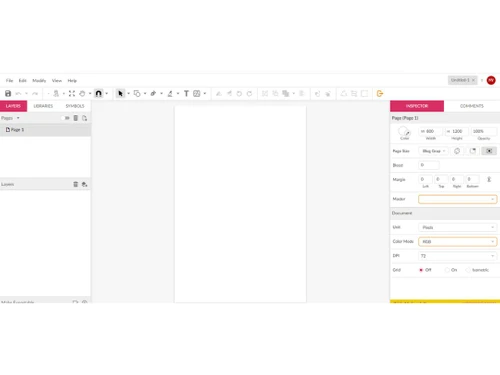
play Using the Pen Tool - Corel Vector Basics
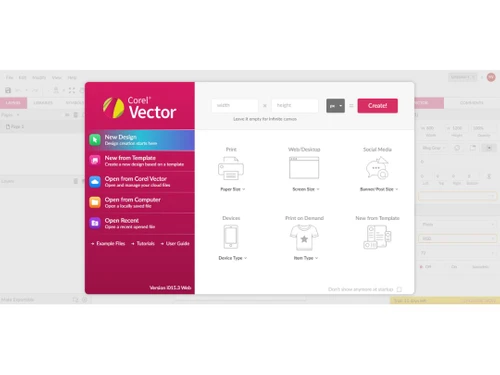
corel vector dimensions
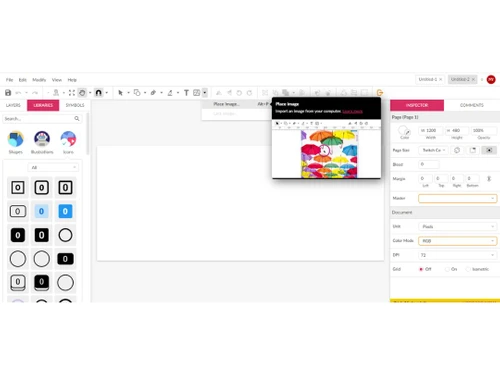
corel vector placeimage

Corel Vector

Brand: Alludo

  • 4.3

  • 6 Ratings

Corel Vector is a versatile vector graphics software for creating precise and scalable designs, including logos and illustrations. It offers advanced tools and an intuitive interface, catering to beginners and graphic design professionals.

See More

Have you used Corel Vector before?

Share your insights for better experience

Add a Review
Starting Price 50% OFF
₹394 ₹789

View plans

100% Genuine
Products
Best Price
Guaranteed
Safe & Secure
Payment
  • Description

  • Pricing

  • Features

  • Specification

  • Review

  • Compare

  • Alternatives

  • FAQ

Starting at ₹394

Corel Vector Software Overview

What is Corel Vector?

Corel Vector is a comprehensive vector graphics software designed to create precise and scalable illustrations. It provides many tools for designing logos, icons, and detailed vector artwork. The software features an intuitive interface, making it accessible for beginners and professionals.

It supports various file formats, ensuring compatibility with other design applications. Corel Vector enhances creativity with advanced typography, color management, and drawing tools. It's widely used for its efficiency and powerful design capabilities in graphic design projects.

Why Choose Corel Vector Software?

  • User-Friendly Interface: Easy to navigate, suitable for both beginners and professionals.
  • Advanced Design Tools: Comprehensive tools for creating detailed and precise vector graphics.
  • Compatibility: Supports multiple file formats for seamless integration with other design software.
  • Scalability: Produces high-quality graphics that can be scaled without losing resolution.
  • Creative Flexibility: Features advanced typography, color management, and drawing tools.
  • Productivity Boost: Enhances workflow efficiency with intuitive features and powerful capabilities.

Benefits of Corel Vector Software

  • Cloud-Based Collaboration: Facilitates real-time collaboration and sharing, making it easy for teams to collaborate on projects from different locations.
  • Regular Updates: Provides frequent updates with new features and improvements, ensuring the software stays current with industry standards.
  • Resource Library: Access a vast library of templates, clipart, and design assets to streamline the creative process.
  • Customizable Workspace: Allows users to customize it according to their preferences, enhancing the overall user experience.
  • Performance Optimization: Designed for optimal performance, enabling smooth handling of large files and complex designs.

Pricing of Corel Vector

Corel Vector price in India starts at INR 394/Month at techjockey.com.

The pricing model is based on different parameters, including extra features, deployment type, and the total number of users. For further queries related to the product, you can contact our product team and learn more about the pricing and offers.

Read more

Alludo Company Details

Founded Year:  1985

Alludo is a global technology company fueled by make-everything-easier flexibility.

Director/Founders Michael Cowpland
Company Size 501-1000 Employees

Corel Vector Pricing & Plans

Corel Vector Subscription
Key Features
  • Smart shape primitives
  • Non destructive objects styling
  • Full Google Fonts library
  • Word processor grade editing
  • Image Editing
  • Advanced sizing features
  • Intuitive user interfaces
  • Background blur
  • Live palette
  • Data Import/Export
Starting at ₹394 ₹789 SAVE UPTO 50%
    • Licenses

      Licenses
      Licenses
    • Monthly

      Monthly
      Monthly

Key Features

  • Smart shape primitives

  • Non destructive objects styling

  • Full Google Fonts library

  • Word processor grade editing

  • Image Editing

  • Advanced sizing features

  • Intuitive user interfaces

  • Background blur

  • Live palette

  • Data Import/Export

Corel Vector Features

  • icon_check Smart Shape Primitives
    Allows users to quickly create and manipulate basic shapes like rectangles, circles, and polygons with intelligent controls.
  • icon_check Non destructive objects styling
    Allows style adjustments to objects without permanently altering their original attributes, preserving design flexibility.
  • icon_check Full Google Fonts Library
    Access to a wide range of fonts from Google Fonts directly within the software, enhancing typographic options.
  • icon_check Word Processor Grade Editing
    Offers text editing capabilities similar to word processors, facilitating easy and precise text manipulation.
  • icon_check Image Editing
    Basic editing tools for adjusting and enhancing images directly within the vector graphics environment.
  • icon_check Advanced Sizing Features
    Includes features for precise resizing and scaling of objects while maintaining their quality and proportions.
  • icon_check Intuitive user interfaces
    User-friendly interface designed to be intuitive and easy to navigate, promoting efficient workflow.
  • icon_check Background Blur
    Allows for adding blur effects to backgrounds or elements to create depth and focus on specific areas of the design.
  • icon_check Live Palette
    Dynamic color palette updates in real-time as colors are adjusted, ensuring consistent and easy color management.
  • icon_check Data Import/Export
    Supports importing and exporting data in various formats, facilitating integration with other software and workflows.
  • icon_check Boolean Operations
    An intelligent tool for creating complex compound shapes by joining, subtracting, or intersecting multiple primitives while
  • icon_check Cloud Sync & Versioning
    Automatically saves your projects to a secure cloud space, allowing you to access your work from any device and revert to
Corel Vector Demo Video play icon

Get Corel Vector Demo

Watch the demo video to explore key features, real workflows, and how the software fits your business needs.

Understand
Key Features
Personal
Demo Insights
Interactive
Demo Support

Corel Vector Specifications

Supported Platforms
Ubuntu Ubuntu Windows Windows MacOS MacOS Linux Linux
Devices
Desktop Desktop
Deployment
Cloud-Based Cloud-Based
Suitable For
All Industries
Business Specific
All Businesses
Business Size
Small Business Startups Medium Business Enterprises
Customer Support
Email Communities
Language
English
Training Resources
Webinars Documentation Videos

Explore the Best Alternative Solutions Similar to Your Business Size and Needs

Corel Vector Review

4.3

Out of 5

img

Overall Rating

Based on
6 Verified Ratings

Rating Breakdown

  • Features 4.3
  • Value for Money 4.3
  • Ease of Use 4.0
  • Customer Support 4.5

91% Recommend this Product

Add Review

Techjockey Trusted Reviews from Verified Users

No reviews are currently available for Corel Vector. Discover similar Vector Graphics Software reviews

  • Adobe Illustrator

    4.6

    Whats great - No matter how many times I use Adobe Illustrator I still find new features. It has an intuitive user interface, and you can c... read more

  • Kittl

    4.3

    Whats great - Kittl helps me create product images for my Etsy listings. read more

  • Adobe XD

    4.7

    Whats great - I would recommend Adobe XD to all designers and professionals who are working on product development projects. It is very eas... read more

Compare Corel Vector With other Vector Graphics Software

Products
Ratings
Pricing
Device Supported
Deployment
Supported Platforms
  • img

    Corel Vector

  • 4.3

  • ₹ 394.00 excl. GST

  • Desktop

    Mobile

  • Web based

    On Premises

  • Windows

    Mac OS

  • img

    Drawtify

  • 4.6

  • Price On Request

  • Desktop

    Mobile

  • Web based

    On Premises

  • Windows

    Mac OS

  • img

    YouiDraw

  • 4.2

  • Price On Request

  • Desktop

    Mobile

  • Web based

    On Premises

  • Windows

    Mac OS

  • img

    Illustroke

  • 4.4

  • Price On Request

  • Desktop

    Mobile

  • Web based

    On Premises

  • Windows

    Mac OS

  • img

    SaviDraw

  • 4.1

  • Price On Request

  • Desktop

    Mobile

  • Web based

    On Premises

  • Windows

    Mac OS

  • img

    Inkscape

  • 4.1

  • Price On Request

  • Desktop

    Mobile

  • Web based

    On Premises

  • Windows

    Mac OS

  • img

    EasyCut Pro

  • Price On Request

  • Desktop

    Mobile

  • Web based

    On Premises

  • Windows

    Mac OS

  • img

    Vectr

  • 4.6

  • Price On Request

  • Desktop

    Mobile

  • Web based

    On Premises

  • Windows

    Mac OS

  • img

    SVG-edit

  • 4

  • Price On Request

  • Desktop

    Mobile

  • Web based

    On Premises

  • Windows

    Mac OS

(0) Product(s) selected

Corel Vector Alternatives

See All Corel Vector Alternatives

Available

Price on Request

Articles for Corel Vector

See All Related Articles

What is the cost of Corel Vector software?

The price of Corel Vector in India starts at INR 4,389 on techjockey.com.

Is there a Corel Vector software app?

Corel Vector does not offer an app for mobile and tablet use.

Which operating systems are supported by Corel Vector software?

Corel Vector software supports Ubuntu, Windows, MacOS, and Linux.

Does Corel Vector software offer a free trial?

Yes, Corel Vector software offers a free trial period.

How does Corel Vector software function?

Corel Vector software is a vector graphics design tool with various advanced features.

Who are the potential users of Corel Vector software?

Graphic designers, illustrators, and digital artists are the potential users of Corel Vector software.

Is there a free demo available for Corel Vector software?

Yes, a free demo of Corel Vector software is available.

Is Corel Vector software free?

No, Corel Vector software is not free but offers a free trial.

Can Corel Vector software be used offline?

Corel Vector software can be used offline after initial installation and activation.

Does Corel Vector support collaborative work?

Corel Vector supports collaborative work, allowing multiple users to work on the same project.

20,000+ Software Listed

Best Price Guranteed

Free Expert Consultation

2M+ Happy Customers

Terms and Condtions

close

Users with registered businesses can purchase goods from merchants on the platform to satisfy their business needs. Users are not permitted to utilize any products acquired through the platform for resale, advertising, business, or further distribution.

For each purchase made, users will receive a Tax Invoice (or 'GST invoice') that includes specific details such as:

  • the GSTIN of the user associated with their registered business, and

  • the specified Entity Name for their business.

It should be noted that not all products are eligible for GST Invoice. Only the products displayed by participating sellers with the 'GST-based Invoice Available' callout on the product description page would qualify.

Certain goods and services are not eligible to get a GST Invoice, including items with VAS, i.e., Value Added Services (e.g., Total Mobile Protection/Assured Buyback) and those involving an exchange offer at the time of purchase.

Users must ensure the accuracy of the GSTIN, and business entity name provided for the GST Invoice. Requests for corrections into GST Invoice would not be accommodated by Techjockey.com or any Seller, and any issues arising from user-provided information are the sole responsibility of users.

Techjockey.com is not liable for the GST Invoice or any associated input tax credit. To efficiently claim an input tax credit, users should select the registered place of business address as per the GST authority's data and follow the provisions of the GST Act and rules.

To claim an input tax credit, the delivery and billing addresses must match. Furthermore, input tax credits will not be granted if the delivery address and GSTIN on the invoice are from different states. In case of incorrect GST details provided during the order placement, the order will be canceled automatically.