linkedin
BitRaser logo
play BitRaser - Certified Data Erasure
bitraser-data
bitraser-file

BitRaser

Brand: Stellar Information Technology

  • 4.2

  • 4 Ratings

BitRaser permanently erases files, browser history, and deleted data beyond recovery, offering a certified DIY solution for data privacy and security.

See More

Have you used BitRaser before?

Share your insights for better experience

Add a Review

Price Available on Request

Questions about pricing or customization? We’re here to help, just a click away.

100% Genuine
Products
Best Price
Guaranteed
Safe & Secure
Payment
  • Description

  • Pricing

  • Features

  • Specification

  • Review

  • Compare

  • Alternatives

  • FAQ

BitRaser Software Overview

What is BitRaser?

BitRaser is a professional, do-it-yourself (DIY) data erasure software developed by Stellar Information Technology. It is engineered to permanently and securely erase sensitive data from a variety of storage media. The software goes beyond simple deletion by overwriting data using 17 internationally recognized erasure standards, including DoD 5220.22-M (3-Pass/7-Pass) and NATO, ensuring that erased information is completely unrecoverable by any tool or technique. It effectively wipes files, folders, application traces, system traces, internet browsing history, and even the free space on your drives. BitRaser is designed for both Windows and Mac systems, providing a robust solution for individuals and organizations looking to protect their privacy and meet regulatory compliance standards for data security.

Why Choose BitRaser?

  • Failsafe Data Protection: BitRaser uses world-class erasure standards to permanently destroy data, offering failsafe protection against data breaches and theft. Once data is erased with BitRaser, it is gone forever.
  • Certified & Trusted: The software is trusted by major organizations, including the Reserve Bank of India, to handle sensitive data erasure. It generates 100% secure and tamper-proof erasure reports, which serve as a certified audit trail for meeting statutory and regulatory compliance needs.
  • Comprehensive Wiping: It is not limited to just files. BitRaser can erase internet history from all major browsers (Chrome, Mozilla, Safari, Edge), including saved passwords and cookies, as well as traces left by applications and the operating system.
  • User-Friendly & Efficient: As a DIY tool, it features an intuitive interface that allows users to easily manage and schedule erasure tasks. It supports the simultaneous erasure of multiple files, enhancing efficiency.

Advanced Features of BitRaser

  • Scheduled Erasure: Automate your data hygiene by scheduling erasure tasks. You can set the software to run once, daily, weekly, monthly, or upon every system restart, ensuring confidential data is consistently managed without manual intervention.
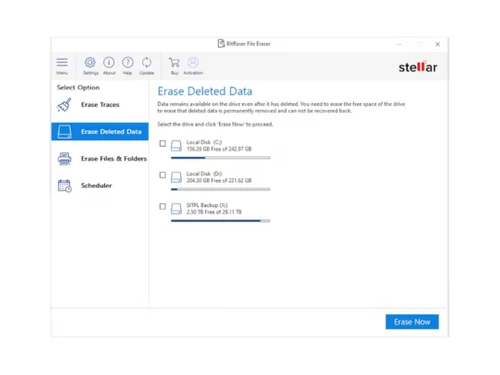
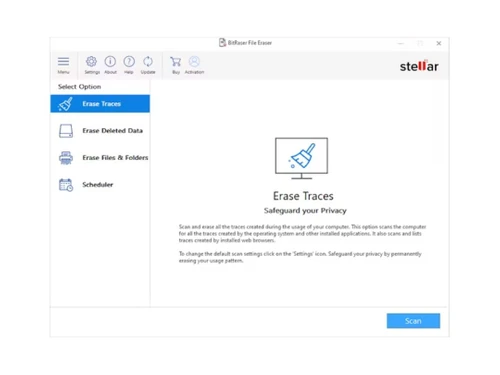
  • Erasure of Deleted Data: Files that are simply deleted can often be recovered. BitRaser addresses this vulnerability by wiping the free or unused space on your drive, permanently destroying any recoverable traces of previously deleted files.
  • Specific File Search: The software includes a powerful search function that allows you to locate specific files for erasure based on their name or extension. This is ideal for targeting particular documents without having to browse through entire directories.
  • Tamper-Proof Reporting: After every erasure task, BitRaser generates a certified report. This report is tamper-proof and can be saved in PDF or XML format, either locally or on a secure cloud console, providing essential documentation for compliance audits.
  • User Authentication: To prevent accidental or unauthorized data loss, BitRaser incorporates user authentication, ensuring that only authorized individuals can access and operate the software's powerful erasure functions.

Key Capabilities of BitRaser

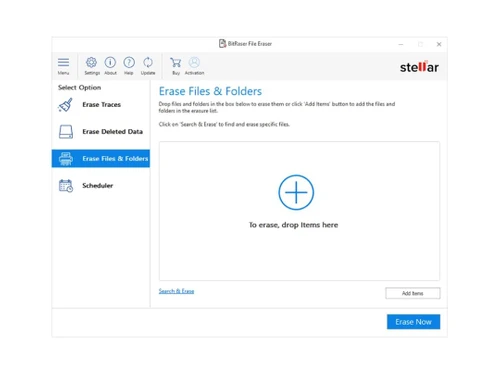
  • Erase Files & Folders: Securely and permanently delete specific confidential files and folders from your hard drive or external storage media, making them completely unrecoverable.
  • Erase Application & System Traces: Remove the digital footprints created by your computer usage. This includes temporary files, logs, and other data left behind by applications and the operating system.
  • Erase Deleted Data (Free Space Wipe): Target the empty space on your hard drive to permanently destroy data fragments from files you have previously deleted, closing a common security loophole.
  • Erase Partitions: Safely erase entire logical drives or partitions without harming the operating system or other installed applications, perfect for repurposing a drive or ensuring a section is completely clean.
  • Scope and Limitations: BitRaser is designed to erase user data only. It does not delete operating system files, ensuring your system remains functional after use. It can also erase SAN storage if mapped as a local drive, but cannot erase data stored in cloud storage accounts.

How to Use BitRaser?

  1. Install & Launch: Download and install the BitRaser software on your Windows or Mac computer.
  2. Select What to Erase: From the main interface, choose the type of data you wish to erase, be it specific files/folders, application traces, internet activity, or the free space on a drive.
  3. Customize the Task: Use the search function to find specific files or create an erasure list for targeted wiping. You can also navigate to the scheduling tab to set up automated erasure tasks.
  4. Initiate Erasure: Once you have confirmed your selection, start the erasure process. BitRaser will overwrite the data using a selected algorithm, rendering it permanently unrecoverable.
  5. Generate Report: After the process is complete, the software will generate a certified erasure report, which you can save for your records.

BitRaser Pricing

BitRaser pricing details are available on request on techjockey.com.

The pricing model is based on different parameters, including extra features, deployment type, and the total number of users. For further queries related to the product, you can contact our product team and learn more about the pricing and offers.

Read more

Stellar Information Technology Company Details

Founded Year:  1993

Stellar is best data recovery as well as data security Company.

Director/Founders Stellar Information Technology
Company Size 101-500 Employees

BitRaser Pricing & Plans

Looking for The Right Pricing?

Share your requirements and get a plan built around your business.

  • Define your business needs
  • Get customised pricing
  • Choose features that fit your workflow

Price Available on Request

Get personalised BitRaser pricing that fits your needs. Our team will connect with you.

BitRaser Features

  • icon_check User Authentication
    Being a data erasing tool, BitRaser allows only the authorised user to access and operate it to avoid unnecessary loss
  • icon_check Erasure Reporting
    BitRaser is a data erasing software that enables you to report to your colleagues and ensures timely information sharing.
  • icon_check Data Security
    BitRaser is a data erasing software that has been specially crafted to provide you with optimum data security.
  • icon_check Erasure Algorithm
    This file eraser tool makes use of erasure algorithm to erase files, folders and other data. 
  • icon_check Certification
    This data erasing solution can generate a certificate after the erasure process is over, which can be saved in a PDF
  • icon_check Erasure Standards
    This file eraser software makes use of erasure standards while it is erasing the data. 
BitRaser Demo Video play icon

Get BitRaser Demo

Watch the demo video to explore key features, real workflows, and how the software fits your business needs.

Understand
Key Features
Personal
Demo Insights
Interactive
Demo Support

BitRaser Specifications

Supported Platforms
Windows Windows
Devices
Desktop Desktop
Deployment
Perpetual Perpetual
Suitable For
All Industries
Business Specific
All Businesses
Business Size
Small Business Startups Medium Business SMBs SMEs
Customer Support
Phone Email Live Chat
Language
English
Training Resources
Videos

Explore the Best Alternative Solutions Similar to Your Business Size and Needs

BitRaser Review

4.2

Out of 5

img

Overall Rating

Based on
4 Verified Ratings

Rating Breakdown

  • Features 4.3
  • Value for Money 4
  • Ease of Use 4.3
  • Customer Support 4.1

97% Recommend this Product

Add Review

Techjockey Trusted Reviews from Verified Users

No reviews are currently available for BitRaser. Discover similar Data Erasure Software reviews

  • Blancco File Eraser

    4.5

    Whats great - Ease of use, simple interface, and the best part is the reporting and customer service they provide read more

  • Certus Erasing Software

    5.0

    Whats great - Their solution is very straight forward, and covers absolutely any kind of media device, from Mobile phones ( both IOS and AN... read more
  • Lsoft Killdisk for Industrial Systems

    4.9

    Whats great - I have been utilizing Kill Disk Industrial for quite a long time. It is my standard for composing a huge amount of zeros to a... read more

Compare BitRaser With other Data Erasure Software

Products
Ratings
Pricing
Device Supported
Deployment
Supported Platforms
  • img

    BitRaser

  • 4.2

  • Price On Request

  • Desktop

    Mobile

  • Web based

    On Premises

  • Windows

    Mac OS

  • img

    CCleaner

  • 4.6

  • Price On Request

  • Desktop

    Mobile

  • Web based

    On Premises

  • Windows

    Mac OS

  • img

    Wise Care 365

  • 4.5

  • ₹ 1695

  • Desktop

    Mobile

  • Web based

    On Premises

  • Windows

    Mac OS

  • img

    Onerep

  • 4.1

  • Price On Request

  • Desktop

    Mobile

  • Web based

    On Premises

  • Windows

    Mac OS

  • img

    Advik Data Wipe

  • Price On Request

  • Desktop

    Mobile

  • Web based

    On Premises

  • Windows

    Mac OS

  • img

    WipeDrive

  • 4.5

  • Price On Request

  • Desktop

    Mobile

  • Web based

    On Premises

  • Windows

    Mac OS

(0) Product(s) selected

BitRaser Alternatives

See All BitRaser Alternatives

Starting Price:

$15 /Month

Articles for BitRaser

See All Related Articles

What mode of payments can be used to purchase this data erasing software?

One can pay with almost all the major credit and debit cards. Once you choose the software and make the payment your subscription amount will appear on your bank and card statement. In case you want, you can also receive an invoice.

Can I get a free demo or trial of this file eraser tool?

Yes, you will get a free demo of BitRaser. Techjockey provides free demo of all the services it provides to help you give a glimpse of what you are going to get. It greatly helps customers make the right choice and open avenues to make businesses grow.

What is BitRaser used for?

BitRaser is a data erasure software used to permanently erase sensitive files, folders, internet browsing history, application traces, and drive volumes to safeguard privacy and prevent data theft.

Is BitRaser free?

While a free download is offered on the official website, full pricing for BitRaser is available on request on techjockey.com.

Is BitRaser safe to use?

Yes, BitRaser is safe to use as it securely erases data using world-class standards, ensuring that the erased information cannot be recovered with any tool or technique.

How do I use BitRaser?

You can use BitRaser by selecting specific files, folders, or drive partitions for erasure, and you can also schedule automated erasure tasks or create a custom list of items to wipe.

How much does BitRaser cost?

BitRaser pricing details are available on request on techjockey.com.

Can BitRaser provide proof of data erasure?

Yes, the software generates a 100% secure and tamper-proof certified data erasure report after each task, which can be saved as a PDF or XML file for audit and compliance purposes.

Can BitRaser erase files that have already been deleted?

Yes, BitRaser can permanently remove previously deleted files by erasing the free space on the drive, which ensures the data is completely unrecoverable by any method.

What kind of internet data can BitRaser erase?

BitRaser can erase your complete internet activity, including browsing and search history, cookies, saved passwords, and form-fill data from browsers like Chrome, Firefox, Safari, and Edge.

Can I automate the erasure process with BitRaser?

Yes, the software includes a scheduling feature that allows you to automate erasure tasks to run at set intervals, such as daily, weekly, monthly, or upon every system restart.

Who can use BitRaser?

BitRaser is ideal for home users, SMBs, large enterprises, and government agencies that need to securely erase sensitive data from devices and maintain data privacy and compliance.

20,000+ Software Listed

Best Price Guranteed

Free Expert Consultation

2M+ Happy Customers

Terms and Condtions

close

Users with registered businesses can purchase goods from merchants on the platform to satisfy their business needs. Users are not permitted to utilize any products acquired through the platform for resale, advertising, business, or further distribution.

For each purchase made, users will receive a Tax Invoice (or 'GST invoice') that includes specific details such as:

  • the GSTIN of the user associated with their registered business, and

  • the specified Entity Name for their business.

It should be noted that not all products are eligible for GST Invoice. Only the products displayed by participating sellers with the 'GST-based Invoice Available' callout on the product description page would qualify.

Certain goods and services are not eligible to get a GST Invoice, including items with VAS, i.e., Value Added Services (e.g., Total Mobile Protection/Assured Buyback) and those involving an exchange offer at the time of purchase.

Users must ensure the accuracy of the GSTIN, and business entity name provided for the GST Invoice. Requests for corrections into GST Invoice would not be accommodated by Techjockey.com or any Seller, and any issues arising from user-provided information are the sole responsibility of users.

Techjockey.com is not liable for the GST Invoice or any associated input tax credit. To efficiently claim an input tax credit, users should select the registered place of business address as per the GST authority's data and follow the provisions of the GST Act and rules.

To claim an input tax credit, the delivery and billing addresses must match. Furthermore, input tax credits will not be granted if the delivery address and GSTIN on the invoice are from different states. In case of incorrect GST details provided during the order placement, the order will be canceled automatically.