linkedin
Booksy logo
play Booksy. The only tool you need to enjoy boss life.
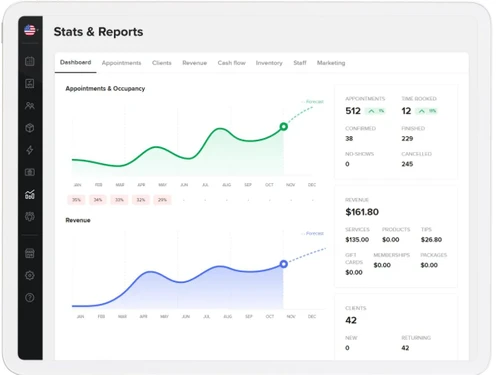
booksy-dashboard
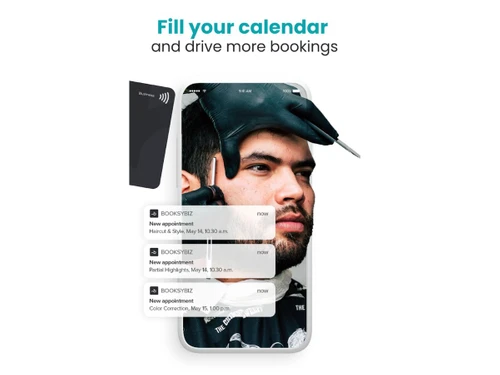
booksy-calendar

Booksy

Brand: Booksy

  • 4.1

  • 3 Ratings

Booksy allows users to book beauty and wellness services online while helping professionals manage their appointments and clients.

See More

Have you used Booksy before?

Share your insights for better experience

Add a Review
Starting Price
$30

View plans

100% Genuine
Products
Best Price
Guaranteed
Safe & Secure
Payment
  • Description

  • Pricing

  • Features

  • Specification

  • Review

  • FAQ

Starting at $30

Booksy Software Overview

What is Booksy?

Booksy is an online appointment scheduling software that helps people find and book services like haircuts, beauty treatments, massages, and more with just a few taps on their phone or computer.

It lets customers see real-time availability, compare providers, read reviews, and book or cancel appointments anytime, day or night without calling the business.

Booksy also sends automatic reminders so users don't miss their slots. For businesses, it offers tools to manage calendars, client details, payments, and marketing all in one place. It simplifies appointment handling for both customers and service providers.

Why Choose Booksy Software?

  • Easy Online Booking: Booksy allows customers to book appointments online anytime, reducing missed calls and scheduling issues.
  • 24/7 Availability: Clients can book services at any time, even outside business hours.
  • Mobile App Access: Available on iOS and Android, making booking and management convenient on the go.
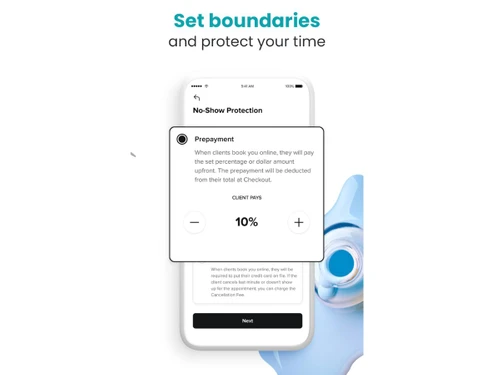
  • Appointment Reminders: Automated reminders reduce no-shows and improve customer attendance.
  • Client Management: Stores client details, visit history, and preferences in one place for better service.
  • Payment Processing: Integrated payments make transactions seamless and secure for clients and businesses.
  • Calendar Management: Easily manage multiple appointments and staff schedules with an intuitive calendar.
  • Staff Management: Track employee schedules, productivity, and performance efficiently.
  • Promotions & Discounts: Create and manage offers, discounts, and loyalty programs to attract customers.

Benefits of Booksy Software

  • Business Insights: Access detailed reports on sales, bookings, and client trends for smarter decisions.
  • Multi-Location Support: Manage appointments and staff across multiple locations from a single account.
  • Customizable Services: Set service durations, pricing, and availability to match your business needs.
  • Customer Reviews: Collect and showcase reviews to build trust and attract new clients.
  • Marketing Tools: Send automated emails and notifications to engage clients and drive repeat business.
  • Easy Rescheduling & Cancellations: Clients can modify bookings easily without calling, saving time for staff.
  • Secure Data Storage: Client and business data are stored securely, complying with privacy regulations.
  • Global Reach: Booksy connects businesses with customers worldwide, expanding potential client base.
  • User-Friendly Interface: Both clients and business owners find the platform intuitive and easy to navigate.
  • Integration Capabilities: Works with other software like accounting tools and social media platforms.

Booksy Pricing

Booksy price starts at USD 30 at techjockey.com.

The pricing model is based on different parameters, including extra features, deployment type, and the total number of users. For further queries related to the product, you can contact our product team and learn more about the pricing and offers.

Read more

Booksy Company Details

Founded Year:  2014

What started in Poland is now an international, cloud-based marketplace that’s scaling quickly. We bring together entrepreneurs in the beauty, health and wellness industry with their customers on a product that connects creative communities and opens up worlds of opportunities.

Director/Founders Konrad Howard, Stefan Batory, Tomasz Zembrzycki
Company Size 501-1000 Employees

Booksy Pricing & Plans

Basic
Key Features
  • 24/7 Online Booking
  • Built-in Marketing Tools
  • Client and Calendar management
  • Flexible, integrated payments
  • Detailed Stats and Reports
  • All features included
Starting at $30
    • Licenses

      Licenses
      Licenses
    • Monthly

      Monthly
      Monthly

Key Features

  • 24/7 Online Booking

  • Built-in Marketing Tools

  • Client and Calendar management

  • Flexible, integrated payments

  • Detailed Stats and Reports

  • All features included

Booksy Features

  • icon_check Calendar Management
    Displays all staff appointments in one view, allowing easy scheduling, drag-drop, and conflict prevention.
  • icon_check Client Management
    Stores client details, booking history, and contact info in unified digital client profiles.
  • icon_check Reminders & Notifications
    Sends automatic text or email reminders to clients, reducing late arrivals and no-shows.
  • icon_check Staff Scheduling
    Lets business owners assign services, manage staff availability, and track working hours easily.
  • icon_check Service Catalog Management
    Allows creation and customization of service lists, prices, and durations per staff member.
  • icon_check POS Integration
    Supports in-app payment processing, receipts, and sales tracking for all transactions.
  • icon_check Multi Location Management
    Provides centralized control and analytics for businesses operating across multiple locations.
  • icon_check Business Analytics
    Generates real-time insights on sales, revenue, staff utilization, and booking patterns.
  • icon_check Inventory Management
    Tracks product stock, updates quantities automatically, and links sales to inventory items.
  • icon_check Marketing Campaigns
    Provides built-in tools to create, schedule, and send targeted promotions to existing clients.
  • icon_check Loyalty Management
    Tracks client visits and rewards repeat customers with automated loyalty features.
  • icon_check Performance Tracking
    Monitors staff activity, appointment count, and sales data for performance analysis.
  • icon_check Data Security
    Ensures all client and transaction data are encrypted and compliant with privacy standards.
Booksy Demo Video play icon

Get Booksy Demo

Watch the demo video to explore key features, real workflows, and how the software fits your business needs.

Understand
Key Features
Personal
Demo Insights
Interactive
Demo Support

Booksy Specifications

Supported Platforms
Windows Windows iOS iOS Android Android MacOS MacOS
Devices
Desktop Desktop Mobile Mobile
Deployment
Cloud-Based Cloud-Based
Suitable For
Spa & Salon
Business Specific
All Businesses
Business Size
Individual Small Business Startups SMBs MSMBs Freelancers
Customer Support
Email Communities
Language
English
Training Resources
Videos

Booksy Review

4.1

Out of 5

img

Overall Rating

Based on
3 Verified Ratings

Rating Breakdown

  • Features 3.8
  • Value for Money 4
  • Ease of Use 4.3
  • Customer Support 4.3

80% Recommend this Product

Add Review

Techjockey Trusted Reviews from Verified Users

No reviews are currently available for Booksy. Discover similar Appointment Scheduling Software reviews

  • Agriya Zocdoc Clone

    4.4

    Whats great - I might propose to anyone agriya offerings. They may be very expert and they're very friendly group. There's lot of work on t... read more

  • Omnify Software

    5.0

    Whats great - extremely helpful team who did everything they could to help solve our issues read more

  • OnceHub (formerly ScheduleOnce)

    1.0

    Whats great - ScheduleOnce sadly is a company that started with a great concept. I used them because at the time, they were one of the ver... read more

Articles for Booksy

See All Related Articles

How much does Booksy Software cost?

Booksy pricing starts at USD 30, as listed on techjockey.com.

Is there a mobile app available for Booksy Software?

Yes, Booksy has a mobile app available for both iOS and Android devices.

Which operating systems are compatible with Booksy Software?

Booksy is compatible with iOS, Android, and any web browser on Windows or macOS.

Does Booksy Software offer a free trial?

Yes, Booksy offers a free trial for new users to test the platform.

How does Booksy Software function?

Booksy allows clients to book services online while helping businesses manage appointments, payments, and clients.

Who uses Booksy Software?

Booksy is used by beauty, wellness, and lifestyle professionals like salons, spas, barbers, and therapists.

Is a free demo available for Booksy Software?

Yes, Booksy provides a free demo for businesses to explore its features.

Is Booksy Software available for free?

Booksy is not fully free, but it offers a trial period; paid plans are required for full features.

20,000+ Software Listed

Best Price Guranteed

Free Expert Consultation

2M+ Happy Customers

Terms and Condtions

close

Users with registered businesses can purchase goods from merchants on the platform to satisfy their business needs. Users are not permitted to utilize any products acquired through the platform for resale, advertising, business, or further distribution.

For each purchase made, users will receive a Tax Invoice (or 'GST invoice') that includes specific details such as:

  • the GSTIN of the user associated with their registered business, and

  • the specified Entity Name for their business.

It should be noted that not all products are eligible for GST Invoice. Only the products displayed by participating sellers with the 'GST-based Invoice Available' callout on the product description page would qualify.

Certain goods and services are not eligible to get a GST Invoice, including items with VAS, i.e., Value Added Services (e.g., Total Mobile Protection/Assured Buyback) and those involving an exchange offer at the time of purchase.

Users must ensure the accuracy of the GSTIN, and business entity name provided for the GST Invoice. Requests for corrections into GST Invoice would not be accommodated by Techjockey.com or any Seller, and any issues arising from user-provided information are the sole responsibility of users.

Techjockey.com is not liable for the GST Invoice or any associated input tax credit. To efficiently claim an input tax credit, users should select the registered place of business address as per the GST authority's data and follow the provisions of the GST Act and rules.

To claim an input tax credit, the delivery and billing addresses must match. Furthermore, input tax credits will not be granted if the delivery address and GSTIN on the invoice are from different states. In case of incorrect GST details provided during the order placement, the order will be canceled automatically.