linkedin
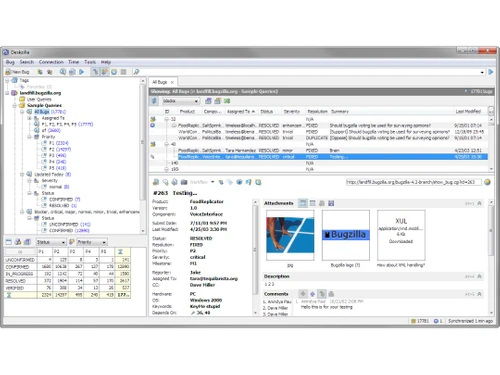
Bugzilla logo
Bugzilla Bug Tracking
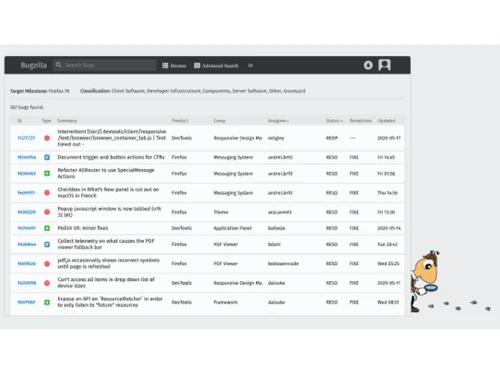
Bugzilla Dashboard
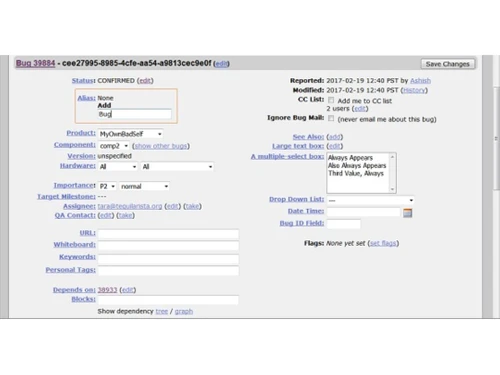
Bugzilla Edit Bug

Bugzilla

Brand: Bugzilla

  • 4.4

  • 4 Ratings

Bugzilla is an open-source bug-tracking system used to manage software bugs and development issues, facilitating communication and collaboration among developers, testers, and project stakeholders.

See More

Have you used Bugzilla before?

Share your insights for better experience

Add a Review

Free Forever

Get started immediately at no cost. Upgrade anytime if your business demand more.

100% Genuine
Products
Best Price
Guaranteed
Safe & Secure
Payment
  • Description

  • Pricing

  • Features

  • Specification

  • Review

  • Compare

  • Alternatives

  • FAQ

Bugzilla Software Overview

What is Bugzilla?

Bugzilla is an open-source bug-tracking system utilized to manage software issues and bugs throughout the development process. It offers a centralized platform where developers, testers, and project stakeholders can report, track, and prioritize bugs effectively.

With features like customizable workflows and advanced search capabilities, Bugzilla streamlines bug management and facilitates collaboration among team members. Additionally, it provides detailed reports and analytics to help teams monitor bug trends and make informed decisions. Bugzilla is widely adopted in the software development industry to enhance the quality and reliability of software products.

Why Choose Bugzilla Software?

  • Open Source: It is an open-source bug tracking system, meaning its source code is freely available and can be customized to suit specific needs. This open nature fosters a collaborative development environment and allows for community contributions.
  • Robust Bug Tracking: It provides a comprehensive set of features for tracking bugs, issues, and enhancements throughout the software development lifecycle. It allows users to submit, track, and prioritize bugs, assign them to specific individuals or teams, set deadlines, and monitor their resolution status.
  • Customization: It is highly customizable, allowing organizations to tailor it to their specific workflow and requirements. Administrators can define custom fields, workflows, and user roles to match their development processes.
  • Integration: It integrates well with other development tools and systems, such as version control systems (e.g., Git, Subversion), project management tools, continuous integration servers, and more. This facilitates seamless collaboration and workflow automation.
  • Scalability: It is capable of handling large volumes of bug reports and users, making it suitable for both small teams and large enterprises. It offers performance optimizations and scalability features to ensure efficient operation even in demanding environments.
  • Community Support: It has a large and active user community, providing ample resources for troubleshooting, customization tips, and best practices. Users can benefit from forums, mailing lists, and online documentation to resolve issues and optimize their deployment.
  • History and Reliability: It has a long history and is widely used in the software development industry. Its reliability and stability have been proven over time, making it a trusted choice for bug tracking and issue management.

Benefits of Bugzilla Platform

  • Advanced Search Capabilities: Enables complex searches based on keywords, status, severity, etc., aiding in efficient bug tracking.
  • Email Notifications: Sends updates on bug progress to involved users, ensuring timely resolution.
  • Reporting and Charts: Generates custom reports and charts to analyze bug trends and track performance metrics.
  • Time Tracking: It includes features for time tracking, allowing users to log time spent on resolving bugs or working on specific tasks. This helps in monitoring resource utilization and project management.
  • Version Control Integration: Links bug reports with code changes in systems like Git, Subversion, and CVS for better traceability.
  • Custom Workflows: Define unique workflows to match organizational processes and rules for bug handling.
  • Localization and Internationalization: Supports different languages and regions, fostering global collaboration.
  • Security Features: Ensures data protection through authentication, access controls, and encryption.
  • RESTful API: Integrates with other systems for task automation, like bug creation and querying.
  • Customizable User Interface: Personalize theme, layout, and dashboard settings for improved usability.

Pricing of Bugzilla Bug Tracking Software

Bugzilla is available for free.

The pricing model is based on different parameters, including extra features, deployment type, and the total number of users. For further queries related to the product, you can contact our product team and learn more about the pricing and offers.

Read more

Bugzilla Pricing & Plans

This Product is Available Free Forever.

Start instantly with no fees, no subscriptions, and no commitments.

  • Full access to basic version available
  • No credit card or sign-up required

Free Forever Plan

Get started immediately at no cost. Upgrade anytime if your business demand more.

Free Forever

Bugzilla Features

  • icon_check Bug Tracking
    Track bugs efficiently throughout the development lifecycle, with submission, prioritization, and resolution monitoring.
  • icon_check Workflow Management
    Customize workflows to manage bug handling and define transitions and permissions.
  • icon_check Ticket / Issue Tracking
    Monitor and manage project-related tickets and issues, assigning priorities and tracking progress.
  • icon_check Dashboards
    View summary of open bugs, recent activity, and deadlines for better organization and project status awareness.
  • icon_check Defect Tracking
    Record and manage software defects effectively, capturing details like severity and steps to reproduce.
  • icon_check Release Management
    Track release statuses and milestones for effective planning and coordination of software releases.

Bugzilla Specifications

Supported Platforms
Ubuntu Ubuntu Windows Windows MacOS MacOS Linux Linux
Devices
Desktop Desktop
Deployment
Cloud-Based Cloud-Based
Suitable For
All Industries
Business Specific
All Businesses
Business Size
Small Business Medium Business SMBs SMEs
Customer Support
Email Communities
Language
English

Explore the Best Alternative Solutions Similar to Your Business Size and Needs

Bugzilla Review

4.4

Out of 5

img

Overall Rating

Based on
4 Verified Ratings

Rating Breakdown

  • Features 4.8
  • Value for Money 3.7
  • Ease of Use 4.5
  • Customer Support 4.5

95% Recommend this Product

Add Review

Techjockey Trusted Reviews from Verified Users

No reviews are currently available for Bugzilla. Discover similar Bug Tracking Tools reviews

  • Bugasura

    4.7

    Whats great - We had to stop Jira licenses for issue tracing as it cost a bomb for a team of 20. However, Bugasura is easy and business tea... read more

  • Jira

    4.5

    Whats great - Jira's emphasis on visuals when tracking performance and tickets is something I appreciate. Since our project is a support pr... read more

  • Clickup

    4.3

    Whats great - ClickUp is great for helping us stay organized. The platform’s customization options let us set it up exactly how we need it.... read more

Compare Bugzilla With other Bug Tracking Tools

Products
Ratings
Pricing
Device Supported
Deployment
Supported Platforms
  • img

    Bugzilla

  • 4.4

  • FREE

  • Desktop

    Mobile

  • Web based

    On Premises

  • Windows

    Mac OS

  • img

    Bugasura

  • 4.6

  • Price On Request

  • Desktop

    Mobile

  • Web based

    On Premises

  • Windows

    Mac OS

  • img

    Zoho Bug Tracker

  • 4.3

  • ₹ 240

  • Desktop

    Mobile

  • Web based

    On Premises

  • Windows

    Mac OS

  • img

    Nitpicks AI

  • 4.3

  • Price On Request

  • Desktop

    Mobile

  • Web based

    On Premises

  • Windows

    Mac OS

  • img

    Marker io

  • 4.5

  • Price On Request

  • Desktop

    Mobile

  • Web based

    On Premises

  • Windows

    Mac OS

  • img

    BugTrace AI

  • 4.1

  • Price On Request

  • Desktop

    Mobile

  • Web based

    On Premises

  • Windows

    Mac OS

  • img

    BugHerd

  • 4.2

  • Price On Request

  • Desktop

    Mobile

  • Web based

    On Premises

  • Windows

    Mac OS

  • img

    Ruttl

  • 4.3

  • Price On Request

  • Desktop

    Mobile

  • Web based

    On Premises

  • Windows

    Mac OS

  • img

    zipBoard

  • 4.2

  • Price On Request

  • Desktop

    Mobile

  • Web based

    On Premises

  • Windows

    Mac OS

  • img

    Reqtest

  • 4.5

  • Price On Request

  • Desktop

    Mobile

  • Web based

    On Premises

  • Windows

    Mac OS

  • img

    MantisBT

  • 4.1

  • Price On Request

  • Desktop

    Mobile

  • Web based

    On Premises

  • Windows

    Mac OS

(2) Product(s) selected

Bugzilla Alternatives

See All Bugzilla Alternatives

Available

Price on Request

Articles for Bugzilla

See All Related Articles

Which operating system does Bugzilla Software Support?

Bugzilla Software is compatible with Ubuntu, Windows, Linux and macOS.

Is there any Bugzilla Software App?

Bugzilla Software is not available for Android and iOS app users.

What is the deployment type of Bugzilla Software?

Bugzilla Software supports web-based deployment.

How much does Bugzilla Software Cost?

Bugzilla is available for FREE at techjockey.com.

Who are the potential users of Bugzilla Software?

Bugzilla Software is typically used by all industries to manage software issues and bugs throughout the development process.

Is there any free demo for Bugzilla Software?

Yes, Bugzilla Software demo is available at techjockey.com.

Is Bugzilla Software Free?

Bugzilla Software is an open-source software and is available for free. However, the premium plan with advanced features is available at techjockey.com with exciting deals.

How can you download Bugzilla Software?

Bugzilla Software installation is not required, as it is web-based. Just open the Setup Wizard to get started.

How does Bugzilla Software Work?

Bugzilla works by allowing users to submit bug reports, which are then tracked, prioritized, and managed through customizable workflows, facilitating collaboration and ensuring timely resolution of issues. Users can access the system via a web interface, where they can view and update bug statuses, communicate with team members, and generate reports for analysis.

20,000+ Software Listed

Best Price Guranteed

Free Expert Consultation

2M+ Happy Customers

Terms and Condtions

close

Users with registered businesses can purchase goods from merchants on the platform to satisfy their business needs. Users are not permitted to utilize any products acquired through the platform for resale, advertising, business, or further distribution.

For each purchase made, users will receive a Tax Invoice (or 'GST invoice') that includes specific details such as:

  • the GSTIN of the user associated with their registered business, and

  • the specified Entity Name for their business.

It should be noted that not all products are eligible for GST Invoice. Only the products displayed by participating sellers with the 'GST-based Invoice Available' callout on the product description page would qualify.

Certain goods and services are not eligible to get a GST Invoice, including items with VAS, i.e., Value Added Services (e.g., Total Mobile Protection/Assured Buyback) and those involving an exchange offer at the time of purchase.

Users must ensure the accuracy of the GSTIN, and business entity name provided for the GST Invoice. Requests for corrections into GST Invoice would not be accommodated by Techjockey.com or any Seller, and any issues arising from user-provided information are the sole responsibility of users.

Techjockey.com is not liable for the GST Invoice or any associated input tax credit. To efficiently claim an input tax credit, users should select the registered place of business address as per the GST authority's data and follow the provisions of the GST Act and rules.

To claim an input tax credit, the delivery and billing addresses must match. Furthermore, input tax credits will not be granted if the delivery address and GSTIN on the invoice are from different states. In case of incorrect GST details provided during the order placement, the order will be canceled automatically.