linkedin
BuildSmart logo
buildsmart-dashboardpage
buildsmart-inputs
buildsmart-mobileview

BuildSmart

Brand: BuildSmart

  • 4.3

  • 5 Ratings

BuildSmart is a construction ERP and cost management software for managing projects, finances, procurement, and resource allocation.

See More

Have you used BuildSmart before?

Share your insights for better experience

Add a Review

Price Available on Request

Questions about pricing or customization? We’re here to help, just a click away.

100% Genuine
Products
Best Price
Guaranteed
Safe & Secure
Payment
  • Description

  • Pricing

  • Features

  • Specification

  • Review

  • Compare

  • Alternatives

  • FAQ

BuildSmart Software Overview

What is BuildSmart?

BuildSmart is a construction ERP software that helps to manage construction projects, costs, and resources from one platform. It creates a centralized database for the company and comes with different modules to provide a single view for management. It connects financial data, procurement, labour, inventory, HR, and scheduling data to manage workflows.

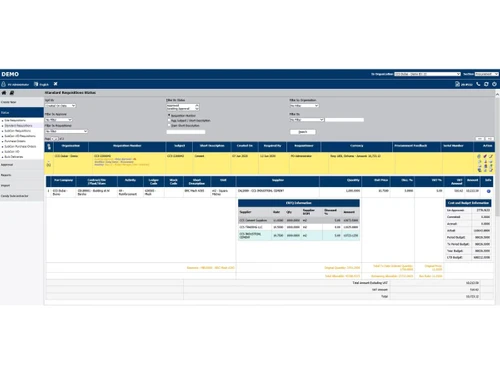
The interface uses clear dashboards, configurable modules, and integrated tools, making it simple for contractors and managers to track progress, control budgets, and coordinate with teams effectively.

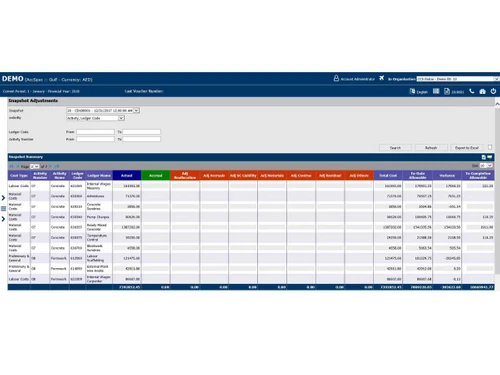
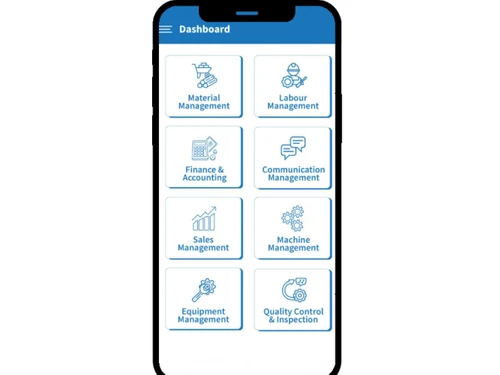
BuildSmart offers project scheduling, procurement management, subcontractor coordination, and inventory tracking. It provides cost control, financial dashboards, and real-time reporting. It allows users to generate analytics, manage budgets, and monitor risks. The software provides modules to support resource allocation, inventory management, labour management, sales management, compliance tracking, and communication. There is mobile access and ERP integration options to help construction companies deliver projects on time.

Why Choose BuildSmart Construction ERP Software?

  • Project management: This Construction ERP Software helps manage scheduling, budgeting, and coordination, ensuring construction projects remain organized, efficient, and delivered on time.
  • Real-time tracking: Provides live dashboards and analytics, allowing managers to monitor progress, identify risks, and adjust strategies instantly.
  • Inventory management: BuildSmart Construction ERP Software helps track materials, reduce wastage, and optimize procurement, ensuring resources are available when needed without extra costs.
  • Labour management: Allows for managing workforce allocation, attendance, and productivity, optimizing labor usage and reducing operational inefficiencies.
  • Material management: It provides control over procurement, delivery, and usage of materials, ensuring accurate tracking, reduced waste, and improved profitability.

Benefits of BuildSmart

  • Improved efficiency: It helps to manage workflows, with proper scheduling and tracking, saving time and reducing delays across construction projects.
  • Cost savings: It provides accurate tracking of expenses, reducing waste and ensuring projects remain within budget.
  • Better collaboration: BuildSmart helps to connect field and office teams, share data instantly , thus improving communication and reducing mismanagement effectively.
  • Real-time insights: It provides live dashboards and analytics, to help managers to make faster, data-driven decisions.
  • Enhanced safety: Helps standardize safety programs, ensuring compliance and reducing risks on construction sites.
  • Quality assurance: Provides centralized issue tracking, resolving problems early and maintaining consistent construction quality standards.

Pricing of BuildSmart

BuildSmart details are available on request at techjockey.com.

BuildSmart may vary based on factors like customization, additional features required, number of users, and the deployment type. Please request a callback for subscription-related details and to avail offers on premium packages at techjockey.com.

Read more

BuildSmart Pricing & Plans

Looking for The Right Pricing?

Share your requirements and get a plan built around your business.

  • Define your business needs
  • Get customised pricing
  • Choose features that fit your workflow

Price Available on Request

Get personalised BuildSmart pricing that fits your needs. Our team will connect with you.

BuildSmart Features

  • icon_check Materials Management
    Streamline procurement, track inventory levels, control material usage efficiently across projects and reduce wastage.
  • icon_check Finance & Accounting
    Automate financial transactions, generate accurate reports, maintain regulatory compliance, monitor cost overruns.
  • icon_check RA Bill Generation
    Manage leads to sales, generate RA bills seamlessly, track payment status and customer invoicing.
  • icon_check Project Management
    Plan, schedule, monitor project progress in real time, allocate resources, ensure tasks meet milestones.
  • icon_check Labour Management
    Track attendance and shifts, assign tasks to labourers, monitor productivity and workforce utilization.
  • icon_check Inspection Management
    Enforce inspection protocols, manage quality checkpoints, ensure standards are met in project deliverables.
  • icon_check Inventory Management
    Track stock levels, manage stock movement, reduce overstocking and stockouts with accurate inventory control.
  • icon_check HRMS
    Manage employee data, payroll, leave & performance to support workforce operations.
  • icon_check Communication Management
    Centralize communication channels, enable real-time stakeholder collaboration, reduce delays.
  • icon_check Resource Allocation
    Allocate manpower, machines and materials optimally across projects to maximize utilization and cut idle time.
  • icon_check Real-Time Collaboration
    Allow teams, contractors, suppliers to collaborate instantly, share updates and maintain alignment.
  • icon_check Risk Management
    Identify, assess and mitigate project risks proactively to ensure timely delivery and cost control.
  • icon_check Compliance Monitoring
    Implement safety protocols, conduct inspections, ensure compliance with standards on-site.
  • icon_check Approval Workflows
    Centralize project documentation, streamline approvals, maintain version history and compliance.
  • icon_check Stakeholder Reporting
    Provide transparency via reports, dashboards; keep clients updated on progress, finances and KPIs.
  • icon_check Budget Monitoring
    Track budgets vs costs continuously, detect variances, avoid overruns and ensure profitability.
  • icon_check Supply Chain Tracking
    Simplify purchasing flows, track vendor performance, ensure timely delivery of materials.

BuildSmart Specifications

Supported Platforms
Windows Windows iOS iOS Android Android MacOS MacOS
Devices
Desktop Desktop
Deployment
Cloud-Based Cloud-Based
Suitable For
Construction
Business Specific
All Businesses
Business Size
Small Business Medium Business SMBs MSMEs
Customer Support
Email Communities
Language
English

Explore the Best Alternative Solutions Similar to Your Business Size and Needs

BuildSmart Review

4.3

Out of 5

img

Overall Rating

Based on
5 Verified Ratings

Rating Breakdown

  • Features 4.2
  • Value for Money 4.5
  • Ease of Use 4.3
  • Customer Support 4.5

80% Recommend this Product

Add Review

Be the First to Review

This product has no reviews yet. Be the first to leave your feedback.

Add Review
Compare BuildSmart With other Construction ERP Software

Products
Ratings
Pricing
Device Supported
Deployment
Supported Platforms
  • img

    BuildSmart

  • 4.3

  • Price On Request

  • Desktop

    Mobile

  • Web based

    On Premises

  • Windows

    Mac OS

  • img

    Highrise ERP

  • 5

  • Price On Request

  • Desktop

    Mobile

  • Web based

    On Premises

  • Windows

    Mac OS

  • img

    CivitBUILD

  • 4.3

  • ₹ 2000

  • Desktop

    Mobile

  • Web based

    On Premises

  • Windows

    Mac OS

  • img

    RQube

  • 4.1

  • Price On Request

  • Desktop

    Mobile

  • Web based

    On Premises

  • Windows

    Mac OS

  • img

    NEWSTAR

  • 4.5

  • Price On Request

  • Desktop

    Mobile

  • Web based

    On Premises

  • Windows

    Mac OS

  • img

    RedSky ERP

  • 4.2

  • Price On Request

  • Desktop

    Mobile

  • Web based

    On Premises

  • Windows

    Mac OS

  • img

    Bhoomi ERP

  • 4.2

  • Price On Request

  • Desktop

    Mobile

  • Web based

    On Premises

  • Windows

    Mac OS

(0) Product(s) selected

BuildSmart Alternatives

See All BuildSmart Alternatives

Available

Price on Request

Available

Price on Request

Available

Price on Request

eCMS

4.2

Available

Price on Request

Articles for BuildSmart

See All Related Articles

How much does BuildSmart cost?

BuildSmart pricing is available at techjockey.com. on placing request.

Who uses BuildSmart Construction ERP Software?

BuildSmart is used by contractors, project managers, engineers, and construction firms for managing costs, resources, and project workflows.

How does BuildSmart work?

BuildSmart Construction ERP Software works by connecting financial data, procurement, scheduling, and reporting into one ERP platform, streamlining construction management.

Which operating systems are compatible with BuildSmart Software?

BuildSmart runs smoothly on OS like Windows, macOS, iOS, and Android.

Is a free demo available for BuildSmart Construction ERP Software?

Yes, BuildSmart offers a free demo, allowing users to explore its features before making a purchase decision.

What project management features does BuildSmart provide?

BuildSmart Construction ERP Software provides scheduling, resource allocation, subcontractor coordination, and progress tracking to keep construction projects organized and efficient.

How does BuildSmart support cost control?

BuildSmart provides financial dashboards, expense tracking, and procurement management to reduce waste and keep projects within budget.

Can BuildSmart generate reports and analytics?

Yes, BuildSmart generates customized reports and real-time analytics, giving managers insights into project performance and risks.

Does BuildSmart integrate with other software tools?

Yes, BuildSmart Construction ERP Software integrates with ERP modules like accounting systems and reporting tools, to help in better ways for construction operations.

20,000+ Software Listed

Best Price Guranteed

Free Expert Consultation

2M+ Happy Customers

Terms and Condtions

close

Users with registered businesses can purchase goods from merchants on the platform to satisfy their business needs. Users are not permitted to utilize any products acquired through the platform for resale, advertising, business, or further distribution.

For each purchase made, users will receive a Tax Invoice (or 'GST invoice') that includes specific details such as:

  • the GSTIN of the user associated with their registered business, and

  • the specified Entity Name for their business.

It should be noted that not all products are eligible for GST Invoice. Only the products displayed by participating sellers with the 'GST-based Invoice Available' callout on the product description page would qualify.

Certain goods and services are not eligible to get a GST Invoice, including items with VAS, i.e., Value Added Services (e.g., Total Mobile Protection/Assured Buyback) and those involving an exchange offer at the time of purchase.

Users must ensure the accuracy of the GSTIN, and business entity name provided for the GST Invoice. Requests for corrections into GST Invoice would not be accommodated by Techjockey.com or any Seller, and any issues arising from user-provided information are the sole responsibility of users.

Techjockey.com is not liable for the GST Invoice or any associated input tax credit. To efficiently claim an input tax credit, users should select the registered place of business address as per the GST authority's data and follow the provisions of the GST Act and rules.

To claim an input tax credit, the delivery and billing addresses must match. Furthermore, input tax credits will not be granted if the delivery address and GSTIN on the invoice are from different states. In case of incorrect GST details provided during the order placement, the order will be canceled automatically.