
linkedin
Viewpoint Vista logo
play Using Vista's Help Menu
viewpoint vista-dashboard
viewpoint vista-scheduling

Viewpoint Vista

Brand: Trimble

  • 3.8

  • 4 Ratings

Viewpoint Vista is a construction ERP software that integrates projects, finance, HR, and resources into one management platform.

See More

Have you used Viewpoint Vista before?

Share your insights for better experience

Add a Review

Price Available on Request

Questions about pricing or customization? We’re here to help, just a click away.

100% Genuine
Products
Best Price
Guaranteed
Safe & Secure
Payment
  • Description

  • Pricing

  • Features

  • Specification

  • Review

  • FAQ

Viewpoint Vista Software Overview

What is Viewpoint Vista?

Viewpoint Vista is a construction ERP software designed to manage construction projects efficiently. It integrates financials, projects, and human resources on a single platform. It works by integrating accounting, project data, and workforce management, managing collaboration across different departments.

Viewpoint Vista provides project scheduling, payroll management, subcontractor coordination, and document control. It includes cost tracking, compliance tools, and real-time reporting. The software allows users to generate analytics, manage budgets, and monitor risks effectively.

This Construction ERP Software supports resource allocation, mobile access, and ERP integration, ensuring efficiency. It helps construction companies deliver projects on time, reduce waste, and improve profitability through centralized management.

Why Choose Viewpoint Vista Construction ERP Software?

  • Centralized management: It helps create a central platform by integrating finance, HR, and operations, improving efficiency.
  • Budgeting: It provides accurate expense tracking and budget control, ensuring projects remain financially efficient and within planned limits.
  • Forecasting: Viewpoint Vista predicts future costs, resource needs, and timelines, enabling proactive planning and reducing project risks.
  • Resource allocation: Helps assign workforce, equipment, and materials effectively, ensuring optimal utilization and minimizing operational inefficiencies.
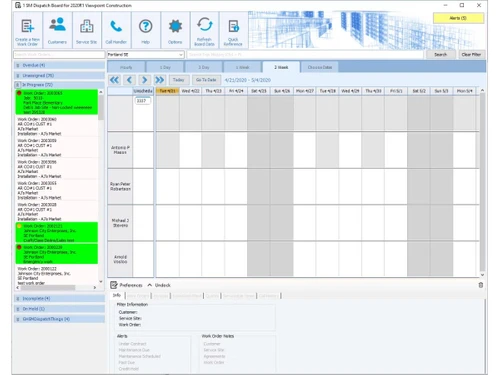
  • Project scheduling: Provides tools for planning tasks, setting timelines, and monitoring milestones, keeping projects organized and on track.

Benefits of Viewpoint Vista

  • Better decision-making: Helps managers use accurate insights, enabling smarter choices and reducing risks across projects.
  • Real-time information: Viewpoint Vista Construction ERP Software provides instant updates through dashboards, allowing teams to monitor progress and respond quickly.
  • Improve data visibility: It helps centralize information, making project, financial, and resource data easily accessible and transparent.
  • Cost management: It provides expense tracking and budget control, reducing waste and ensuring projects remain financially efficient.
  • Better project efficiency: Helps in making schedules, resource allocation, and workflows, so that the projects are delivered on time.
  • Better communication: This Construction ERP Software provides connected tools for teams, improving collaboration between field staff, contractors, and office managers.

Pricing of Viewpoint Vista

Viewpoint Vista details are available on request at techjockey.com.

Viewpoint Vista may vary based on factors like customization, additional features required, number of users, and the deployment type. Please request a callback for subscription-related details and to avail offers on premium packages at techjockey.com.

Read more

Trimble Company Details

Founded Year:  1978

Trimble Inc. is a Sunnyvale, California-based hardware, software and services technology company. Trimble services global industries in Agriculture, Building & Construction, Geospatial, Natural Resources and Utilities, Governments, Transportation and others.

Director/Founders Charles Trimble / Charles Robert Trimble
Company Size 1000+ Employees

Viewpoint Vista Pricing & Plans

Looking for The Right Pricing?

Share your requirements and get a plan built around your business.

  • Define your business needs
  • Get customised pricing
  • Choose features that fit your workflow

Price Available on Request

Get personalised Viewpoint Vista pricing that fits your needs. Our team will connect with you.

Viewpoint Vista Features

  • icon_check Job Cost Accounting
    Track project budgets, change orders, and actual costs in real-time to maintain profitable projects.
  • icon_check Invoicing and Payments
    Streamline billing cycles and process payments efficiently to improve cash flow management.
  • icon_check Payroll Management
    Manage employee records, timecards, and payroll seamlessly across projects in a unified system.
  • icon_check Service Management
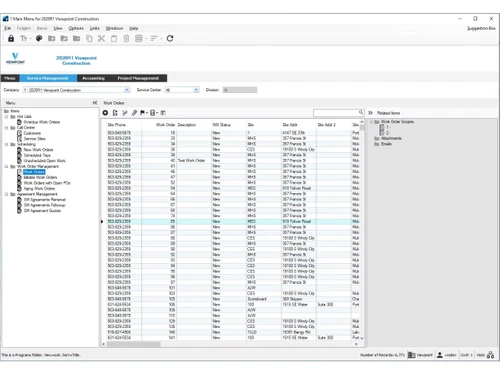
    Handle service contracts, work orders, and dispatching to ensure timely field service delivery.
  • icon_check Equipment Management
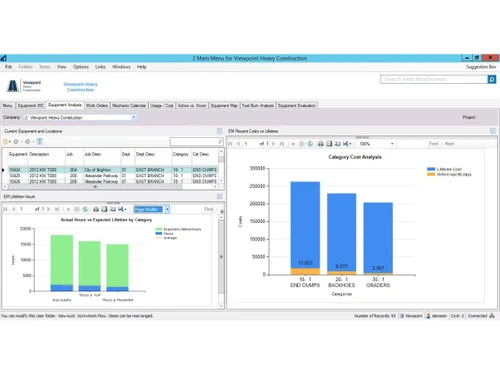
    Monitor usage, maintenance schedules, and costs of equipment for optimal resource utilization.
  • icon_check Reporting & Analytics
    Generate dashboards and reports to analyze project performance and financial health accurately.
  • icon_check Time Tracking
    Record employees’ work hours directly in the system to ensure precise payroll and job costing.
  • icon_check Material Receipt Tracking
    Track incoming materials to maintain inventory accuracy and prevent project delays.
  • icon_check Real-Time Collaboration
    Enable office and field teams to share updates instantly, improving coordination and efficiency.
  • icon_check Document Management
    Store and manage all project documentation digitally for easy access and compliance.
  • icon_check Templates
    Use standard or custom templates to produce consistent, professional project reports.
  • icon_check Subcontractor Management
    Manage subcontractor agreements, performance tracking, and payment processing efficiently.
  • icon_check Role-Based Access Control (RBAC)
    Define user roles and permissions to secure sensitive data and ensure proper system access.
Viewpoint Vista Demo Video play icon

Get Viewpoint Vista Demo

Watch the demo video to explore key features, real workflows, and how the software fits your business needs.

Understand
Key Features
Personal
Demo Insights
Interactive
Demo Support

Viewpoint Vista Specifications

Supported Platforms
Ubuntu Ubuntu Windows Windows MacOS MacOS Linux Linux
Devices
Desktop Desktop
Deployment
Cloud-Based Cloud-Based
Suitable For
Construction
Business Specific
All Businesses
Business Size
Medium Business Enterprises SMBs
Customer Support
Email Communities
Language
Nederlands English français
Integration
API Integration
Training Resources
Live Online Videos

Viewpoint Vista Review

3.8

Out of 5

img

Overall Rating

Based on
4 Verified Ratings

Rating Breakdown

  • Features 3.5
  • Value for Money 3.7
  • Ease of Use 4
  • Customer Support 4.1

80% Recommend this Product

Add Review

Be the First to Review

This product has no reviews yet. Be the first to leave your feedback.

Add Review

Articles for Viewpoint Vista

See All Related Articles

How much does Viewpoint Vista cost?

Viewpoint Vista pricing can be requested at techjockey.com.

Who uses Viewpoint VistaConstruction ERP Software?

Viewpoint Vista is used by contractors, builders, project managers, and construction firms for managing projects, finances, and resources efficiently.

How does Viewpoint Vista work?

Viewpoint Vista Construction ERP Software works by integrating finance, HR, and project data into one ERP platform, streamlining workflows and collaboration.

Which operating systems are compatible with Viewpoint Vista Software?

Viewpoint Vista runs smoothly on OS like Windows, macOS, iOS, and Android.

Is a free demo available for Viewpoint Vista Construction ERP Software?

Yes, Viewpoint Vista Construction ERP Software offers a free demo, allowing users to explore its ERP modules and features before purchasing.

What project management features does Viewpoint Vista provide?

Viewpoint Vista provides scheduling, resource allocation, document management, and progress tracking to keep construction projects organized and efficient.

How does Viewpoint Vista support cost management?

Viewpoint Vista Construction ERP Software provides expense tracking, procurement control, and financial dashboards to reduce waste and keep projects within budget.

Can Viewpoint Vista Construction ERP Software generate reports and analytics?

Yes, Viewpoint Vista generates customized reports and real-time analytics, giving managers insights into project performance and risks.

Does Viewpoint Vista support cloud deployment?

Yes, Viewpoint Vista supports cloud deployment, allowing secure remote access, scalability, and easier updates for construction companies.

How secure is data in Viewpoint Vista Construction ERP Software?

Viewpoint Vista uses role-based access, encryption, and compliance standards to ensure sensitive project and financial data remain protected.

20,000+ Software Listed

Best Price Guranteed

Free Expert Consultation

2M+ Happy Customers

Terms and Condtions

close

Users with registered businesses can purchase goods from merchants on the platform to satisfy their business needs. Users are not permitted to utilize any products acquired through the platform for resale, advertising, business, or further distribution.

For each purchase made, users will receive a Tax Invoice (or 'GST invoice') that includes specific details such as:

  • the GSTIN of the user associated with their registered business, and

  • the specified Entity Name for their business.

It should be noted that not all products are eligible for GST Invoice. Only the products displayed by participating sellers with the 'GST-based Invoice Available' callout on the product description page would qualify.

Certain goods and services are not eligible to get a GST Invoice, including items with VAS, i.e., Value Added Services (e.g., Total Mobile Protection/Assured Buyback) and those involving an exchange offer at the time of purchase.

Users must ensure the accuracy of the GSTIN, and business entity name provided for the GST Invoice. Requests for corrections into GST Invoice would not be accommodated by Techjockey.com or any Seller, and any issues arising from user-provided information are the sole responsibility of users.

Techjockey.com is not liable for the GST Invoice or any associated input tax credit. To efficiently claim an input tax credit, users should select the registered place of business address as per the GST authority's data and follow the provisions of the GST Act and rules.

To claim an input tax credit, the delivery and billing addresses must match. Furthermore, input tax credits will not be granted if the delivery address and GSTIN on the invoice are from different states. In case of incorrect GST details provided during the order placement, the order will be canceled automatically.