USA
USA UAE
UAESmall Business
Designed for startups and growing businesses

See More





Brand: MindChipps
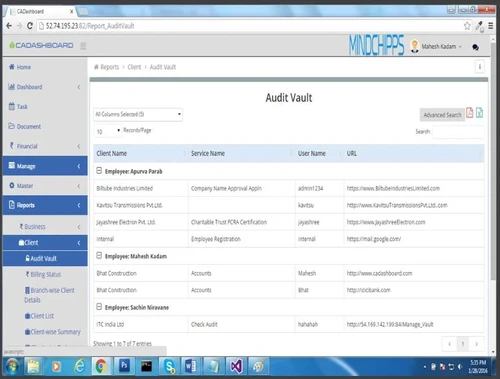
CADashboard is CA Management software for Chartered Accountants to work with their daily operations. It provides business compliance with all the current financial guidelines. Understand your organization’s financial structure and comply with the guidelines with no inconveniences. CADashboard provides you with effective practice supervising, that let places your operations in autopilot mode. W...
See MoreHave you used CADashboard before?
Share your insights for better experience
View plans
 Save upto 18%, Get GST Invoice on your business purchase T&C Buy Now & Pay Later, Check offer on payment page.
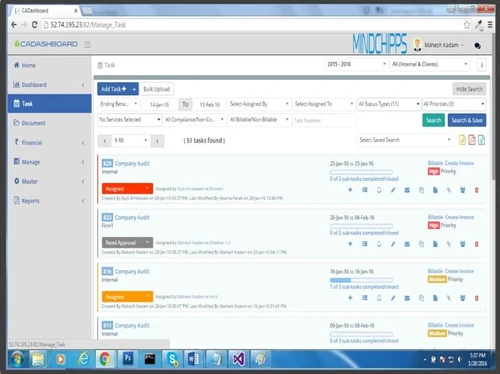
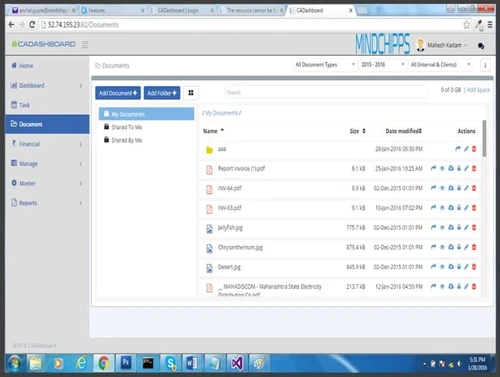
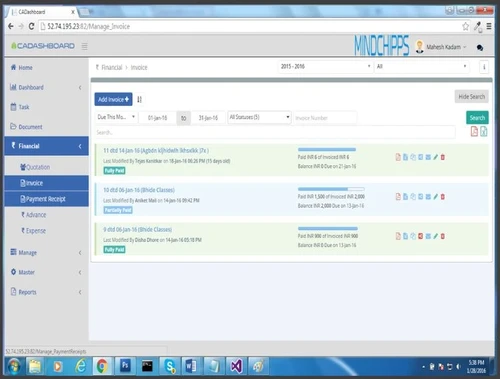
  Master Compliance Library Unified Compliance Board Automated Client Reminders Task Tracking Secure Document Repository Role-Based Access Control Compliance Management Collaboration Practice Management Document Management Finance Management Role Management Analytics & Reporting Alerts Mobile Support

Watch the demo video to explore key features, real workflows, and how the software fits your business needs.
 Ubuntu
  Windows
  iOS
iOS  Android MacOS
  Linux
Linux  Desktop
  Mobile
  Tablet
  iPad
iPad  Cloud-Based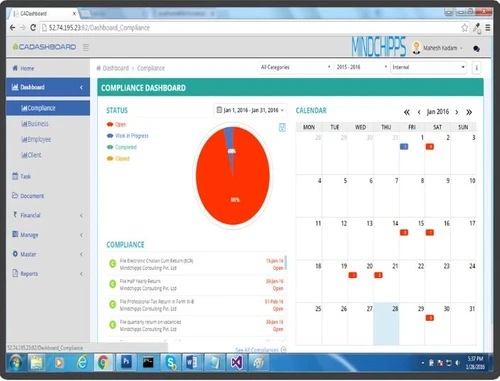
Small Business
Designed for startups and growing businesses
Medium Business
Built for business growth and flexibility
Enterprises
Designed for complex and large-scale business needs
4.9
Out of 5

Overall Rating
Based on
5 Verified Reviews
Rating Breakdown
92% Recommend this Product
Add ReviewUsers express high satisfaction with CADashboard and Techjockey, highlighting their effectiveness in compliance management and software recommendation services. Customers appreciate the comprehensive features of CADashboard, which they believe significantly contribute to business growth. Techjockey's support team is frequently praised for their responsiveness and ability to match users with suitable software solutions quickly. However, there are limited reviews, and some users noted minor delays in software downloads, suggesting room for improvement in speed. Overall, both services are highly recommended by users.

Feb 4, 2019
Techjockey Verified
“CA dashboard”
Pros
We have been using CADashboard from the previous year and a half. It is a compliance management software with all the important features like Document management, time tracking, etc which could boost the growth of your business.
Cons
None, none, none!
Mar 6, 2018
Techjockey Verified
“had a great experience”
Pros
I had only a vague idea of what I needed when I contacted Techjockey about software. Josh Muraki asked me the right questions and quickly provided me with a list of companies and sales reps that could offer me the software solutions that I needed. All of the sales reps contacted me directly within hours of receiving Josh's recommendations. All of companies offered software that was exactly what I was looking for at a price that fit my budget. Josh and Techjockey saved me a lot of time I would have misspent considering the wrong solutions. I highly recommend their services. I couldn't have had a better experience.
Cons
N/A
Feb 27, 2018
Techjockey Verified
“Techjockey Makes My Job Easier”
Pros
But it did eventually just download what I had requested, although the time it took might well have been for the whole package.
Cons
N/A

CADashboard
₹ 12000.00 excl. GST
Desktop
Mobile
Web based
On Premises
Windows
Mac OS

Jamku Office Management Software
Price On Request
Desktop
Mobile
Web based
On Premises
Windows
Mac OS
Spectrum Cloud CA
₹ 6300
Desktop
Mobile
Web based
On Premises
Windows
Mac OS

EasyCloudBooks
Price On Request
Desktop
Mobile
Web based
On Premises
Windows
Mac OS

Turia
₹ 100
Desktop
Mobile
Web based
On Premises
Windows
Mac OS

ERPCA
₹ 1000
Desktop
Mobile
Web based
On Premises
Windows
Mac OS

MyTask
₹ 690
Desktop
Mobile
Web based
On Premises
Windows
Mac OS

CAProWin
₹ 100
Desktop
Mobile
Web based
On Premises
Windows
Mac OS

eProcessify
₹ 600
Desktop
Mobile
Web based
On Premises
Windows
Mac OS

CA Cloud Desk
₹ 3000
Desktop
Mobile
Web based
On Premises
Windows
Mac OS

Smart Office Management System
₹ 10000
Desktop
Mobile
Web based
On Premises
Windows
Mac OS
(2) Product(s) selected
Starting Price:
₹6,300 /Year ₹7,200
Starting Price:
₹100 /Month
Starting Price:
₹10,000 /Year

Available
Price on Request

Available
Price on Request

Available
Price on Request

Available
Price on Request
Starting Price:
£4 /Month
Starting Price:
₹600 /Month

Starting Price:
₹1,788 User/Month
Starting Price:
$79 /Month
Professionals (CA/CS/Lawyers) and their SME clients and their clients spent a lot of time understanding exact compliance status. You also have to do a lot of follow-up to get/provide compliance related data. As Professionals/business owners, why should you spend your time on follow ups? You want to focus your time and energy on business strategy and goals. CADashboard will help reduce the follow-up tasks thereby you will save valuable time of your day, reduce operating costs, and gain peace of mind
Your are sole owner of your uploaded data. You own your data files and you are able to download them back to your local computer if you decide to discontinue the service.
No one can have access to your data without your permission. CADashboard team goes to extraordinary lengths when it comes to your data security. CADashboard.com offers greater security than many companies would have if the software and hardware were located in-house. Security measures are taken to make sure that your information is protected. Each company’s data is password-protected. You create your own passwords, so no one (not even the CADashboard team) can see or have access to your password. As your data travels over the Internet, it is protected by a technology called Secure Sockets Layer (SSL) encryption. SSL ensures that your data makes it to your location before it can be decoded. For added security, your company needs to make sure your browser supports 128-bit encryption. This level of encryption is the highest currently supported by consumer Web browsers. Be sure you are also using the latest version of your Web browser, as enhancements have probably been made since you last upgraded. (Security.)
Right now if you are like most of others, your data/records are in an unlocked file cabinet or worse, sitting on someone’s desk. You share your data on public email sites. Compare this with CADashboard.com security. • CADashboard uses state of art cloud network for storage of data. • The cloud service provider’s server are located in data centres, which have stringent security & access measures built in for SaaS type of applications. • Your data is very much secure. • The CADashboard application is SSL secured (256 bits encryption) – SSL is protocol used for encrypting information over the Internet. • Your data security is of prime importance to us. We take data privacy very seriously. You can be assured that you and only you are privy to your most important data.
The pricing of CADashboard starts at INR 15,000 for the SME (SILVER) Plan at techjockey.com.
20,000+ Software Listed
Best Price Guranteed
Free Expert Consultation
2M+ Happy Customers
Terms and Condtions

Users with registered businesses can purchase goods from merchants on the platform to satisfy their business needs. Users are not permitted to utilize any products acquired through the platform for resale, advertising, business, or further distribution.
For each purchase made, users will receive a Tax Invoice (or 'GST invoice') that includes specific details such as:
the GSTIN of the user associated with their registered business, and
the specified Entity Name for their business.
It should be noted that not all products are eligible for GST Invoice. Only the products displayed by participating sellers with the 'GST-based Invoice Available' callout on the product description page would qualify.
Certain goods and services are not eligible to get a GST Invoice, including items with VAS, i.e., Value Added Services (e.g., Total Mobile Protection/Assured Buyback) and those involving an exchange offer at the time of purchase.
Users must ensure the accuracy of the GSTIN, and business entity name provided for the GST Invoice. Requests for corrections into GST Invoice would not be accommodated by Techjockey.com or any Seller, and any issues arising from user-provided information are the sole responsibility of users.
Techjockey.com is not liable for the GST Invoice or any associated input tax credit. To efficiently claim an input tax credit, users should select the registered place of business address as per the GST authority's data and follow the provisions of the GST Act and rules.
To claim an input tax credit, the delivery and billing addresses must match. Furthermore, input tax credits will not be granted if the delivery address and GSTIN on the invoice are from different states. In case of incorrect GST details provided during the order placement, the order will be canceled automatically.