linkedin
CA Office Pro logo
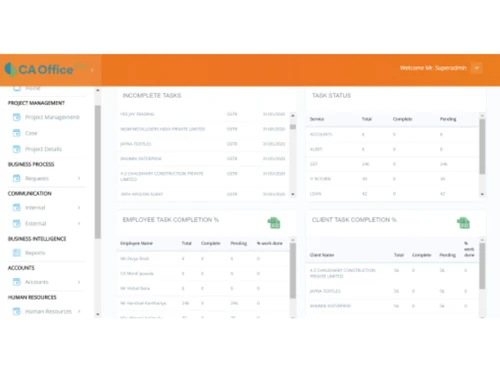
ca office pro-tasks
ca office pro-projects
ca office pro-charts

CA Office Pro

Brand: DigiEn InfoSoft LLP

  • 4.5

  • 3 Ratings

CA Daksh is one of the best CA office management software for Indian markets. The software offers an easy to use interface with multiple device and cross-platform access. The CA automation tool offers several planning and management features which allow CAs to handle multiple clients. CA Daksh provides chartered accountants a dashboard to monitor the productivity of the entire workforce in a si...

See More

Have you used CA Office Pro before?

Share your insights for better experience

Add a Review
Starting Price
₹12,500 excl.GST
₹ 14,750 incl. GST

View plans

offer Save upto 18%, Get GST Invoice on your business purchase T&C
offer Buy Now & Pay Later, Check offer on payment page.
Buy Now
100% Genuine
Products
Best Price
Guaranteed
Safe & Secure
Payment
  • Description

  • Pricing

  • Features

  • Specification

  • Review

  • Compare

  • Alternatives

  • FAQ

Starting at ₹12,500
Buy Now

CA Office Pro Software Overview

What is CA Daksh? 

CA Daksh is one of the best CA office management software for Indian markets. The software offers an easy to use interface with multiple device and cross-platform access. The CA automation tool offers several planning and management features which allow CAs to handle multiple clients. 
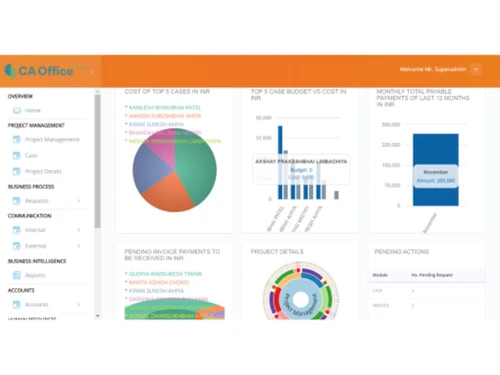
CA Daksh provides chartered accountants a dashboard to monitor the productivity of the entire workforce in a single page. The dashboard of the software can be customized for employees as per their designation. 

CA Daksh enables organizations to setup a self-service portal for customers to access relevant information. This service can be deployed through IVR tool, bots in chat messenger, or direct notifications. Plus, companies can create and manage different support websites for different products they are dealing with, without any extra charges.  

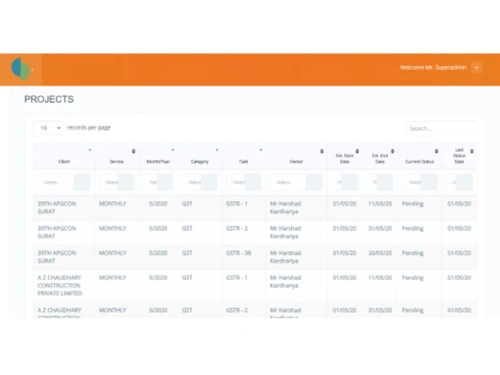
Managing projects with CA Daksh CA Office Management Software

CA Daksh is a fully featured CA office automation tool that helps manage day-to-day activities from a single platform. CA Daksh helps automate all the task schedules for multiple clients with only a few clicks. It also helps in planning out the workflow for every individual employee. The CA office automation tool provides many important features to help employees at a CA firm finish projects on time. Furthermore, the CA automation tool has a tracker module, which sends alerts to the employees regarding their work schedule. 

Features of CA Daksh CA Office Automation Software 

Here are some key features offered by CA Daksh CA office automation tool: 

  1. Project management suite 
  2. Multi-device access 
  3. Role-based login
  4. Faster accessibility through quick workable items
  5. Business monetary performance at first sight
  6. Employee productivity information 
  7. Customer profitability analysis

Price of CA Daksh CA Automation Tool

CA Daksh is available in four different plans, these are: 

  1. Silver – ₹12,500/- per year per 5 users
  2. Gold – ₹ 28,500/- per year per 15 users 
  3. Platinum – ₹ 45,000/- per year per 30 users
  4. Diamond – ₹ 60,000/- per year per 50 users
Read more

DigiEn InfoSoft LLP Company Details

Founded Year:  2017

DigiEn InfoSoft LLP is made up of a team of professionals with expertise in Business Processes, Technology Consulting, Software Design and Software Development Process, who apply innovative solutions that contribute to rapid, systematic and scalable development of the client organization.

Director/Founders Kushal Adhvaryu
Company Size 1-100 Employees

CA Office Pro Pricing & Plans

Silver (Users 5)

Calculated Price

15000 Exclusive of all taxes
    • Quantity

      Quantity
      Quantity
    • Yearly

      Yearly
      Yearly
One Time Installation (Price: ₹ 2500)
  • Installation
    1

Key Features

  • Project Management

  • Multi Device Support

  • Multi User login & Role based access

  • Profitability Analysis

  • Automated Reminder

  • Engagement

  • Email/SMS Alerts

  • Finance Management

  • Leave & Attendance Management

  • Auto generate salary slips

  • Balance Sheet

  • Dashboards

Gold (Users 15)

Calculated Price

32000 Exclusive of all taxes
    • Quantity

      Quantity
      Quantity
    • Yearly

      Yearly
      Yearly
One Time Installation (Price: ₹ 3500)
  • Installation
    1

Key Features

  • Project Management

  • Multi Device Support

  • Multi User login & Role based access

  • Profitability Analysis

  • Automated Reminder

  • Engagement

  • Email/SMS Alerts

  • Finance Management

  • Leave & Attendance Management

  • Auto generate salary slips

  • Balance Sheet

  • Dashboards

Platinum (Users 30)

Calculated Price

50000 Exclusive of all taxes
    • Quantity

      Quantity
      Quantity
    • Yearly

      Yearly
      Yearly
One Time Installation (Price: ₹ 5000)
  • Installation
    1

Key Features

  • Project Management

  • Multi Device Support

  • Multi User login & Role based access

  • Profitability Analysis

  • Automated Reminder

  • Engagement

  • Email/SMS Alerts

  • Finance Management

  • Leave & Attendance Management

  • Auto generate salary slips

  • Balance Sheet

  • Dashboards

Diamond (Users 50)

Calculated Price

66000 Exclusive of all taxes
    • Quantity

      Quantity
      Quantity
    • Yearly

      Yearly
      Yearly
One Time Installation (Price: ₹ 6000)
  • Installation
    1

Key Features

  • Project Management

  • Multi Device Support

  • Multi User login & Role based access

  • Profitability Analysis

  • Automated Reminder

  • Engagement

  • Email/SMS Alerts

  • Finance Management

  • Leave & Attendance Management

  • Auto generate salary slips

  • Balance Sheet

  • Dashboards

CA Office Pro Features

  • icon_check Project Management
    Manage multiple client projects and track progress simultaneously with this CA automation tool for streamlined operations.
  • icon_check Multi Device Support
    Users can access their data and work from multiple devices without any issues.
  • icon_check Multi User login & Role based access
    Multi-user interface enables employees to collaborate seamlessly on projects, boosting teamwork and overall efficiency.
  • icon_check Dashboards
    All employees get a dashboard to track the progress of projects they manage, ensuring visibility and accountability.
  • icon_check Profitability Analysis
    The software provides features to calculate and assess their profits per projects.
  • icon_check Automated Reminder
    The CA office management software generates reminders for employees to trigger an automated response whenever required.
  • icon_check Engagement
    It provides a multi-user interface for employee engagement and easy work management.
  • icon_check Email/SMS Alerts
    The software generates all project-related alerts through email or SMS text messages.
  • icon_check Finance Management
    Organizations can manage their finances effectively with the help of this CA office management software.
  • icon_check Leave & Attendance Management
    CA Daksh allows employees to apply for their attendance and leaves directly from the software.
  • icon_check Auto generate salary slips
    The CA automation tool helps generate salary slips for the entire workforce.
  • icon_check Balance Sheet
    Organizations can create a balance sheet to track their finances effectively through expenditures and revenues.

CA Office Pro Specifications

Supported Platforms
Windows Windows
Devices
Desktop Desktop
Deployment
Cloud-Based Cloud-Based Perpetual Perpetual
Suitable For
All Industries
Business Specific
All Businesses
Business Size
Small Business Medium Business
Customer Support
Phone Email
Language
English
Training Resources
Documentation

Explore the Best Alternative Solutions Similar to Your Business Size and Needs

CA Office Pro Review

4.5

Out of 5

img

Overall Rating

Based on
3 Verified Ratings

Rating Breakdown

  • Features 4.3
  • Value for Money 4.3
  • Ease of Use 4.5
  • Customer Support 5

93% Recommend this Product

Add Review

Techjockey Trusted Reviews from Verified Users

No reviews are currently available for CA Office Pro. Discover similar CA Office Management Software reviews
  • SPRO

    4.9

    Whats great - Web-based access allows users to access data from anywhere. read more

  • CAProWin

    4.7

    Whats great - Easy software with the best UI. Suitable for small and Large firms. Software Specifically for CA read more

  • Vider Atom

    4.9

    Whats great - User-friendly tools, easy to maintain, and extraordinary support services. read more

Compare CA Office Pro With other CA Office Management Software

Products
Ratings
Pricing
Device Supported
Deployment
Supported Platforms
  • img

    CA Office Pro

  • 4.5

  • ₹ 12500.00 excl. GST

  • Desktop

    Mobile

  • Web based

    On Premises

  • Windows

    Mac OS

  • img

    EasyCloudBooks

  • 4.7

  • Price On Request

  • Desktop

    Mobile

  • Web based

    On Premises

  • Windows

    Mac OS

  • img

    Turia

  • 4.7

  • ₹ 100

  • Desktop

    Mobile

  • Web based

    On Premises

  • Windows

    Mac OS

  • img

    CADashboard

  • 4.9

  • ₹ 12000

  • Desktop

    Mobile

  • Web based

    On Premises

  • Windows

    Mac OS

  • img

    ERPCA

  • 4.7

  • ₹ 1000

  • Desktop

    Mobile

  • Web based

    On Premises

  • Windows

    Mac OS

  • img

    MyTask

  • 3.7

  • ₹ 690

  • Desktop

    Mobile

  • Web based

    On Premises

  • Windows

    Mac OS

  • img

    CAProWin

  • 4.6

  • ₹ 100

  • Desktop

    Mobile

  • Web based

    On Premises

  • Windows

    Mac OS

  • img

    eProcessify

  • 4.2

  • ₹ 600

  • Desktop

    Mobile

  • Web based

    On Premises

  • Windows

    Mac OS

(0) Product(s) selected

CA Office Pro Alternatives

See All CA Office Pro Alternatives

Starting Price:

₹100 /Month

SPRO

4.8

Available

Price on Request

Starting Price:

₹600 /Month

Starting Price:

$79 /Month

Articles for CA Office Pro

See All Related Articles

Is there a setup charge for CA Office Pro?

Yes, there is a nominal setup charge for CA Office Pro CA office management software, but you do not have to worry as it is included in the plans.

How to access CA Office Pro CA office management tool on PC?

CA Office Pro is a web application which can be easily accessed through an internet browser on PC.

How to get the updates of CA Office Pro software?

CA Office Pro uses a SaaS-model which facilitates automated updates for free. The charges are covered under your yearly subscription plan.

Where does CA Office Pro save all the data?

This CA office management solution saves all the data on the cloud.

Can I get a demo for CA Office Pro?

Yes, Techjockey offers a demo for CA Office Pro office automation tool to help potential buyers make the right decision.

20,000+ Software Listed

Best Price Guranteed

Free Expert Consultation

2M+ Happy Customers

Terms and Condtions

close

Users with registered businesses can purchase goods from merchants on the platform to satisfy their business needs. Users are not permitted to utilize any products acquired through the platform for resale, advertising, business, or further distribution.

For each purchase made, users will receive a Tax Invoice (or 'GST invoice') that includes specific details such as:

  • the GSTIN of the user associated with their registered business, and

  • the specified Entity Name for their business.

It should be noted that not all products are eligible for GST Invoice. Only the products displayed by participating sellers with the 'GST-based Invoice Available' callout on the product description page would qualify.

Certain goods and services are not eligible to get a GST Invoice, including items with VAS, i.e., Value Added Services (e.g., Total Mobile Protection/Assured Buyback) and those involving an exchange offer at the time of purchase.

Users must ensure the accuracy of the GSTIN, and business entity name provided for the GST Invoice. Requests for corrections into GST Invoice would not be accommodated by Techjockey.com or any Seller, and any issues arising from user-provided information are the sole responsibility of users.

Techjockey.com is not liable for the GST Invoice or any associated input tax credit. To efficiently claim an input tax credit, users should select the registered place of business address as per the GST authority's data and follow the provisions of the GST Act and rules.

To claim an input tax credit, the delivery and billing addresses must match. Furthermore, input tax credits will not be granted if the delivery address and GSTIN on the invoice are from different states. In case of incorrect GST details provided during the order placement, the order will be canceled automatically.